


To rank on Google, your page has to be crawled, indexed, and then judged the most useful answer for a specific search compared with every other indexed page. In practice that comes down to seven steps: make the page indexable, choose a keyword your site can realistically win, match the search intent of the current top results, write a clearly better page, get the technical basics right, link to it internally and earn links from relevant sites, then measure and improve in Search Console.
Nobody can guarantee a position (Google says it doesn't accept payment to rank a page higher), but these steps are what move pages from page five to page one. Below: how Google's ranking works, each step with the exact tools and menus, and how long it realistically takes.
Key takeaways
- Google ranks in three stages: crawl, index, serve. A page that isn't indexed can't rank, so check it first with URL Inspection in Search Console.
- Pick keywords you can win. Across 183,540 articles Outrank wrote in the last 90 days, the median keyword difficulty was 14 and 63% targeted KD under 20.
- Ranking takes months, not days: the average #1 page is 5 years old and 72.9% of top-10 pages are over 3 years old (Ahrefs, 1.3M keywords).
- Across Outrank customer sites, median Google clicks were up 28% after 12 weeks and reached 2.04× after about 7 months.
- There is no published weighting of ranking factors. Any "content is 23% of the algorithm" figure is a guess.
How Google's ranking algorithm works
Google's ranking algorithm is a set of automated systems that order indexed pages for each search using "hundreds of factors", including the searcher's location, language and device, according to Google's own explanation of Search. Before any of that happens, a page has to get through two earlier stages.
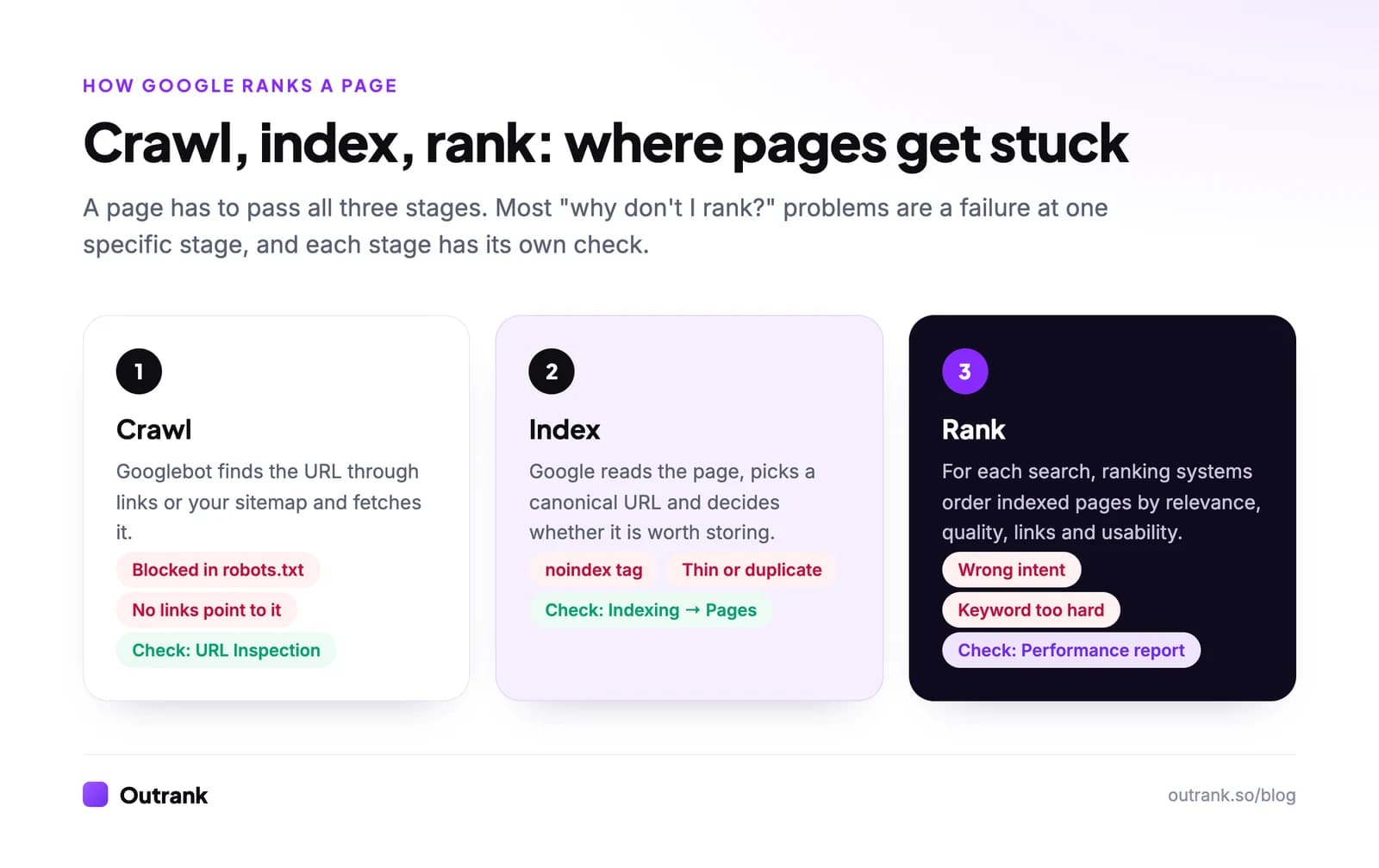
- Crawling: Googlebot discovers your URL through links or your sitemap and downloads it.
- Indexing: Google renders the page, works out what it's about, picks a canonical version, and decides whether it's worth storing.
- Ranking (serving): when someone searches, Google's ranking systems pick and order the indexed pages that best answer that query.
Google publishes a guide to its ranking systems. The ones that matter most for a normal website:
| Ranking system | What it does | What it means for you |
|---|---|---|
| Link analysis and PageRank | Uses links between pages to understand what pages are about and which are useful | Internal links and relevant backlinks still count |
| BERT, RankBrain, neural matching | Match the meaning of a query to the meaning of a page, not just the exact words | Write naturally about the topic; repeating the keyword doesn't help |
| Passage ranking | Judges individual sections of a long page | A clear section that answers a sub-question can rank on its own |
| Freshness systems | Favor recent content where recency is expected | Update pages on topics that change (prices, tools, rules) |
| Reviews system | Rewards insightful, first-hand reviews | Show real testing, photos and comparisons in review content |
| Spam detection (SpamBrain) | Filters spam and policy violations | Bought link schemes and scaled junk content get demoted |
| Site diversity | Usually shows no more than two results from one site | You can't flood a results page with your own URLs |
The helpful content system became part of Google's core ranking in March 2024, which is why "people-first content" now affects every update rather than a separate one. What Google doesn't publish is any weighting. Charts that say "content quality is 23% of the algorithm" are a vendor's survey, not Google data.
Step 1: Make sure Google can index the page
Check indexing before you rewrite a word. Open Google Search Console, paste the URL into the URL Inspection bar at the top and read the verdict. "URL is on Google" means you can move on. Anything else tells you which stage is broken.
The usual culprits:
- A
noindexmeta tag left over from a staging site or an SEO plugin setting. - A
robots.txtrule blocking the folder. - A canonical tag pointing to a different URL.
- No internal links to the page, so Google rarely finds or recrawls it.
- "Crawled - currently not indexed": Google fetched it and decided it wasn't worth storing. That's a quality and duplication verdict, covered in how to fix crawled but not indexed.
Submit an XML sitemap under Indexing → Sitemaps (see how to make a sitemap) and click Request indexing in URL Inspection for new or updated pages. Requesting it repeatedly doesn't speed things up.
Step 2: Choose a keyword you can actually win
Most pages fail to rank because they target a search the site has no chance of winning yet. A three-month-old blog won't outrank NerdWallet for "best credit cards", however good the article.
Look for keywords where the current page one is beatable:
- Low keyword difficulty. Ahrefs, Semrush and Moz all score difficulty from 0 to 100. Under 20 is realistic for a new site; see what keyword difficulty means.
- Weak results on page one. Forum threads, thin listicles, outdated posts from 2019, or pages that only half answer the question.
- Specific, longer phrases. "how to rank a Shopify product page on Google" is easier than "rank on Google" and the people searching it know exactly what they want.
This is how Outrank picks keywords for its customers, and the numbers show where small sites win:
14
median keyword difficulty Outrank targets
183,540 articles, 90 days to October 2026
63%
of targeted keywords have KD under 20
170
median monthly searches per targeted keyword
96.7% target fewer than 1,000 searches a month
Source: Outrank platform data, 90 days to October 2026. Many small, winnable keywords add up to more traffic than one head term you'll never reach. The full method is in how to find low-competition keywords.
Step 3: Match the search intent of the top results
Search intent is the reason behind a query: to learn something, compare options, buy, or reach a specific site. Google shows you which one it thinks applies, so search your keyword in a private window and look at what ranks.
- If the top 10 are step-by-step guides, write a guide. A product page won't rank for "how to clean a cast iron pan".
- If the results are category pages from stores, a blog post won't rank for "running shoes for flat feet".
- If page one is full of tools and calculators, build a tool. Outrank's study of 6.2 million pages found free tools earn 2.11× the click-through rate of the same site's articles at positions 4 to 10.
Note the format (list, guide, tool, video), the angle ("for beginners", "in 2026", "free") and the depth. Your page should fit the same mold and then beat it on substance.
Step 4: Write a clearly better page
"Better" doesn't mean longer. It means the searcher gets their answer faster and learns something the other nine results don't tell them.
- Answer in the first two sentences. Then expand. This is also what AI Overviews and ChatGPT quote.
- Add something original: your own data, screenshots of the actual menus, a worked example with real numbers, a template, a mistake you made. Google's guide to helpful, people-first content asks exactly this: does the content provide original information, reporting, research or analysis?
- Show who wrote it and why they know. E-E-A-T (experience, expertise, authoritativeness, trust) comes from Google's quality rater guidelines. Google says it isn't a ranking factor by itself, but its systems look for signals that line up with it.
- Write a title that earns the click. Put the main keyword near the start of the title tag and give a reason to choose you. Our guide to writing meta titles has the formulas.
- Use headings that mirror the sub-questions people ask, so passage ranking and readers can find each answer.
Forget keyword density targets and "LSI keywords". Google's language systems match meaning, so use the words a real expert would use and stop there (what LSI keywords really are).
Step 5: Get the technical basics right
Technical SEO rarely makes a page rank by itself, but technical problems regularly stop good pages from ranking. Check four things:
- Mobile version. Google indexes the mobile version of your site, so content hidden or missing on mobile effectively doesn't exist.
- Core Web Vitals. Aim for Largest Contentful Paint under 2.5 seconds, Interaction to Next Paint under 200 ms and Cumulative Layout Shift under 0.1 (web.dev thresholds). INP replaced First Input Delay in March 2024. Test with PageSpeed Insights and see sitewide data under Experience → Core Web Vitals in Search Console.
- HTTPS everywhere, with HTTP redirecting to HTTPS.
- Structured data where it fits (products, recipes, events, organizations), tested with the Rich Results Test. Google's old Structured Data Testing Tool and Mobile-Friendly Test have both been retired, so ignore guides that still send you there.
For a full pass, use our technical SEO audit checklist.
Step 6: Link to the page, then earn links from other sites
Links are still one of Google's documented ranking systems. Two kinds matter.
Internal links tell Google which pages you consider important and help it find new ones. Link to your new page from two or three related pages that already get traffic, using descriptive anchor text ("keyword difficulty checker", not "click here"). More in why internal links matter.
Backlinks from relevant, real sites are votes of confidence. Count referring domains (different sites), not total links. Good sources for a small site: suppliers and partners, local associations, guest articles on niche blogs, data or tools other writers want to cite. Our guide on how many backlinks you need shows how to set a target from the current top 10.
Outrank's own data points the same way. Among customer sites, those receiving 30+ backlinks a month grew Google clicks a median 2.18×, against 1.59× for those receiving under 5 (results data, October 2026). That's a correlation across sites, not a controlled test, but it matches what Google says about links.
Step 7: Measure in Search Console and improve
Rankings move for months after publishing, so treat the first version as a draft Google will grade.
- Open Performance → Search results, filter by page, and switch on Average position.
- Look at the Queries tab. Queries where you sit in positions 8 to 20 are your easiest wins: add a section that answers them better, tighten the title, add internal links.
- If a page gets impressions but almost no clicks, rewrite the title and meta description.
- If a page has no impressions at all after 8 to 12 weeks, revisit step 1 (indexing) or step 2 (keyword too hard).
One caution when reading average position: in September 2025 Google stopped supporting the &num=100 parameter that rank trackers used to load 100 results at once. In Outrank's study of 415 sites, median impressions dropped 33% within days and average position jumped from 29 to 13 with no real ranking change. Compare periods after mid-September 2025 with each other, not with older data. Our explainer on what page ranking means covers how average position is calculated, and how to track your Google rankings compares tools that check positions daily.
How long does it take to rank on Google?
Expect months, not weeks, and longer for a brand-new domain. Ahrefs' study of 1.3 million keywords found the average #1 page is 5 years old and only 13.7% of top-10 pages are less than a year old. In its original 2017 version, the few new pages that reached the top 10 within a year mostly got there in 61 to 182 days.
Growth also compounds once it starts. This is the median change in Google clicks for Outrank customer sites, each compared with its own 28 days before joining:
Median Google clicks after starting consistent SEO
Hover or tap the chart for exact values.
The pattern is three slow months, then acceleration as more pages get indexed, collect links and move up. It's also not universal: about a quarter of those sites had fewer clicks than before. Sites that stop after six weeks never see the part of the curve that pays.
How to rank on Google Maps and local results
Local rankings work differently. Google says local results are based mainly on relevance, distance and prominence, meaning how well known and well reviewed the business is (Google Business Profile help). You can't change distance, so work on the other two:
- Claim your Google Business Profile, choose the most specific primary category, and fill in services, hours, photos and service areas.
- Keep your business name, address and phone number identical on your site and in directories.
- Ask every happy customer for a review and reply to all of them, including the bad ones.
- Build a page for each service and location you genuinely serve, with local details, not a template with the city name swapped.
For a country-specific example, see our guide to ranking on page 1 in Malaysia, and the small business SEO mistakes that most often hold local sites back.
What doesn't help you rank
- Paying for Google Ads. Ads and organic results are separate systems (SEO vs SEM explained).
- Keyword density targets like "1 to 2%". Google matches meaning, not ratios.
- Word count for its own sake. A 900-word page that answers the question beats a 4,000-word page that pads.
- Submitting your URL over and over. Once is enough.
- Bought link packages ("500 backlinks for $20"). These are what SpamBrain is built to catch.
If you'd rather run this playbook yourself, start with our do-it-yourself SEO guide, and see how to increase website traffic organically for the levers beyond rankings. If the bottleneck is publishing enough well-targeted pages, Outrank finds low-difficulty keywords for your site, writes and publishes one article a day, and builds backlinks through its exchange.
FAQ
How do I rank on Google for free?
Every step in this guide can be done for free: Google Search Console for indexing and performance, PageSpeed Insights for speed, Google Business Profile for local results, and a free keyword tool for research. What it costs is time, usually several hours a week for months. Paid tools speed up keyword research and link building but aren't required.
How long does it take to rank on Google?
Expect a few months for a new page on an established site and longer for a new domain. Ahrefs found the average #1 result is 5 years old, and across Outrank customer sites median clicks grew 28% after 12 weeks and about doubled after 7 months. Low-competition keywords can rank within weeks once a page is indexed.
Can you pay Google to rank higher?
No. Google states it doesn't accept payment to rank pages higher or crawl them more often. You can pay for Google Ads, which appear in labeled ad slots above and below the organic results, but they have no effect on organic rankings.
Why is my website not showing up on Google?
Usually it isn't indexed yet, or it's blocked. Inspect the URL in Search Console: a noindex tag, a robots.txt block, a wrong canonical or a "Crawled - currently not indexed" status are the common causes. If it is indexed, search for your exact page title; if it shows up for that but not for your keyword, the problem is competition or intent, not indexing.
What is the most important Google ranking factor?
Google doesn't rank factors by importance, and the weight changes by query. In practice, relevance to the search intent comes first, then quality and originality of the content, then links from other sites. Technical issues matter mostly when they stop a page from being crawled, indexed or used on mobile.
How do I get my site to the top of Google search results?
Target a specific keyword where page one is beatable, publish the most useful page for that search, link to it from your strongest pages, and earn a few relevant backlinks. Then use Search Console to improve the page based on the queries it already shows up for. Doing this repeatedly across many keywords is what gets a whole site to the top.


