To track your Google rankings for free, verify your site in Google Search Console, open Performance → Search results, switch on Average position, and compare the last 28 days with the previous 28 for your non-branded queries. That gives you Google's own position, click and impression data for every query your site appears for, with 16 months of history. Add a paid Google rank tracker (from about $49 a month) only when you need daily checks of a fixed keyword list, competitor positions, or city-level local rankings.
This guide covers the Search Console setup, the filters that turn it into a real rank tracker, a 15-minute weekly routine you can tick off below, how to read the numbers without fooling yourself, and what to check when rankings drop.
Key takeaways
- Google Search Console is the most accurate free Google rank tracker for your own site: it averages your position across every real search, not one simulated check.
- Average position is 'the average position of the topmost result from your site'. A page at #3 on mobile and #9 on desktop can show up as 6.
- Since late 2025 Search Console has weekly and monthly chart views, a branded vs non-branded filter, custom annotations and AI query groups. Use all four.
- The UI shows 1,000 queries; the free API exports up to 50,000 rows per day per search type, and BigQuery bulk export has no daily row limit.
- Look at positions 5 to 20 with real impressions first. Google already finds those pages relevant, so they move fastest.
What your Google ranking actually is
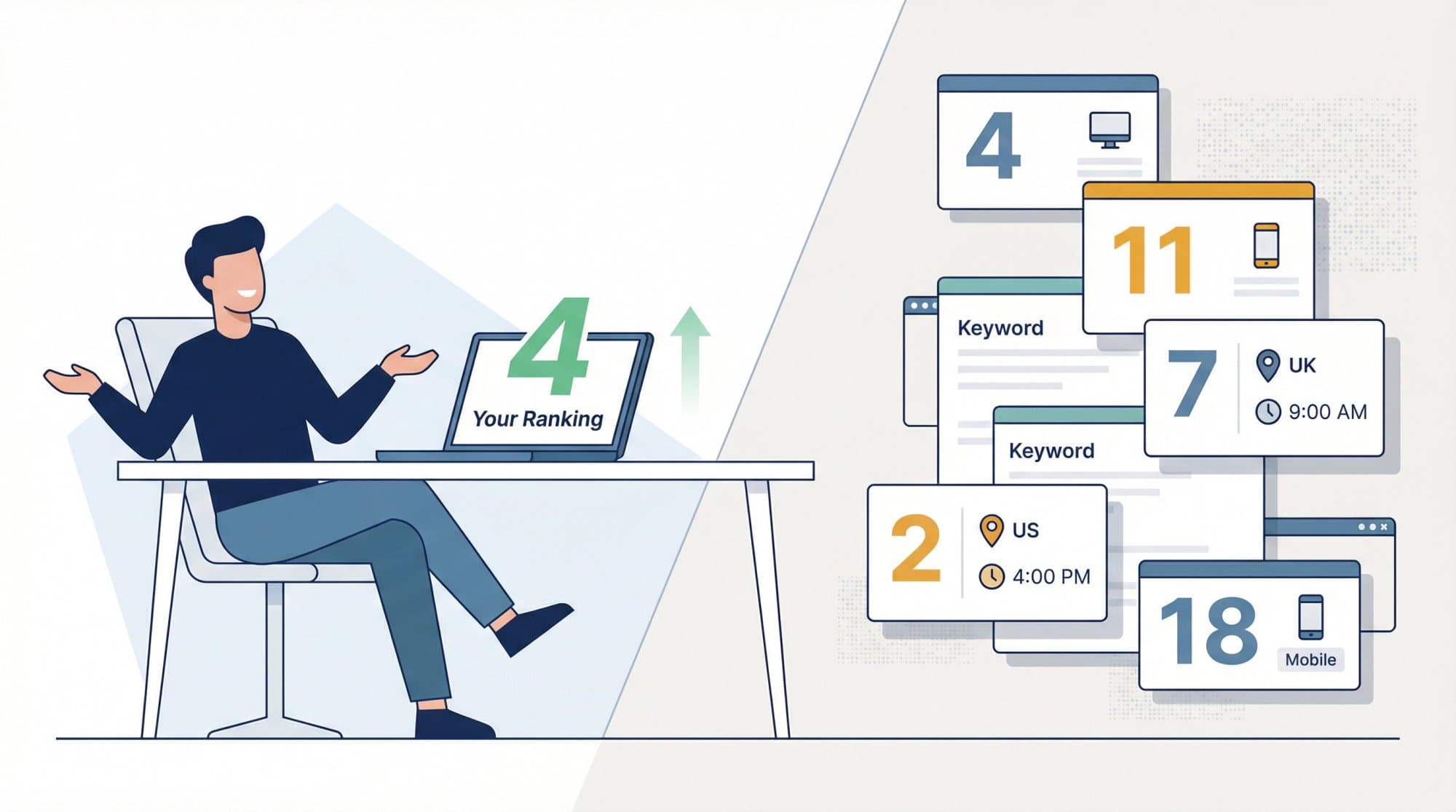
A Google ranking is not one number. Google states that results are "specific to the time, place, device, and recent history of the person searching," so the position you see when you search your own keyword is one data point out of thousands (Google's Performance report help).
Search Console solves this by averaging. Its average position is "the average position of the topmost result from your site" across every impression. In the chart it's the topmost result from your whole site; in the table it's per query or per page. That's why it's the right metric for tracking trends, and why it will rarely match what you see in an incognito window.
Two details matter in 2026:
- AI Overviews and AI Mode are already in your data. Google counts sites shown in AI features in the regular Web search type of the Performance report (Google's AI features documentation). There is no separate AI report in Search Console.
- Searches with images are split out. The Performance report's search type filter now separates Web: text-based from Web: multimodal (Google Lens, Circle to Search and other image searches).
This guide is about tracking your own site over time. For a quick one-off check, including a competitor's position, see how to check keyword rankings for any website.
How to track Google rankings in Search Console, step by step
1. Verify a Domain property
Add your site as a Domain property (example.com), verified with a DNS record. It covers every subdomain and both http and https, so you don't track half your site by accident. URL-prefix properties only cover one exact prefix. Our guide to Domain vs URL-prefix properties explains the trade-offs.
2. Submit your sitemap and check indexing
Submit your XML sitemap under Indexing → Sitemaps, then open Indexing → Pages. A page that isn't indexed can't rank, and no rank tracker will tell you why. Fix indexing before you obsess over positions; crawled but not indexed is the most common culprit.
3. Open the Performance report and turn on all four metrics
Go to Performance → Search results and click all four metric cards: Total clicks, Total impressions, Average CTR and Average position. The default view covers the past three months. The table below the chart is your rank tracker: the Queries tab lists each query with its clicks, impressions, CTR and position, and the Pages tab does the same per URL.
4. Filter by query, page, country, device and search type
Click + Add filter to narrow the data. The filters that matter for rank tracking:
- Query contains or matches a regex, to follow one keyword or a topic (for example,
rank track|rank check). - Page, to see every query one URL ranks for.
- Country, so a strong UK position doesn't hide a weak US one.
- Device, since mobile and desktop positions often differ.
- Search type, to separate Web from Image, Video and News results.
5. Split branded from non-branded queries
Since November 2025, the Performance report can split Branded from Non-branded queries automatically (Google's announcement). Non-branded is the number that tells you whether your SEO is growing; branded mostly follows your marketing and PR. Google's classification is AI-assisted and can mislabel some queries, and it's only available for top-level properties with enough traffic. If you don't see it, use a regex query filter that excludes your brand name.
6. Switch to weekly or monthly views
Daily charts are noisy: weekends, holidays and news cycles all show up as dips. Since December 2025 you can switch any Performance chart to Weekly or Monthly (Google), which also fixes the misaligned-weekend problem when you compare two periods. Use daily only to debug a launch or a sudden drop, and the 24 hours view (hourly, preliminary data) for something you published this morning.
7. Add annotations for every change you make
Right-click the Performance chart, choose Add annotation, and log the date and a note of up to 120 characters (Google). Log new articles, title rewrites, template changes, migrations, link campaigns and Google updates. Everyone with access to the property sees them, so keep them free of personal data. Six months from now, this log is what turns "rankings moved" into "rankings moved because of X".
8. Use query groups to track topics, not single keywords
The Search Console Insights report now groups similar queries ("guac dip recipe", "how to make guacamole dip") into query groups and shows the top, trending up and trending down groups (Google). Tracking a topic is more stable than tracking one phrasing of it.
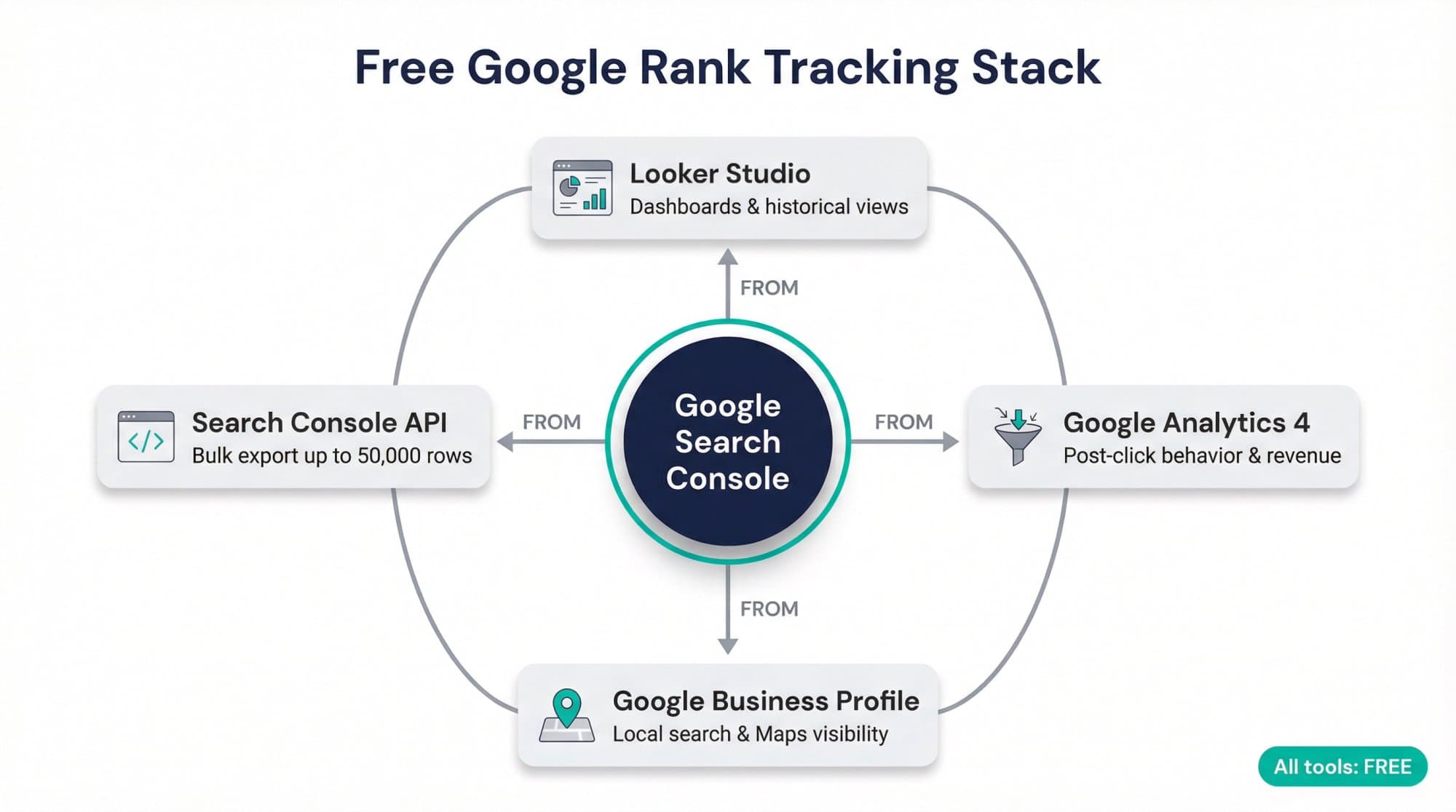
9. Build a Looker Studio dashboard for history and sharing
The free Looker Studio Search Console connector pulls the same data into charts you can share. Pick Site Impression for query-level ranking data or URL Impression for page-level data (one per data source, so create two if you want both). A useful rank tracking dashboard has non-branded clicks and impressions over time, average position by page group, top gaining and losing queries, and a device and country split. If you report to clients or a boss, our guide to building an SEO keyword ranking report has a ready-made layout.
10. Use the API when you outgrow 1,000 rows
The Performance table shows up to 1,000 rows. The free Search Analytics API (and the Looker Studio connector) can export up to 50,000 rows per day per site per search type, and the BigQuery bulk export has no daily row limit (Google's post on data filtering and limits). Our Search Console API guide has working Apps Script and Python code that logs your rankings to a sheet every day.
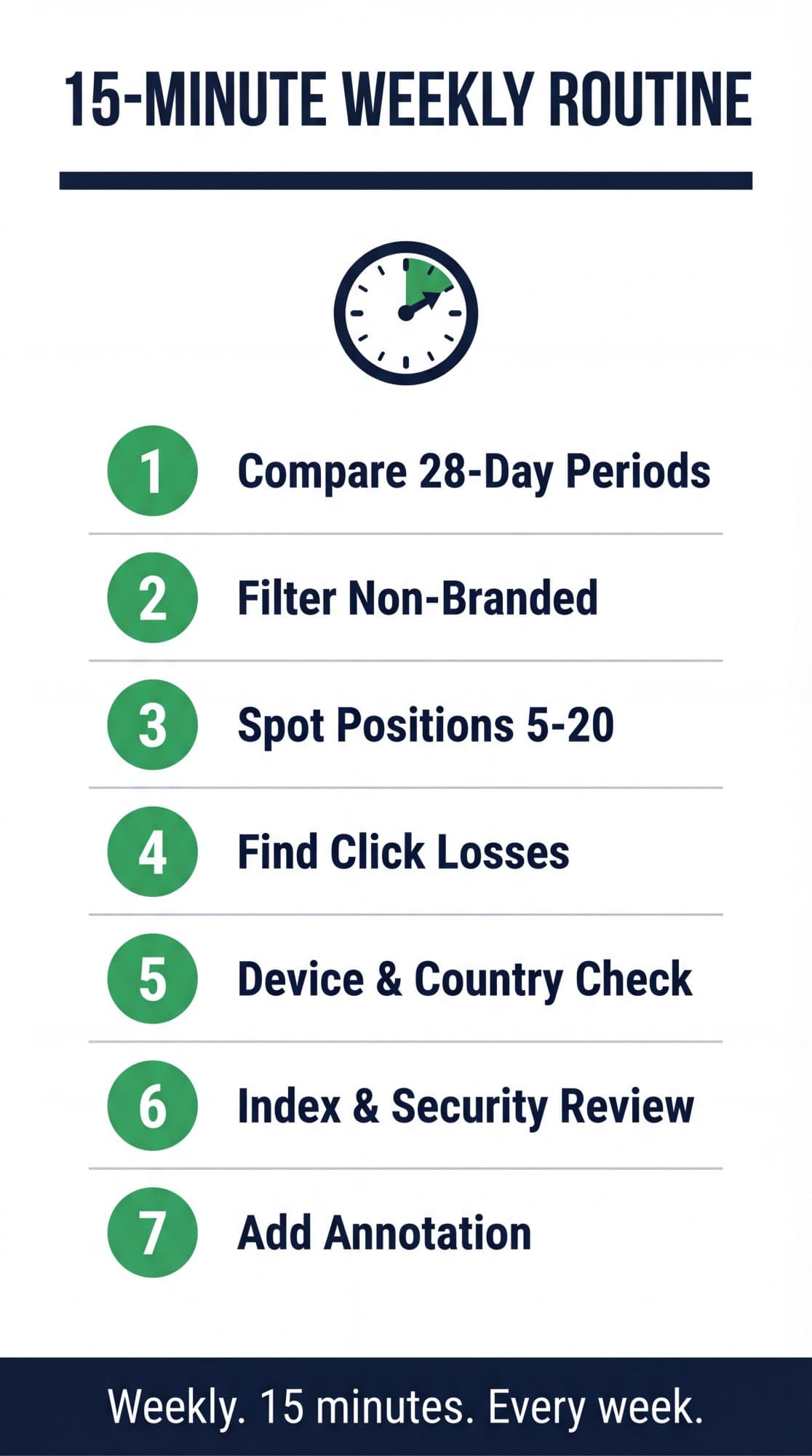
The 15-minute weekly Google rank tracking routine
Google itself says there's no need to sign in every day, because Search Console emails you when it finds new issues (Search Console getting started). A weekly check is enough for most sites. Tick these off; your progress saves in your browser.
Interactive checklist
Weekly Google rank tracking routine
0/9
Trend check (5 minutes)
0/3Opportunities (5 minutes)
0/3Health and log (5 minutes)
0/3Your progress is saved in this browser, so you can come back to it later.
How to read Google ranking data without fooling yourself
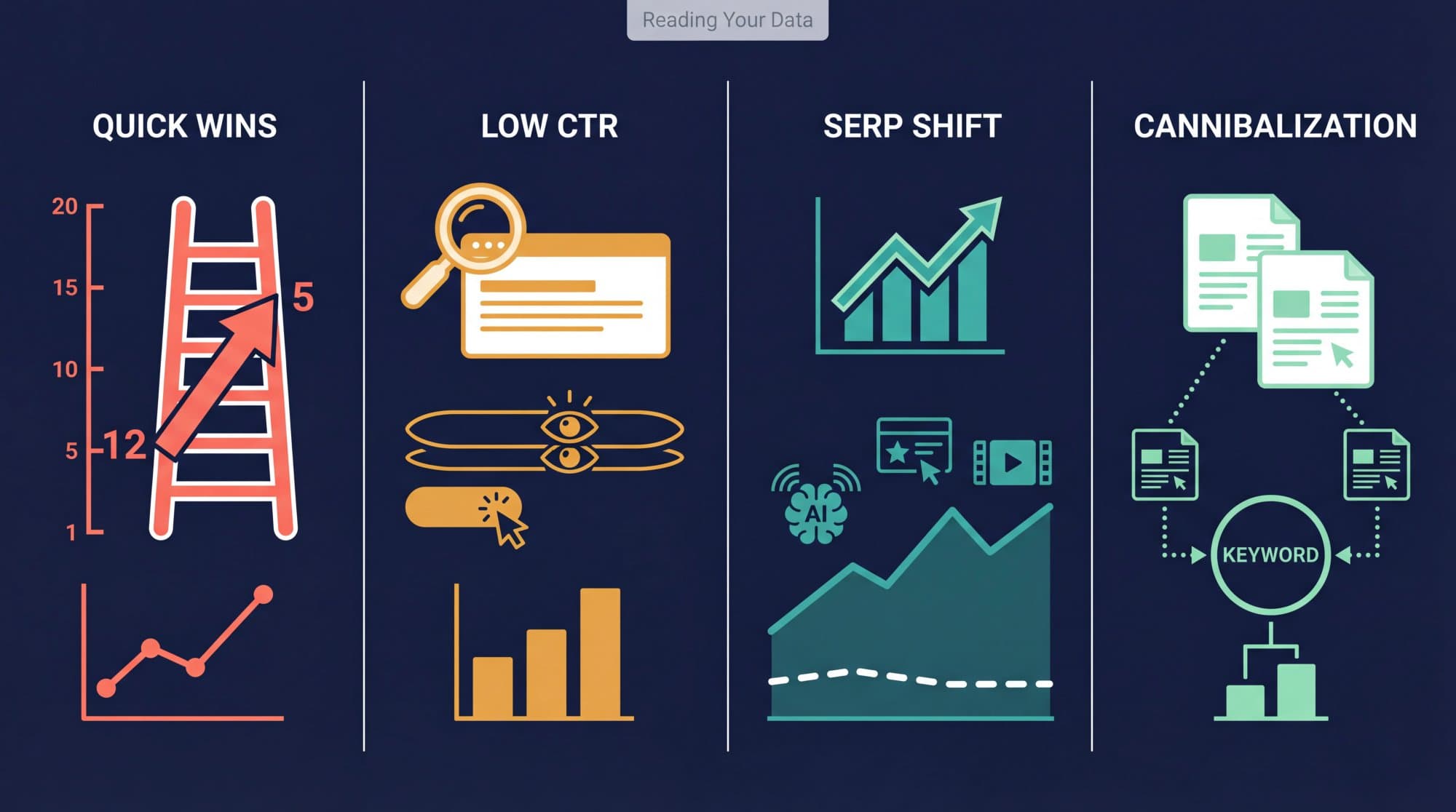
Positions move every day. Google's own guidance on traffic drops says "positions aren't static or fixed in place" and recommends avoiding radical changes to a page that is already performing well (Google). These four patterns are the ones worth acting on.
Positions 5 to 20 with real impressions: quick wins. Google is already testing the page. A position-12 query with 2,000 impressions a month is usually a better target than a query you already rank #2 for. The usual levers: answer the query more directly near the top, add the subtopics competing pages cover, add internal links from related pages, and refresh outdated facts.
Good position, low CTR: a packaging problem. If a query sits at position 3 and gets far fewer clicks than your other top-3 queries, rewrite the title and meta description first. See how to improve click-through rate.
Impressions up, clicks flat: the SERP changed. AI Overviews, video blocks and other features take clicks even when your position doesn't move. Across 415 sites in Outrank's Search Console panel, median impressions more than doubled between October 2025 and August 2026 while clicks grew 22%, and median CTR fell 40%.
Median Google impressions vs clicks per site, indexed to October 2025
Hover or tap the chart for exact values. Click a legend item to hide it.
Two of your pages trading places for one query: cannibalization. Filter by the query, open the Pages tab, and if two URLs split the impressions, pick one to be the main page and merge or re-angle the other. Our guide to keyword cannibalization walks through the fix.
Why your Search Console ranking data looks wrong (but isn't)
- You only see 1,000 queries. That's a UI limit. Rare queries are also hidden for privacy: Google omits "anonymized queries" that fewer than a few dozen people searched over two to three months.
- Table totals don't match chart totals. Anonymized queries are included in the chart totals but never in the table, and they disappear entirely once you filter by query.
- A page shows no clicks. Search Console credits the canonical URL. If Google picked a different canonical, the data lands there. Check with URL inspection.
- Average position jumped in September 2025. Google stopped supporting the
&num=100parameter on September 10–13, 2025, which removed many scraper impressions from deep result pages. In Outrank's zero-click study, median impressions fell 33% within days across 1,503 sites and average position moved from 29 to 13 with no real ranking change. Compare clicks across that date, not position.
What to check when Google rankings drop
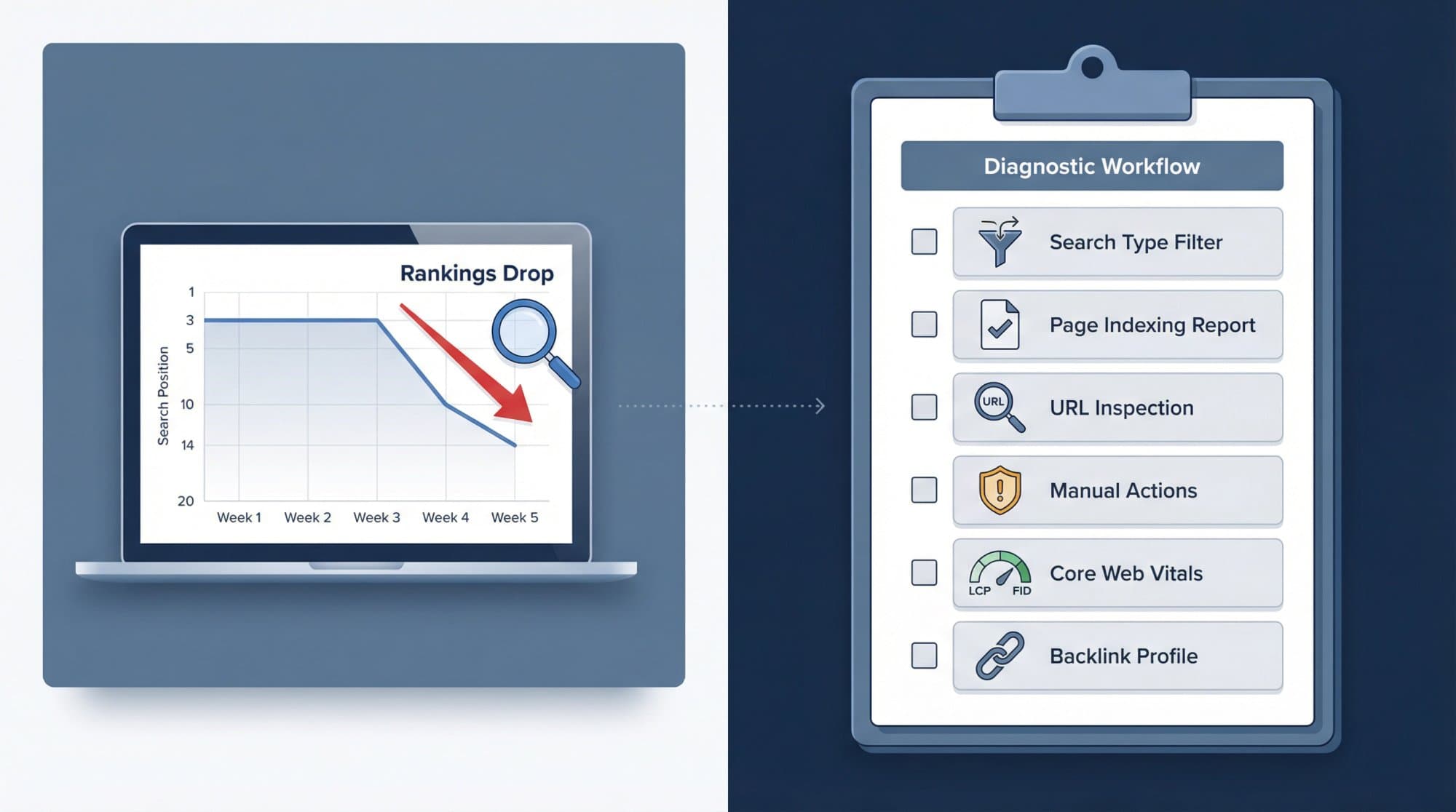
Work through these in order. Most drops have boring causes.
- Is it real? Compare weekly views, the same period last year (seasonality) and clicks, not just position.
- Is it one search type, device or country? Filter each. An image-search drop is not a web ranking problem.
- Did pages fall out of the index? Check Indexing → Pages for important URLs that moved to "not indexed".
- Is it one page? Run URL inspection on it: indexability, the canonical Google chose, and a live test.
- Any manual action or security issue? Rare, but check both reports early so you don't chase the wrong problem.
- Did a Google update land? Check the Google Search Status Dashboard. After a large drop, Google advises self-assessing the whole site and waiting a few weeks before judging your changes.
- Did competitors overtake you? This is where a rank tracker earns its fee: Search Console can't show who passed you.
A technical SEO audit catches the slow-building problems (redirect chains, Core Web Vitals, broken internal links) before they show up as drops.
Google rank tracker tools: when free isn't enough
Search Console covers your own site's real performance. A paid Google rank tracker adds four things it can't do:
| You need | Why Search Console can't | Example tool and entry price (October 2026) |
|---|---|---|
| Competitor positions | It only covers sites you verify | SE Ranking, $129/mo for 2,000 keywords daily |
| Keywords you don't rank for yet | It only lists queries you already appear for | Wincher, from $49/mo for 500 keywords daily |
| City or ZIP-level local rankings | It filters by country only | Nightwatch, €79/mo billed yearly, includes Google Maps |
| Daily or hourly refreshes of a fixed list | Data arrives about 2 to 3 days late (24-hour view excepted) | AccuRanker, from $224/mo with on-demand refresh |
For a full comparison of 13 trackers with prices and free options, see our roundup of the best keyword rank checker tools. For local businesses, also check Google Business Profile → Performance, which shows how people find and interact with your profile on Search and Maps; Search Console doesn't cover that.
Turn the tracking into traffic
Tracking tells you where the gaps are. Closing them means publishing and improving pages every week, and that's where most sites stall. Outrank connects to your Search Console, flags articles that underperform so you can schedule rewrites, and researches, writes and publishes a new SEO article to your CMS every day, with backlinks from its exchange. It isn't a rank tracker; it's the part that acts on what your tracker shows. You can try it free for 3 days.
FAQ
How can I track my Google rankings for free?
Use Google Search Console. Verify your site, open Performance → Search results, enable Average position, and look at the Queries tab, which lists every query your site appears for with clicks, impressions, CTR and average position. Compare 28-day periods in the weekly view and filter to non-branded queries to see real SEO progress.
Does Google have its own rank tracker?
Google Search Console is Google's own tool for tracking how your site ranks, and it's free. It reports average position across real searches rather than checking a keyword list on a schedule, and it only covers sites you own. "Google rank tracker" tools from SE Ranking, Semrush (Position Tracking) or AccuRanker are third-party tools that simulate searches.
Why is my Google ranking different when I search myself?
Your own search is personalized by location, device, language and search history. Search Console averages your topmost position across every real impression, so a page can show #3 in your browser and 7.4 in Search Console at the same time. Neither is wrong; for trends, trust the average.
How often do Google rankings update in Search Console?
Performance data is usually available after two to three days, and the 24-hours view shows recent hourly data marked as preliminary. Because daily data is noisy, review weekly and use the weekly or monthly chart view for trends.
Does Search Console show AI Overview rankings?
Yes, but not separately. Google includes sites shown in AI Overviews and AI Mode in the regular Web search type of the Performance report, and an AI Overview counts as a single position. There's no filter that isolates AI Overview traffic.
Can I track local Google rankings for free?
Partly. Search Console filters by country, not city, so use it with local-intent queries ("plumber in Austin") and check Google Business Profile's Performance report for Maps and local search activity. City- or ZIP-level position grids need a paid tracker.