


To write a meta title, put the words people search for in the first three to five words, add one specific reason to click (a format, an audience, a number or a year), and end with your brand after a dash or colon. Keep it between 50 and 60 characters so it fits Google's roughly 600-pixel desktop width, make it say the same thing as your H1, and give every page its own.
That last part matters more than most guides admit. In Zyppy's study of 80,959 titles, Google rewrote 61.6% of them, and the rewrite rate swung from 39% to 99.9% depending on length and formatting. This guide gives you the formula, the data on what triggers rewrites, eight copy-ready templates and a checklist you can run on any page.
Key takeaways
- A meta title is the HTML <title> element. Google uses it as the clickable headline in search results, but it can replace it with your H1, og:title or anchor text.
- Titles of 51–60 characters were rewritten least (39–42%) in Zyppy's study; titles over 70 characters were rewritten 99.9% of the time.
- Square brackets got rewritten 77.6% of the time and pipes were removed 41% of the time, against 19.7% for dashes.
- Write query first, one true reason to click second, brand last. If something has to go, cut the brand.
- What the page is matters as much as the wording. In Outrank's data across 3,332 sites, free tool pages earn 2.11× the CTR of the same site's articles at positions 4–10.
What a meta title is (and where it shows up)
A meta title, also called a title tag or SEO title, is the text inside the <title> element in a page's <head>. It looks like this:
<title>Invoice Template for Freelancers: Free Word & PDF - Brand</title>Google calls the result it builds from it a title link: the blue headline in search results. Your title tag is the main input, but Google's documentation lists eight other sources it may use instead: the main visual title on the page, heading elements like the <h1>, og:title, other large text, other text on the page, anchor text on the page, the text of links pointing to the page, and WebSite structured data.
The same title also appears in the browser tab, in bookmarks, and as the fallback headline when someone shares your link and you haven't set og:title. AI assistants such as Perplexity and ChatGPT often show it on their source cards too.
| Element | Where people see it | Length rule of thumb |
|---|---|---|
<title> (meta title) | Google title link, browser tab, bookmarks | 50–60 characters |
<h1> | Top of the page itself | Whatever reads well; can be longer |
og:title | Link previews on LinkedIn, Slack, X, Facebook | Short enough to read in a link card |
| Meta description | Snippet under the title link (when Google uses it) | 120–155 characters |
Your H1 and title don't have to be identical. They should make the same promise. On this page the H1 is long and specific, while the meta title is a shorter version of the same idea.
The formula: query, reason to click, brand
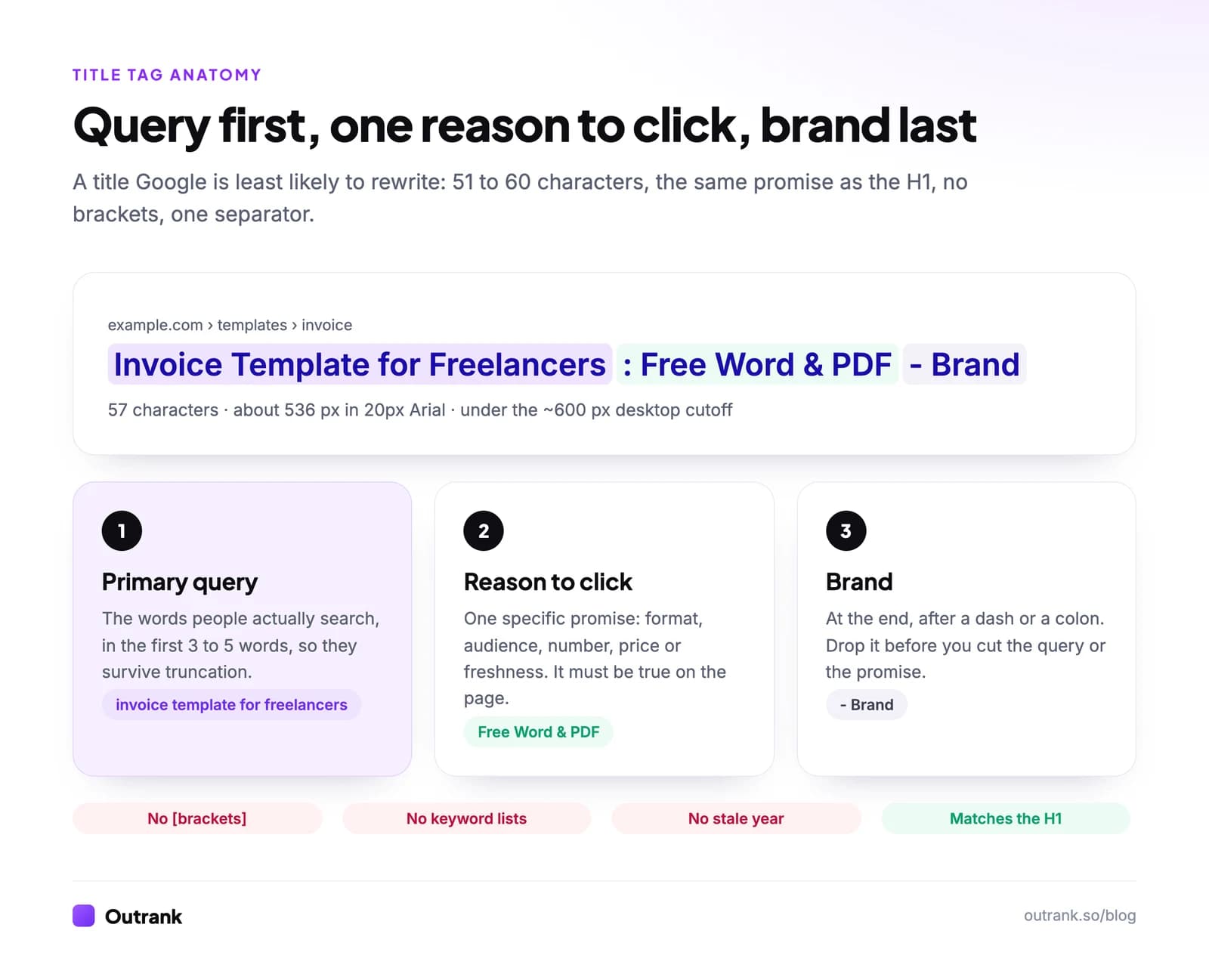
Every good title answers two questions for the searcher in under a second: "is this about my search?" and "why this result and not the other nine?"
- Primary query first. Use the words people type, not your internal jargon. If people search "invoice template for freelancers", don't title the page "Billing Document Starter Kit". The first three to five words survive truncation on every screen, so the query goes there.
- One reason to click. Pick the single most useful true detail: a format ("Free Word & PDF"), an audience ("for Freelancers"), a number ("7 Causes and Fixes"), a price ("Under $50"), a location ("in Leeds") or freshness ("(2026)") when the content is genuinely current. One is enough. Three reads like spam.
- Brand last. Add it after a dash or colon. Google itself recommends putting the site name at the start or end, separated by a delimiter. On the home page, put the brand first.
The checks that keep the formula honest:
- Match the H1. In Zyppy's data, when a title contained a number but the H1 didn't, Google stripped the number 25.8% of the time. When both had it, Google kept a number 97.3% of the time.
- Same language as the page. A title in English on a page written in Hindi is one of the cases Google lists for rewriting.
- Unique per page. Boilerplate titles that differ by one word ("Season 1 - Show", "Season 2 - Show") are a listed rewrite trigger. Two pages with near-identical titles often signal a bigger problem, keyword cannibalization.
If you want a starting point, Outrank's free title tag generator builds options from a keyword and shows each one in a Google-style preview with a pixel ruler.
How long should a meta title be?
Google sets no length limit on the <title> element. It truncates the title link to fit the device, which on desktop works out to roughly 600 pixels. Characters vary in width (in Arial, a "W" is nearly five times as wide as an "i"), so 50–60 characters is the practical target, not a hard rule.
Length also changes how often Google throws your title away:
How often Google rewrote titles, by title length
1–5 characters
96.6%
20 characters or fewer
over 50%
51–60 characters
39–42%
Over 60 characters
over 76%
Over 70 characters
99.9%
Two practical consequences:
- Too short is as bad as too long. "Home", "Products" or "Blog" give Google nothing, so it builds its own title from your headings.
- Front-load anyway. Mobile and desktop widths differ, and a title that fits today can be cut by a layout change tomorrow. If the first 40 characters make sense alone, you're safe.
To check width rather than guessing, paste a live URL into Outrank's metadata checker, which reports the title's character and pixel length along with the meta description, canonical and Open Graph tags.
Why Google rewrites titles, and how to stop it
Google rewrites a title when it thinks the title describes the page badly. Its documentation names seven common cases:
| Issue | Example | Fix |
|---|---|---|
| Half-empty title | "| Site Name" | Put the page's own subject before the brand |
| Obsolete title | "2020 admissions criteria" on a 2021 page | Update the year in the title and the H1 together |
| Inaccurate title | A list of products the page doesn't sell | Describe what's actually on the page |
| Micro-boilerplate | Identical titles across a series | Add the distinguishing detail first |
| No clear main title | Several equally large headings | One visible H1 that matches the title |
| Language mismatch | English title on a Hindi page | Write the title in the page's language |
| Site name repeated | Brand twice in one title | Keep the brand once, at one end |
Zyppy's data adds formatting triggers that the documentation doesn't spell out:
- Brackets: titles with
[ ]were rewritten 77.6% of the time, and the bracketed text was removed in 32.9% of cases. Parentheses fared better: 61.9% rewritten, 19.7% removal. If you want "(2026)" or "(Free Template)", use round brackets. - Separators: Google removed or replaced pipes 41% of the time and dashes 19.7% of the time. A dash or colon is the safer delimiter.
- Keyword repetition: "Running Shoes | Men's Running Shoes | Buy Running Shoes" is a rewrite magnet and has been for years.
One newer factor: in March 2026 Google confirmed a small test that rewrites titles to better match the query, and said any wider launch would select text from the page rather than generate headlines with AI. The defence is the same either way: a title, H1 and opening paragraph that say the same thing leave Google nothing better to pick.
Changes take a few days to a few weeks to show, because Google has to recrawl the page. You can speed it up with URL Inspection → Request indexing in Search Console.
Meta title templates by page type
These follow the formula and land between 47 and 58 characters with the brand. "Brand" stands for your site name.
| Page type | Template | Example | Characters |
|---|---|---|---|
| How-to guide | How to [task]: [method or scope] | How to Fix Crawled but Not Indexed: 7 Causes and Fixes | 54 |
| Listicle | [N] Best [things] for [audience] ([year]) - Brand | 9 Best Standing Desks for Small Spaces (2026) - Brand | 53 |
| Comparison | [A] vs [B] for [use]: [decision] | Ahrefs vs Semrush for Keyword Research: Which to Pick? | 54 |
| Definition | What Is [term]? [what you add] | What Is Keyword Difficulty? How KD Is Calculated | 48 |
| Free tool | [Tool name]: Free, No Signup - Brand | Keyword Density Checker: Free, No Signup - Brand | 48 |
| Product page | [Brand] [model] [type] - Store | Nike Pegasus 41 Men's Road Running Shoe - Brand | 47 |
| Category page | [Category], [offer] - Brand | Women's Trail Running Shoes, Free Returns - Brand | 49 |
| Local service | [Service] in [city], [proof or offer] - Brand | Emergency Plumber in Leeds, 24/7 Call-Out - Brand | 49 |
For the home page, flip it: "Brand: Accounting Software for Freelancers" (42 characters). People searching your brand already know the name, so tell them what you do.
For e-commerce catalogs with thousands of products, set a title template once (SEO plugins such as Yoast and Rank Math support variables for the product name, category and site name), then hand-write titles for the 20 pages that get the most impressions.
The title can't fix the wrong page type
Wording tweaks move CTR a little. What the page is moves it a lot. Outrank's answer engine optimization study compared 6.2 million pages across 3,332 sites, measuring each format against the same site's other articles at the same positions (4–10):
- Free tools and calculators earned 2.11× the click-through rate of the site's articles.
- "Best X" listicles earned 0.69×.
- "What is" definitions earned 0.52×, because Google and its AI Overviews often answer the definition on the results page.
Our query fan-out study found the same pattern from the query side: at the same top-3 position, question-shaped queries earned 58% fewer clicks than other queries on the median site. Backlinko's CTR analysis found question titles and non-question titles performed about the same (15.5% vs 16.3%, not statistically significant), so the problem is the query, not the question mark.
What to do with that:
- If a definition is your page, promise something the snippet can't give: "What Is Keyword Difficulty? How KD Is Calculated" beats "What Is Keyword Difficulty?".
- If you have a calculator, template or checker, say so in the first words: "Free", "Calculator", "Template", "Checker" are the words people scan for.
- If you're writing for a question that Google answers in one line, put the deeper value in the title (the steps, the data, the template), and format the answer to win the featured snippet as well.
More on lifting clicks once you rank in our guide on how to improve click-through rate.
How to test a title change in Search Console
Title changes are one of the few SEO changes you can measure within a month. Pick pages that already rank in positions 1–10 with at least a few hundred impressions a month, so there's enough data to see a difference.
- 1
Note the baseline
In Search Console, open Performance → Search results, click + Add filter → Page and paste the exact URL. Write down clicks, impressions, CTR and average position for the last 28 days. - 2
Change one thing
Rewrite the title (and the H1 if they no longer match). Don't change the content or internal links at the same time, or you won't know what worked. - 3
Request recrawling
Use URL Inspection → Request indexing, then search for the page a few days later to confirm Google shows the new title. - 4
Compare 28 days against 28 days
Back in Performance, set Date → Compare to the 28 days before and the 28 days after Google picked up the change. Look at CTR together with average position. - 5
Keep or revert
CTR only means something at a similar position. If position moved by more than one or two places, compare CTR for the queries where it stayed steady (the Queries tab).
Seasonality and Google updates add noise, so treat a single test as a hint and roll a pattern out only after it wins on several pages.
Meta title checklist
Run this on any page before you publish or when you refresh old content. Your ticks are saved in your browser.
Interactive checklist
Meta title checklist
0/12
Content
0/5Format
0/5Site-wide
0/2Your progress is saved in this browser, so you can come back to it later.
How Outrank handles titles
If you publish a lot, writing titles by hand stops scaling. Outrank writes an SEO title and meta description for every article it creates, along with the H2/H3 structure, internal links and FAQ, and publishes them to WordPress, Webflow, Shopify, Wix and other CMSs. You can still edit any title before it goes live, since articles can be previewed up to 7 days ahead. For the rest of the on-page work, see our step-by-step guide to optimizing blog posts for SEO and the SEO copywriting checklist.
FAQ
How long should a meta title be?
Aim for 50–60 characters. Google truncates titles by pixel width (roughly 600 pixels on desktop), and in Zyppy's study of 80,959 titles, those of 51–60 characters were the least likely to be rewritten. Titles over 70 characters were rewritten 99.9% of the time.
Is a meta title the same as a title tag?
Yes. Meta title, title tag, SEO title and page title all refer to the HTML <title> element. Google calls the headline it shows in results a "title link", which is usually, but not always, built from that tag.
Should I put my brand name in the meta title?
Usually yes, once, at the end and after a dash or colon. Google recommends branding titles concisely at the start or end. On the home page, lead with the brand; on long titles, drop the brand before you cut the keyword or the promise.
Why is Google showing a different title than mine?
Google replaces titles it judges unhelpful: too long, too short, outdated, boilerplate, stuffed with keywords or out of line with the page's main heading. Match the title to your H1, keep it to 51–60 characters, avoid square brackets and pipes, then request recrawling in Search Console.
Do meta titles affect rankings?
Google uses the title to understand what a page is about, so it carries some relevance weight, but its bigger effect is on clicks. A clear title that matches the query earns more clicks at the same position, and a title Google rewrites loses control of your best sales line.
Should I add the year to my title?
Only when the content is genuinely updated for that year, such as a pricing comparison or a "best tools" list. Google lists outdated years as a reason to rewrite titles, so update the year in the title and the H1 together, and only when the page itself changes.


