


Internal links are important for SEO because they are how Google finds your pages, how ranking value (PageRank) moves from your strongest pages to the ones you want to rank, and how Google learns what each page is about from the anchor text pointing to it. They also give readers a next step, which keeps them on your site instead of back on the results page.
So yes, internal linking helps SEO, and it's the one link signal you fully control. In Zyppy's study of 23 million internal links, pages with 40–44 internal links received about four times the Google clicks of pages with 0–4. This page explains the four jobs a link does, what the evidence says about how many you need, and the mistakes that waste them.
Key takeaways
- An internal link is a link from one page to another page on the same domain, in menus, footers or the body text.
- Google says "the vast majority of the new pages Google finds every day are through links", and that every page you care about should have a link from at least one other page on your site.
- PageRank, which flows through links, is still "part of our core ranking systems", according to Google.
- In Zyppy's 23-million-link study, pages with 40–44 internal links got about 4× the clicks of pages with 0–4, and traffic declined past roughly 45–50 links. It's a correlation, not proof.
- Contextual links with descriptive anchor text do more than navigation or footer links, which appear on every page and can't tell Google what's special about one page.
What an internal link is
An internal link is any hyperlink that points from one page on your site to another page on the same site. There are three kinds:
| Type | Where it sits | What it does best |
|---|---|---|
| Navigational | Main menu, header, footer, breadcrumbs | Makes every important section reachable from every page |
| Contextual | Inside the body text of an article or page | Passes relevance through anchor text and surrounding words |
| Structural | Category pages, related posts, pagination, hub pages | Groups pages by topic and keeps deep pages a few clicks from the home page |
All three help Google crawl. Contextual links do the most to tell Google which specific pages matter and what they're about, because they're placed by a person (or a well-briefed tool) for a reason.
The four jobs an internal link does
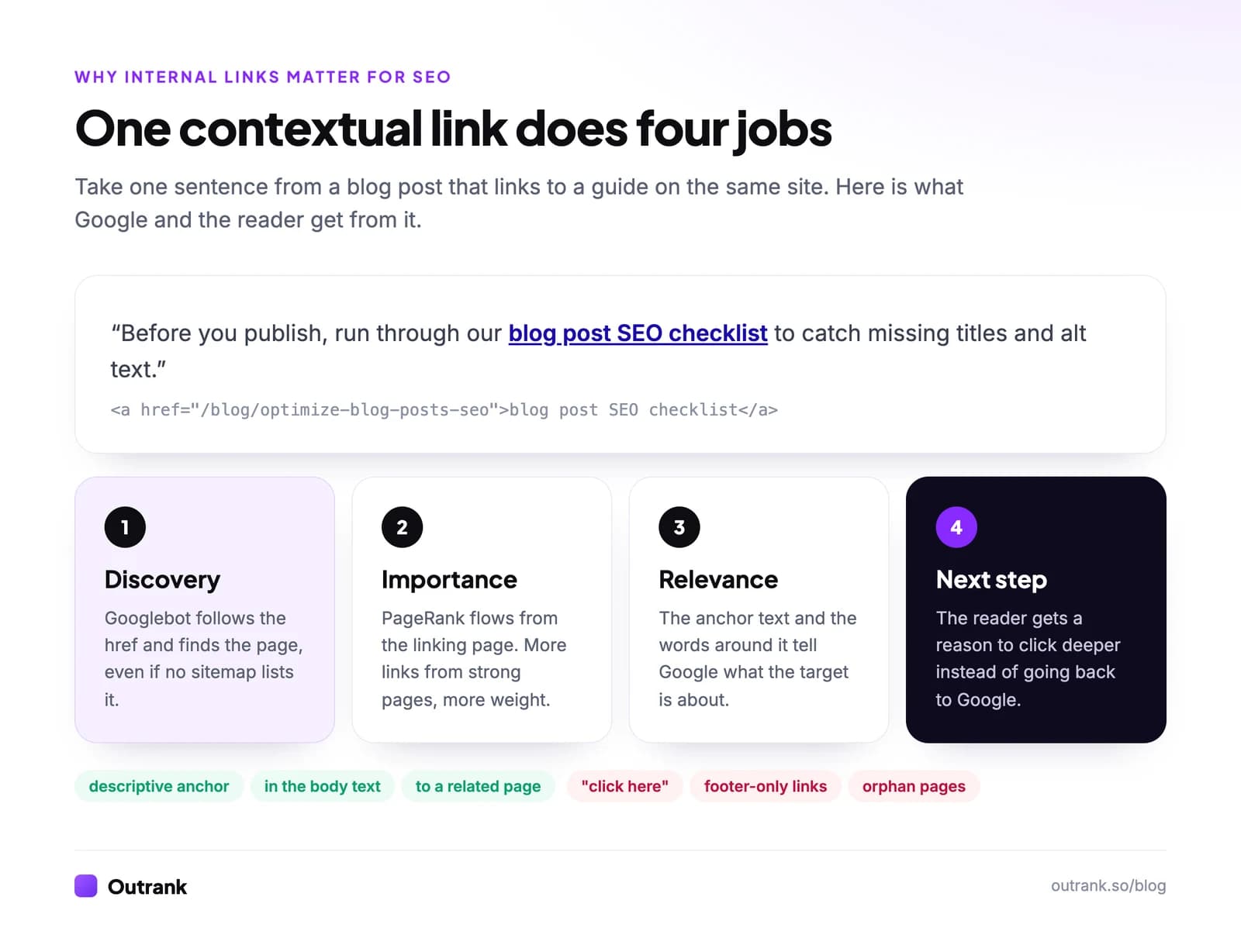
1. Discovery: Google finds pages by following links
Google's crawler moves from page to page through <a href> links. Its SEO Starter Guide says "the vast majority of the new pages Google finds every day are through links", and its link guidelines are direct: "Every page you care about should have a link from at least one other page on your site."
A sitemap tells Google a URL exists. A link tells Google the URL exists, that you think it's worth visiting, and what it's about. Pages with no internal links (orphan pages) can still be indexed through a sitemap, but they get crawled less and look unimportant.
Orphans happen to everyone. When we checked the 280 posts on this blog in October 2026, 40 of them (14.3%) had no link from any other post's body text, even though category pages and the sitemap still listed them. Our guide on how to find internal links to a page shows how we ran that check and how you can run it on your site.
Links also need to be crawlable. Google can only follow a real <a> element with an href; a button with a JavaScript onclick handler may never be followed.
2. Importance: links pass PageRank
Every link passes some of the linking page's ranking value to the page it points to. Google's ranking systems guide confirms PageRank "continues to be part of our core ranking systems", even though how it works "has evolved a lot" since the original paper.
That's why where a link comes from matters:
- Your home page and the posts that earn the most backlinks hold the most value. A link from them to a new or struggling page is the strongest internal signal you can send.
- A page linked from dozens of related pages looks central to your site. A page reachable only through page 14 of the blog archive looks like an afterthought.
- Backlinks to one article benefit the rest of the site only if that article links onward. Internal links spread the value you earned from building backlinks.
3. Relevance: anchor text tells Google what the target is about
Google reads the clickable text of a link, and the words around it, as a description of the page it points to. Its guidelines ask for anchor text that is "descriptive, reasonably concise, and relevant to the page that it's on and to the page it links to", and flag "click here" and "read more" as bad examples. For image links, the image's alt text acts as the anchor.
Zyppy's study backs this up, with caveats:
- Anchor variety correlated strongly with clicks: pages linked with more different anchor phrases got more traffic.
- Pages with at least one exact-match anchor had at least 5× the traffic of pages with none.
- The authors call the results "directionally useful" rather than proof, and a 2026 update to the study notes newer data suggesting sites with very high anchor-text diversity may actually be hurt.
The practical rule: describe the target page in natural words, vary the phrasing across links, and use the target keyword when it reads naturally. Internal anchors don't carry the over-optimization risk that exact-match backlinks do, but stuffing them still reads badly.
4. Next step: internal links keep readers moving
A reader who finishes an article with nowhere to go returns to Google. A reader who sees a relevant link to the next question, the template or the product page goes deeper. That's where internal links connect to revenue: blog posts that link to the right product, pricing or sign-up page turn readers into customers.
There's an SEO side to this too. In the 2023 US v. Google antitrust trial, Google's Pandu Nayak confirmed that a system called NavBoost memorizes click data from the past 13 months of queries. Pages that satisfy searchers, rather than sending them back to the results, are the ones Google sees working. More on that in our guide to improving click-through rate.
How many internal links does a page need?
Google's answer is that there's no ideal number, and "if you think there are too many, then it probably is." The best public data is Zyppy's study of 23 million internal links across 1,800 sites and about 520,000 URLs, matched to Search Console clicks:
2
average Google clicks for URLs with 0–4 internal links
The baseline
4×
clicks for URLs with 40–44 internal links
Compared with 0–4 links
45–50
internal links where traffic started to decline
Often sitewide links on pages that aren't the most valuable
Source: Zyppy internal links study, updated February 2026. Correlational: pages that deserve many links tend to get them.
The study also found that pages linked sitewide (hundreds of links, typically from menus and footers) tended to have lower traffic on small and medium sites. Navigation links alone don't make a page important.
What we'd do with that:
- Each article links out to 3–8 related pages in its body text, where they help the reader.
- Each important page receives contextual links from several related pages, not just from the menu.
- New pages get links from two or three older pages that already rank, on the day they go live.
- Key commercial pages (products, services, sign-up) are linked from the articles that discuss what they solve.
Internal links vs backlinks
| Internal links | Backlinks | |
|---|---|---|
| Who controls them | You, completely | Other site owners |
| What they pass | PageRank already on your site, plus context | New authority from outside, plus context |
| Effect on Domain Rating | None | Main driver |
| Anchor text risk | Low; describe the page naturally | High for repeated exact-match anchors |
| Cost | Your time | Time, outreach or money |
You need both. Internal links distribute authority; backlinks bring new authority in. If backlinks are the gap, Outrank's backlink exchange places links to your site inside relevant articles on other sites in your niche, with a guarantee of 15 verified backlinks a month. For the content side, every article Outrank writes includes internal links to your existing posts, so new pages are connected from day one.
Internal linking mistakes that waste links
- Orphan pages. Published, in the sitemap, linked from nowhere in context. Audit them twice a year.
- "Click here" anchors. They tell Google nothing about the target.
- Links buried in footers only. Repeated on every page, they carry little context.
- Nofollow on your own links. It doesn't save PageRank for other links; it just stops Google following the path. If a page shouldn't be indexed, use
noindexinstead. - Links through redirects or to 404s. Each hop wastes crawl time. Point links straight at the final URL; our guide to fixing broken links covers the clean-up.
- Two pages competing for one query. Linking both with the same anchor confuses Google about which one should rank. Pick one, as explained in what is keyword cannibalization.
Internal linking checklist
Interactive checklist
Internal linking checklist
0/8
Every new page
0/4Twice a year
0/4Your progress is saved in this browser, so you can come back to it later.
For the step-by-step method to see which pages link where, read how to find internal links to a page. For where internal links fit in the rest of on-page SEO, see our blog post SEO checklist.
FAQ
Do internal links help SEO?
Yes. They help Google discover and crawl your pages, pass PageRank from strong pages to weaker ones, and describe the target page through anchor text. Google says every page you care about should have a link from at least one other page on your site, and studies such as Zyppy's 23-million-link analysis find pages with more internal links tend to get more clicks.
What are the benefits of internal linking?
The four main benefits are faster discovery and crawling of new pages, more ranking value flowing to the pages you link to, clearer topical signals from anchor text, and readers who move deeper into your site instead of leaving. Internal links also route blog readers to product and sign-up pages.
Do internal links count as backlinks?
No. Backlinks come from other domains and are what drive authority metrics like Ahrefs Domain Rating. Internal links redistribute the authority your site already has and add context, but they don't raise your domain's overall authority.
Should internal links be nofollow?
No. Nofollowing your own links doesn't push more value to your other links; it only tells Google not to follow that path. Keep internal links followed, and use a noindex tag on pages you don't want in search results.
How many internal links should a page have?
There's no ideal number, according to Google. A practical range is 3–8 contextual links out of a typical article, plus several contextual links pointing to every important page. Zyppy's data found clicks rising up to around 40–45 internal links to a page and declining after that.
Does anchor text matter for internal links?
Yes. Google uses anchor text to understand the linked page and recommends descriptive, concise and relevant anchors over generic ones like "click here". Vary the wording naturally and include the target page's main topic when it reads well.


