


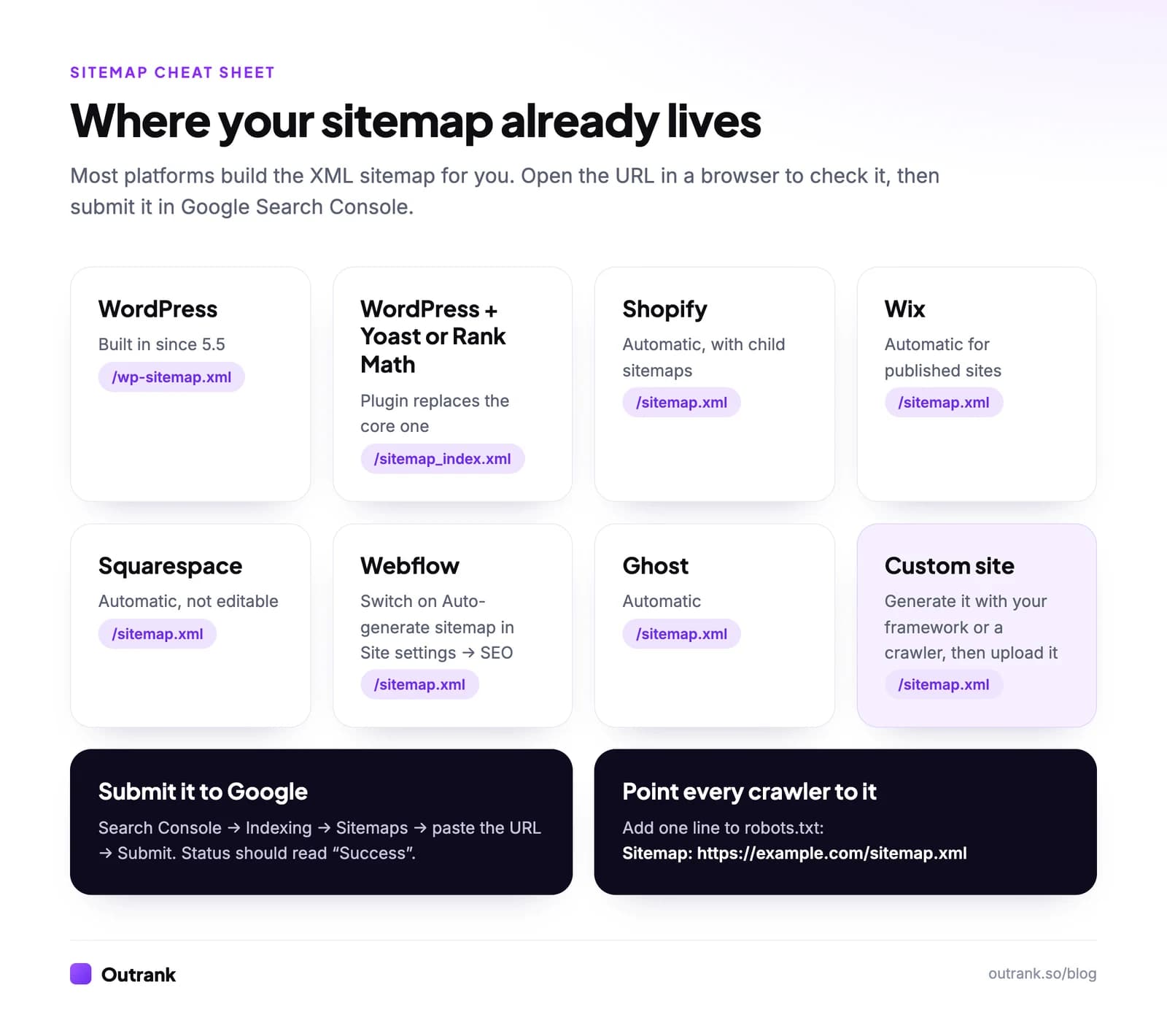
To make a sitemap, first check whether your website already has one: WordPress, Shopify, Wix, Squarespace, Webflow and Ghost all generate an XML sitemap automatically, usually at yourdomain.com/sitemap.xml. If yours doesn't, create one with an SEO plugin, your site's framework or a crawler such as Screaming Frog, or write the XML file by hand. Then submit the sitemap URL in Google Search Console under Indexing → Sitemaps and add it to your robots.txt file.
This guide covers each of those routes step by step, with a valid XML template you can copy, the exact settings on each platform, and what to do when Search Console reports an error.
Key takeaways
- Most sites don't need to build a sitemap: WordPress (since version 5.5), Shopify, Wix, Squarespace, Webflow and Ghost create one automatically.
- One sitemap file can hold up to 50,000 URLs or 50 MB uncompressed. Bigger sites split it into several files listed in a sitemap index.
- Google ignores the <priority> and <changefreq> tags. It uses <lastmod> only when the date is consistently accurate.
- Submit the sitemap once in Search Console (Indexing → Sitemaps). Google re-reads it on its own, and the old ping URL no longer works.
- A sitemap is a hint, not an order. Only list canonical pages that return 200 and that you want indexed.
What is a sitemap?
A sitemap is a file that lists the pages, images, videos and other files on your website so search engines can find and crawl them. Google describes it as a file where you give information about the pages and files on your site and the relationships between them.
There are two kinds, and when people ask how to make a sitemap for SEO they almost always mean the first:
| XML sitemap | HTML sitemap | |
|---|---|---|
| Written for | Search engine crawlers | Human visitors |
| Format | An .xml file of URLs, usually at /sitemap.xml | A normal page with links, often in the footer |
| What it does | Helps Google and Bing discover and recrawl URLs | Helps people (and crawlers) navigate a large site |
| Do you need it? | Yes for most sites, and it's usually automatic | Optional; good navigation does the same job |
Do you need a sitemap?
Google says a sitemap matters most when your site is large, new with few external links, or full of pages that aren't well linked from each other. According to Google's documentation, you might not need one if your site is small (about 500 pages or fewer), every page is linked from your navigation, and you don't rely on images, videos or news appearing in search.
In practice, a sitemap costs nothing and catches pages your internal links miss, so every site should have one. Just don't expect it to fix indexing on its own: a sitemap helps Google find pages, it doesn't make Google index them. If pages are found but not indexed, that's a quality or duplication problem (see how to fix "Crawled, currently not indexed").
Step 1: Check whether you already have a sitemap
Before you build anything, open these URLs in your browser, replacing the domain with yours:
https://yourdomain.com/sitemap.xmlhttps://yourdomain.com/sitemap_index.xmlhttps://yourdomain.com/wp-sitemap.xml(WordPress)https://yourdomain.com/robots.txt, then look for a line that starts withSitemap:
If one of them shows a list of URLs (or a list of other sitemaps), you already have a sitemap. Skip to submitting it.
Step 2: Make your sitemap
Pick the route that matches how your site is built.
How to make a sitemap in WordPress
WordPress has generated a basic XML sitemap on its own since version 5.5 (August 2020). It lives at /wp-sitemap.xml, lists your posts, pages, categories, tags and author archives (up to 2,000 URLs per file), and is referenced in your robots.txt automatically. If Settings → Reading → Discourage search engines from indexing this site is ticked, WordPress switches the sitemap off, so check that box first if yours is missing.
Most sites use an SEO plugin instead, which adds a more configurable sitemap at /sitemap_index.xml:
- Yoast SEO: go to Yoast SEO → Settings → Site features, and make sure XML sitemaps is switched on. Yoast then disables the core WordPress sitemap automatically, and noindexed content is left out.
- Rank Math: enable the Sitemap module, then go to Rank Math SEO → Sitemap Settings to choose which post types and taxonomies are included and to exclude individual posts.
Use one SEO plugin, not two. Two sitemap generators running side by side is a common source of duplicate or conflicting sitemaps.
How to make a sitemap on Shopify
You don't. Shopify generates /sitemap.xml automatically for every store, as an index that links to separate sitemaps for your products, collections, blogs and pages. To keep a page, product or blog post out of it, Shopify's documented method is a seo.hidden metafield (type Integer, value 1, created under Settings → Metafields and metaobjects), which hides the item from sitemaps, search engines and your store search. A store that's still password-protected can't be read by Google, so launch it before you submit the sitemap.
How to make a sitemap on Wix
Wix creates /sitemap.xml automatically, as an index of separate sitemaps for your pages, blog posts, products and other items, and updates it whenever you make changes. The simplest way to submit it is the SEO Setup Checklist (under SEO & GEO → Tools and settings): connect Google Search Console there and Wix submits the sitemap to Google for you. That step needs a Premium plan and a connected domain. Pages you hide from search engines may not appear in the sitemap. Our Wix SEO guide covers the rest of the settings.
How to make a sitemap on Squarespace
Squarespace generates /sitemap.xml automatically, including page, blog and image entries, and leaves out disabled, password-protected and hidden-from-search pages. You can't edit it, and trial sites don't have one, so publish the site on a paid plan first. Then verify your site in Search Console and submit the URL.
How to make a sitemap on Webflow
Open Site settings → SEO, go to the Sitemap section and set Auto-generate sitemap to Yes, then save and publish (Webflow's guide). Webflow then serves /sitemap.xml, adds it to your robots.txt and updates it on every publish. To leave a page out, switch off Sitemap indexing in the page's SEO settings, which also adds a noindex tag. To take full control, set auto-generation to No and paste your own XML into the custom sitemap field.
Ghost, Blogger and other hosted platforms
Ghost creates /sitemap.xml automatically, and so do most hosted builders. If you can't find yours, search the platform's help center for "sitemap" before generating one yourself: an uploaded file on a hosted platform usually can't replace the built-in one anyway.
How to make a sitemap for a custom-coded site
If your site is hand-coded or built with a framework, you have three options, from best to worst:
- Generate it from your code. Most frameworks can build a sitemap from your routes or database so it stays current on every deploy. In Next.js, for example, an
app/sitemap.tsfile returns the list of URLs and Next.js serves it at/sitemap.xml(Next.js docs). Static site generators like Astro, Hugo and Eleventy have sitemap plugins or built-in options. - Crawl the site and export a sitemap. Desktop crawlers such as Screaming Frog SEO Spider (free up to 500 URLs) can crawl your live site and export an XML sitemap. Only indexable pages that return a 200 status should go in it.
- Use an online sitemap generator. These crawl your site from a web page and give you a file to download. They work for small static sites, but you have to rerun them every time you add a page.
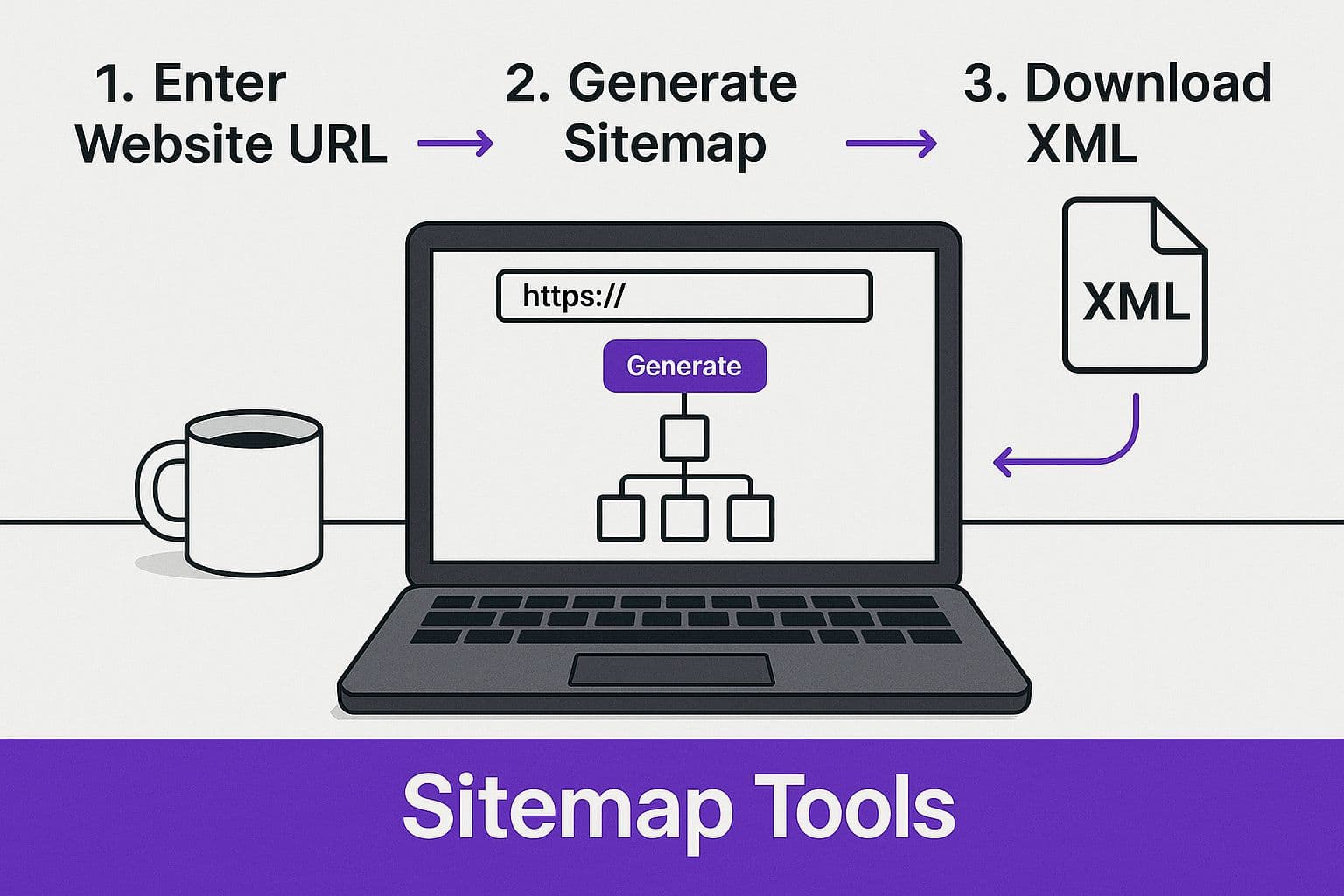
The catch with options 2 and 3 is that the file goes stale the moment you publish something new. If your site changes more than once a month, generate the sitemap automatically.
How to make an XML sitemap manually
Writing a sitemap by hand makes sense for a small static site or when you want to understand what a generator produces. Here is a complete, valid sitemap following the sitemaps.org protocol:
<?xml version="1.0" encoding="UTF-8"?>
<urlset xmlns="http://www.sitemaps.org/schemas/sitemap/0.9">
  <url>
    <loc>https://www.example.com/</loc>
    <lastmod>2026-10-01</lastmod>
  </url>
  <url>
    <loc>https://www.example.com/services/emergency-plumbing</loc>
    <lastmod>2026-09-14</lastmod>
  </url>
  <url>
    <loc>https://www.example.com/blog/how-to-fix-a-leaking-tap</loc>
    <lastmod>2026-10-12</lastmod>
  </url>
</urlset>
The rules that matter:
<loc>is required and must be the full, absolute URL, exactly as you want it indexed (same protocol, samewwwor non-www, same trailing slash).<lastmod>is optional but useful if it's honest. Google uses it when it's consistently accurate, so only change it when the page content really changes.- Skip
<priority>and<changefreq>. Google ignores both. - Save the file as UTF-8 and escape special characters in URLs (
&becomes&). - Keep each file under 50,000 URLs and 50 MB (uncompressed). You can gzip it.
Then upload it:
- 1
Save the file as sitemap.xml
Use a plain text editor (VS Code, Notepad++, TextEdit in plain text mode), not a word processor. - 2
Validate it
Open it in a browser. If the XML is broken, the browser shows an error instead of the URL tree. Search Console will also flag invalid files when you submit. - 3
Upload it to your site's root folder
Put it at https://yourdomain.com/sitemap.xml via FTP, your host's file manager or your deploy process. Google only applies a sitemap to URLs in its own folder and below (unless you submit it in Search Console), so the root is the safe place. - 4
Add it to robots.txt
Add the lineSitemap: https://yourdomain.com/sitemap.xmlanywhere in your robots.txt file.
Sitemap index files for large sites
When you have more than 50,000 URLs, or you want separate files per content type (which makes errors easier to trace), create several sitemaps and list them in a sitemap index:
<?xml version="1.0" encoding="UTF-8"?>
<sitemapindex xmlns="http://www.sitemaps.org/schemas/sitemap/0.9">
  <sitemap>
    <loc>https://www.example.com/sitemap-pages.xml</loc>
    <lastmod>2026-10-01</lastmod>
  </sitemap>
  <sitemap>
    <loc>https://www.example.com/sitemap-posts.xml</loc>
    <lastmod>2026-10-12</lastmod>
  </sitemap>
</sitemapindex>
Submit only the index file; search engines find the child sitemaps through it. An index can list up to 50,000 sitemaps, and the child sitemaps must sit on the same site, in the index's folder or below.
Step 3: Submit your sitemap to Google and Bing
Search engines can find your sitemap through robots.txt, but submitting it directly gets it read sooner and shows you errors.
- 1
Open Google Search Console
Go to Search Console and select your property. If your site isn't verified yet, add it first (a Domain property covers every subdomain and protocol; see Domain vs URL prefix). - 2
Go to Indexing → Sitemaps
It's in the left-hand menu. - 3
Enter the sitemap URL and click Submit
Type the path after your domain (for examplesitemap.xmlorsitemap_index.xml) under Add a new sitemap, then click Submit. - 4
Check the status
Success means Google read the file. Couldn't fetch usually means a wrong URL, a robots.txt block or a server error. Has errors lists the problems; click the sitemap to see them. - 5
Submit to Bing too
In Bing Webmaster Tools, open Sitemaps, click Submit sitemaps and paste the full URL. If you add your site by importing it from Search Console, Bing brings your Google sitemaps across too.
You only need to submit once. Google rereads known sitemaps on its own schedule, and the old google.com/ping?sitemap= URL that some tools still mention was deprecated in 2023 and no longer works. If you want faster discovery on Bing, look at IndexNow, an open protocol that notifies participating search engines (Bing, Yandex, Naver, Seznam and others; Google isn't one of them) each time a URL changes. Many SEO plugins, hosts and builders such as Wix support it out of the box.
Sitemap strategy: what to include and what to leave out
A good sitemap for SEO is a clean list of the pages you want in search results, and nothing else. Every redirect, 404 or noindexed URL in it wastes a crawl and makes the report harder to read. Use this checklist when you audit yours:
Interactive checklist
Sitemap health checklist
0/12
What goes in
0/4How it's built
0/4How it's submitted
0/4Your progress is saved in this browser, so you can come back to it later.
Image, video and news sitemaps
Google supports extra tags for images, videos and news articles. You only need them in specific cases: image sitemaps help when images load in ways Google can't see in the HTML, video sitemaps help video-heavy sites, and news sitemaps are for publishers that want to appear in Google News. Multilingual sites can also declare language versions with hreflang annotations in the sitemap instead of in each page's HTML.
Fixing common sitemap errors
| What Search Console says | What it usually means | Fix |
|---|---|---|
| Couldn't fetch | Wrong URL, the file is blocked by robots.txt, or the server returned an error | Open the URL in a private window; check robots.txt; resubmit |
| Sitemap is HTML | The URL returned a web page (often a 404 page or login page) instead of XML | Submit the exact XML URL, not your homepage or a plugin settings page |
| Invalid XML / Parsing error | Broken tags, unescaped & characters or a wrong encoding | Regenerate the file, or fix the line Search Console points to |
| URL not allowed | The sitemap lists URLs from another domain, or from a folder above its own | Host the sitemap at the root of the same domain and protocol |
| Submitted URL marked noindex (in the Pages report) | The sitemap lists a page that tells Google not to index it | Remove the page from the sitemap or remove the noindex tag |
| Submitted URL has crawl issue / not found (404) | Deleted or moved pages are still listed | Make the sitemap dynamic so deleted pages disappear on their own |
Once the sitemap is clean, internal links do most of the remaining work of getting pages discovered. Our guides on why internal links matter and how to find internal links to a page cover that side, and the technical SEO audit checklist puts sitemaps in context with everything else Google checks.
A sitemap only helps if there are good pages to list. If your site has few pages worth indexing, that's the bigger problem to solve. Outrank publishes a researched, internally linked article to your blog every day, and since it publishes through your CMS, every new article lands in your sitemap automatically.
FAQ
How do I create a sitemap for my website?
Check whether your platform already makes one by opening yourdomain.com/sitemap.xml. WordPress, Shopify, Wix, Squarespace, Webflow and Ghost generate it automatically. If you don't have one, use an SEO plugin, your framework's sitemap feature or a crawler like Screaming Frog to generate it, upload it to your site's root folder, and submit it in Google Search Console.
Is a sitemap good for SEO?
Yes. A sitemap helps search engines discover new and updated pages faster, especially on large sites, new sites with few backlinks, and pages that aren't well linked internally. It doesn't improve rankings directly, and it doesn't force Google to index a page; it makes sure Google knows the page exists.
How do I make a sitemap for free?
Every common method is free. CMS-generated sitemaps cost nothing, Yoast SEO and Rank Math include sitemaps in their free versions, Screaming Frog's free version handles sites up to 500 URLs, and you can write an XML sitemap by hand in any text editor using the template above.
How many URLs can a sitemap have?
One sitemap file can contain up to 50,000 URLs and must be no larger than 50 MB uncompressed. If you have more URLs, split them across several sitemaps and list those in a sitemap index file, then submit the index.
Do I need to resubmit my sitemap every time I add a page?
No. Once Google knows your sitemap, it rereads it periodically, and an automatically generated sitemap already includes new pages. For an important new page you want crawled quickly, use the URL Inspection tool in Search Console and click Request indexing.
What is the difference between an XML and an HTML sitemap?
An XML sitemap is a machine-readable file that lists your URLs for search engine crawlers. An HTML sitemap is a regular page on your site with links to your main sections, meant for visitors. For SEO, the XML sitemap is the one that matters; an HTML sitemap is optional on sites with clear navigation.
Where should a sitemap be located?
Put the sitemap at the root of your domain, for example https://www.example.com/sitemap.xml, because Google applies a sitemap only to URLs in its own folder and below unless you submit it in Search Console. You can name it anything, as long as you submit the exact URL in Search Console and reference it in robots.txt.


