To check the traffic of any website, paste the domain into a free traffic checker: Similarweb (3 free searches a day), Semrush (no sign-up) or Ahrefs (organic search only). To check your own website's traffic, use Google Analytics 4 for visits and Google Search Console for Google clicks, both free.
The difference matters more than the tool. Your own analytics measure real visits. Third-party checkers model them, and independent tests put their average error at roughly 50%. Below: every tool worth using, what each costs as of October 2026, how far off the estimates run, and a 15-minute weekly routine to keep watching the numbers.
Key takeaways
- Free checkers for any domain: Similarweb, Semrush and Ahrefs. All three show modeled estimates, not real analytics.
- In a 2024 test of 184 sites against Search Console, average error was 48.6% for Ahrefs, 57.0% for Similarweb and 61.6% for Semrush.
- For your own site, GA4 counts visits on your pages and Search Console counts clicks from Google. Neither matches the other, and that is normal.
- Estimates are least reliable for small sites: SparkToro and Screaming Frog both found the biggest misses below 5,000 to 10,000 monthly visits.
- Since May 2026, GA4 puts ChatGPT, Gemini and Claude referrals in their own "AI Assistant" channel.
Your site or someone else's: pick the right kind of tool
Website traffic is the number of visits a site receives, usually counted as sessions (visits), users (people or browsers) and views (pages loaded). How you check it depends on one question: do you own the site?
| Your own website | Any other website | |
|---|---|---|
| Where the number comes from | A tracking script or Google's own search logs | A model built from panels, clickstream data and rankings |
| Accuracy | Close to real, minus visitors who block tracking | Often off by half, sometimes by 100% or more |
| Best free tools | GA4, Search Console, Clarity, Cloudflare | Similarweb, Semrush, Ahrefs |
| What you can see | Every page, source, device and conversion | Totals, channel mix, top pages, top keywords |
You cannot see another site's real analytics unless the owner shares them. Anyone who claims "exact" traffic for a domain they don't control is selling an estimate.
Website traffic checkers compared (October 2026)
Prices come from each vendor's pricing page in October 2026. "Price from" is the cheapest plan that includes the traffic data; $0 means the tool is free.
Website traffic checkers and analytics tools compared
| Google Analytics 4 | Your site | Measured visits | ✓ | $0/mo | Visits, sources, pages and conversions |
| Google Search Console | Your site | Measured Google clicks | ✓ | $0/mo | Queries, clicks, impressions and position in Google |
| Bing Webmaster Tools | Your site | Measured Bing clicks | ✓ | $0/mo | Bing and Copilot search performance |
| Microsoft Clarity | Your site | Measured sessions and recordings | ✓ | $0/mo | Heatmaps, recordings and AI referral channels |
| Cloudflare Web Analytics | Your site | Measured visits | ✓ | $0/mo | Cookie-free basics; 10 sites if not proxied through Cloudflare |
| Ahrefs Web Analytics | Your site | Measured visits | ✓ | $0/mo | Cookie-free analytics with AI traffic, free up to 1M events |
| Matomo | Your site | Measured visits | ✓ | $0/mo | Self-hosted analytics you fully own (cloud plans cost extra) |
| Plausible | Your site | Measured visits | ✕ | $9/mo | Simple privacy-first stats; 30-day free trial |
| Fathom | Your site | Measured visits | ✕ | $15/mo | Cookie-free analytics up to 100k pageviews; 7-day trial |
| Ahrefs Traffic Checker | Any site | Estimate, organic search only | ✓ | $29/mo | A competitor's Google traffic, top pages and keywords |
| Similarweb | Any site | Estimate, all channels | ✓ | $125/mo | Competitor visits, channel mix and engagement. Free checker: 3 searches a day |
| Semrush | Any site | Estimate, all channels | ✓ | $289/mo | Quick check with no sign-up; full Traffic Analytics in the Traffic & Market toolkit |
Click a column header to sort.
Three tools cover almost every need. GA4 plus Search Console for your own site, and Similarweb's free checker for a quick look at a competitor. Add Ahrefs when the question is specifically "how much Google traffic does this competitor get, and from which pages?"
How to check any website's traffic for free
Use two checkers, not one, and trust the trend more than the number.
- 1
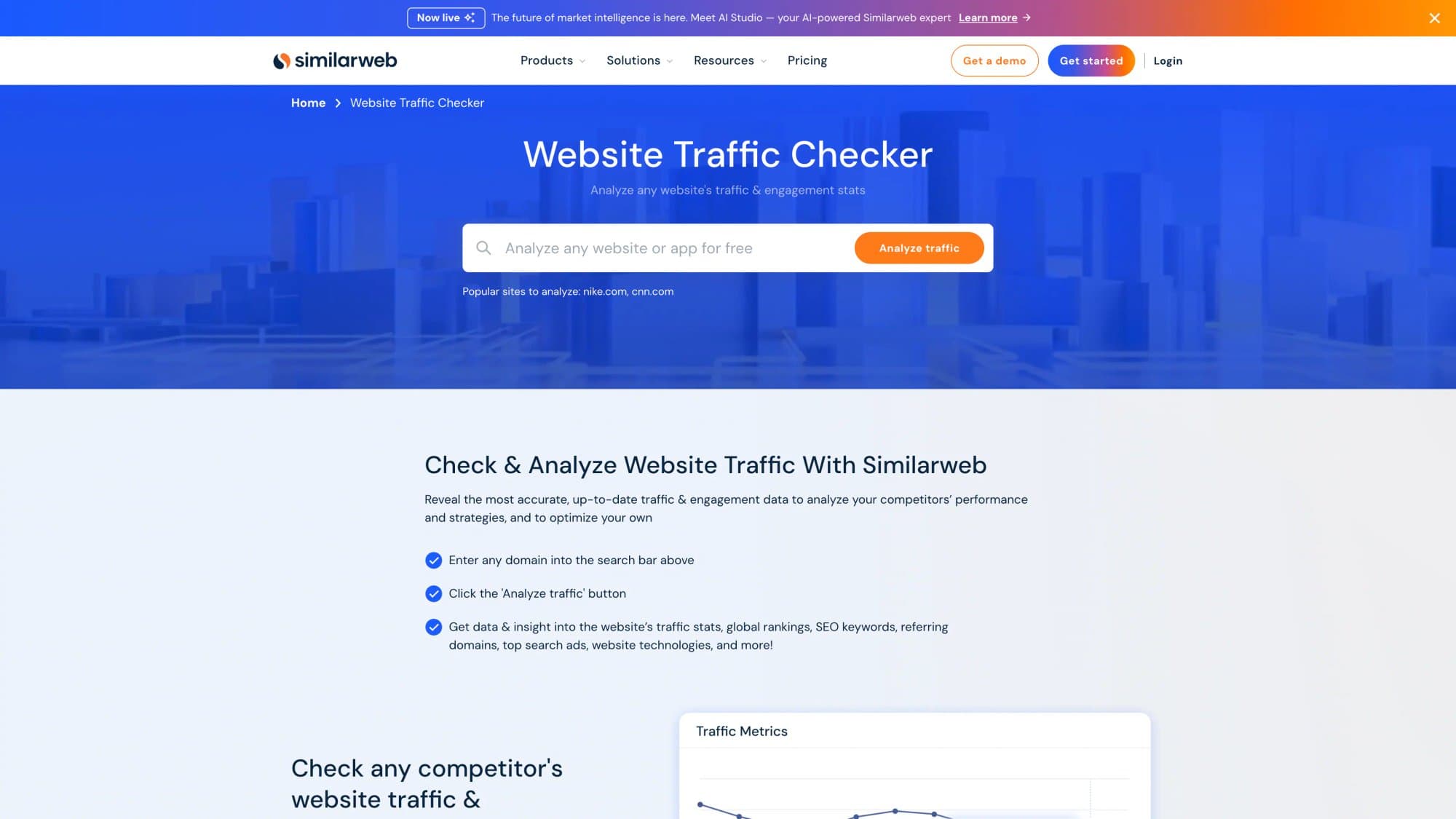
Run the domain through Similarweb
Go to similarweb.com/website, enter the domain without "https://" and click Analyze traffic. Note total visits, the channel split (direct, search, social, referral) and top countries. The free view is a sample, limited to a few searches a day. - 2
Cross-check in Semrush
Open semrush.com/website, enter the same domain and click Check Traffic. If Semrush and Similarweb disagree by more than 2×, assume the site is small or niche and treat both numbers as a rough range. - 3
Check organic search traffic in Ahrefs
Paste the domain into the Ahrefs Website Traffic Checker. This shows estimated monthly Google traffic only, plus the pages and keywords that bring it. It is the best free view of a competitor's SEO. - 4
Look at direction, not the headline
A competitor going from an estimated 20,000 to 40,000 visits in six months tells you more than either number alone. Estimators are better at ranking sites against each other than at counting visits. - 5
Turn the findings into keywords
Take the competitor's top organic pages and run a competitor website analysis to find the topics you don't cover yet.
For AI traffic specifically, Similarweb also has a free AI Traffic Checker that estimates visits a domain gets from ChatGPT, Gemini, Perplexity and other assistants.
How accurate are website traffic checkers?
Not very, and every serious test agrees. Four studies compared estimator numbers with real data from the sites' own analytics or Search Console:
| Study | Sites | Compared against | Headline result |
|---|---|---|---|
| Collaborator, Dec 2024 | 184 | Search Console | Average error: Ahrefs 48.6%, Similarweb 57.0%, Semrush 61.6%. Semrush overestimated on 112 of 184 sites; Ahrefs tended to underestimate |
| SparkToro, Nov 2022 | 641 (7,692 site-months) | Google Analytics users | Correlation with real traffic: Semrush 0.79, Datos 0.72, Similarweb 0.66, Ahrefs 0.50 (organic only). No tool was "consistently accurate" |
| Ahrefs, May 2022 | 1,635 | Search Console, US organic | Median deviation: Ahrefs 49.5%, Semrush 68.4%. Some sites off by under 5%, others by over 1,000% |
| Screaming Frog, 2016 | 25 | Google Analytics, UK organic | Almost every estimate for sites under 10,000 monthly organic visits was at least 40% off |
Average error vs real Search Console data
Ahrefs
Tends to underestimate
48.6%
Similarweb
Tends to overestimate
57.0%
Semrush
Overestimated 112 of 184 sites
61.6%
Two patterns hold across the studies. First, small sites get the worst estimates: SparkToro found Similarweb's numbers weakest for sites under 5,000 monthly users and Ahrefs "almost always overestimating" in that bucket. Second, vendor studies flatter the vendor: Ahrefs' own test put Ahrefs first, which is why the independent ones matter. Our take on Semrush's accuracy goes deeper on one tool.
Use the calculator to turn a single estimate into a realistic range before you put it in a pitch deck.
Interactive calculator
What a traffic estimate really means
Real traffic could be as low as
12.7K
- Or as high as
- 46.5K
- Gap between the low and high end
- 3.7×
How to check your own website traffic
Your own numbers come from two places, and they answer different questions. Google Analytics 4 counts what happens on your pages. Search Console counts what happens in Google before the click.
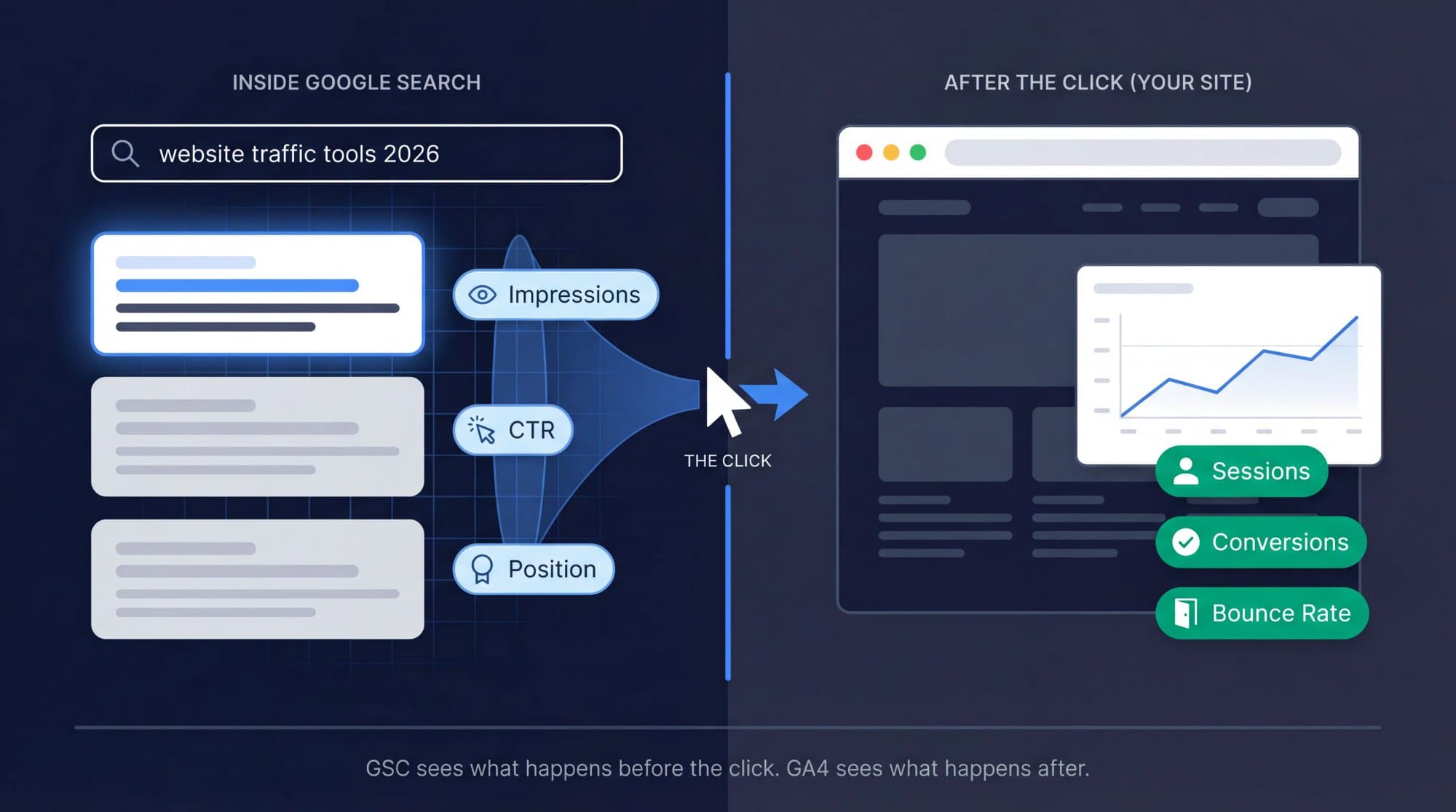
In Google Analytics 4:
- Total visits by source: Reports → Acquisition → Traffic acquisition. Sessions are grouped by "Session default channel group" (Organic Search, Direct, Referral, and so on).
- Views per page: Reports → Engagement → Pages and screens. The "Views" column is what most people mean by "website views".
- Who is on the site right now: Reports → Realtime, which covers the last 30 minutes. Google calls it best-effort, so don't report from it.
In Google Search Console:
- Performance → Search results shows clicks, impressions, average CTR and average position for Google Search, with 16 months of history. The "24 hours" date option shows hourly data.
- Search Console only counts Google. Use Bing Webmaster Tools for Bing and Copilot.
On hosted platforms: Shopify, Wix, Squarespace and WordPress.com have a built-in analytics dashboard in the admin. Self-hosted WordPress sites can install Google's Site Kit plugin to see GA4 and Search Console data inside the WordPress dashboard.
If none of this is installed yet, start with how to track website visitors: it covers setup per CMS, consent banners and the privacy-first alternatives. For a full GA4 walkthrough, see how to use Google Analytics.
Visits, users and views: what each number means
Traffic checkers and analytics tools use the same words for different things, so a "visit" in one tool is rarely a "visit" in another. These are GA4's definitions, which most other tools roughly follow:
| Metric | What it counts | Use it for |
|---|---|---|
| Users (active users) | Distinct browsers or signed-in people who engaged during the period | Audience size |
| Sessions | Visits. A session ends after 30 minutes of inactivity by default | Traffic volume and channel mix |
| Views | Pages or app screens loaded, repeats included | "Website views" and page popularity |
| Engaged sessions | Sessions that lasted over 10 seconds, had a key event, or had 2+ page views | Quality of the traffic |
| Bounce rate | Share of sessions that were not engaged | Pages that fail to hold visitors |
| Clicks (Search Console) | Clicks from Google results to your site | SEO performance |
Estimators like Similarweb report "visits", which are closest to GA4 sessions. Ahrefs reports estimated organic traffic, which is closest to Search Console clicks. Comparing an Ahrefs number with your GA4 sessions will always make Ahrefs look low, because it leaves out every non-search visit.
Why GA4, Search Console and checkers never agree
Expect three different numbers for the same month. That is not a bug.
- Clicks are not sessions. Search Console counts clicks from Google results. GA4 counts sessions from every source, and only for visitors whose browser ran the tag.
- Consent banners remove visitors. When a visitor declines analytics cookies, GA4 can only estimate them through behavioral modeling, and Google requires at least 1,000 daily events from declined users and 1,000 daily users who accepted (each for 7 days) before modeling kicks in. Small EU-facing sites often under-count.
- Ad blockers and privacy browsers block the GA4 script for some visitors, so those visits never reach your reports.
- Estimators model panels, not your traffic. They can be closer to GA4 on big sites and wildly off on small ones.
- Channels get mislabeled. Visits with no referrer land in Direct, which is why organic search vs direct is the most misread split in GA4.
The fix is to pick one source of truth per question: GA4 for visits and conversions, Search Console for Google visibility, and estimators only for comparing other sites.
How to monitor website traffic every week
Monitoring is a habit, not a dashboard. A good routine takes 15 minutes on Monday and catches problems before they cost a month of traffic.
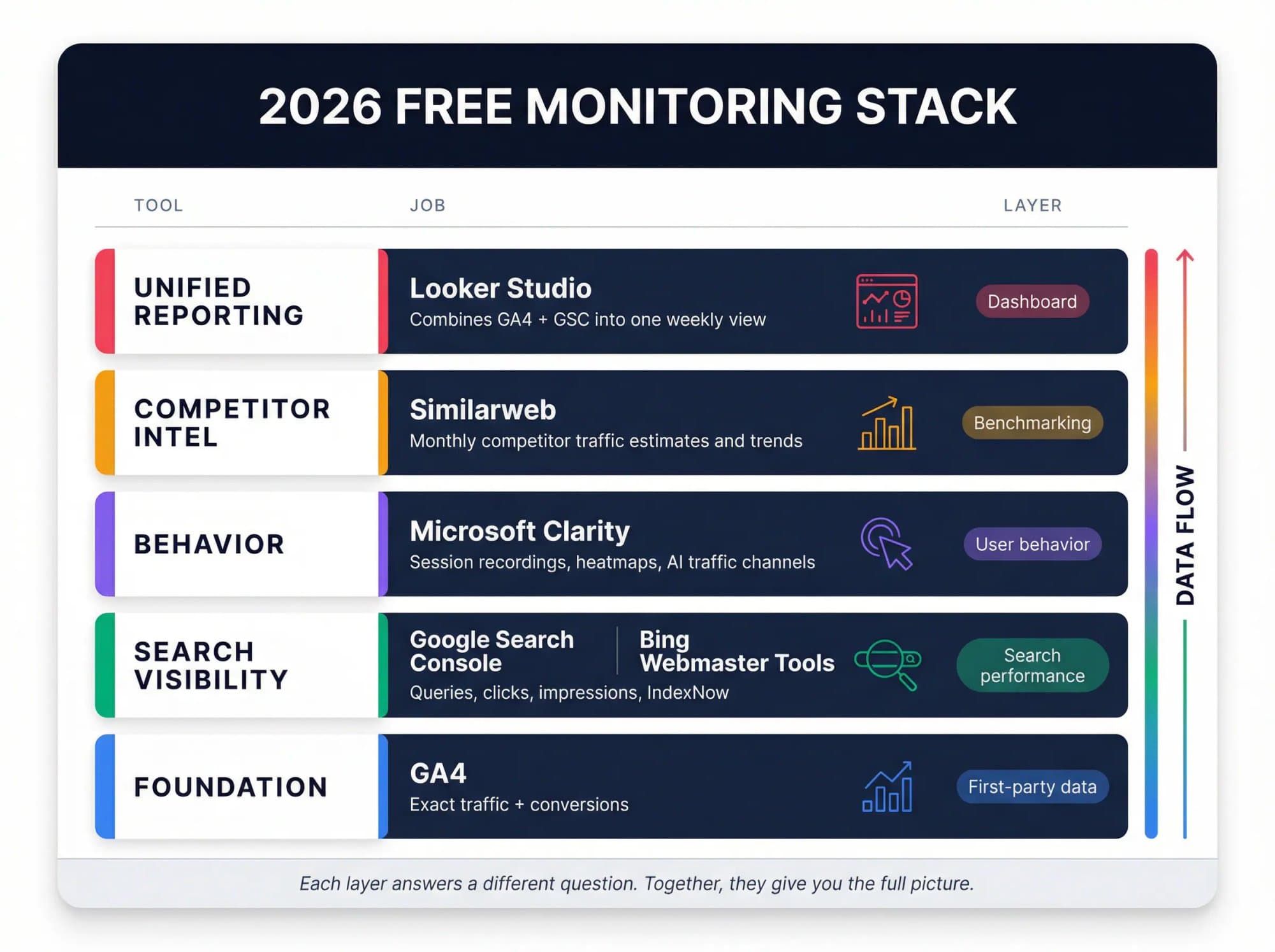
Interactive checklist
Weekly website traffic check
0/10
Set up once
0/4Every Monday
0/6Your progress is saved in this browser, so you can come back to it later.
When something moves and you need to find out why, switch from monitoring to analysis. Our website traffic analysis guide has a step-by-step method for diagnosing drops, and website traffic sources explains exactly how GA4 decides which channel each visit belongs to.
How to track AI traffic (ChatGPT, Gemini, Perplexity)
AI assistants now send measurable traffic, and the tools caught up in 2025 and 2026.
- GA4 added a default AI Assistant channel in May 2026. When the referrer matches a known assistant, GA4 sets the medium to "ai-assistant" automatically. It is not retroactive, and visits that arrive without a referrer (app webviews, copy-pasted links) still land in Direct, as Search Engine Journal reported.
- Microsoft Clarity groups these visits as AIPlatform and PaidAIPlatform, covering ChatGPT, Claude, Copilot, Gemini and Perplexity.
- Ahrefs Web Analytics shows which chatbots send visitors, free for verified sites.
Keep the scale in mind. Contentsquare's 2026 benchmark of 99 billion sessions found AI-referred traffic grew 632% year over year but still made up 0.2% of all visits. Search is still where the volume is.
What to do when the numbers are flat
Checking traffic tells you where you stand. Growing it means publishing pages that rank for searches you don't cover yet, and earning the links that let them rank.
That is what Outrank automates: it picks low-competition keywords for your site, writes and publishes one SEO article a day to your CMS, builds backlinks through its exchange, and flags underperforming articles for rewrites. On our open results page, the median site reached 2.04× its pre-Outrank Google clicks after 7 months, measured in Search Console. It is not instant: in our 2,119-site study, the first three months were slow, then growth compounded.
FAQ
How can I check website traffic for free?
For any website, enter the domain in Similarweb's free Website Traffic Checker, Semrush's Website Traffic Checker or Ahrefs' Traffic Checker. All three are free and show estimated monthly visits. For your own website, Google Analytics 4 and Google Search Console are free and show measured visits and Google clicks.
How do I find out how much traffic another website gets?
Use a traffic estimator such as Similarweb, Semrush or Ahrefs, and compare at least two of them. The numbers are modeled from panels and search rankings, so independent tests found average errors of roughly 50%. Treat them as a range and focus on whether the trend is rising or falling.
What is the most accurate website traffic checker?
No checker is consistently accurate. In a 2024 test of 184 sites against Search Console data, Ahrefs had the lowest average error (48.6%), followed by Similarweb (57.0%) and Semrush (61.6%). In SparkToro's 2022 test against Google Analytics, Semrush correlated best with real traffic. Accuracy drops sharply for sites under about 5,000 visits a month.
How do I see how many views my website gets?
In Google Analytics 4, go to Reports, then Engagement, then Pages and screens. The Views column shows page views per page and in total for the date range you pick. Shopify, Wix and WordPress.com also show views in their built-in analytics dashboards.
Can I see a competitor's Google Analytics data?
No. A site's Google Analytics data is private to the people its owner grants access to. Third-party tools only estimate traffic from outside, using clickstream panels and search rankings, which is why their numbers differ from the site's real analytics.
Is Similarweb accurate?
Similarweb is reasonably good at ranking larger sites against each other and weak on small sites. SparkToro found it the strongest provider for larger sites but the weakest for sites under 5,000 monthly users, and Collaborator's 2024 test measured a 57% average error with a tendency to overestimate. Use it for direction and comparisons, not exact counts.