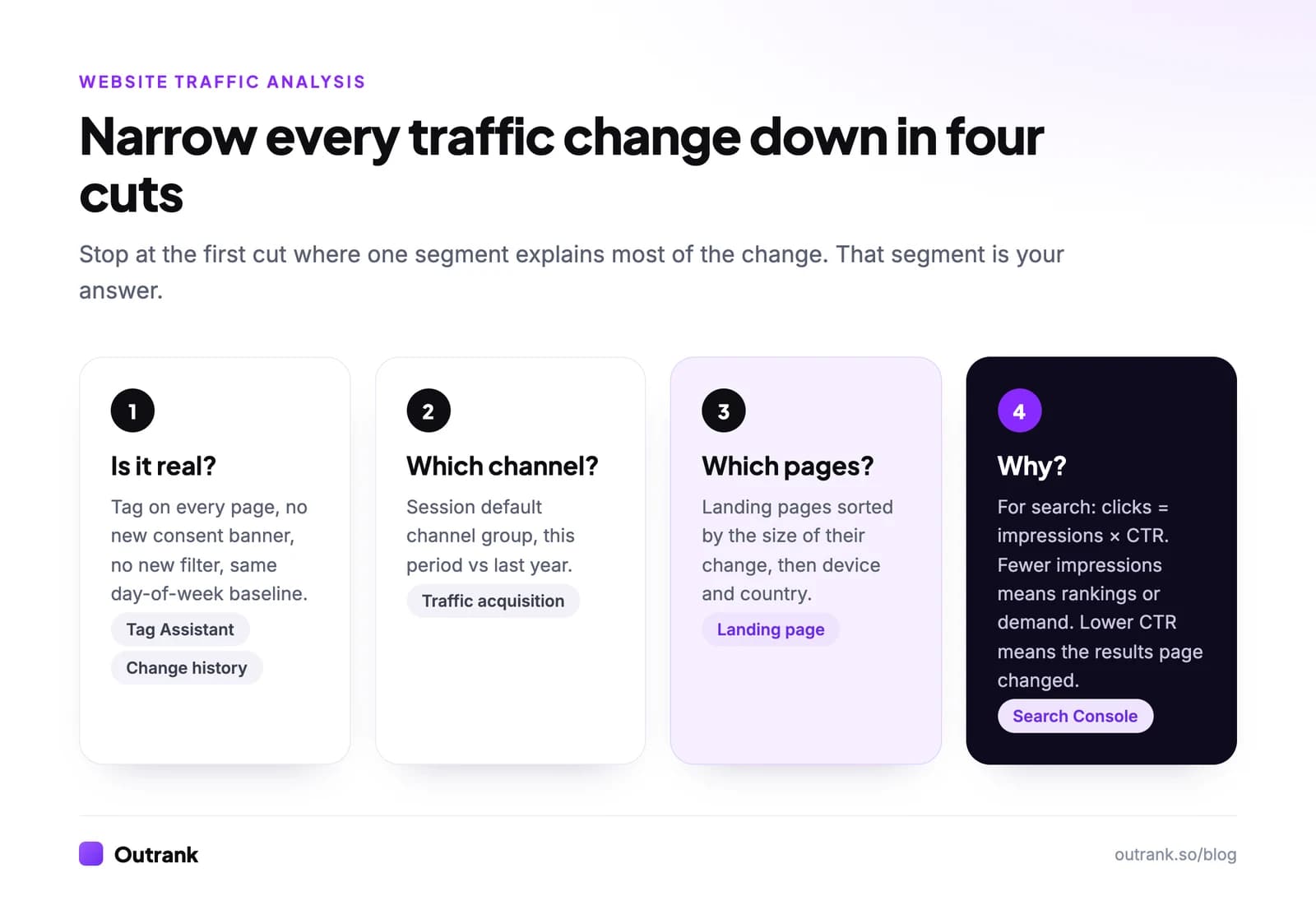
Website traffic analysis is the process of explaining a change in visits by splitting the total into segments (channel, landing page, device, country, search query) until one segment accounts for most of the change. In practice: rule out tracking errors, compare against the same period last year, find the channel that moved, find the pages inside it, then work out why. For search traffic, the "why" is almost always fewer impressions or a lower click-through rate.
This guide gives you the seven steps with the exact GA4 and Search Console reports to open, a worked example with numbers, a checklist for traffic drops, and a calculator that splits a change in Google clicks into its two causes.
Key takeaways
- Compare year over year with matching weekdays, not week over week. Most 'drops' are holidays, weekends or seasonality.
- Rule out tracking first: a missing tag, a new consent banner or a new filter can erase a large share of sessions overnight.
- Google clicks = impressions × CTR. Split every organic change into those two parts before you guess at a cause.
- In Outrank's study of 415 sites, median impressions grew 2.18× from October 2025 to August 2026 while clicks grew only 22%, because CTR fell 40%.
- Google's
&num=100change (September 10–13, 2025) cut median impressions 33% in days with no ranking change. Don't read it as a traffic loss.
Monitoring vs analysis
Monitoring tells you that something changed. Analysis tells you why, and what to do about it. If you don't have tracking and a weekly routine yet, start with how to track website visitors and how to check website traffic, then come back here when a number moves.
Every analysis answers one of three questions:
| Question | Example | Where to look |
|---|---|---|
| How much? | "How many sessions did the blog get last quarter?" | GA4 Traffic acquisition, Search Console Performance |
| From where? | "Which channels and pages bring buyers?" | GA4 Traffic acquisition and Landing page reports, with key events |
| Why did it change? | "Why are sessions down 17% year over year?" | All of the above, cut step by step |
The third question is where most teams get lost, so the method below is built around it.
The 7-step website traffic analysis method
1. Write the question and the date range
"Traffic is down" is not a question. "Why did sessions fall 17% in the last 28 days compared with the same 28 days last year?" is. Writing it down forces you to pick a metric (sessions, users, key events) and a comparison window before you open a single report.
2. Rule out tracking problems
Before you look for a business reason, check that the measurement didn't change. A drop that starts on an exact day, across every channel at once, is almost always tracking.
- Admin → Property change history in GA4 shows who changed filters, data streams or settings, and when.
- Run Tag Assistant on each page template (home, blog post, product, checkout) to confirm the Google tag fires.
- Check whether a consent banner was added or changed. In the EU, visitors who decline are only modeled if your property qualifies for behavioral modeling (1,000+ daily events from declined users and 1,000+ daily users who accepted).
If Search Console clicks are steady while GA4 organic sessions fell, the problem is your tracking, not Google.
3. Compare against the right baseline
Click the date range in any GA4 report, switch on Compare, choose Same period last year and tick Match day of week. In Search Console, use Performance → Date → Compare.
Week over week mixes in public holidays and weekday swings. Year over year removes most seasonality. For a sanity check on demand, look up your main topic in Google Trends: if interest itself fell, your traffic fell with the market, not because of anything you did.
4. Find the channel that moved
Open Reports → Acquisition → Traffic acquisition, which groups sessions by "Session default channel group". Look at the absolute change per channel, not the percentage: a channel that fell 60% but only lost 40 sessions doesn't explain a 4,000-session drop.
Two GA4 quirks distort channel comparisons in 2026:
- GA4 added an AI Assistant channel in May 2026 and it is not retroactive. Last year's ChatGPT and Gemini visits sit in Referral, so Referral may "drop" while AI Assistant "appears".
- Direct is a catch-all for visits with no referrer. If Direct grows while Organic Search shrinks, read organic search vs direct before concluding anything.
Website traffic sources lists every GA4 channel and the exact rule that puts a visit in it.
5. Find the pages inside that channel
Go to Reports → Engagement → Landing page, keep the year-over-year comparison, and filter to the channel from step 4 (Add filter → Session default channel group). Sort by the size of the change. Usually a handful of pages explains most of it.
Then cut once more by device and country (Reports → Tech → Tech details and Reports → User attributes → Demographic details). A drop that only hits mobile points to a template or speed problem; a drop in one country points to a local ranking change or a hreflang mistake.
For combinations the standard reports can't do, such as landing page × channel × device in one table, use Explore → Free form.
6. For search traffic, split clicks into impressions and CTR
Search Console's Performance → Search results report has the one equation that settles most SEO debates: clicks = impressions × CTR. Compare the two periods, then decide which part moved.
| What changed | Likely cause | What to check |
|---|---|---|
| Impressions down, CTR flat | Lost rankings, lost pages, or lower demand | Average position by query, Indexing → Pages for newly excluded URLs, Google Trends |
| Impressions flat or up, CTR down | The results page changed: AI Overviews, more ads, new SERP features, or a worse title | Search the query yourself; compare position (flat position + falling CTR = SERP change) |
| Both down | A ranking drop on high-volume queries | The Google Search Status Dashboard for core updates on that date |
| Impressions down, position "up" | A reporting change, not a ranking change | Whether your range crosses September 10–13, 2025 |
That last row matters for any comparison that includes summer 2025. When Google stopped serving 100 results per page (the &num=100 parameter), rank-tracking bots stopped generating deep impressions. Across 1,503 Outrank-connected sites, median impressions fell 33% within days while clicks rose 4%, and average position jumped from 29 to 13 with no real ranking change, according to our zero-click study.
Since then, the bigger trend has been CTR erosion. The same panel of 415 sites shows impressions doubling while clicks barely moved:
Google impressions vs clicks, median site
Hover or tap the chart for exact values. Click a legend item to hide it.
Use the calculator with your own Search Console numbers. It tells you how many clicks you gained or lost from impressions and how many from CTR.
Interactive calculator
Why did my Google clicks change?
Change in clicks
-3,120
- CTR, earlier period
- 2.2%
- CTR, recent period
- 1.2%
- Clicks explained by impressions
- 5,280
- Clicks explained by CTR
- -8,400
7. Write the finding as one sentence, then act
End every analysis with a sentence in this shape: "[Metric] changed by [amount] because [segment] changed, most likely due to [cause]. Next we will [action]." If you can't fill in the blanks, go back one step.
Match the action to the cause:
- Tracking error: fix the tag, then annotate the gap so nobody analyzes it later.
- Lost rankings: refresh the pages that lost position, check for cannibalization, earn links to them.
- Lower CTR with stable rankings: rewrite titles and meta descriptions (how to improve click-through rate), and change the format. In Outrank's study of 6.2 million pages, free tools and calculators earned 2.11× the CTR of the same site's articles at positions 4–10, while "what is" definition pages earned 0.52×.
- Lower demand: shift effort to topics that are growing, or accept a seasonal dip.
Worked example: a 17% drop, explained in six reports
The numbers below are an illustrative B2B software blog, built to show the method. The comparison is the last 28 days against the same 28 days of 2025, so both periods sit after the September 2025 &num=100 change.
Steps 1 to 3. Sessions fell from 24,000 to 19,900 (−4,100, or −17.1%). Property change history shows no edits, Tag Assistant finds the tag on all templates, and Google Trends interest for the core topic is flat. The drop is real.
Step 4. Traffic acquisition, year over year:
| Channel | Last year | This year | Change |
|---|---|---|---|
| Organic Search | 14,000 | 10,600 | −3,400 |
| Referral | 2,000 | 1,300 | −700 |
| Direct | 5,000 | 4,900 | −100 |
| 1,500 | 1,400 | −100 | |
| Organic Social | 1,000 | 900 | −100 |
| Paid Search | 500 | 500 | 0 |
| AI Assistant | 0 | 300 | +300 |
| Total | 24,000 | 19,900 | −4,100 |
Organic Search explains 83% of the drop (3,400 of 4,100). Part of the Referral loss is not a loss at all: last year's AI chatbot visits were counted as Referral, and this year 300 of them sit in the new AI Assistant channel.
Step 5. Filtering the Landing page report to Organic Search shows three glossary pages ("what is X") lost a combined 2,100 sessions. Product and comparison pages are flat. Device and country splits show the same pattern everywhere.
Step 6. Search Console for the site: impressions rose from 600,000 to 840,000, but clicks fell from 13,200 to 10,080. CTR went from 2.2% to 1.2%. Splitting the change:
- Impressions alone would have added 240,000 × 2.2% = +5,280 clicks.
- The CTR drop cost 840,000 × (1.2% − 2.2%) = −8,400 clicks.
- Net: −3,120 clicks, the same number Search Console reports.
Average position on the glossary queries barely moved. Searching them shows an AI Overview answering the definition at the top of the page.
Step 7. The sentence: "Organic sessions fell 3,400 because three glossary pages lost CTR while holding their rankings, most likely because an AI Overview now answers those queries. Next we will turn the glossary into interactive tools and comparison pages, and track CTR on those queries monthly."
Traffic drop diagnosis checklist
Use it top to bottom. Most drops are explained before you reach the last group.
Interactive checklist
Traffic drop diagnosis checklist
0/17
Is the drop real?
0/4Is the comparison fair?
0/3Where is it?
0/3Why did search change?
0/4Did the site change?
0/3Your progress is saved in this browser, so you can come back to it later.
Which report answers which question
A reference for the reports used above, with their GA4 and Search Console paths as of October 2026:
| You want to know | Open | Path |
|---|---|---|
| Sessions by channel | Traffic acquisition | GA4 → Reports → Acquisition → Traffic acquisition |
| Which pages people enter on | Landing page | GA4 → Reports → Engagement → Landing page |
| Views per page | Pages and screens | GA4 → Reports → Engagement → Pages and screens |
| Device, browser, OS | Tech details | GA4 → Reports → Tech → Tech details |
| Country and city | Demographic details | GA4 → Reports → User attributes → Demographic details |
| Any custom combination | Free form exploration | GA4 → Explore → Free form |
| Who changed GA4 settings | Property change history | GA4 → Admin → Property change history |
| Google queries, clicks, CTR, position | Search results | Search Console → Performance → Search results |
| Pages Google dropped from the index | Pages | Search Console → Indexing → Pages |
| Google ranking updates | Search Status Dashboard | status.search.google.com |
If you run this analysis every month, build it once as a report. Our guide to content performance analysis shows how to track it page by page.
When the analysis says "publish more"
Many analyses end the same way: a few pages carry the site, and growth needs more pages like them. That part is what Outrank automates. It finds keywords your site can realistically rank for, writes and publishes an article to your CMS every day, builds backlinks through its exchange, and flags underperforming articles so you can schedule rewrites.
FAQ
What is website traffic analysis?
Website traffic analysis is the process of explaining how many visitors a site gets, where they come from, and why that changed, by breaking the total into segments such as channel, landing page, device, country and search query. It uses tools like Google Analytics 4 for on-site visits and Google Search Console for search performance. The goal is a specific cause and an action, not a chart.
How do I analyze website traffic in Google Analytics?
Open Reports, then Acquisition, then Traffic acquisition to see sessions by channel, and turn on a comparison with the same period last year. Then open Reports, Engagement, Landing page, and filter to the channel that changed most to find the pages responsible. Use Explore, then Free form, for custom combinations such as landing page by channel by device.
Why is my website traffic dropping?
The most common causes are a tracking change (missing tag, new consent banner or filter), seasonality, lost Google rankings, a lower click-through rate because AI Overviews or other features now answer the query, and site changes such as migrations without redirects. Compare year over year, find the channel and pages that lost the most, and for search traffic check whether impressions or CTR fell.
Why are my impressions up but clicks down in Search Console?
Your pages are being shown more often but clicked less, which means CTR fell. In Outrank's study of 415 sites, median impressions grew 2.18× between October 2025 and August 2026 while clicks grew 22%, as AI Overviews and other results answered more queries on the page. If average position is stable, the cause is the results page, not your ranking.
How often should I analyze website traffic?
Monitor weekly and analyze monthly, or whenever a weekly check shows a change you can't explain. A monthly analysis compares the last full month with the same month last year, by channel and landing page. Daily checks mostly show noise, except right after a launch, migration or tracking change.
What tools do I need for website traffic analysis?
Google Analytics 4 and Google Search Console cover almost every analysis and are free. Google Trends helps you separate demand changes from ranking changes, and the Google Search Status Dashboard lists confirmed ranking updates. Third-party tools such as Semrush or Ahrefs add competitor estimates but aren't needed to analyze your own traffic.