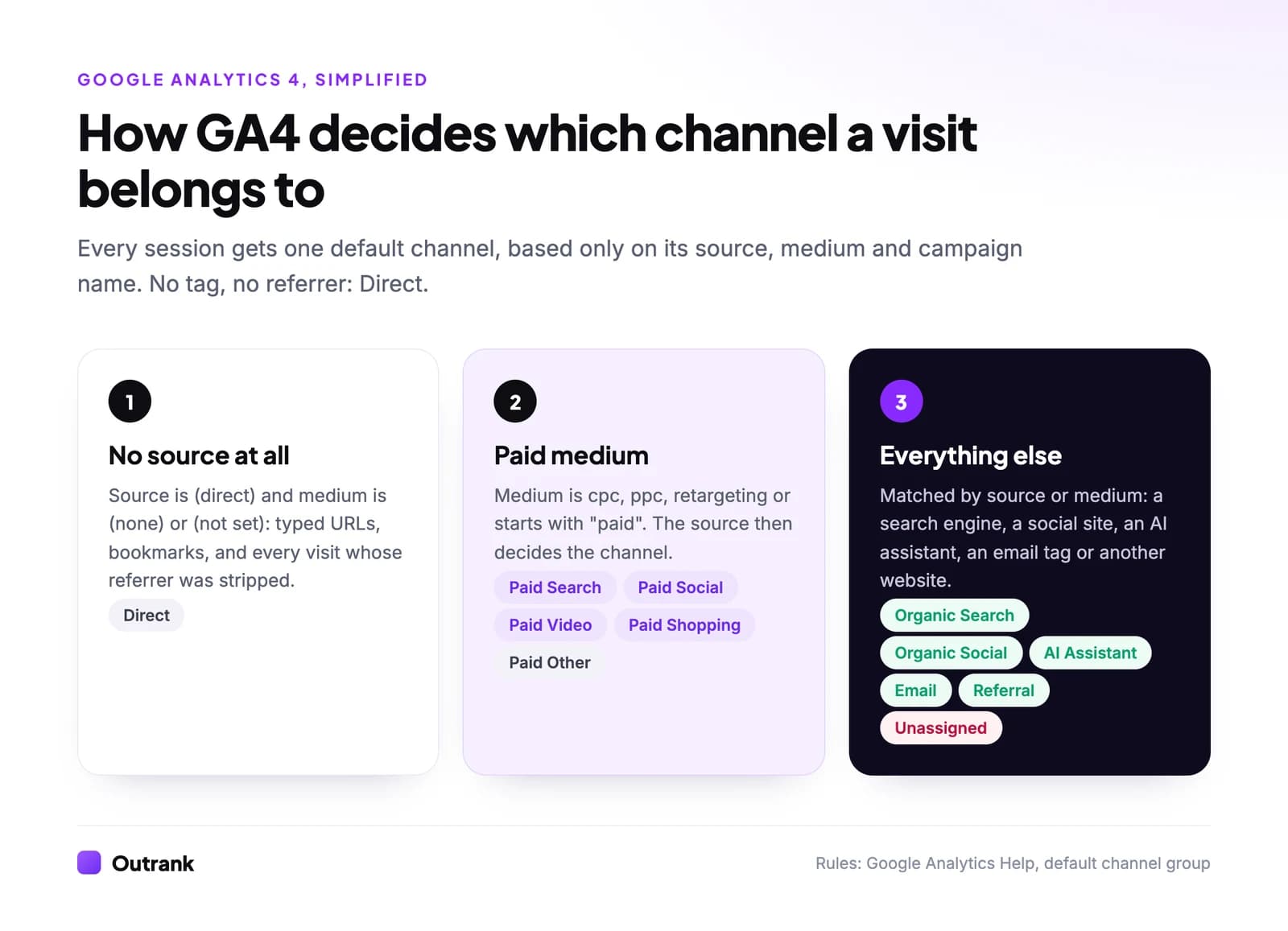
Website traffic sources are the places visitors come from before they land on your site. The main ones are organic search, direct, referral, paid search, organic and paid social, email, display, video, affiliates and, since 2026, AI assistants such as ChatGPT and Gemini. Google Analytics 4 puts every visit into exactly one of these "channels" using a fixed rule based on the visit's source, medium and campaign name.
Those rules decide what your reports say, so knowing them is the difference between "our social traffic dropped" and "our social links lost their tags". Below: every GA4 channel with its exact rule, the main sources explained one by one, the UTM values that land a link in the right channel, and what the traffic mix looks like across thousands of sites.
Key takeaways
- GA4 assigns every session to one default channel using only source, medium and campaign name. The rules are public and case-insensitive.
- Direct means GA4 received no referrer and no campaign tags, not that someone typed your URL. Untagged emails, apps and chat links all land there.
- Since May 2026, GA4 has an AI Assistant channel for visits from recognized assistants like ChatGPT, Gemini and Claude. Older AI visits stay in Referral.
- A link tagged utm_medium=newsletter lands in Unassigned. Use utm_medium=email.
- In Contentsquare's 2026 benchmark of 99 billion sessions, direct was the largest channel (29.4%), paid search second (25.2%), and AI assistants sent 0.2% of visits.
Source, medium and channel: three words you need
GA4 describes every visit with three labels:
- Source is where the visit came from:
google,facebook.com,chatgpt.com,newsletter. - Medium is the type of traffic:
organic,cpc,referral,email,(none). - Channel is GA4's bucket, computed from source, medium and campaign by the rules in Google's default channel group definitions.
GA4 fills source and medium automatically from the referrer (the page the visitor clicked from) and from Google Ads auto-tagging. You can override them with UTM parameters on your own links. The channel is never set directly: it is always derived.
Every GA4 default channel and the rule behind it
This is the full list of default channels as Google documents them in October 2026, with the rule simplified to one line. "Paid medium" means a medium matching ^(.*cp.*|ppc|retargeting|paid.*)$, so cpc, ppc, paid_social and paidsearch all count. Search the table or sort by type.
GA4 default channel group, October 2026
| Rule (simplified) | Example source / medium | ||
|---|---|---|---|
| Organic Search | Organic | Source is a known search engine, or medium is organic | google / organic |
| Direct | None | Source is (direct) and medium is (none) or (not set) | (direct) / (none) |
| Referral | Organic | Medium is referral, app or link | example.com / referral |
| AI Assistant | Organic | Referrer is a recognized AI assistant, or medium is ai-assistant | chatgpt.com / ai-assistant |
| Organic Social | Organic | Source is a known social site, or medium is social, social-network, social-media, sm | linkedin.com / referral |
| Organic Video | Organic | Source is a known video site, or medium contains video | youtube.com / referral |
| Organic Shopping | Organic | Source is a known shopping site, or campaign name matches a shopping pattern | Merchant Center free listings |
| Owned | Source or medium is email, e-mail, e_mail or e mail | newsletter / email | |
| SMS | Owned | Source or medium is exactly sms | klaviyo / sms |
| Mobile Push Notifications | Owned | Medium ends in push or contains mobile or notification, or source is firebase | firebase / push |
| Affiliates | Partner | Medium is affiliate | partnername / affiliate |
| Paid Search | Paid | Search engine source with a paid medium, or Google Ads Search campaigns | google / cpc |
| Paid Social | Paid | Social site source with a paid medium | facebook / paid_social |
| Paid Video | Paid | Video site source with a paid medium, or Google Ads video campaigns | youtube / cpc |
| Paid Shopping | Paid | Shopping site or shopping campaign name with a paid medium, or Google Ads Shopping | google / cpc (Shopping) |
| Display | Paid | Medium is display, banner, expandable, interstitial or cpm | adnetwork / display |
| Cross-network | Paid | Campaign name contains cross-network, or Google Ads Performance Max, Demand Gen, Smart and similar | google / cpc (Performance Max) |
| Audio | Paid | Medium is exactly audio | podcastnetwork / audio |
| Paid Other | Paid | Paid medium, but the source matches no search, social, video or shopping list | sponsor-site / cpc |
| Unassigned | None | No rule matched | newsletter / newsletter |
Click a column header to sort.
Two consequences people miss. First, organic social wins on the source alone: a visit from linkedin.com with medium referral is Organic Social, not Referral. Second, Unassigned is almost always self-inflicted: it means someone invented a UTM medium that matches no rule.
The main website traffic sources, explained
Organic search
Organic search traffic is visits from unpaid search engine results: Google, Bing, DuckDuckGo, Yahoo and others on GA4's search list. It is the only channel you can analyze query by query, in Google Search Console (Performance → Search results).
Organic traffic is slow to build and cheap to keep. Pages that rank keep sending visits without paying per click, which is why most content-led businesses treat it as the base layer. It is also under pressure: in Outrank's study of 415 sites, median Google impressions grew 2.18× between October 2025 and August 2026 while clicks grew 22%, as AI Overviews answered more queries on the results page.
How to grow it: publish pages for specific, low-competition queries, keep the ones that rank fresh, and earn links. Our guide on how to increase website traffic organically covers the full playbook.
Direct
Direct traffic is every session where GA4 received no referrer and no campaign tags. It includes typed URLs and bookmarks, but also links clicked in email apps, PDFs, Slack, WhatsApp and many mobile apps, plus visits where the browser stripped the referrer.
That makes Direct partly a brand signal and partly a measurement leak. A Direct spike on a deep blog URL nobody would type is almost never real "direct" interest. The full story, including the 2014 Groupon experiment that found up to 60% of its "direct" traffic was actually organic search, is in organic search vs direct.
Referral
Referral traffic is visits from links on other websites that aren't search engines, social networks or AI assistants: blogs, news sites, directories, partners, forums. In GA4 it shows up with the linking domain as the source and referral as the medium.
Referral traffic doubles as a backlink audit: the domains in Reports → Acquisition → Traffic acquisition, filtered to Referral, are links people actually click. Our guide to finding backlinks in Google Analytics shows the report setup. One cleanup step: add payment providers like PayPal to GA4's "unwanted referrals" list, or they get credit for your sales.
AI assistants (ChatGPT, Gemini, Claude, Perplexity)
AI assistant traffic is visits from links inside chatbot answers. Since May 2026, GA4 detects recognized assistant referrers automatically, sets the medium to ai-assistant, and groups them in the AI Assistant channel, as Search Engine Journal reported. Google named ChatGPT, Gemini and Claude as examples but hasn't published the full list.
Three caveats: the channel is not retroactive (older AI visits stay in Referral), visits from assistant apps that strip the referrer still land in Direct, and the volume is small. Contentsquare's 2026 benchmark measured AI-referred traffic at 0.2% of all visits, up 632% in a year. If you want to be in those answers, see why ChatGPT skips your site.
Paid search
Paid search is visits from search ads, mostly Google Ads and Microsoft Advertising. With Google Ads auto-tagging on, GA4 classifies them from the campaign type, so you don't need UTMs. For other ad platforms, tag links with the engine as source and cpc as medium.
Paid search is the fastest channel to switch on and the first to stop when the budget does. It is worth running even on your own brand name in some cases; see the benefits of running search ads for brand keywords.
Organic and paid social
Social traffic is visits from social networks and communities: LinkedIn, Facebook, Instagram, X, Reddit, Pinterest, TikTok and others on GA4's social list. Organic and paid social are split by medium: a paid medium on a social source makes it Paid Social.
Much social traffic arrives with no referrer at all, because in-app browsers and messaging apps don't always pass one. Tag every link you post (utm_source=linkedin&utm_medium=social) to keep it out of Direct.
Email traffic is visits from links in your newsletters and automated emails. GA4 only recognizes it when the source or medium is email (or e-mail, e_mail, e mail). Without tags, clicks from mail apps usually arrive as Direct because the apps send no referrer, and clicks from webmail show up as Referral from the webmail domain.
Display, video, affiliates and the rest
- Display: banner and programmatic ads, identified by mediums like
display,bannerorcpm, or by Google Ads Display campaigns. - Organic and paid video: YouTube, Vimeo and other video sites, split by medium.
- Affiliates: partner links tagged with medium
affiliate. - SMS, push and audio: each needs its own exact medium (
sms, a medium ending inpush,audio).
UTM rules that put a link in the right channel
UTM parameters are tags added to a URL (?utm_source=...&utm_medium=...&utm_campaign=...) that tell GA4 the source, medium and campaign of a visit. They only change what GA4 records, never where the link goes. Use these values so the channel rules match:
| Where the link lives | utm_source | utm_medium | GA4 channel |
|---|---|---|---|
| Your newsletter | newsletter | email | |
| A LinkedIn post | linkedin | social | Organic Social |
| A paid Meta ad | facebook | paid_social | Paid Social |
| A Microsoft Ads search ad | bing | cpc | Paid Search |
| A banner on a niche site | sitename | display | Display |
| An affiliate's review | partnername | affiliate | Affiliates |
| An SMS campaign | yourtool | sms | SMS |
| A sponsored newsletter slot | newslettername | cpc | Paid Other |
Interactive checklist
UTM tagging rules
0/6
Your progress is saved in this browser, so you can come back to it later.
How to see your traffic sources in GA4
- Sessions by channel: Reports → Acquisition → Traffic acquisition. The default dimension is "Session default channel group".
- Exact source and medium: in the same report, click the dimension dropdown above the table and choose Session source / medium.
- Where new users first came from: Reports → Acquisition → User acquisition, which shows the channel that first brought each new user.
- Your own channel definitions: Admin → Data display → Channel groups lets you copy the default group and edit it, for example to split out a partner network.
If any of these reports look empty or wrong, check the setup first with our guide on how to track website visitors. To read the numbers well, look at engagement and key events per channel, not sessions alone. A channel that sends 5% of visits and 30% of sign-ups deserves more attention than its size suggests. For a full method, see website traffic analysis; to check the totals or compare with competitors, see how to check website traffic.
Traffic source benchmarks
Benchmarks disagree because samples do. Contentsquare's 2026 report covers 99 billion sessions on more than 6,000 sites that use its tools, and 42% of those sessions came from paid channels:
Share of all website sessions by channel, 2025
Direct
29.4%
Paid search
25.2%
Paid social
Up from 8.6% a year earlier
10.5%
AI assistants
Up 632% year over year
0.2%
Older and differently weighted samples tell another story. BrightEdge's 2019 channel share research put organic search at 53.3% of traffic and organic social at 5%. Conductor's 2025 benchmarks measured AI referrals at about 1.08% of traffic across 10 industries, roughly five times Contentsquare's figure.
The useful benchmark is your own history: compare each channel's share with the same months last year, and investigate anything that moved more than a few points.
Which sources to build first
| Source | Speed | Cost per extra visit | Keeps working when you stop? |
|---|---|---|---|
| Organic search | Slow (months) | Falls over time | Yes, for months or years |
| Paid search and social | Immediate | Constant or rising | No |
| Fast once you have a list | Near zero | Yes, as long as the list is engaged | |
| Referral | Slow | Low | Yes, as long as the links stay live |
| Social (organic) | Fast but spiky | Your time | Mostly no |
| AI assistants | Slow | Low | Depends on being cited |
Most sites that grow steadily combine one durable channel (organic search or email) with one fast one (paid or social) to test ideas. Organic search is the one that compounds. That is where Outrank helps: it finds keywords your site can rank for, publishes an SEO article to your CMS every day, and builds backlinks through its exchange. On our results page, the median site reached 2.04× its pre-Outrank Google clicks after 7 months.
FAQ
What are the main sources of website traffic?
The main website traffic sources are organic search, direct, referral (links from other sites), paid search, organic and paid social, email, display ads, video, affiliates and AI assistants such as ChatGPT. Google Analytics 4 groups every visit into one of about 20 default channels based on its source, medium and campaign name.
What does direct traffic mean in Google Analytics?
Direct traffic is any session where GA4 received no referrer and no campaign tags, recorded as source "(direct)" and medium "(none)" or "(not set)". It includes typed URLs and bookmarks, but also untagged email links, links opened from apps, documents and chat tools, and visits where the browser removed the referrer.
What is the difference between source and medium?
Source is where a visit came from, such as google, facebook.com or newsletter. Medium is the type of traffic, such as organic, cpc, referral or email. GA4 combines source, medium and campaign name to decide the visit's channel, so a source of google with medium organic becomes Organic Search, while google with cpc becomes Paid Search.
What is Unassigned traffic in GA4?
Unassigned is the channel GA4 uses when a visit's source and medium match none of its channel rules. It is usually caused by custom UTM values such as utm_medium=newsletter or utm_medium=post. Changing the medium to a recognized value (email, social, cpc, affiliate, display) moves future visits into the right channel.
How does Google Analytics track ChatGPT traffic?
Since May 2026, GA4 automatically detects visits from recognized AI assistants such as ChatGPT, Gemini and Claude, sets their medium to ai-assistant, and reports them in the AI Assistant channel. The change is not retroactive, so earlier AI visits remain in Referral, and AI visits that arrive without a referrer still appear as Direct.
What is referral traffic?
Referral traffic is visits that come from links on other websites, excluding search engines, social networks and AI assistants. In GA4 the linking domain is the source and the medium is referral. It shows which backlinks actually send visitors, and payment providers should be excluded so they don't take credit for conversions.