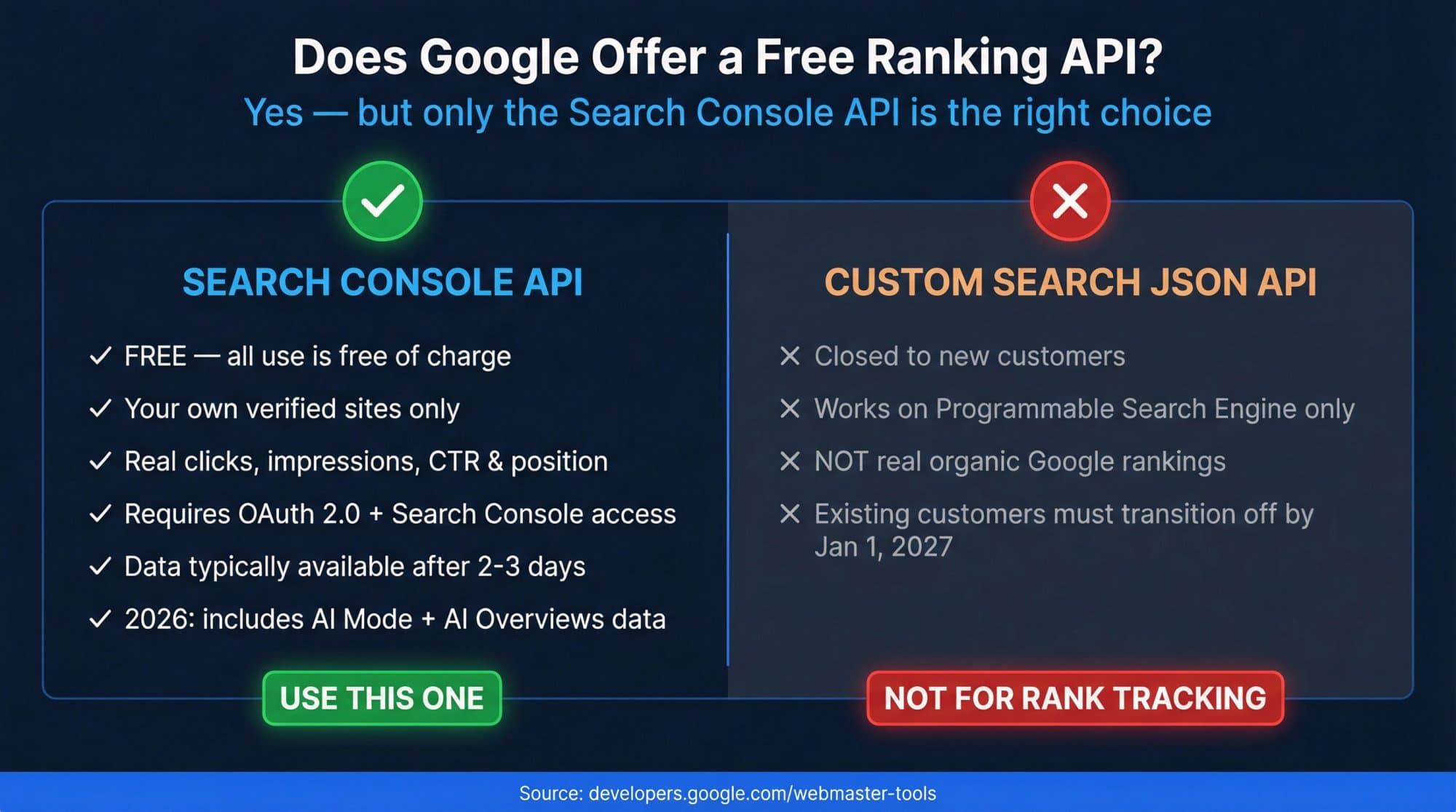
Google doesn't offer an API that returns public rankings for any website. The official way to check your keyword positions with a Google API is the Search Console API: its searchanalytics.query method returns clicks, impressions, CTR and average position for every query on sites you have access to, it's free, and it pages up to 25,000 rows per request and 50,000 rows per day per search type. For competitors or any other domain, you need a third-party SERP API such as DataForSEO (from $0.60 per 1,000 results pages) or SerpApi (250 free searches a month, then from $25 for 1,000), prices as of October 2026.
This guide gives you working Python and Google Sheets code for the free Google method, the limits that make exports look "wrong", the BigQuery option for big sites, and a cost calculator for third-party keyword ranking APIs.
Key takeaways
- The Search Console API is Google's only official keyword ranking API. It's free, needs OAuth and access to the property, and only covers sites you manage.
- Limits: up to 25,000 rows per request, about 50,000 rows per day per site per search type, 1,200 queries per minute per site. BigQuery bulk export has no daily row limit.
- Data is usually final after 2 to 3 days. Since April 2025 the API also returns up to 10 days of hourly data (HOUR dimension, HOURLY_ALL data state).
- The Custom Search JSON API is not a rank tracking API: it's closed to new customers and existing users must leave by January 1, 2027.
- For competitor rankings, a SERP API costs $0.0006 to $0.025 per results page as of October 2026. Tracking the top 100 takes ten pages per keyword.
Which "Google ranking API" do you actually need?
| You want | Use | Cost (October 2026) |
|---|---|---|
| Positions, clicks and impressions for your own site | Search Console API | Free (Google) |
| All your rows, no daily cap, for a large site | Search Console bulk export to BigQuery | BigQuery storage and queries; first 1 TiB of queries a month free |
| Positions for any domain, keyword, city or device | A SERP API (DataForSEO, SerpApi) | Pay per results page |
| A ready-made tracker you can query | Your rank tracker's API (Ahrefs, AccuRanker, AWR, SE Ranking, Nozzle) | Included in some plans, add-on in others |
The API people often find first, the Custom Search JSON API, searches a Programmable Search Engine you configure, not Google's normal organic results. Google says it "is closed to new customers" and that existing customers "have until January 1, 2027 to transition." Don't build a rank tracker on it.
If you're new to how Search Console measures position, read how to track Google rankings in Search Console first; this guide assumes you know the Performance report.
What the Search Console API returns (and what it doesn't)
The Search Analytics query reference defines everything you can ask for:
- Dimensions:
query,page,country,device,searchAppearance,dateandhour. - Metrics per row:
clicks,impressions,ctrandposition. - Search type (
type):web(default),image,video,news,discover,googleNews. - Filters:
equals,notEquals,contains,notContains,includingRegex,excludingRegex(RE2 syntax).equalsis case-sensitive for queries and pages. - Freshness (
dataState):final(default),all(includes fresh data) orhourly_all(when grouping by hour). - Paging:
rowLimitfrom 1 to 25,000 (default 1,000) and a zero-basedstartRow.
Position is the average position of your topmost result, the same number as the Performance report. AI Overviews and AI Mode are included in the web search type; Google doesn't break them out.
What it can't do: return data for sites you don't have access to, give city-level positions (country is the finest location), list queries you don't rank for, or show anonymized queries, which Google withholds for privacy (Google's post on data filtering and limits). For a quick manual check of a site you don't own, see how to check keyword rankings for any website.
Quotas and row limits
| Limit | Value | Source |
|---|---|---|
| Rows per request | 25,000 max (rowLimit) | Query reference |
| Rows exported per day | About 50,000 per site per search type, sorted by clicks | All your data guide |
| Queries per minute | 1,200 per site and 1,200 per user | Usage limits |
| Per Cloud project | 40,000 queries per minute, 30,000,000 per day | Usage limits |
| Date handling | startDate and endDate are read in Pacific Time | Query reference |
Google's own recommendation: query one day's worth of data each day, and expect data to be available after 2 to 3 days. Grouping by both page and query can drop some rows on big sites; group by query alone when you need complete totals.
Set up access in 10 minutes
- 1
Create a Google Cloud project
In the Google Cloud console, create a project (or reuse one) and enable the Google Search Console API under APIs & Services. - 2
Create OAuth credentials
Under APIs & Services → Credentials, create an OAuth client ID of type Desktop app, download the JSON and save it asclient_secret.json. Configure the consent screen and add yourself as a test user. - 3
Check your Search Console access
The Google account you sign in with needs access to the property. For servers and cron jobs, create a service account instead and add its email as a user in Search Console → Settings → Users and permissions. - 4
Find your property identifier
Domain properties look likesc-domain:example.com. URL-prefix properties use the full URL with a trailing slash, likehttps://www.example.com/.
Python: export your keyword positions to a CSV
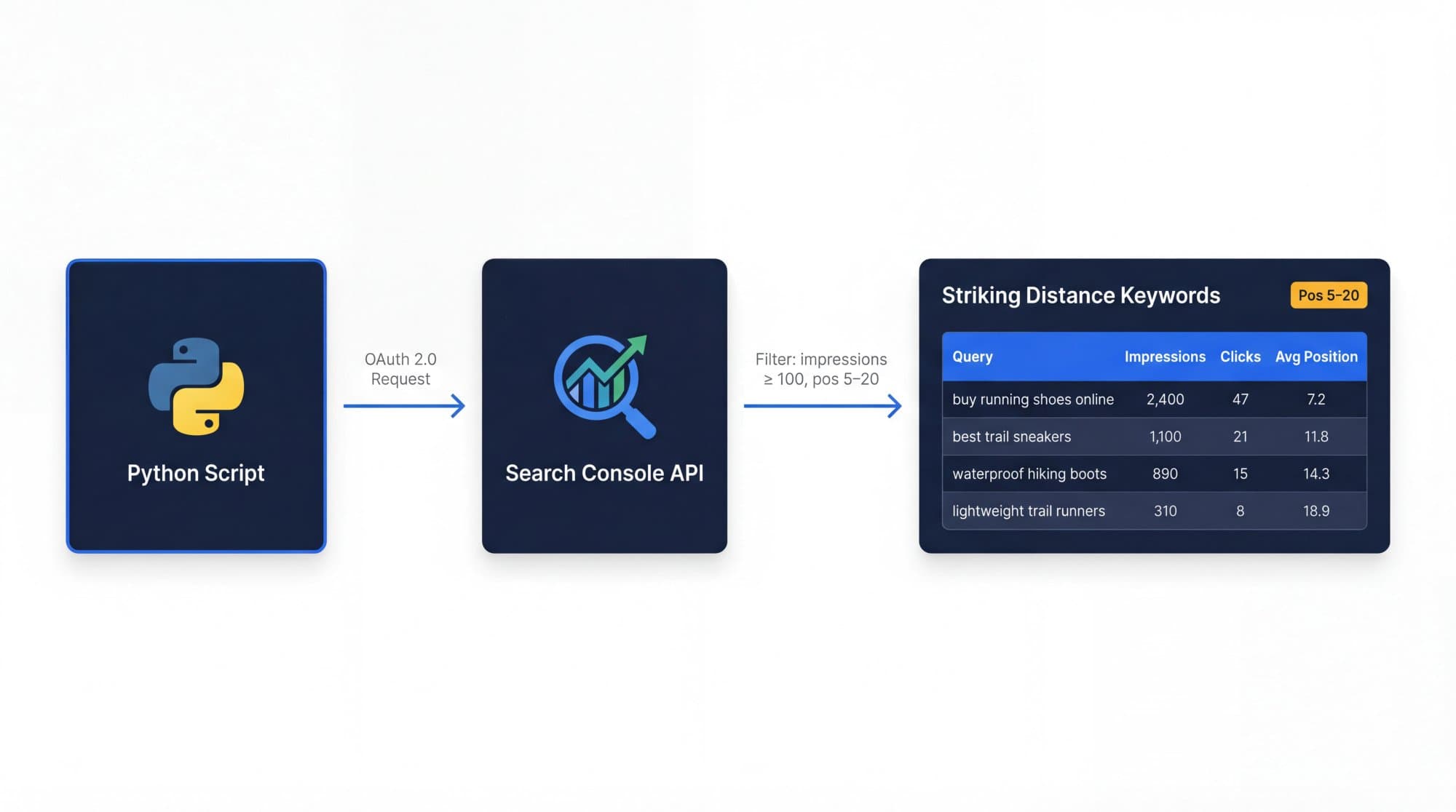
Install the two libraries, put client_secret.json next to the script, change SITE_URL, and run it. The first run opens a browser to authorize; after that it reuses token.json.
pip install google-api-python-client google-auth-oauthlib"""Export your Google keyword positions from the Search Console API to a CSV."""
import csv
import datetime as dt
import os
from google.auth.transport.requests import Request
from google.oauth2.credentials import Credentials
from google_auth_oauthlib.flow import InstalledAppFlow
from googleapiclient.discovery import build
SITE_URL = "sc-domain:example.com" # or "https://www.example.com/" for a URL-prefix property
SCOPES = ["https://www.googleapis.com/auth/webmasters.readonly"]
ROW_LIMIT = 25000 # the API maximum per request
def get_service():
"""Authorize once in the browser, then reuse token.json."""
creds = None
if os.path.exists("token.json"):
creds = Credentials.from_authorized_user_file("token.json", SCOPES)
if not creds or not creds.valid:
if creds and creds.expired and creds.refresh_token:
creds.refresh(Request())
else:
flow = InstalledAppFlow.from_client_secrets_file("client_secret.json", SCOPES)
creds = flow.run_local_server(port=0)
with open("token.json", "w") as token:
token.write(creds.to_json())
return build("searchconsole", "v1", credentials=creds)
def query_all(service, body):
"""Page through every row the API returns for one request."""
rows, start_row = [], 0
while True:
request = dict(body, rowLimit=ROW_LIMIT, startRow=start_row)
response = service.searchanalytics().query(siteUrl=SITE_URL, body=request).execute()
batch = response.get("rows", [])
rows.extend(batch)
if len(batch) < ROW_LIMIT:
return rows
start_row += ROW_LIMIT
def main():
service = get_service()
end = dt.date.today() - dt.timedelta(days=3) # data is usually final after 2-3 days
start = end - dt.timedelta(days=27) # a 28-day window
rows = query_all(service, {
"startDate": start.isoformat(),
"endDate": end.isoformat(),
"dimensions": ["query", "page"],
"type": "web",
})
with open("rankings.csv", "w", newline="", encoding="utf-8") as f:
writer = csv.writer(f)
writer.writerow(["query", "page", "clicks", "impressions", "ctr", "position"])
for row in rows:
writer.writerow([*row["keys"], row["clicks"], row["impressions"],
round(row["ctr"], 4), round(row["position"], 1)])
# Striking distance: real impressions, ranking between 5 and 20
striking = [r for r in rows if r["impressions"] >= 100 and 5 <= r["position"] <= 20]
striking.sort(key=lambda r: r["impressions"], reverse=True)
print(f"Saved {len(rows)} rows to rankings.csv. Top striking-distance keywords:")
for r in striking[:20]:
query, page = r["keys"]
print(f"{r['position']:5.1f} {r['impressions']:>8,.0f} impressions {query} -> {page}")
if __name__ == "__main__":
main()What it does: pulls the last 28 finalized days grouped by query and page, writes every row to rankings.csv, and prints the 20 biggest striking-distance keywords (100+ impressions, positions 5 to 20), with the page that ranks. Change dimensions to ["date", "query"] to get a daily history instead, or add "dimensionFilterGroups" (below) to follow specific keywords.
Google Sheets + Apps Script: a free daily rank log
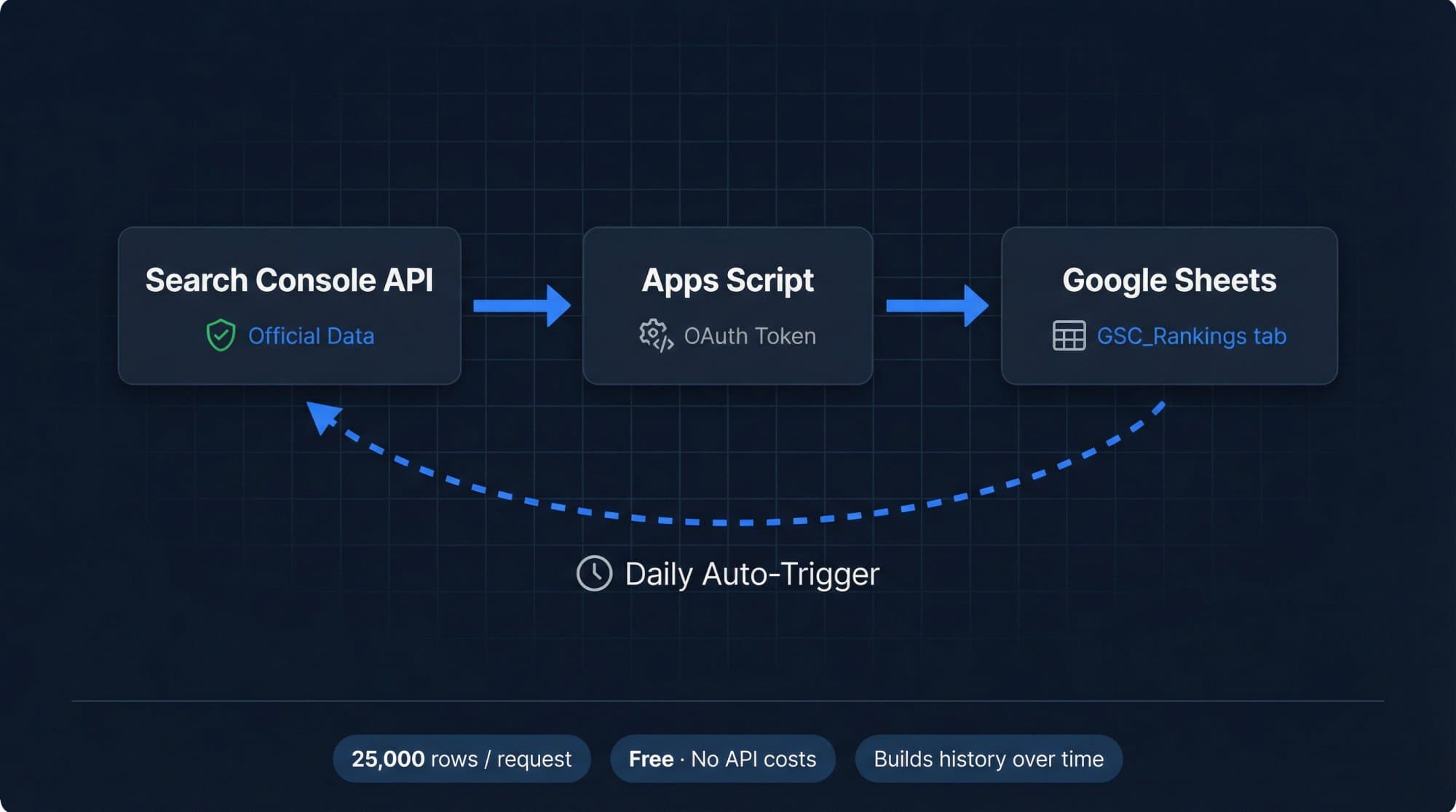
If you'd rather not run Python, this script appends one day of query positions to a sheet every day. Over a few months it becomes a free rank history with no 16-month cutoff.
// Logs one day of Search Console keyword positions to a "GSC_Rankings" sheet.
// Run once to authorize, then add a daily time-driven trigger.
function logDailyKeywordRankings() {
  const SITE_URL = 'sc-domain:example.com'; // or 'https://www.example.com/'
  const ROW_LIMIT = 25000;

  // The API reads dates in Pacific Time, and data is usually final after 2-3 days.
  const day = new Date();
  day.setDate(day.getDate() - 3);
  const date = Utilities.formatDate(day, 'America/Los_Angeles', 'yyyy-MM-dd');

  const ss = SpreadsheetApp.getActiveSpreadsheet();
  const sheet = ss.getSheetByName('GSC_Rankings') || ss.insertSheet('GSC_Rankings');
  if (sheet.getLastRow() === 0) {
    sheet.appendRow(['date', 'query', 'clicks', 'impressions', 'ctr', 'position']);
  }

  const url = 'https://www.googleapis.com/webmasters/v3/sites/' +
    encodeURIComponent(SITE_URL) + '/searchAnalytics/query';

  for (let startRow = 0; startRow < 50000; startRow += ROW_LIMIT) {
    const response = UrlFetchApp.fetch(url, {
      method: 'post',
      contentType: 'application/json',
      headers: { Authorization: 'Bearer ' + ScriptApp.getOAuthToken() },
      payload: JSON.stringify({
        startDate: date,
        endDate: date,
        dimensions: ['query'],
        type: 'web',
        rowLimit: ROW_LIMIT,
        startRow: startRow
      }),
      muteHttpExceptions: true
    });
    if (response.getResponseCode() !== 200) throw new Error(response.getContentText());

    const rows = JSON.parse(response.getContentText()).rows || [];
    if (!rows.length) break;

    const values = rows.map(function (r) {
      return [date, r.keys[0], r.clicks, r.impressions, r.ctr, r.position];
    });
    sheet.getRange(sheet.getLastRow() + 1, 1, values.length, values[0].length).setValues(values);
    if (rows.length < ROW_LIMIT) break;
  }
}
Add these scopes to appsscript.json (Project Settings → Show "appsscript.json" manifest file in editor):
{
  "oauthScopes": [
    "https://www.googleapis.com/auth/spreadsheets",
    "https://www.googleapis.com/auth/script.external_request",
    "https://www.googleapis.com/auth/webmasters.readonly"
  ]
}
Setup: create a Google Sheet, open Extensions → Apps Script, paste the code, set SITE_URL, run it once and authorize, then add a daily time-driven trigger under Triggers. If the run fails with a 403 saying the API "has not been used in project", link the script to a standard Google Cloud project (Project Settings → Google Cloud Platform project) and enable the Google Search Console API there. Don't run it twice for the same day, or that day's rows will be duplicated.
Track one keyword over time
To graph a single keyword, filter on query and group by date:
{
  "startDate": "2026-09-01",
  "endDate": "2026-10-15",
  "dimensions": ["date"],
  "type": "web",
  "dimensionFilterGroups": [{
    "filters": [{
      "dimension": "query",
      "operator": "equals",
      "expression": "keyword rank checker"
    }]
  }]
}
Use includingRegex with an expression like rank (checker|tracker) to follow a family of keywords together, which is more stable than one exact phrase.
Hourly data for things you published today
Since April 2025 the API returns hourly data for up to 10 days, wider than the 24-hour view in the Search Console interface (Google's announcement). Group by hour and set "dataState": "hourly_all"; Google flags that hourly data may be partial. It's useful for checking whether a new page started getting impressions, or comparing today with the same weekday last week. It's not useful for daily rank tracking, where finalized data is what you want.
BigQuery bulk export for large sites
If your site hits the 50,000-row daily ceiling, set up the Search Console bulk data export to BigQuery. It sends a daily dump of all performance data except anonymized queries, and isn't affected by the daily row limit (Google). It's billed as normal BigQuery usage: the first 1 TiB of query processing each month is free, then on-demand queries cost $6.25 per TiB (BigQuery pricing). Storage has its own small charges, so set a partition expiration.
This query finds striking-distance keywords for the last 28 days. Note Google's quirks: anonymized queries are stored as an empty string, and sum_top_position is zero-based, hence the + 1.0 (Google's sample queries).
SELECT
  query,
  SUM(impressions) AS impressions,
  SUM(clicks) AS clicks,
  SAFE_DIVIDE(SUM(clicks), SUM(impressions)) AS ctr,
  SUM(sum_top_position) / SUM(impressions) + 1.0 AS avg_position
FROM `your_project.searchconsole.searchdata_site_impression`
WHERE data_date BETWEEN DATE_SUB(CURRENT_DATE(), INTERVAL 28 DAY) AND CURRENT_DATE()
  AND search_type = 'WEB'
  AND query != ''
GROUP BY query
HAVING impressions >= 100 AND avg_position BETWEEN 5 AND 20
ORDER BY impressions DESC;Third-party keyword ranking APIs (for competitors and any location)
When you need positions for domains you don't own, a specific city, or the full results page, you need data from a SERP API or a rank tracker's API. Prices from each vendor's pricing page in October 2026:
| API | What you get | Price |
|---|---|---|
| DataForSEO Google Organic SERP API | One Google results page (10 results) for any keyword, location, language and device | $0.0006 per page (standard queue, about 5 minutes), $0.0012 priority, $0.002 live. $50 minimum top-up, $1 free trial credit |
| SerpApi | Google results as JSON, one search per request | 250 free searches a month; $25/mo for 1,000; $75/mo for 5,000; $150/mo for 15,000 |
| Ahrefs API | Ahrefs data through its API and MCP server | API and MCP credits included on paid plans (Lite from $129/mo) |
| AccuRanker API | Your tracked keywords and SERP data | Unlimited read API on Expert ($764/mo) |
| Advanced Web Ranking API | Your tracked rankings | Agency plan ($279/mo) and up |
| SE Ranking API | Projects and research data | Add-on, $45/mo, annual billing only |
| Nozzle | Full SERPs (top 5 pages) plus BigQuery export | Included on every plan; pricing by SERPs per month |
The cost driver is depth. Since Google stopped supporting &num=100 in September 2025, one request returns one page of about 10 results, so tracking the top 100 takes ten requests per keyword. DataForSEO bills each extra 10 results as another base price. Estimate your monthly bill:
Interactive calculator
What would a keyword ranking API cost you?
Estimated cost per month
$18
- Result pages per month
- 30K
- Cost per tracked keyword per month
- $0.036
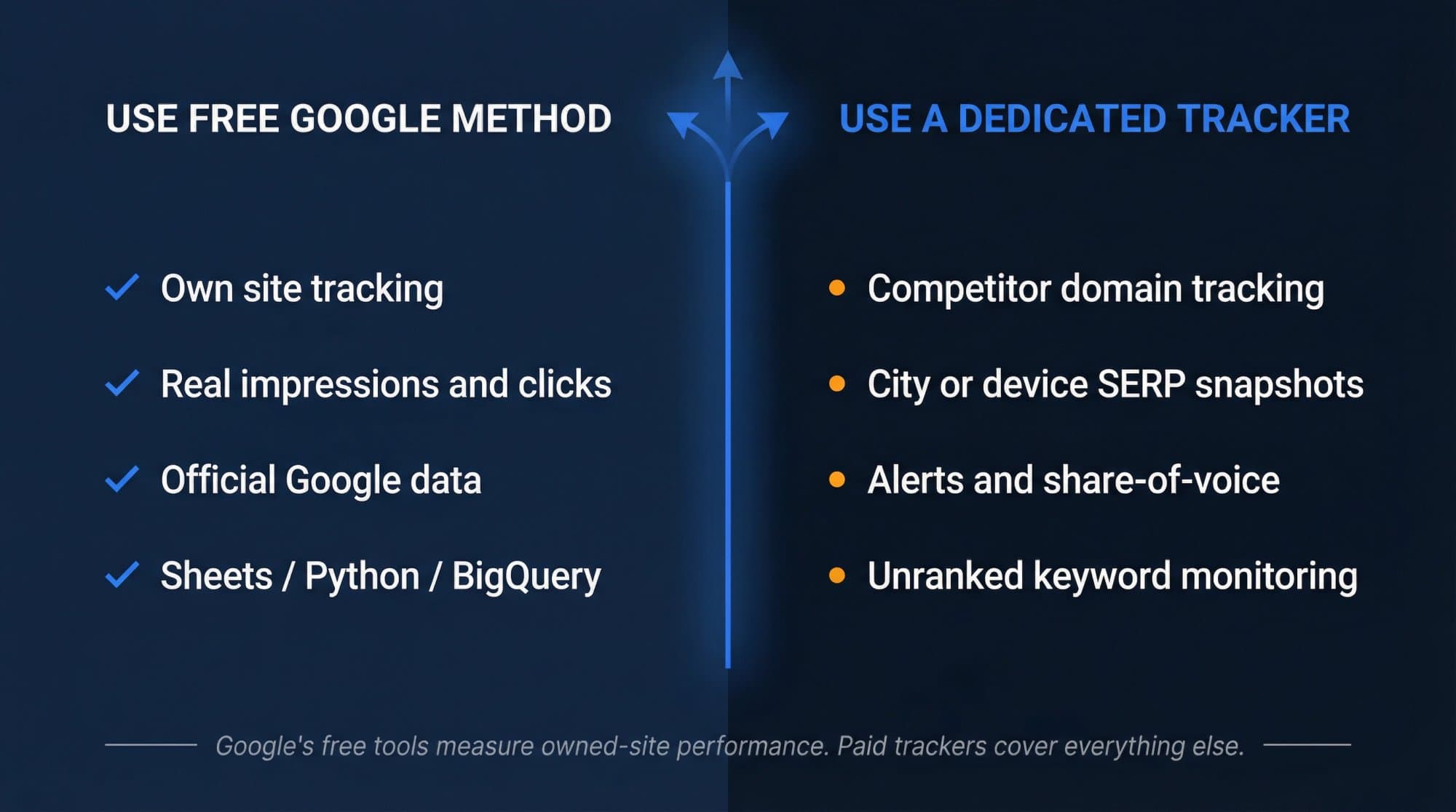
If you'd rather not build anything, a rank tracker wraps the same data in a dashboard. Our comparison of the best keyword rank checker tools lists 13 with prices.
Why your API numbers don't match the UI
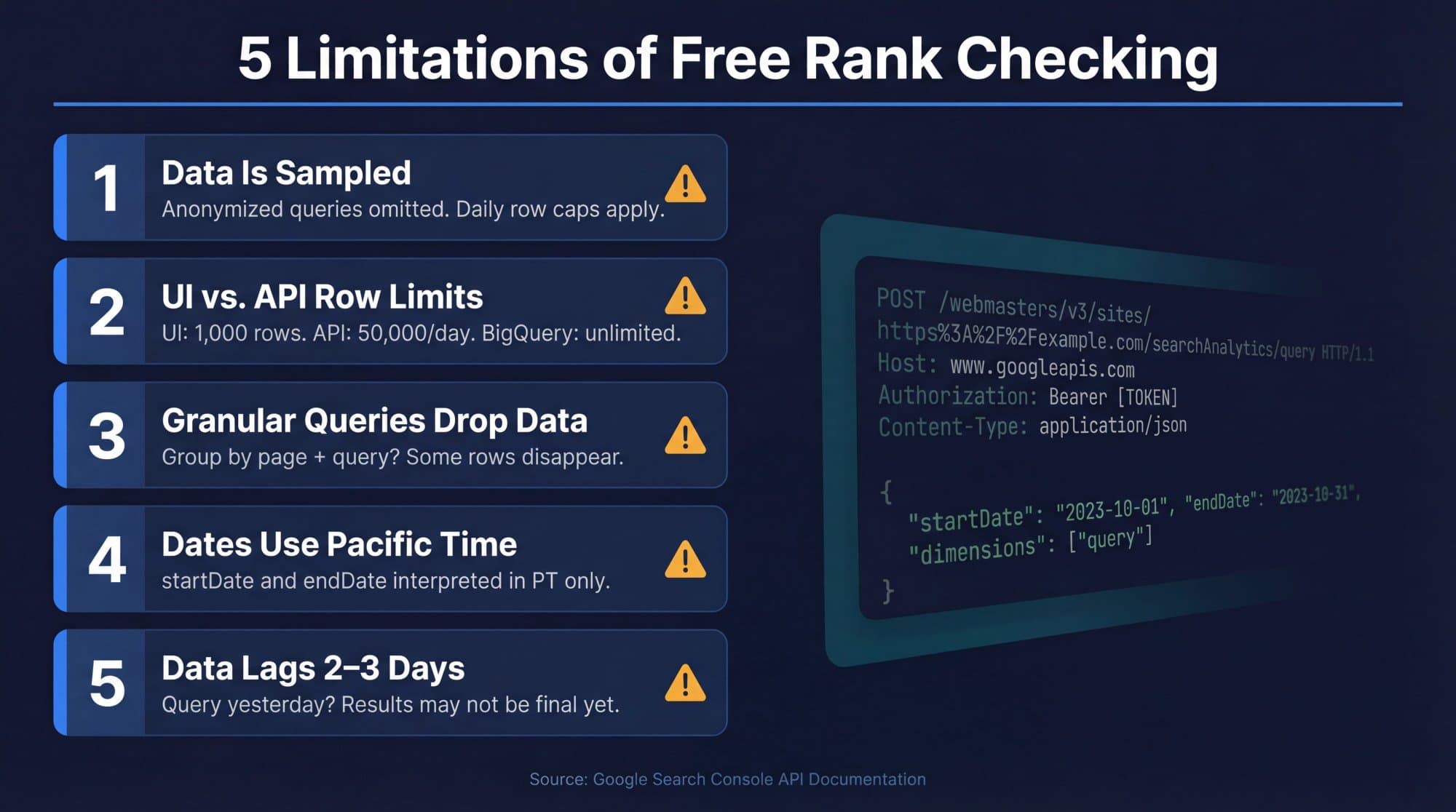
- Row sums are lower than chart totals. Anonymized queries are counted in totals but never returned as rows.
- Page + query exports lose rows. Google warns that grouping by page and/or query can drop data; group by query alone for complete totals.
- "Yesterday" changes. Data is usually final after 2 to 3 days. Pull with
dataState: final(the default) for reporting. - Dates are off by one. The API works in Pacific Time; schedule and label your pulls accordingly.
- Average position jumped in September 2025. Google stopped supporting
&num=100on September 10–13, 2025. In Outrank's zero-click study of 1,503 sites, median impressions fell 33% within days and average position moved from 29 to 13 with no real ranking change. Compare clicks across that date.
Turn the export into actions
The API's real value is the striking-distance list: queries with real impressions at positions 5 to 20, where Google already considers the page relevant. Work it in this order: rewrite titles where CTR lags (how to improve click-through rate), expand the page that already ranks, add internal links to it, and only then write a new page. Put the trend in a monthly keyword ranking report so you can see what moved.
If the list keeps growing faster than you can write, that's the gap Outrank fills: it connects to Search Console, flags underperforming articles so you can schedule rewrites, and publishes a new SEO article to your CMS every day.
FAQ
Is there a Google API for keyword rankings?
Yes, for your own sites: the Search Console API (searchanalytics.query) returns average position, clicks, impressions and CTR per query for properties you can access. Google has no API for public rankings of other websites; for that you need a third-party SERP API like DataForSEO or SerpApi.
Is the Google Search Console API free?
Yes. Google states that all use of the Search Console API is free of charge, subject to usage limits: 1,200 queries per minute per site and per user, and 40,000 per minute or 30 million per day per Cloud project. The BigQuery bulk export is billed as normal BigQuery usage, with the first 1 TiB of queries each month free.
How many keywords can I export with the Search Console API?
Up to 25,000 rows per request, and about 50,000 rows per day per site per search type, sorted by clicks. The Search Console interface shows only 1,000 rows. For more than that on a large site, use the bulk export to BigQuery, which isn't affected by the daily row limit.
Can I check competitor rankings with the Google API?
No. The Search Console API only returns data for properties you have permission to access. To track competitors, use a SERP API (DataForSEO from $0.60 per 1,000 result pages, SerpApi from $25 a month for 1,000 searches as of October 2026) or a rank tracker such as SE Ranking or AccuRanker.
How fresh is Search Console API ranking data?
Finalized data is usually available after 2 to 3 days. Setting dataState to all includes fresher, possibly incomplete data, and hourly_all with the hour dimension returns up to 10 days of hourly data, which Google marks as potentially partial.
What happened to the Custom Search JSON API?
It searches a Programmable Search Engine, not Google's organic results, so it was never a reliable rank checker. Google has closed it to new customers, and existing customers have until January 1, 2027 to move to an alternative.