Organic search traffic is visits from unpaid search engine results: in GA4, any session whose source is a known search engine or whose medium is "organic". Direct traffic is every session that arrives with no referrer and no campaign tags: source "(direct)", medium "(none)" or "(not set)". Organic search measures how people find you through search. Direct is a catch-all, and it is almost always inflated, because untagged emails, chat apps, documents, in-app browsers and some AI apps all strip the referrer.
The practical upshot: some of your SEO results are probably sitting in Direct. This guide shows the exact GA4 rules, the seven most common reasons Direct is too big, how to find the organic visits hiding in it, and a checklist to shrink it.
Key takeaways
- In GA4, Direct means the browser sent no referrer and the link had no UTM tags. It does not mean the visitor typed your URL.
- In a 2014 experiment, Groupon removed its site from Google for about six hours and found up to 60% of its "direct" visits to long URLs were really organic search.
- GA4's session attribution ignores Direct when it knows an earlier source for the same user, so Direct mostly holds new or untraceable visitors.
- A Direct entrance on a deep blog URL is rarely typed. Read it as hidden search, social, email or chat traffic.
- Tagging every email, social post, QR code and document link with UTMs is the single biggest fix.
Organic search vs direct: the definitions side by side
| Organic Search | Direct | |
|---|---|---|
| GA4 rule | Source is on Google's list of search engines, or medium is exactly "organic" | Source is exactly "(direct)" and medium is "(none)" or "(not set)" |
| What it really includes | Clicks on unpaid results in Google, Bing, DuckDuckGo, Yahoo and other listed engines | Typed URLs and bookmarks, plus every visit whose referrer was lost |
| Typical landing pages | Blog posts, guides, category and product pages | Home page (real direct), but also deep URLs (leaked traffic) |
| Visitor intent | Has a question or need, often doesn't know you yet | Usually knows you already, or clicked a link somewhere untracked |
| Where to analyze deeper | Google Search Console (queries, impressions, CTR, position) | Nowhere: there's no data on where it came from |
| What grows it | Pages that rank, links, technical SEO | Brand awareness, email lists, repeat customers |
The rules come from Google's default channel group documentation. The key word in the Direct rule is "exactly": GA4 only files a session under Direct when it has nothing else to go on. Our guide to website traffic sources lists every other channel and its rule.
How GA4 decides between organic and direct
GA4 reads the referrer (the page the visitor clicked from) and any UTM tags in the URL. If the referrer is google.com, the session is Organic Search. If there's no referrer and no tag, it's Direct.
Two details change how you should read the numbers:
- Direct doesn't overwrite a known source. Google's scopes documentation says session and user traffic-source dimensions use the "paid and organic channels last click" model, and its example shows sessions that start with a direct entrance taking the user's earlier campaign values. In plain terms: a returning visitor who first came from Google and later types your URL can still be credited to Organic Search.
- Key events ignore Direct too. The same model "ignores direct traffic" when it assigns credit for conversions, unless the path is entirely direct, per Google's attribution help.
So the sessions left in Direct are mostly visitors GA4 can't link to any earlier source: new visitors whose referrer was lost, people who cleared cookies or declined consent, and real first-time typed visits.
Seven reasons direct traffic is inflated
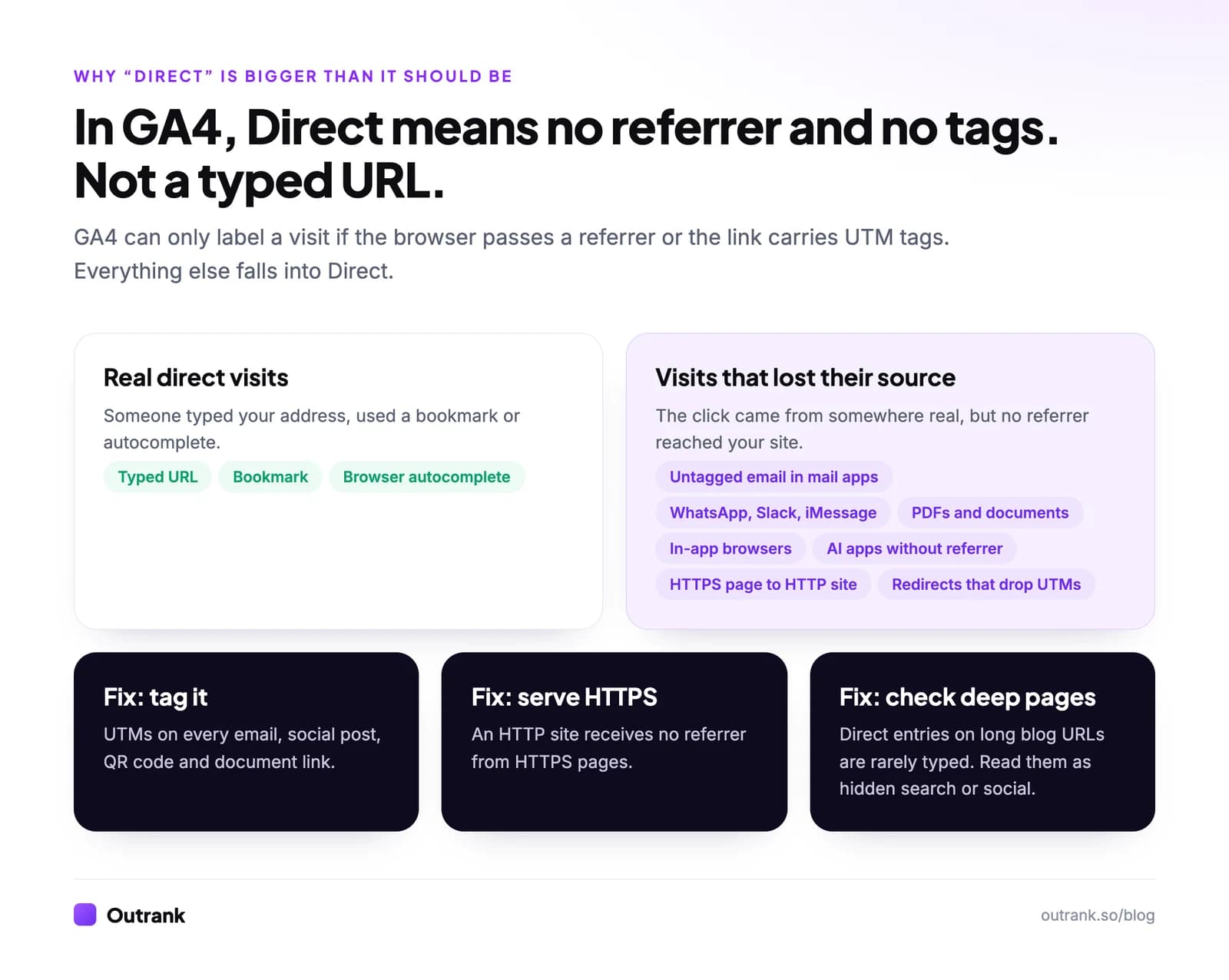
- Untagged email. Desktop and mobile mail apps usually open links with no referrer, so every newsletter click without UTM tags counts as Direct.
- Chat and messaging apps. Links shared in WhatsApp, Slack, Teams, iMessage or Discord ("dark social") rarely pass a referrer.
- Documents and offline. Links in PDFs, slide decks, Word files, QR codes and printed material carry no referrer at all.
- HTTPS pages linking to an HTTP site. Browsers' default policy,
strict-origin-when-cross-origin, sends no referrer when a visitor moves from a secure page to an insecure one, per MDN. Sites that setReferrer-Policy: no-referreralso send nothing. - In-app browsers and search apps. Some apps open links in their own browser without passing where the click came from. This is how search traffic leaks into Direct: Groupon's 2014 test found the effect was strongest on interior pages with long URLs, which nobody types, and BrightEdge's write-up reports that about 6 direct visitors disappeared for every 10 search visitors lost.
- AI assistants without a referrer. GA4 now has an AI Assistant channel, but visits from app webviews and copy-pasted links still arrive as Direct, as Search Engine Journal noted. Microsoft's Clarity docs say the same of its AI channel: if the source is hidden, the traffic might appear as Direct.
- Redirects and tracking gaps. Link shorteners, JavaScript redirects and server redirects that drop the query string strip UTMs along the way. Landing pages without the GA4 tag, or a consent banner that delays it, can lose the original source too.
A fair caveat on the Groupon number: it is from 2014, when browsers and apps handled referrers differently. The mechanism still exists; the size on your site will differ. Measure it rather than assume it.
How to find organic traffic hiding in direct
Three checks, each takes a few minutes in GA4 and Search Console.
- 1
Build a landing page × channel table
In GA4, go to Explore → Free form. Add Landing page + query string as rows, Session default channel group as columns and Sessions as values. Filter the channel to Direct and Organic Search. Sort Direct by sessions. - 2
Flag deep pages with lots of direct entrances
Your home page, login page and short brand URLs are where real direct traffic lands. If long blog URLs like /blog/how-to-fix-a-leaking-tap get hundreds of direct entrances, those visitors almost certainly clicked a link or search result that GA4 couldn't see. - 3
Check whether direct and organic move together
Open the same deep page in Search Console (Performance → Search results → Pages) and compare its daily clicks with its daily direct sessions in GA4. If they rise and fall together, the direct sessions are mostly search. - 4
Compare GA4's Google organic with Search Console clicks
In Reports → Acquisition → Traffic acquisition, switch the dimension to Session source / medium and note sessions for google / organic. Compare with total clicks in Search Console for the same dates, using the calculator below.
Interactive calculator
How much Google traffic is GA4 missing?
Google clicks with no google / organic session
2,200
- Share of Google clicks GA4 recorded as organic
- 78%
If the gap is large and your Direct channel is large on deep pages, the most useful conclusion is not a number but a reporting rule: report SEO results from Search Console clicks, and use GA4's Organic Search for engagement and conversions, not for volume.
How to shrink direct traffic
Most of the fix is tagging. The rest is plumbing.
Interactive checklist
Direct traffic cleanup checklist
0/11
Tag what you control
0/4Fix the plumbing
0/4Read Direct correctly
0/3Your progress is saved in this browser, so you can come back to it later.
Is direct or organic traffic better?
Neither is better; they measure different things. Organic search is the best signal of whether people can find you for problems they're searching for. Real direct traffic (typed URLs and bookmarks, mostly landing on the home page) is a decent signal of brand demand.
The useful comparison is how they move together:
- Organic up, direct flat: search is bringing in new people who haven't come back yet. Give them a reason to (email capture, tools worth bookmarking).
- Direct up on deep pages, organic flat or down: suspect leakage before celebrating. Run the landing page check above.
- Both down: look at demand first (Google Trends), then rankings. Our website traffic analysis method walks through it step by step.
- Direct to the home page up after a campaign or press mention: that is the brand effect showing up. Branded searches in Search Console usually rise at the same time.
Does direct traffic help SEO?
Not directly. Google has never said it uses visits from typed URLs as a ranking signal. What matters is brand demand: when more people know your name, more of them search for it, and branded queries show up in Search Console as organic clicks.
For SEO reporting, that means two things. Count branded and non-branded organic clicks separately in Search Console (filter queries containing your brand name), and don't let a growing Direct channel hide a shrinking non-branded organic one. For a full view of your own numbers, see how to check website traffic; to set up tracking that loses less data in the first place, see how to track website visitors.
Growing the organic side
The organic channel is the one you can grow on purpose: more pages that rank for the questions your buyers search, and links that help them rank. Our guide on how to increase website traffic organically covers the manual playbook. Outrank automates that: it researches keywords your site can win, publishes an SEO article to your CMS every day, and builds backlinks through its exchange. On our results page, measured in Search Console rather than GA4, the median site reached 2.04× its pre-Outrank Google clicks after 7 months.
FAQ
What is the difference between organic search and direct traffic?
Organic search traffic comes from clicks on unpaid search engine results, such as Google or Bing. Direct traffic is any visit where Google Analytics received no referrer and no campaign tags, recorded as source "(direct)" and medium "(none)". Organic search is attributed to a specific search engine and can be analyzed by query in Search Console, while direct traffic has no known origin.
Why is my direct traffic so high?
Direct traffic is usually inflated by visits that lost their referrer: untagged email links opened in mail apps, links shared in WhatsApp, Slack or iMessage, links in PDFs and QR codes, in-app browsers, AI apps that pass no referrer, and HTTPS pages linking to an HTTP site. If many direct visits land on deep blog URLs, they are mostly unattributed search, social or email traffic rather than typed visits.
Is direct traffic good or bad?
Direct traffic isn't good or bad on its own. Direct visits to your home page are a reasonable sign of brand awareness and returning visitors, but a large share of Direct on deep pages means your tracking is losing the real source. Tag your links with UTMs so more visits land in the channel that actually sent them.
Does Google Analytics count organic traffic as direct?
Sometimes. When a search click reaches your site without a referrer, for example from some apps or in-app browsers, GA4 records it as Direct. A 2014 Groupon experiment found up to 60% of direct visits to long URLs were really organic search. GA4 does credit a returning visitor's direct session to their earlier known source, which reduces but doesn't remove the problem.
Why does GA4 show less organic traffic than Search Console?
Search Console counts clicks on Google results, while GA4 counts sessions only for visitors whose browser ran the GA4 tag and passed a referrer. Visitors who decline analytics cookies, block scripts, leave before the page loads, or arrive without a referrer are missing from GA4's Organic Search. Use Search Console for SEO volume and GA4 for engagement and conversions.
How do I reduce direct traffic in GA4?
Add UTM tags to every link you control: emails, social posts, bios, QR codes, documents and partner links. Serve your site over HTTPS, make sure redirects keep query strings, and confirm the GA4 tag loads on every landing page. Configure cross-domain measurement and unwanted referrals so checkout domains don't reset the source.