



Competitor website analysis is the process of studying a rival's site to learn where its traffic comes from, which pages and keywords earn that traffic, who links to it, and how it turns visitors into customers. You can do a solid first pass for free: look the domain up in a traffic checker such as Similarweb or a free Semrush account, pull its top pages and keyword gaps, check its backlinks, then click through the site the way a buyer would.
This guide covers the whole method: what to look at, how far to trust traffic estimates, a side-by-side comparison sheet, the free and paid tools worth using (prices checked in October 2026), and a checklist template you can run for each competitor.
Key takeaways
- Analyze 3 to 5 competitors picked from the search results for your most valuable keywords, not only the companies you lose deals to.
- Third-party traffic numbers are estimates. In Ahrefs' own test against Search Console data, its estimates deviated by a median of 49.5%, so compare competitors with each other in one tool, never with your own analytics.
- The three outputs that matter most are a competitor's top pages, the keywords they rank for that you don't, and the pages that earn their backlinks.
- You can run the whole analysis for free with Google, Similarweb's free lookup, Semrush's 10 free reports a day and Screaming Frog (up to 500 URLs). Entry-level paid plans run from $29 a month (Ahrefs Starter) to $139 (Semrush SEO).
- End with a 30/60/90-day plan. An analysis that ends as a spreadsheet changes nothing.
What is competitor website analysis?
Competitor website analysis is a structured review of a competing site's traffic, content, keywords, backlinks, technical setup and conversion path, done to decide what your own site should build next.
Two ideas make it useful instead of a research hobby.
Your search competitors are not always your business competitors. For "how to choose a CRM", you might be up against a review site, a Reddit thread and a software directory, none of which sell CRM software. They still take the clicks you want, so they belong in the analysis.
You are reading decisions, not pages. A competitor's navigation shows how they segment demand. Their pricing page shows how they frame value. A folder full of /vs/ pages tells you which rivals they worry about. Every page type is a bet they made, and the analysis tells you which bets paid off.
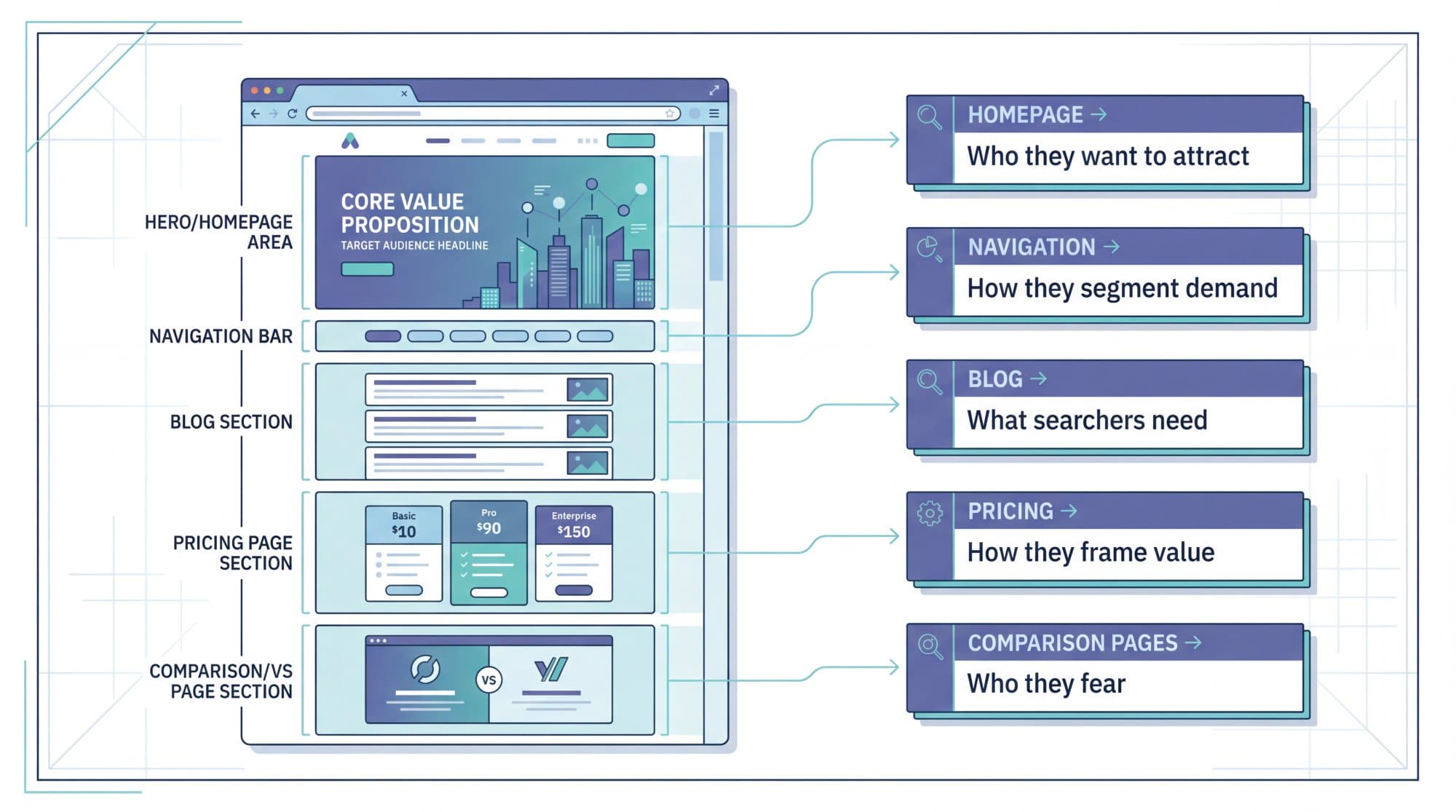
If you only care about search rankings, our 7-step SEO competitor analysis process narrows this down to rankings, keyword gaps and links.
What to analyze on a competitor's website
Eight areas cover almost everything worth knowing. You rarely need all eight for every competitor, so pick the ones tied to the decision you're trying to make.
| Area | What to look at | What it tells you |
|---|---|---|
| Traffic and channels | Estimated monthly visits, 12-month trend, share from search, direct, referral, paid and social | How big they are and which channel they depend on |
| Top pages | The 10 to 20 URLs that earn most of their organic traffic | Which topics and page types actually pay off |
| Keywords | Keywords they rank for in the top 10 that you don't | Your content gaps, sorted by demand |
| Site structure | Folders, page templates, hub pages, internal links | Whether they win with a page type you don't have (tools, /vs/ pages, glossary, templates) |
| Backlinks | Referring domains, the pages that attract links, the kind of sites linking | Why Google trusts them, and which assets you'd need to match it |
| Technical health | Core Web Vitals, indexation, JavaScript rendering, structured data | Whether their edge comes from content or from delivery |
| Conversion path | CTAs, pricing transparency, proof, lead magnets, demo vs free trial | How they turn visits into revenue |
| AI visibility | Which of their pages get cited by ChatGPT, Perplexity and Google AI Overviews | Who the answer engines trust in your topic |
How to check a competitor's website traffic (and how much to trust it)
You can't see a competitor's Google Analytics or Search Console. Every traffic number you find for their site is a model built from clickstream panels, ranking data and click-through-rate curves. That's fine, as long as you use it the right way.
Free ways to check a competitor's traffic:
- Similarweb's free lookup at similarweb.com/website gives a high-level estimate of total visits and channel mix (search, direct, referral, social, paid). Similarweb itself calls its free data "a high-level sample" of the paid product.
- A free Semrush account includes 10 reports a day across its main tools, enough for a Domain Overview of a few competitors.
- Outrank's free SEO competitor analysis tool puts their domain next to yours and shows the traffic and authority gap, keyword gaps and suggested content briefs, with no login.
Paid options go further. Semrush's Traffic & Market Toolkit ($289 a month as of October 2026, sold separately from its SEO plans) breaks traffic down by channel and lists a competitor's most visited pages. Similarweb's paid plans add the deeper drill-downs its free lookup leaves out. For organic search alone, Ahrefs Site Explorer and Semrush's Organic Rankings report estimate search traffic per page and per keyword.
How accurate are those estimates? Less accurate than the tidy numbers suggest:
- Ahrefs compared its organic traffic estimates with Google Search Console data for 1,635 websites and found a median deviation of 49.52% for Ahrefs and 68.36% for Semrush. Ahrefs ran the study on its own product, so treat it as a ballpark.
- SparkToro compared four providers with real Google Analytics data from 641 sites. The estimates tracked real traffic reasonably well overall, but errors of plus or minus 100% or more were common for individual sites.
How closely traffic estimates tracked real Google Analytics data
Semrush
0.79
Datos
0.72
Similarweb
0.66
Ahrefs (organic only)
0.50
The practical rule: use one tool for every site you compare, read trends and ratios rather than absolute visits, and never compare a competitor's estimate with your own Google Analytics figure. Look your own site up in the same tool to get a like-for-like baseline. Our review of how accurate Semrush is shows where its estimates tend to drift.
How to analyze a competitor website in 7 steps
1. Pick the right 3 to 5 competitors
Search your 10 most valuable keywords in a private window and write down every domain that appears on page one more than once. Add the direct rivals your sales team names. You want a mix of four types.
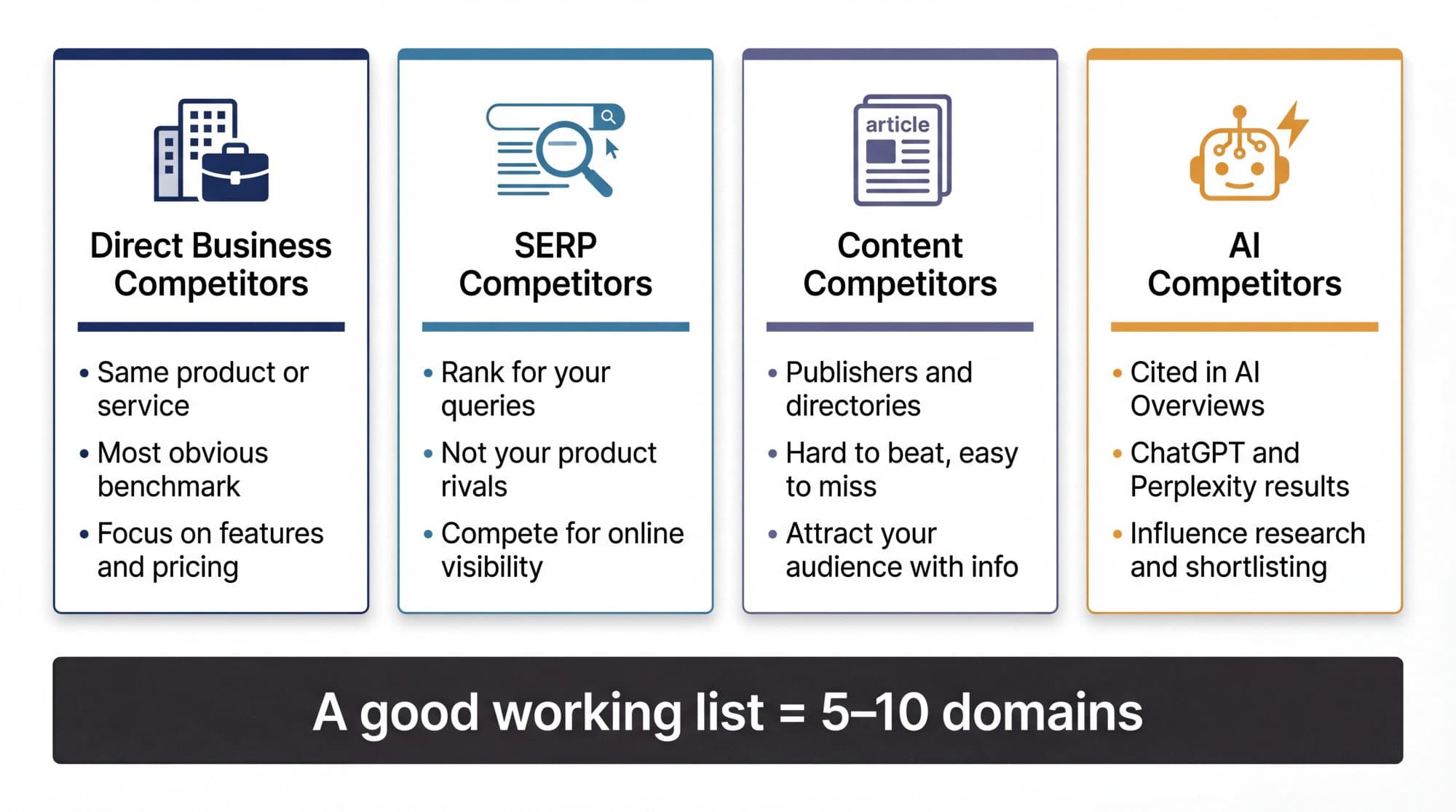
Drop giants you can't learn from (Wikipedia, Amazon, national news sites) unless they own a whole category of your keywords. For a second opinion, the free SEO Competitor Finder in Outrank's SEO tools lists the sites that compete with a domain on Google.
2. Benchmark size, authority and trend
For each site, record estimated organic traffic and its 12-month trend, Domain Rating or Authority Score, referring domains, and the number of keywords ranking in the top 10. A smaller competitor whose traffic doubled last year is a bigger threat than a large one that has been flat for two years. If the authority scores confuse you, read Domain Rating vs Domain Authority.
3. Find the pages that earn their traffic
Open a top pages report (Ahrefs Site Explorer → Top pages, Semrush's Organic Rankings report, or SE Ranking's Competitive Research) and sort by estimated traffic. For each of the top 10 to 20 pages, note the topic, the page type (guide, tool, comparison, category page, template), the depth and the last update date. Outrank's free content analyzer shows a competitor's top pages and topic clusters without an account.
Patterns show up fast. If six of a competitor's top ten pages are free calculators, they win with tools, and another blog post won't close that gap. In Outrank's study of 6.2 million pages, free tools and calculators earned 2.11 times the click-through rate of the same site's articles at positions 4 to 10.
4. Run a keyword gap
A keyword gap compares your domain with a few competitors and lists the keywords they rank for that you don't ("missing") or where they outrank you ("weak"). Semrush Keyword Gap, Ahrefs Content Gap and SE Ranking's Competitor Comparison all do this. Filter to competitor positions 1 to 10, remove branded terms, then sort by volume and check each keyword's difficulty before you commit to it. The full method is in our competitor keyword analysis guide, and our keyword gap analysis post covers the filters.
5. Map the site structure
Crawl the site with Screaming Frog (free up to 500 URLs) or read its XML sitemap, usually at /sitemap.xml, to see which page types exist and how many of each.
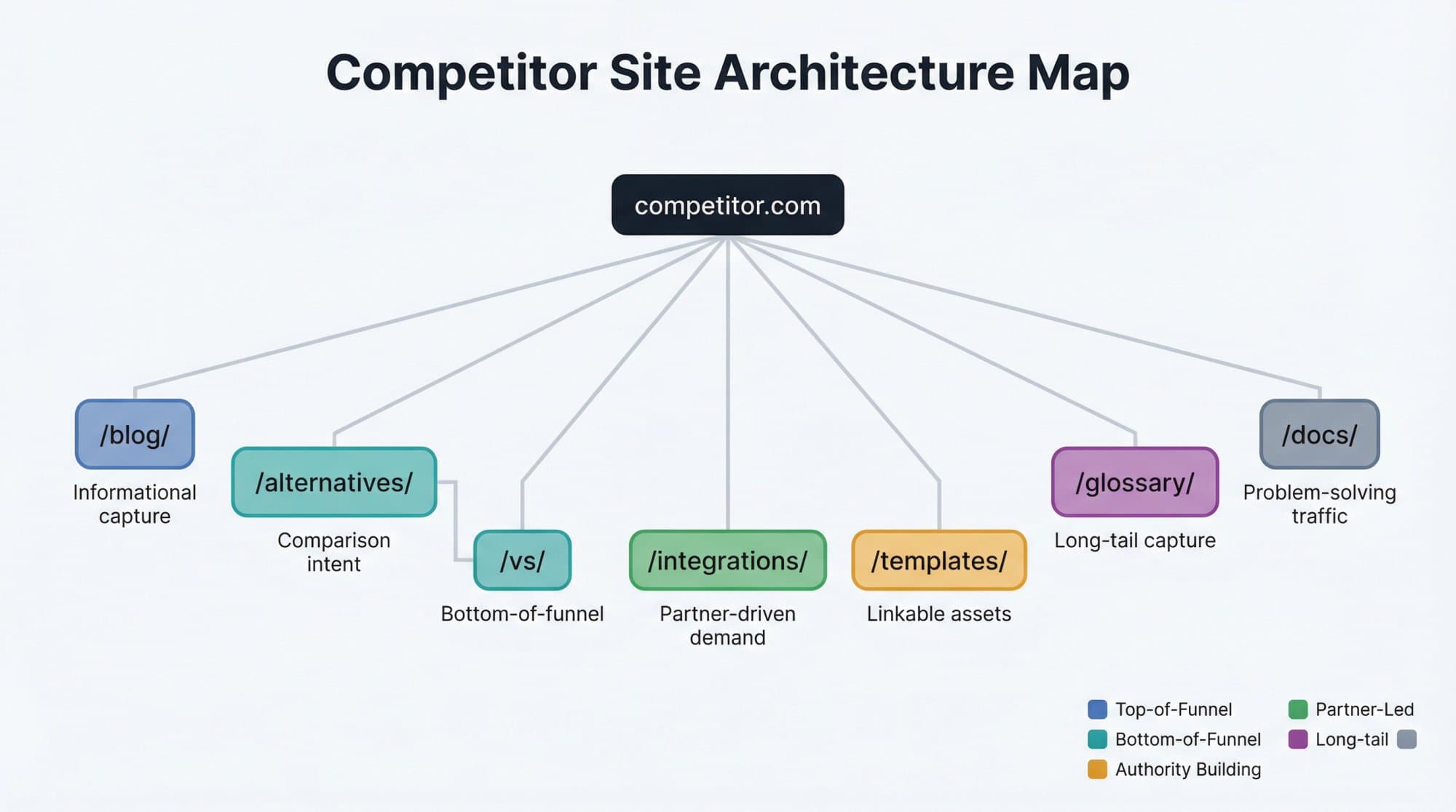
Each folder is a bet on one type of demand: /vs/ and /alternatives/ pages catch buyers comparing options, /integrations/ pages catch users of a partner tool, /glossary/ pages catch definitions. If a competitor owns a page type you don't have at all, that's usually a bigger opportunity than any single keyword. It also explains why tweaking your existing posts won't move you past them.
6. Study their backlinks and linkable assets
Look at referring domains (unique sites linking), the pages that attract the most links, and the kind of sites linking. Ahrefs' Link Intersect shows sites that link to several competitors but not to you, which are your warmest outreach prospects. The free Backlink Checker in Outrank's SEO tools shows who links to any website.
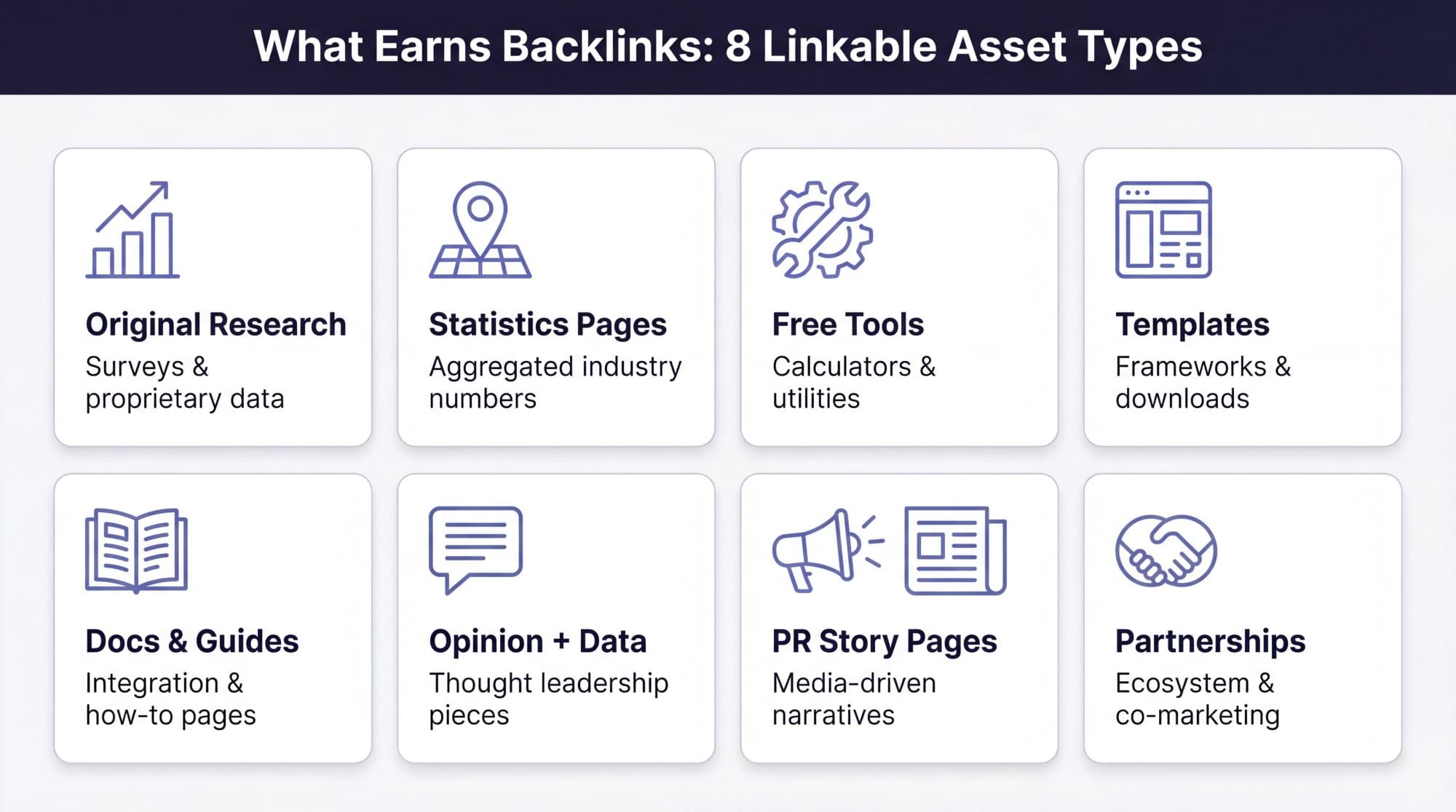
The question to answer is "what did they publish that other sites wanted to cite?", not "how many links do they have?" Most link gaps turn out to be asset gaps. Our guide to building backlinks covers how to close them.
7. Check technical health, conversion path and AI visibility
Run their main templates through PageSpeed Insights. Google's "good" Core Web Vitals thresholds are an LCP of 2.5 seconds or less, an INP of 200 milliseconds or less and a CLS of 0.1 or less, measured at the 75th percentile of real visits. Wappalyzer or BuiltWith show their CMS and marketing stack.
Then click through like a buyer. Is pricing public? Is there a free trial, a demo gate, a calculator? What proof sits above the fold? A competitor with less traffic and a sharper offer can still out-earn you.
Last, ask ChatGPT, Perplexity and Google AI Mode the questions your customers ask, and note which competitor pages get cited. Google says there are no additional requirements to appear in AI Overviews or AI Mode beyond normal SEO, and in our study of AI citations across 200 sites, Google impressions were the strongest predictor of how often a site got cited. The competitors winning classic search usually win the AI answers too. Outrank's AI visibility tracker monitors those citations across ChatGPT, Perplexity, Gemini, Copilot, AI Overviews and AI Mode.
How to compare competitor websites side by side
Put every competitor in one sheet, with your own site in the first column, and pull every number from the same tool so the estimates share the same bias. These are the rows worth tracking:
| Row in your sheet | Where to get it | Why it matters |
|---|---|---|
| Estimated organic traffic and 12-month trend | Ahrefs, Semrush, SE Ranking | Size and momentum |
| Total traffic and channel mix | Similarweb, Semrush Traffic & Market | Dependence on search vs brand, paid or referral |
| Domain Rating or Authority Score | Ahrefs, Semrush, Moz | How hard their pages are to outrank |
| Referring domains | Any backlink tool | Link profile size, harder to fake than raw backlinks |
| Keywords in the top 10 | Organic keyword reports | Breadth of visibility |
| Indexed pages | site:domain.com search or a crawl | Content volume |
| Main page types | Crawl or sitemap | Whether they win with tools, /vs/ pages, templates or guides |
| New pages per month | Sitemap dates or a crawl | Publishing pace you'd need to match |
| Core Web Vitals on mobile | PageSpeed Insights | Technical edge |
| Pricing public, free trial, demo | Manual check | Conversion friction |
| Cited in AI answers for your top questions | Manual prompts or an AI visibility tracker | Visibility in answer engines |
If you only need a quick one-on-one comparison, Outrank's free SEO competitor analysis tool does it in one go: enter their domain and yours, and it shows where they win, where they're weak and which quick wins are open to you.
Free vs paid competitor website analysis tools (October 2026)
You don't need fifteen tools. You need one tool per job, and for a first analysis the free set covers most jobs.
Competitor website analysis tools compared (October 2026)
Google search (site: operator) | ✓ | — | Who ranks for your keywords and how many pages a competitor has indexed |
| Google Search Console | ✓ | — | Your own real clicks and positions, as the baseline |
| PageSpeed Insights | ✓ | — | Core Web Vitals for any URL |
| Outrank SEO Competitor Analysis | ✓ | — | Head-to-head comparison of their domain and yours, no login |
| Outrank Free Content Analyzer | ✓ | — | A competitor's top pages, keyword gaps and topic clusters |
| Outrank free SEO tools | ✓ | — | 22 free tools incl. backlink checker, rank checker and competitor finder |
| Similarweb | ✓ | — | Total traffic and channel mix across all channels |
| Wappalyzer / BuiltWith | ✓ | — | Tech stack: CMS, analytics and marketing tools |
| Screaming Frog SEO Spider | ✓ | $23.25/mo | Crawling site structure and templates (free up to 500 URLs) |
| Ahrefs | ✓ | $29/mo | Backlinks, top pages, Content Gap, Link Intersect (Starter $29, Lite $129; check which reports each plan includes) |
| Moz Pro | — | $49/mo | Domain Authority and keyword research (entry plan $49, Standard $99) |
| SE Ranking | ✕ | $129/mo | Competitive Research with unlimited competitor research on Core (14-day trial) |
| Semrush | ✓ | $139/mo | Domain Overview, Organic Rankings, Keyword Gap (free plan: 10 reports a day) |
| Semrush Traffic & Market Toolkit | ✕ | $289/mo | Traffic by channel, competitors' top pages, market share |
Click a column header to sort.
Start free. If you run competitor analyses every month, one paid suite pays for itself: Semrush if you also want traffic-by-channel and PPC data, Ahrefs if backlinks are the main question, SE Ranking if budget matters most. Our lists of cheaper Semrush alternatives and Ahrefs alternatives compare more options.
Competitor website analysis template
Run this once per competitor. Ticks are saved in your browser, so you can close the page and come back.
Interactive checklist
Competitor website analysis checklist
0/26
Setup
0/3Traffic
0/3Pages and keywords
0/4Structure
0/3Backlinks
0/3Technical and UX
0/3Conversion
0/3AI visibility
0/2Decision
0/2Your progress is saved in this browser, so you can come back to it later.
A content gap analysis template helps if you want to turn the keyword part of this into a publishing plan.
Turn the findings into a 30/60/90-day plan
Sort every finding into four buckets:
- Quick wins: keywords where you rank 11 to 20 and the competitor ranks in the top 5 with a page you can beat.
- Structural gaps: page types you don't have at all (comparison pages, a glossary, templates, free tools).
- Authority gaps: assets that earn the competitor links and citations (original data, statistics pages, tools).
- Conversion gaps: proof, pricing clarity and calls to action where their site persuades better than yours.
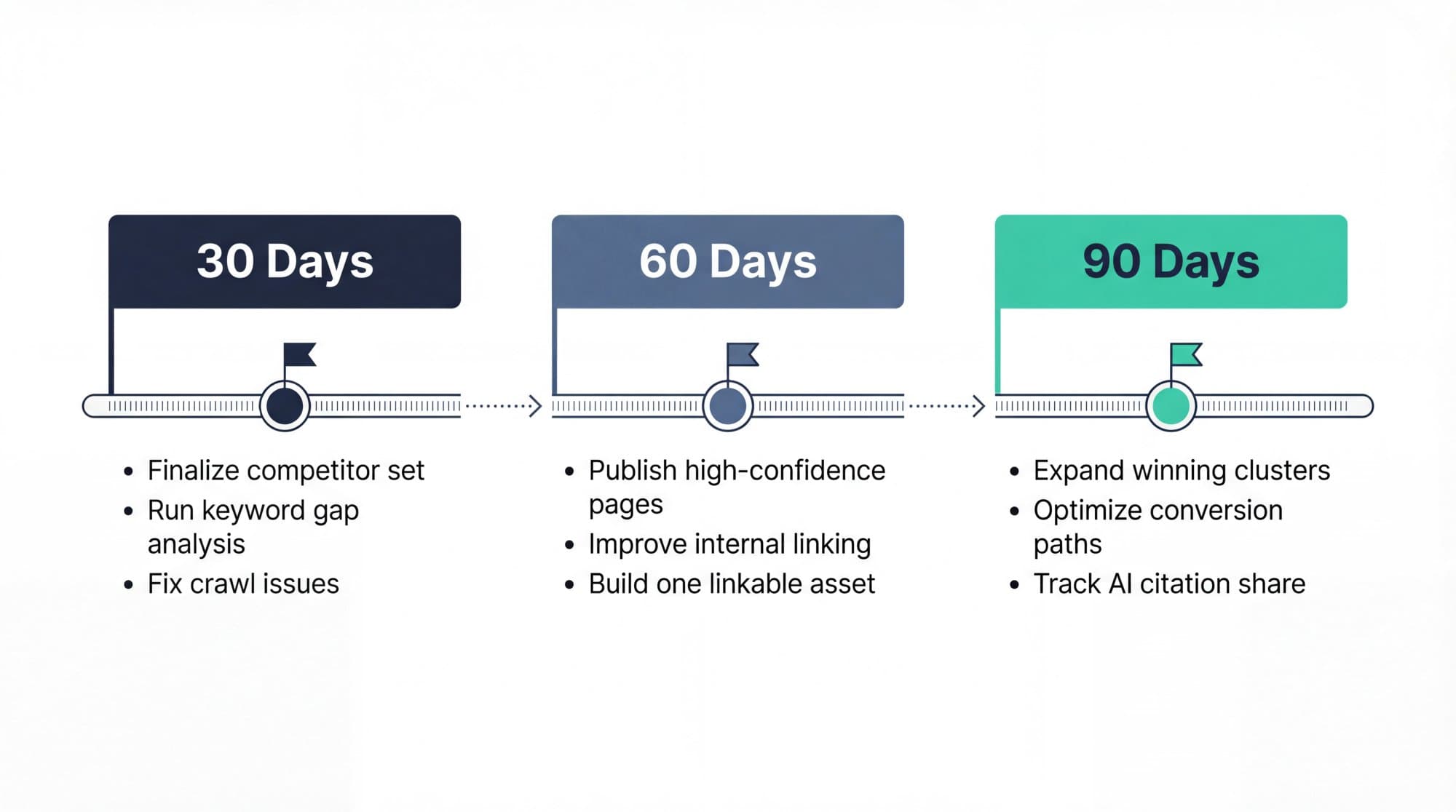
Days 1 to 30: fix critical crawl or indexing issues and refresh the pages closest to page one. Days 31 to 60: publish the highest-confidence new pages and build the first missing page type or linkable asset. Days 61 to 90: expand the topics that respond, improve conversion paths on your top organic pages, and re-run the comparison sheet. Use Search Console's branded queries filter (available to all eligible sites since March 11, 2026) to check that growth comes from non-branded searches, which is where you take share from competitors.
The usual bottleneck after a competitor analysis is publishing capacity, not insight. That's the part Outrank automates: it researches keywords with live volume and difficulty, writes and publishes an article a day to your CMS, and builds backlinks through its exchange. Of the 200,871 articles Outrank wrote in the 90 days to October 2026, 63% targeted keywords with a difficulty under 20: winnable gaps rather than head terms.
Mistakes that waste a competitor analysis
- Studying only business rivals. Publishers, directories and forums often own the search results you want.
- Treating estimates as facts. Mixing tools, or comparing a competitor's estimate with your own analytics, produces conclusions that are wrong by design.
- Copying pages instead of systems. If a competitor wins with a cluster of 40 integration pages, one copied headline does nothing.
- Analyzing too many sites. Past five competitors, most teams start collecting instead of deciding.
- Ending with a spreadsheet. If you can't name your top five actions for the next 90 days, the analysis isn't finished.
For a faster version you can run before a meeting, use our 30-minute SEO competitor audit.
FAQ
How can I check a competitor's website traffic for free?
Look the domain up in Similarweb's free website checker for total visits and channel mix, and in a free Semrush account (10 reports a day) for organic traffic and keywords. Outrank's free SEO competitor analysis tool compares their traffic and authority with yours without a login. All of these are estimates, so compare competitors within one tool rather than reading the numbers as exact.
Can I see a competitor's Google Analytics or Search Console data?
No. Only the site owner, or someone they grant access to, can see Google Analytics or Search Console data. Every third-party traffic number is a model built from clickstream data, rankings and click-through-rate estimates, which is why tools often disagree.
What is the best tool for competitor website analysis?
For SEO depth, Semrush (from $139 a month as of October 2026) or Ahrefs (from $29 a month for Starter, $129 for Lite) cover traffic estimates, top pages, keyword gaps and backlinks. Similarweb is stronger for total traffic across all channels. If you're starting out, the free set (Google, Search Console, Similarweb's free lookup, Screaming Frog and Outrank's free tools) is enough for a first analysis.
How do I find my website's competitors?
Search your 10 most valuable keywords in a private browser window and list the domains that appear on page one more than once. Then confirm with an organic competitors report in Semrush, Ahrefs or SE Ranking, or a free competitor finder, which lists the sites sharing the most keywords with you. Keep 3 to 5 that are realistic to learn from.
How many competitor websites should I analyze?
Three to five is the useful range: enough to see patterns, few enough to act on. Include at least one direct business rival and at least one site that wins your search results without selling what you sell. Add more only after you've acted on the first round of findings.
How often should I do a competitor website analysis?
Run the full analysis once a quarter and a light monthly check in between: ranking changes on your key terms, new sections or page types on their site, and new pages earning links. Markets with heavy publishing, like SaaS or e-commerce, may need the monthly check every two weeks.


