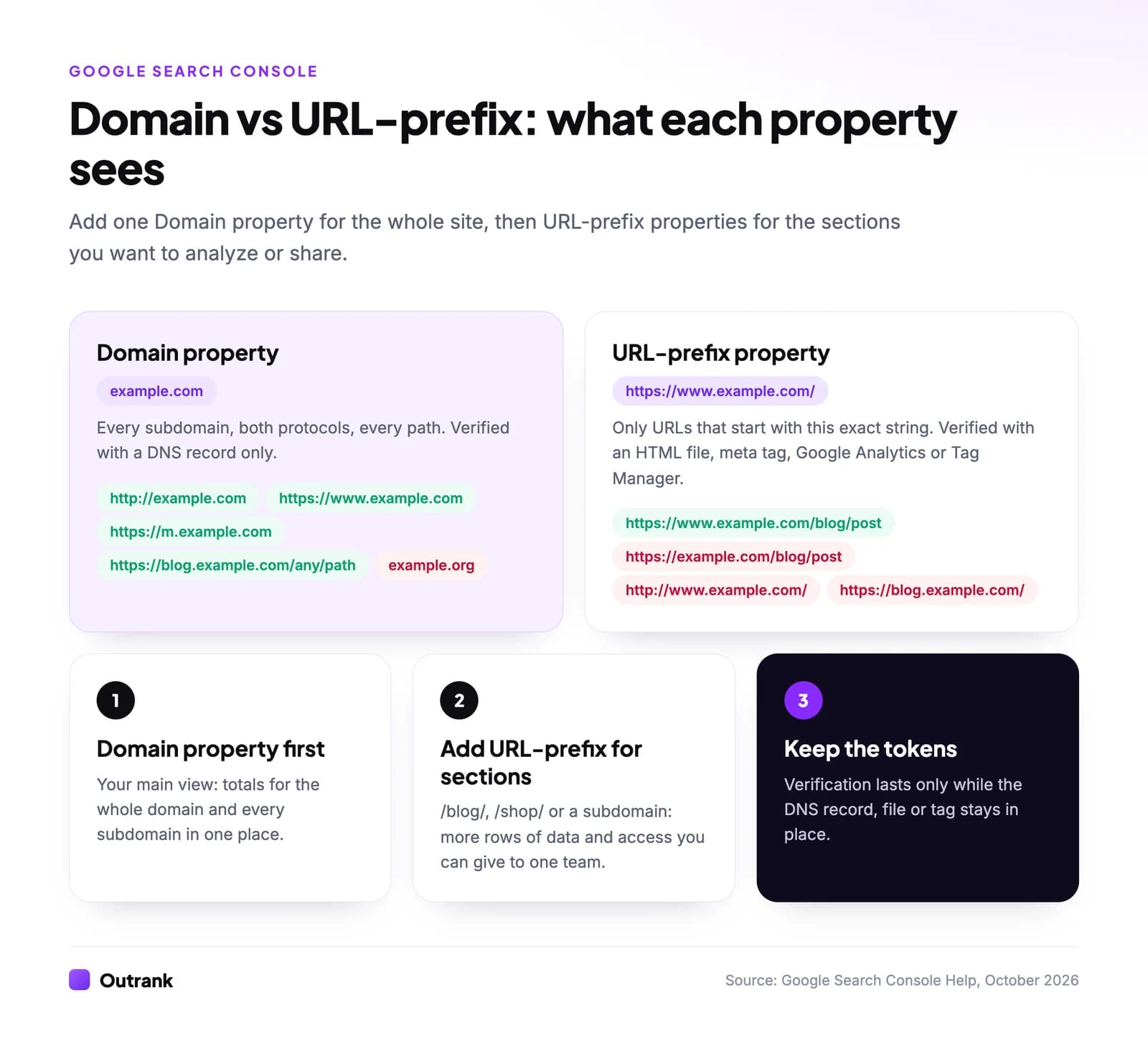
A Domain property in Google Search Console (entered as example.com) collects data for every URL on that domain: all subdomains such as www, m and blog, both http and https, and every path. You can only verify it with a DNS record. A URL-prefix property (entered as https://www.example.com/) only includes URLs that start with that exact string, protocol and subdomain included, but you can verify it with an HTML file, a meta tag, Google Analytics or Tag Manager.
For almost every site, the answer is: add a Domain property as your main view, then add URL-prefix properties for the sections you want to analyze or share separately. Below is exactly which URLs each one sees, how to verify both, the reports that only work with one type, and the data limits that make a second property worth having.
Key takeaways
- A Domain property covers all subdomains, protocols and paths of a domain and can only be verified by DNS (a TXT record, occasionally a CNAME).
- A URL-prefix property is an exact match: https://example.com/ does not include https://www.example.com/ or http://example.com/.
- Google launched Domain properties on February 27, 2019 and recommends using them "where possible".
- Each property has its own data limits (1,000 rows per export in the interface, up to 50,000 rows per day per search type in the API), so URL-prefix properties for big sections show more queries and pages.
- The disavow links tool doesn't support Domain properties, and Crawl Stats needs a root-level property; you can have up to 1,000 properties per account.
Domain vs URL-prefix at a glance
| Domain property | URL-prefix property | |
|---|---|---|
| You enter | example.com (no protocol, no www) | https://www.example.com/ (exact) |
| Covers | Every subdomain, http and https, every path | Only URLs starting with that exact prefix |
| Verification | DNS record only | HTML file, HTML tag, Google Analytics, Tag Manager, Google Sites or Blogger, or DNS |
| Shows up in the API as | sc-domain:example.com | https://www.example.com/ |
| Disavow links tool | Not supported | Supported |
| Crawl Stats report | Yes | Only at the root, e.g. https://example.com/ |
| Best for | Your main, site-wide view | Sections, subdomains, migrations, limited access |
Sources: Add a website property and Verify your site ownership in Search Console Help, checked October 2026.
What a Domain property covers
A Domain property is Search Console's view of an entire domain name. Google's definition: it "includes all subdomains (m, www, and so on) and multiple protocols (http, https, ftp)". Google's own examples:
example.comincludeshttp://example.comandhttps://m.example.com/any/path/here, but notexample.org.fish.example.comincludeshttps://support.fish.example.com, but not the parentexample.com.
You type only the domain, without https:// and without www; www and non-www are both included automatically. Anything new you launch on the domain later, say shop.example.com, shows up in the same property without any extra setup.
Google announced Domain properties on February 27, 2019 to replace the old routine of verifying http, https, www and non-www separately, and recommends using them "where possible going forward."
What a URL-prefix property covers
A URL-prefix property is an exact string match on the start of the URL. If the property is http://example.com/, it includes http://example.com/dresses/1234 but not https://example.com/dresses/1234 (different protocol) or http://www.example.com/dresses/1234 (different subdomain). You can also make it narrower with a path, such as https://www.example.com/blog/.
Here's how three common properties see the same set of URLs:
| URL | Domain example.com | Prefix https://www.example.com/ | Prefix https://www.example.com/blog/ |
|---|---|---|---|
https://www.example.com/blog/post | Yes | Yes | Yes |
https://www.example.com/pricing | Yes | Yes | No |
https://example.com/blog/post | Yes | No | No |
http://www.example.com/blog/post | Yes | No | No |
https://shop.example.com/item | Yes | No | No |
https://www.example.org/ | No | No | No |
The common mistake is a site that redirects everything to https://www.example.com but whose owner verified https://example.com/ years ago. That property shows almost nothing, because Google indexes the www URLs. A Domain property avoids the problem entirely.
How to verify each property
- 1
Domain property, step 1
In Search Console, open the property selector → Add property, choose Domain and enterexample.com. - 2
Domain property, step 2
Copy the TXT record Google shows (it starts withgoogle-site-verification=). At your DNS provider, add a TXT record with the host field blank or@and that string as the value. If Google's CNAME check finds your provider uses CNAME verification, you get a name/value pair instead. - 3
Domain property, step 3
Click Verify. Google says a manually added record can take two or three days to start being served. Leave the record in place afterwards; removing it ends your verification after a grace period. - 4
URL-prefix property
Choose URL prefix, enter the exact URL with protocol (https://www.example.com/) and pick a method: upload Google's HTML file to the site root, paste the meta tag into the<head>of your homepage, or use the Google Analytics or Tag Manager code already on the page.
Two details save time. If you already own the Domain property, Google auto-verifies the URL-prefix properties you add under it ("child properties that you add will be auto-verified"), so section properties take seconds. And Google Sites and Blogger sites verify automatically when you're signed in with the account that manages them.
Why add URL-prefix properties next to your Domain property
A Domain property should be your default. These are the five situations where an extra URL-prefix property earns its place.
- You hit the data limits. Search Console caps what it shows per property: the interface exports at most 1,000 rows, and the API (and the Data Studio connector) returns up to 50,000 rows per day per site per search type (Google, 2022). On a large site, separate properties for
/blog/,/products/or a subdomain each get their own allowance, so you see far more long-tail queries and pages, especially if you pull the data into automated reports through the API. - You want section-level reporting. A
https://www.example.com/blog/property gives the content team its own Performance, Pages and Links reports without filters. Our guide to building an SEO report shows what to put in it. - Someone should see only one section. Users and permissions are set per property, so you can give an agency or a regional team access to their subfolder or subdomain only.
- You need the disavow tool. Google's disavow links tool "does not support Domain properties". Upload the file in a URL-prefix property; if you have separate http and https properties, Google says to upload it to each.
- You're migrating. During an http to https move or a domain change, separate prefix properties for the old and new versions make it easy to watch indexing shift from one to the other, while the Domain property shows the total.
One trap when you compare numbers: Search Console aggregates query, country, device and date data by property and page data by page. If two of your subdomains appear in the same search result, the Domain property counts one impression, while each URL-prefix property counts its own. Never add up URL-prefix properties and expect the Domain property's total.
Which reports and tools work with which property
| Report or tool | Domain property | URL-prefix property |
|---|---|---|
| Performance, Pages, URL Inspection, Sitemaps, Links | Yes | Yes, for URLs inside the prefix |
| Crawl Stats | Yes | Only root-level properties like https://example.com/ |
| Disavow links | No | Yes |
| Users and permissions | Per property | Per property |
| URL Parameters tool | Removed for everyone in April 2022 | Removed for everyone in April 2022 |
Older guides still say URL-prefix properties are needed for the URL Parameters tool. Google deprecated it on March 28, 2022, with a month's notice, so that's no longer a reason to choose one type.
Which property should you add?
3-question decision helper
Which Search Console property should you add?
Question 1 of 3
Can you (or your developer) add a TXT record to the domain's DNS?
The setup we recommend
- Add the Domain property and verify it by DNS. Leave the TXT record in place for good.
- Submit your sitemap in it (Indexing → Sitemaps). If you need one, here's how to make a sitemap.
- Add URL-prefix properties for each section or subdomain that has its own owner, goals or more than a few thousand pages.
- Connect tools to the right property. Data Studio, rank trackers and SEO platforms ask you to pick a property when you connect Search Console. Pick the Domain property for site-wide numbers; Outrank, for example, accepts either type and lists Domain properties by their bare domain. Our guide to tracking Google rankings in Search Console shows what to look at weekly.
- Check Indexing → Pages monthly in the Domain property, so problems on any subdomain show up. If pages sit in "Crawled - currently not indexed", our guide to fixing crawled but not indexed pages covers the causes.
FAQ
Should I use a Domain or URL-prefix property in Search Console?
Use a Domain property if you can add a DNS record: it covers every subdomain and protocol in one view, and Google recommends it. Use a URL-prefix property when you can't access DNS, or in addition to the Domain property for sections, subdomains, migrations or the disavow tool.
Can I have both property types for the same site?
Yes, and it's common. If you own the Domain property, URL-prefix properties you add under it are verified automatically. You can have up to 1,000 properties per Search Console account, and each property gets its own data limits, users and permissions.
Why do my Domain and URL-prefix properties show different numbers?
Because they cover different URLs: a URL-prefix property misses other subdomains and protocols. Query, device, country and date totals are also counted per property, so the same impression can appear in several prefix properties but once in the Domain property. Anonymized queries and row limits widen the gap.
What if I can't use DNS verification?
Then you can't create a Domain property. Add a URL-prefix property for the exact version of the site Google indexes, usually https://www.example.com/ or https://example.com/, and verify it with an HTML file, the meta tag, Google Analytics or Tag Manager. If both versions resolve, verify both.
How long does Domain property verification take?
Often minutes, but Google says a manually added DNS record can take two or three days before your provider serves it. If verification fails, wait and click Verify again, and check that the TXT value was pasted exactly.
Does the property type affect my Google rankings?
No. Search Console is a reporting tool; the property type only changes which URLs you see data for. Your rankings are the same whichever property you look at.