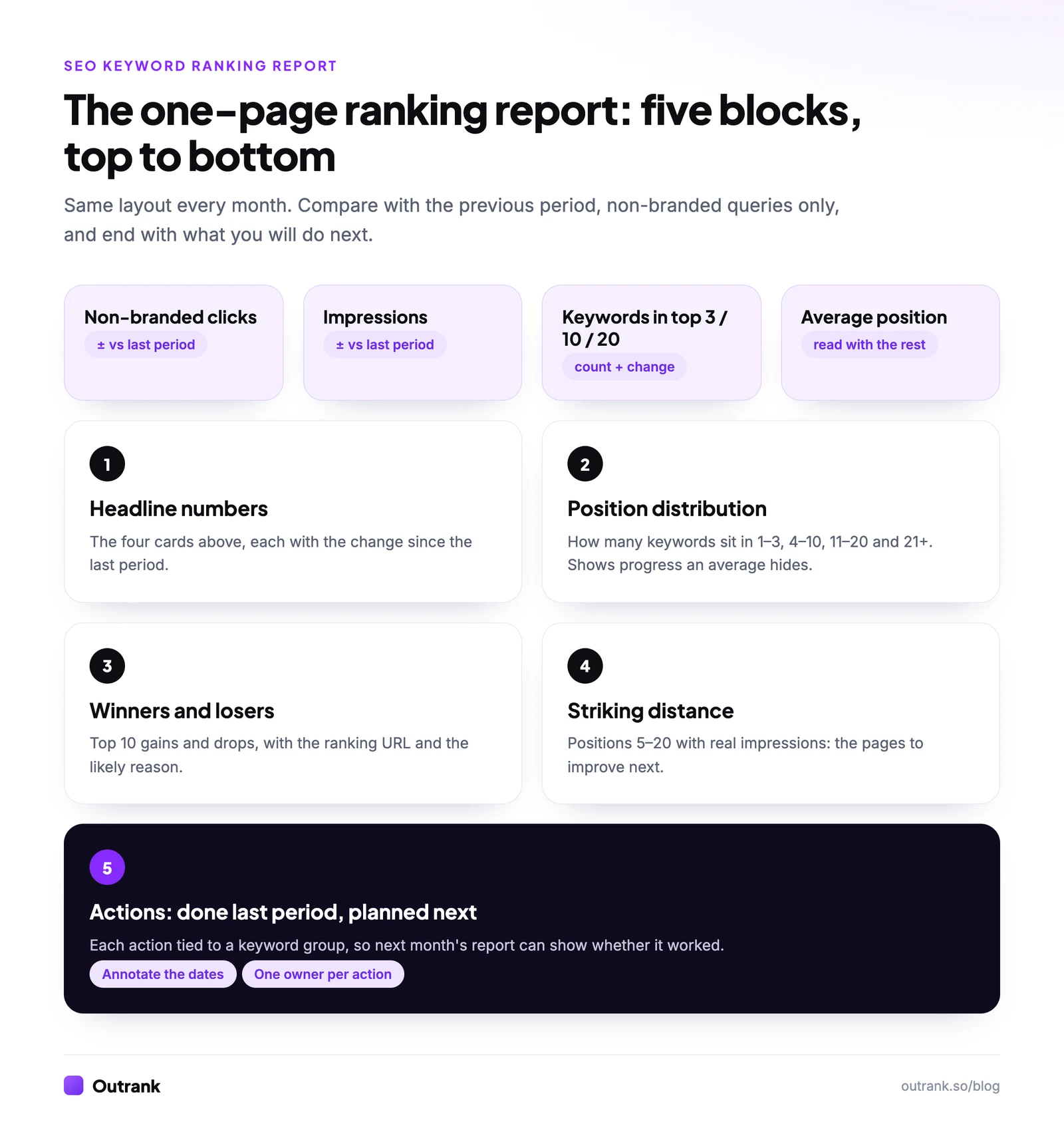
An SEO keyword ranking report shows where your site ranks for the keywords that matter, how that changed since the last period, and what you'll do about it. A useful one fits on one page and has five blocks: headline numbers (non-branded clicks, impressions, keywords in the top 3, 10 and 20), the position distribution, the biggest winners and losers, a striking-distance list (positions 5 to 20 with real impressions), and the actions taken and planned. You can build it free from Google Search Console and Looker Studio, or export it from a rank tracker.
Below: the layout, a column-by-column template you can copy, a step-by-step free build, how to read the report, and a calculator that sizes each opportunity with your own click-through rate.
Key takeaways
- A keyword ranking report has five blocks: headline numbers, position distribution, winners and losers, striking-distance keywords, and actions.
- Report non-branded queries separately. Branded searches follow your marketing, not your SEO, and Search Console can now split them automatically.
- Count keywords per position bucket (1–3, 4–10, 11–20, 21+). An average position can get worse while the site grows, because new keywords enter at low positions.
- Compare equal periods and use weekly or monthly views. Avoid comparing average position across September 10–13, 2025, when Google's &num=100 change moved it without any real ranking change.
- Every report should end with actions tied to keyword groups, so the next report shows whether they worked.
What to include in a keyword ranking report
| Block | What it shows | Where the data comes from | Why it's there |
|---|---|---|---|
| 1. Headline numbers | Non-branded clicks, impressions, CTR, keywords in top 3 / 10 / 20, each vs the previous period | Search Console Performance report, or your rank tracker | The answer to "is SEO working?" in five seconds |
| 2. Position distribution | Number of tracked keywords in positions 1–3, 4–10, 11–20, 21+ over time | Rank tracker, or a COUNTIFS on a Search Console export | Shows progress that an average hides |
| 3. Winners and losers | The 10 biggest gains and drops, with ranking URL and likely cause | Rank tracker change column, or Search Console date comparison | Explains the headline numbers |
| 4. Striking distance | Keywords at positions 5–20 with real impressions | Search Console Queries tab | Your to-do list for next period |
| 5. Actions | What you changed last period (with dates) and what's next | Your annotations and task list | Turns a report into decisions |
| Optional: competitors | Share of voice or positions of 3 to 5 rivals on your top keywords | Rank tracker | Context when you drop but nothing changed on your side |
| Optional: AI visibility | Mentions and citations in ChatGPT, Perplexity, Gemini and Google's AI features | An AI visibility tool such as Outrank's AI visibility tracking | Search Console doesn't separate AI Overview traffic |
Keep the order fixed from month to month. People learn where to look, and changes stand out.
Keyword ranking report template (copy the columns)
The keyword table behind blocks 2 to 4 needs these columns. Paste the header row into a Google Sheet or use it as your rank tracker export format.
| Column | What to put in it | Where to get it |
|---|---|---|
| Keyword | The query, exactly as searched | Rank tracker list, or Search Console Queries |
| Group | Topic, product line or funnel stage (one tag per row) | You |
| Intent | Informational, commercial, transactional or navigational | You |
| Ranking URL | The page that ranks | Search Console Pages tab (filtered by query), or tracker |
| Position now | Current position (tracker) or average position this period (Search Console) | Tracker or Search Console |
| Position before | Same metric, previous period | Same source |
| Change | Position before minus position now (positive = improved) | Formula |
| Impressions | Impressions this period | Search Console |
| Clicks | Clicks this period | Search Console |
| CTR | Clicks divided by impressions | Search Console |
| Next action | Rewrite title, expand section, add internal links, consolidate, new page, none | You |
keyword,group,intent,ranking_url,position_now,position_before,change,impressions,clicks,ctr,next_actionThe Change column is where most reports get confusing: a lower position number is better. Define "change = before minus now" so a positive number always means "moved up", and say so in the report.
How to build a keyword ranking report for free
You need two free Google tools: Search Console for the data and Looker Studio for the report. The whole build takes about 30 minutes, then it updates itself. (If you only need a single number today, checking a keyword's ranking takes a minute; a report is for trends.)
- 1
Connect Search Console to Looker Studio
In Looker Studio, create a report, add the Search Console connector, pick your property, choose Site Impression and the Web search type. Site Impression gives query-level data; add a second data source with URL Impression if you want page-level numbers too. - 2
Add the headline scorecards
Add scorecards for Clicks, Impressions, Site CTR and Average Position, and set the comparison date range to Previous period so each shows its change. - 3
Exclude branded queries
Add a report-level filter: Exclude, Query, RegExp Matchyourbrand|your brand. In Search Console itself, the Branded / Non-branded filter does this automatically for eligible properties. - 4
Add a weekly trend chart
A time series of clicks and impressions with the date dimension set to ISO Year Week smooths out weekday swings. - 5
Build winners and losers
Add a table with Query, Clicks, Impressions and Average Position, with the comparison period on. Sort by the change in clicks, ascending for losers and descending for winners. - 6
Build the striking-distance table
Copy the table and add a chart filter: Average Position greater than or equal to 5 AND less than or equal to 20, and Impressions greater than or equal to 100. Sort by impressions. - 7
Add the actions box and schedule it
Add a text box for actions and dates. Then use Share → Schedule delivery to email the report on the same day every month.
Position distribution in a sheet. Looker Studio can't easily bucket an average, so do block 2 in Google Sheets. Export the Queries table from Search Console (or use the Search Console API script that logs positions daily), put positions in column F, and count:
Top 3:   =COUNTIFS(F:F,"<=3")
4 to 10: =COUNTIFS(F:F,">3",F:F,"<=10")
11 to 20:=COUNTIFS(F:F,">10",F:F,"<=20")
21+:     =COUNTIFS(F:F,">20")
Record the four counts each month in a small table and chart them. Rising numbers in the top two buckets are the clearest sign that SEO work is paying off.
If you're new to Search Console's Performance report, start with our guide to tracking Google rankings for free.
Or export it from a rank tracker
Rank trackers build this report for you, with competitor positions and locations Search Console can't give. What to look for, as of October 2026: SE Ranking has a report builder (white-label is an Agency Pack add-on at $69/month, annual billing only); AccuRanker includes reporting and export on every plan and Looker Studio on Expert; Advanced Web Ranking adds white-label reports, custom dashboards and Looker Studio on its Agency plan ($279/month). Our comparison of keyword rank checker tools has prices and limits for 13 options.
Two settings make tracker reports trustworthy: tag every keyword with a group (so you can report by topic, not one long list), and track mobile and desktop separately for the locations your customers are in.
How to read the report: five patterns and what to do
| What you see | Usually means | Do this |
|---|---|---|
| Many keywords at 5–20 with impressions | Google finds the pages relevant but not the best answer | Improve the ranking page first: answer the query higher up, cover missing subtopics, add internal links |
| Good position, CTR far below your other top results | The snippet doesn't win the click | Rewrite the title and meta description (how to improve CTR) |
| Impressions up, clicks flat | SERP features, often AI Overviews, take the clicks | Target featured answers, add visuals or tools, and report clicks, not impressions |
| Two URLs alternating for one keyword | Keyword cannibalization | Pick one page, merge or re-angle the other, update internal links |
| A whole group dropped at once | A Google update, a template change or an indexing problem | Check the Search Status Dashboard, your annotations and Indexing → Pages before rewriting anything |
The "impressions up, clicks flat" pattern is now common. In Outrank's zero-click study of 415 sites, median Google impressions grew 2.18× between October 2025 and August 2026 while clicks grew 22% and CTR fell 40%. If your report only celebrates impressions, it will look better than reality.
Size each opportunity with your own CTR
Use this to rank the striking-distance list. Enter a keyword's monthly impressions and current CTR from Search Console, and the CTR your site actually gets on queries where it ranks in the top 3 (filter the Queries table by position below 3.5 and read the average CTR). Using your own CTR is more honest than any industry curve, because CTR now varies widely with AI Overviews and other SERP features.
Interactive calculator
How many clicks is this keyword worth?
Extra clicks per month at your top-3 CTR
350
- Clicks per month now
- 50
- Extra clicks per year
- 4.2K
Sort your striking-distance list by this number and work from the top.
Reporting mistakes that make rankings look better or worse than they are
- Mixing branded and non-branded. A PR spike inflates branded clicks and hides a non-branded decline.
- Leaning on average position. When you start ranking for many new long-tail keywords at positions 30 to 60, the average gets worse while traffic grows. Report the distribution and clicks next to it.
- Comparing across September 2025. Google stopped supporting the
&num=100parameter on September 10–13, 2025. Across 1,503 sites in Outrank's zero-click study, median impressions fell 33% within days and average position went from 29 to 13 with no real ranking change. Use clicks for year-over-year comparisons that cross that date. - Unequal periods. Compare 28 days with the previous 28, or a month with the same month last year for seasonal businesses. Weekly views stop weekends from skewing the comparison.
- Reporting without a cause. Log changes as Search Console annotations (right-click the chart, up to 120 characters per note) so every jump has a date and a reason.
How often: weekly is a quick internal check, monthly is the right rhythm for a stakeholder report, and quarterly is where you judge strategy. Rankings for new pages often take a few months to settle, so don't rewrite a page after one bad week. For the broader SEO report (traffic, conversions, technical health) see creating an SEO report, and to put it on autopilot, automated SEO reports.
Checklist before you send the report
Interactive checklist
Keyword ranking report checklist
0/10
Your progress is saved in this browser, so you can come back to it later.
FAQ
What is an SEO keyword ranking report?
An SEO keyword ranking report is a periodic summary of where a website ranks in search results for its target keywords, how those positions changed since the last period, and what actions follow. It usually combines positions with clicks and impressions from Google Search Console, and often competitor positions from a rank tracker.
What should a keyword ranking report include?
Five blocks: headline numbers (non-branded clicks, impressions, keywords in the top 3, 10 and 20), the position distribution over time, the biggest winners and losers with their ranking URLs, a striking-distance list of keywords at positions 5 to 20, and the actions taken and planned. Competitor and AI visibility sections are useful additions.
How do I create a keyword ranking report for free?
Connect Google Search Console to Looker Studio with the free connector, add scorecards with a previous-period comparison, a weekly trend chart, a winners and losers table and a striking-distance table filtered to positions 5 to 20. Count keywords per position bucket in Google Sheets, then schedule the report to email itself monthly.
How often should I report keyword rankings?
Monthly for stakeholders and clients, with a quick weekly check internally. Daily reporting mostly shows noise, because positions move every day. Report weekly only during a migration, a launch or right after a Google core update.
What is a good keyword ranking?
The top results get far more clicks than the rest of page one: Backlinko's study of 4 million results found the #1 result is 10 times more likely to be clicked than the #10 result (Backlinko). A good ranking is also relative: position 6 for a high-intent keyword can be worth more than position 1 for a query nobody buys from, which is why the report should show clicks next to positions.
Why did my average position get worse when my traffic went up?
Because average position includes every query you appear for. When a site starts ranking for many new keywords at low positions, the average drops even though total clicks rise. Track the number of keywords in each position bucket and your non-branded clicks alongside the average.