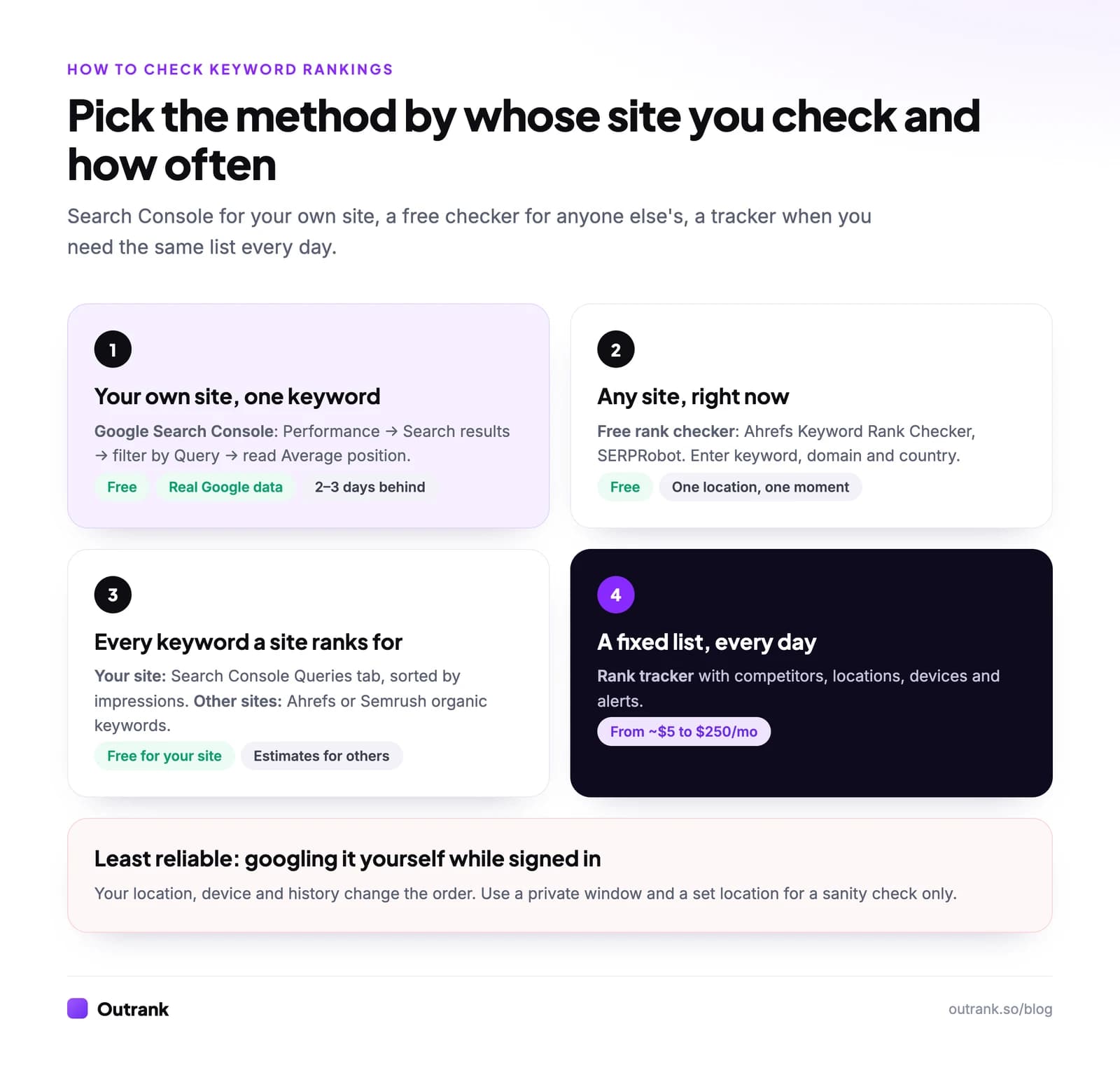
To check where your website ranks for a keyword, open Google Search Console, go to Performance → Search results, add a Query filter with the keyword, and read the Average position above the chart. It's free, it uses Google's own data, and the Pages tab shows which URL is ranking. To check a site you don't own (a competitor, a client prospect), use a free checker such as Ahrefs' Keyword Rank Checker, which takes a keyword, a domain and a country and returns the position in seconds.
Below are five methods, when each one is the right call, how to see every keyword a site ranks for, and how to turn what you find into a keyword ranking analysis.
Key takeaways
- Fastest accurate check for your own site: Search Console → Performance → Search results → filter by Query → read Average position. Free, and it averages every real search.
- For any other website, use a free rank checker (Ahrefs Keyword Rank Checker, SERPRobot) or a paid tracker. Search Console only covers sites you verify.
- Googling your keyword while signed in is the least reliable check: results depend on your location, device and search history.
- To see every keyword you rank for, open the Queries tab in Search Console and sort by impressions. The UI lists up to 1,000 queries; the API goes further.
- There is no public 'PageRank for a keyword' anymore. Google still uses PageRank internally but doesn't publish scores, so check positions instead.
5 ways to check keyword rankings, compared
| Method | Works for | Cost | How accurate | Time |
|---|---|---|---|---|
| Google Search Console | Your own verified site | Free | Highest: average of all real searches, about 2 to 3 days behind | 1 minute |
| Free online rank checker | Any website, one keyword at a time | Free | Good for one location and device, one moment | 30 seconds |
| "What am I ranking for" reports | Your site (Search Console) or any site (Ahrefs, Semrush) | Free to $129+/mo | Good; third-party lists are estimates | 2 minutes |
| Manual search in a clean window | Any website | Free | Low: one personalized snapshot | 1 minute |
| Rank tracker | A saved keyword list, competitors, locations | About $5 to $250/mo | Good for trends, daily | 10 minutes to set up |
Method 1: Check your keyword ranking in Google Search Console
This is the method to use for your own site. Search Console reports the average position of your topmost result across every search that showed your site, which is far more reliable than any single check.
- 1
Open the Performance report
In Search Console, pick your property, then go to Performance → Search results. - 2
Turn on Average position
Click the Average position card (and Total impressions) so both appear in the chart and table. - 3
Pick a date range
Use Last 28 days for a current reading, or Last 3 months for low-traffic keywords that need more data. - 4
Filter by your keyword
Click + Add filter → Query, choose Exact query (or Queries containing) and type the keyword. The average position above the chart is your ranking for it. - 5
See which page ranks
Open the Pages tab under the chart. If two URLs share the impressions, you may have keyword cannibalization. - 6
Narrow by country and device
Add Country and Device filters. A keyword can rank 3 on desktop in the US and 9 on mobile in the UK.
To check the ranking of one specific page instead, filter by Page and read the Queries tab: it lists every keyword that URL appears for, with its position.
Two things to know. Search Console data is usually two to three days behind (a preliminary 24 hours view covers recent hours). And if your site gets few impressions for a keyword, it may not appear at all, because Google hides rare "anonymized" queries for privacy. If you want this as an ongoing system rather than a one-off check, follow our guide to tracking Google rankings in Search Console.
Method 2: Find out what keywords you're ranking for
"What keywords am I ranking for?" is a different question from "where do I rank for X?", and Search Console answers it best.
- Open Performance → Search results, enable all four metrics, set the date to the last 3 months.
- Stay on the Queries tab and sort by Impressions. That's your real keyword list, ordered by visibility.
- Click the filter icon above the table and add Position smaller than 21 to see only page-one and page-two keywords.
- Export with the Export button at the top of the report if you want to work in a spreadsheet.
The UI shows up to 1,000 queries. Bigger sites can export up to 50,000 rows per day per search type through the free API; our Search Console API guide has copy-paste code.
For a site you don't own, you need a tool with its own index. Ahrefs (Site Explorer → Organic keywords) and Semrush (Organic Research) estimate every keyword a domain ranks for in their databases. Free access is limited: Ahrefs Free shows this for sites you verify, and Semrush's free account allows 10 reports a day. Bing users can get the same list for Bing from Bing Webmaster Tools under Search Performance.
Method 3: Use a free online rank checker (any website)
Free rank checkers run one simulated search for a keyword, domain and location, and tell you the position. They're the right tool for competitors and prospects.
- Ahrefs Keyword Rank Checker: enter a keyword, a domain or URL and a country; no account needed for a quick check.
- SERPRobot: a free SERP checker, plus paid bots at $4.99 a month for 75 keyword checks every 24 hours if you want a schedule (14-day free trial).
- SEO PowerSuite Rank Tracker: a free desktop app that checks unlimited keywords across Google, Bing and YouTube, top 10 to top 1,000 results.
- Keyword.com: a 14-day trial with 100 keywords, no card.
Accuracy caveat: a checker reports one search from one location on one device at one moment. Run it for the country (and city, for local businesses) you care about, and don't compare its number directly with Search Console's average. For a full comparison with prices, see the best keyword rank checker tools.
Method 4: Check manually in Google (the right way)
Manual checks are fine for a sanity check, but do them properly:
- Use a private window and stay signed out, so your search history doesn't reorder results.
- Set the location deliberately. Results change by country and city. A free location simulator such as Mangools' SERP location changer shows results as a searcher elsewhere would see them.
- Check mobile separately. Use your phone or your browser's device emulation.
- Count organic results only. Ads, the map pack and "People also ask" boxes push results down the page, but rank checkers and Search Console count positions differently from your eyes. Note the organic position and move on.
Google itself warns that you might not see your site when you repeat a query, because results are "specific to the time, place, device, and recent history of the person searching" (Google's help center). Never base decisions on a manual check alone.
Method 5: Use a rank tracker when you need daily checks
When you need the same list checked every day, competitors side by side, or city-level local rankings, a rank tracker does it automatically. Entry prices as of October 2026: Wincher from $49 a month (500 keywords, daily), SE Ranking $129 a month (2,000 keywords, daily), AccuRanker $224 a month (2,000 keywords, daily, with on-demand refresh). Setup takes ten minutes:
- Add your domain and up to five competitors.
- Import your keyword list, grouped by topic or funnel stage with tags.
- Set the search engine, country, city if local, and device (track mobile and desktop separately).
- Turn on alerts for moves of three or more positions on your priority keywords.
"PageRank for a keyword": what people mean and what to check instead
Searches like "check pagerank for keyword" mix up two things. PageRank is Google's link-analysis system, which scores pages by the links pointing to them. Google says PageRank "continues to be part of our core ranking systems" (Google's ranking systems guide), but it no longer publishes PageRank scores, so no tool can show you a page's real PageRank.
What you can check:
- Your position for a keyword: methods 1 to 5 above.
- A page's link strength: third-party proxies like Ahrefs' Domain Rating and URL Rating or Moz's Domain Authority. They estimate authority from backlinks; they're not Google's numbers. Our comparison of Moz DA vs Ahrefs DR explains how they differ.
Keyword ranking analysis: what to do with the numbers
Checking rankings is only worth it if you act on them. A five-minute analysis:
- Positions 5 to 20 with real impressions: your best near-term wins. Improve the page that already ranks before writing a new one.
- High impressions, low CTR: rewrite the title and meta description. See how to improve click-through rate.
- Keywords you rank 30+ for but care about: you probably need a dedicated page that matches the search intent.
- Two URLs for one keyword: consolidate.
To present this every month, use our keyword ranking report template. And if the gap is new pages you never get around to writing, Outrank finds low-competition keywords, writes and publishes one SEO article a day to your CMS, and flags underperforming articles from your Search Console data so you can schedule rewrites.
FAQ
How do I check my keyword ranking on Google for free?
Use Google Search Console. Open Performance → Search results, click Average position, add a Query filter with your keyword, and read the average position above the chart. The Pages tab shows which URL ranks. For a site you don't own, use a free checker such as Ahrefs' Keyword Rank Checker.
How do I check what keywords my website ranks for?
In Search Console, open Performance → Search results and look at the Queries tab, sorted by impressions: it lists every query your site appeared for, with position, clicks and CTR. For competitors, use the organic keywords report in Ahrefs or Semrush, which estimate rankings from their own databases.
How can I check a competitor's keyword rankings?
Search Console won't work, because it only covers sites you verify. Use a free one-off checker (Ahrefs Keyword Rank Checker, SERPRobot), an organic keywords report in Ahrefs or Semrush, or add the competitor to a rank tracker to follow their positions daily.
Why is my keyword ranking different in different tools?
Each tool measures something different. Search Console averages your topmost position across every real search over the date range; a rank checker reports one simulated search from one location and device; your own browser shows a personalized result. Differences of a few positions are normal.
How often should I check keyword rankings?
Weekly is enough for most sites. Check daily only during launches, migrations, big content pushes or right after a Google core update, and compare weekly or monthly views so normal day-to-day swings don't trigger changes.
Can I still check PageRank for a keyword?
No. PageRank is a link-based score, not a keyword ranking, and Google no longer publishes it. To see how a page performs for a keyword, check its position in Search Console or a rank checker; to gauge link strength, use third-party estimates like Ahrefs' URL Rating or Moz's Page Authority.