An SEO report is a short document, usually monthly, that shows how organic search performed against a business goal, explains why it changed, and says what happens next. To create one: pick the one outcome your reader cares about (leads, sales, sign-ups), pull Search Console and GA4 numbers for the same date ranges, write a three-sentence summary before anything else, back up the biggest change with evidence, and finish with three actions that each have an owner and a date.
Below is the eight-section template we use, the exact menu paths for every number, two summaries written from real sites' Search Console data (one good month, one bad), the data quirks from 2025 and 2026 your report needs to flag, and a checklist to run before you hit send.
Key takeaways
- Lead with three sentences: result against the goal, the main reason, the next action. Write it for a reader who reads nothing else.
- Compare month over month and year over year; Search Console keeps 16 months of data, enough for one full year-over-year comparison.
- Flag September 10–13, 2025 in any comparison that crosses it: across 1,503 sites, median impressions dropped 33% and average position jumped from 29 to 13 with no ranking change.
- Report clicks and conversions as the outcome, not CTR: in a 415-site panel, median CTR fell 40% from October 2025 to August 2026 while 59.5% of sites still grew clicks.
- Strip machine-written queries from your top-queries table: 79% of sites receive them and 95–98% never earn a click.
What an SEO report is (and isn't)
An SEO report answers three questions for someone who doesn't work in SEO: are we getting more business from search, why, and what are you doing about it. Everything in it should serve one of those answers.
It isn't a dashboard export. A 40-chart PDF shows effort, not judgment. The best reports are short: a summary that fits on one screen, then one to three pages of evidence. If you need a live view of every metric, build a dashboard separately and link to it; our guide to automated SEO reports shows how to set one up for free.
The 8 sections of a monthly SEO report
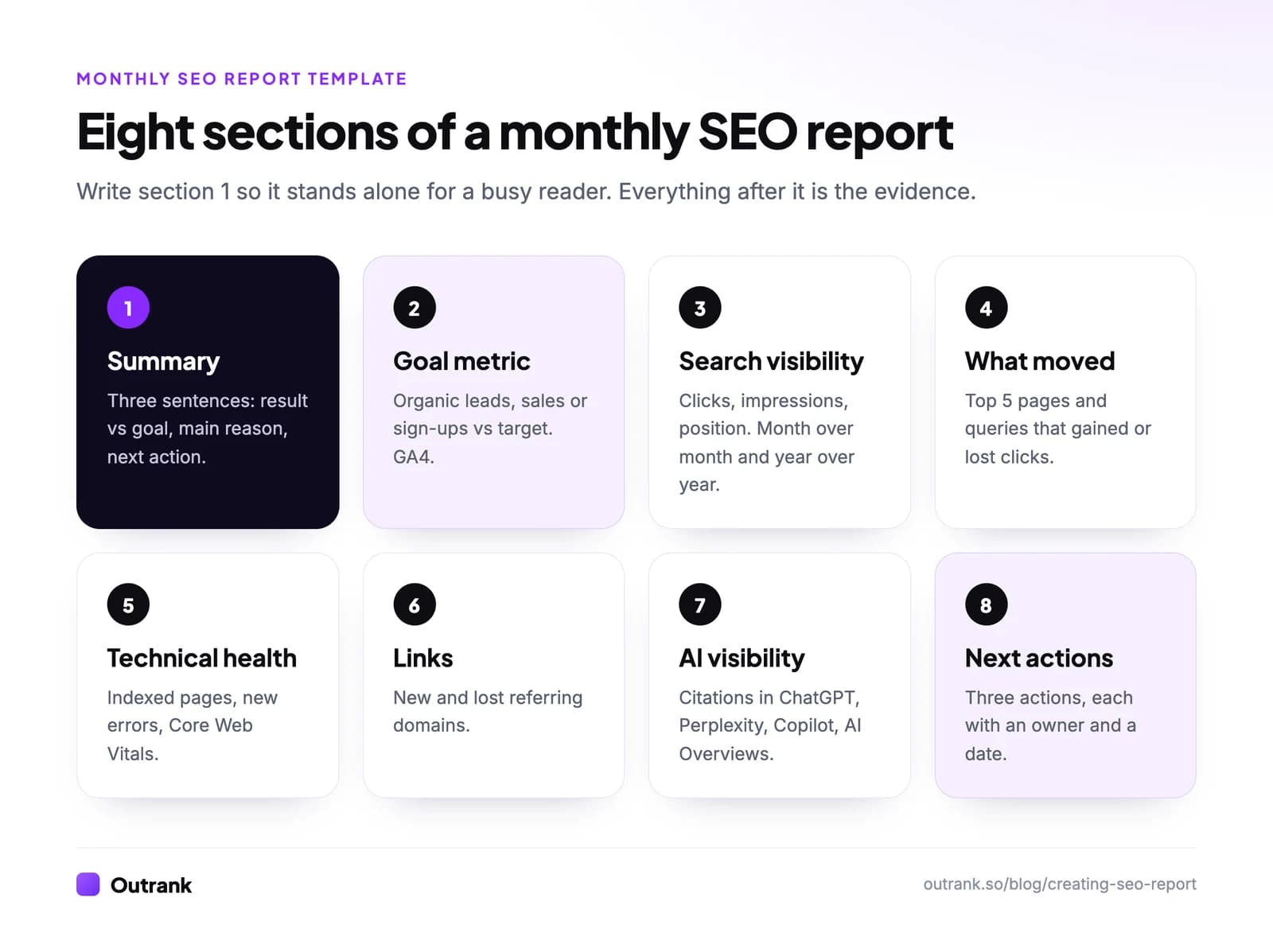
| # | Section | What goes in | Where the data comes from |
|---|---|---|---|
| 1 | Summary | Three sentences: result vs goal, main reason, next action | Your judgment, written last, placed first |
| 2 | Goal metric | Organic leads, sales or sign-ups vs target and vs last year | GA4, filtered to Organic Search |
| 3 | Search visibility | Clicks, impressions, average position; month over month and year over year | Search Console → Performance |
| 4 | What moved | Top five pages and queries that gained and lost the most clicks | Search Console → Performance, Pages and Queries tabs with Compare |
| 5 | Technical health | Indexed pages, new indexing errors, Core Web Vitals status | Search Console → Indexing → Pages; Experience → Core Web Vitals |
| 6 | Links | New and lost referring domains, notable links | Ahrefs, Semrush or Search Console → Links |
| 7 | AI visibility | Citations or mentions in ChatGPT, Perplexity, Copilot, AI Overviews | Bing Webmaster Tools AI Performance, or an AI visibility tool |
| 8 | Work done and next actions | What shipped; three actions with owner and date | Your project tracker |
Keep the order. Section 1 is what a busy reader sees, sections 2 and 3 prove it, and section 8 is what they approve. A keyword ranking table can sit inside section 4; if rankings are the main thing your stakeholders track, see our template for an SEO keyword ranking report.
How to pull every number, step by step
- 1
Set the date ranges once
Use the last full calendar month, compared with the previous month and the same month last year. In Search Console: Performance → Search results → Date → Compare. Search Console keeps 16 months of data, so save last year's numbers before they roll off. - 2
Search visibility (section 3)
In the Performance report, turn on Total clicks, Total impressions and Average position. Add a filter Query → Queries not containing → your brand name to see non-brand search on its own; brand searches mostly measure your other marketing. - 3
What moved (section 4)
With Compare on, open the Pages tab and sort by the clicks difference column. Note the top five winners and losers, then do the same in the Queries tab. Use the Domain property so no subdomain is missing (which property to use). - 4
Goal metric (section 2)
In GA4, go to Reports → Acquisition → Traffic acquisition, keep Session default channel group as the dimension and read the Key events and revenue columns on the Organic Search row. For landing pages, use Reports → Engagement → Landing page with a filter on Organic Search. - 5
Technical health (section 5)
Search Console → Indexing → Pages: record the indexed count and any new reason under "Why pages aren't indexed". Then Experience → Core Web Vitals for mobile and desktop. - 6
Links and AI visibility (sections 6 and 7)
Pull new and lost referring domains from your backlink tool for the month. For AI visibility, Bing Webmaster Tools' AI Performance report shows Copilot citations for free; trackers such as Outrank's AI visibility tool cover ChatGPT, Perplexity, Gemini and Google AI Overviews.
Connect Search Console to GA4 once (GA4 Admin → Product links → Search Console links) and you also get Search Console's query data inside GA4. If you're new to GA4's menus, start with our guide to using Google Analytics.
Two worked examples: writing the summary
The summary is the hardest part to write and the only part everyone reads. Here are two written from real Search Console data published in Outrank's case studies, with the reasoning behind each sentence.
A good month. Life Purpose App, a solo founder's site publishing through Outrank, had 513 Google clicks in May 2025 and 2,309 in May 2026, with impressions up from 7,538 to 186,166. A May 2026 summary:
Google search brought 2,309 visits in May, 4.5× May last year (513), from 186,166 impressions (24.7×). The growth comes from the 450 articles published since June 2025, which now rank for far more searches than a year ago. Next month we'll update the ten articles with the most impressions and fewest clicks, since they're the cheapest clicks left to win.
Sentence one is the result with a year-over-year comparison, sentence two is the cause with evidence, sentence three is an action tied to the data. The action is our illustration of what the data suggests, not what the founder actually did.
A bad month. Moonb, a creative agency, reached 4,980 clicks in January 2026, then fell to 741 in April. Impressions fell less, from 2,214,042 to 958,236, and its Ahrefs Domain Rating rose from 40 to 42 over the same months. An April summary that doesn't hide anything:
Google clicks fell to 741 in April, down 85% from January's peak of 4,980. Impressions fell less (−57%, to 958,236) and Domain Rating rose from 40 to 42, so the site is still visible and still gaining authority; the loss is in clicks on a smaller set of searches. Next, we'll compare January and April query by query to find where clicks disappeared, check whether positions or search features changed on those queries, and refresh the affected pages first.
Bad news reports work when they separate what the data shows from what you don't know yet, and end with the diagnosis you'll run. (Moonb's clicks recovered to 1,521 in August and 3,571 in the first half of September 2026, per the case study.)
Data quirks your report needs to flag
Three changes in Google's data since 2025 make comparisons misleading if nobody explains them. Put a one-line note in the report whenever your date range crosses them. Our content performance analysis guide covers each in more depth.
| Quirk | What you'll see | What to write in the report |
|---|---|---|
Google dropped the &num=100 results parameter, September 10–13, 2025 | Impressions fall and average position "improves" overnight. Across 1,503 sites, median impressions −33% and position 29 → 13 within days, clicks +4% | "Impressions and position changed in mid-September 2025 because of a Google reporting change, not a ranking change." |
| AI answers take clicks | Impressions grow faster than clicks. Median panel site, October 2025 → August 2026: impressions 2.18×, clicks +22%, CTR −40% | "CTR is down across the industry; we judge success by clicks and conversions." |
| Machine-written queries | Long, prompt-like queries with impressions and zero clicks | Exclude them from "top queries" so they don't distort CTR |
Sources: Outrank's zero-click searches study (415-site panel, 1,503 sites for the September 2025 change) and query fan-out study (1.2 million queries from 111 sites).
The machine queries are easy to spot once you look. In our own Search Console, one of our blog posts collected 2,136 impressions in 90 days for "does versusasunnot.fi have a blog" at an average position of 9, with zero clicks. That's an AI tool fanning out searches, not a reader. Left in the report, it would look like the page's biggest keyword with a terrible CTR.
How often to report, and how long
- Monthly is the right default for most sites: long enough for real trends, short enough to act.
- Weekly during a migration, a redesign, a big launch or a Google core update, and only on the few numbers that could break (indexed pages, clicks to top pages, errors).
- Quarterly for leadership: three months against the plan, cost against results, and the next quarter's bets. Our guide to content marketing ROI helps with the cost side.
Length: if the summary doesn't fit on one screen, cut it. If the full report runs past three pages, move detail into a linked dashboard.
Checklist before you send it
Interactive checklist
SEO report checklist
0/13
Numbers
0/5Context
0/4Summary and actions
0/4Your progress is saved in this browser, so you can come back to it later.
Tools for building it
The free stack covers most reports: Google Search Console, GA4, and Data Studio (Google's free reporting tool, formerly Looker Studio) to put them on one page. Paid SEO suites add rankings for keywords you don't get clicks for yet, competitor data and backlinks.
What reporting can't do is create the growth. If the report keeps saying "we need more pages that rank", that's the work Outrank automates: it finds low-competition keywords, writes and publishes an article a day to your site, and builds backlinks through its exchange, so next month's report has something to show. Agencies that want reporting and content handled for them can look at Outrank Agency, where human editors and SEO specialists review every article.
FAQ
What should an SEO report include?
A three-sentence summary, the business goal metric (organic leads, sales or sign-ups), Search Console clicks, impressions and position compared with last month and last year, the pages and queries that moved most, technical health, links, AI visibility, and three next actions with owners and dates.
How do I create an SEO report in Google Analytics?
GA4 shows what organic visitors do but not which searches brought them. Use Reports → Acquisition → Traffic acquisition filtered to Organic Search for sessions and key events, and Reports → Engagement → Landing page for top pages. Link Search Console under Admin → Product links to add query data.
How often should you send an SEO report?
Monthly for most businesses, because SEO changes slowly and weekly numbers are noisy. Switch to weekly checks during a migration, redesign or Google core update, and send a quarterly summary to leadership that compares results with cost and plans.
What is the most important metric in an SEO report?
The business outcome search drives: leads, sales or sign-ups from organic visitors. After that, Google clicks to non-brand pages. Impressions, rankings and CTR explain why the outcome moved, but they're diagnostics, and CTR in particular has fallen across most sites since 2025.
How do you report a drop in SEO traffic?
State the drop plainly with the numbers, then separate what you know from what you don't: did impressions fall too, which pages and queries lost clicks, did anything change on the site or in Google's data. End with the diagnosis you'll run and the fix you'll try first, with a date.
Is there a free SEO report template?
Yes: the eight-section table above works as a template, and you can build it for free with Search Console, GA4 and Data Studio. Copy the sections into a document or slide, fill each with the menu path listed, and keep the summary to three sentences.