ChatGPT skips a site for one of five reasons: it is not allowed to crawl it, it cannot read it, the page does not match the search ChatGPT actually ran, the search results it draws from do not rank it, or the answer is buried too deep to quote. The first two take ten minutes to check. The third is the one almost everyone misses, because ChatGPT does not search for what the user typed. It rewrites the question first.
Below: how to check each cause, in the order worth checking them, with the exact fix.
Key takeaways
- ChatGPT search only shows sites that let OpenAI's OAI-SearchBot crawl them. Blocking it removes you from search answers, and robots.txt changes take about 24 hours to apply.
- GPTBot is OpenAI's training crawler. Blocking GPTBot does not remove you from ChatGPT search; blocking OAI-SearchBot does.
- ChatGPT's crawlers fetch JavaScript files but do not run them, so content that only appears after client-side rendering can be invisible.
- ChatGPT rewrites prompts before it searches. "best esignature tool for a small business" became "best esignature tools for small business 2026 reviews", and the page matching that search won.
- Pages that already rank get cited. In Outrank's 200-site study, Google impressions were the strongest predictor of AI citations.
1. It is not allowed to crawl you
OpenAI runs several crawlers, and only one decides whether you appear in ChatGPT search. The three that matter here, from OpenAI's crawler documentation:
| Crawler | What it does | If you block it |
|---|---|---|
| OAI-SearchBot | Finds and indexes pages for ChatGPT search | Your pages are not shown in ChatGPT search answers (they can still appear as plain navigational links) |
| GPTBot | Collects content to train OpenAI's models | Your content is not used for training. No effect on search answers |
| ChatGPT-User | Visits a page when a user's request needs it | OpenAI says robots.txt rules "may not apply" to these user-initiated visits |
Open yoursite.com/robots.txt and look for a Disallow under OAI-SearchBot or under User-agent: *. To allow it explicitly:
User-agent: OAI-SearchBot
Allow: /
OpenAI says changes take about 24 hours to reach its systems.
Then check the layer above robots.txt. OpenAI's ChatGPT search help page asks site owners to confirm that their host or CDN allows traffic from its published searchbot IP addresses. Cloudflare, for example, offers one-click AI bot blocking and, from July 2025, asked every new domain whether to block AI crawlers, so a setting someone switched on once can block ChatGPT whatever your robots.txt says. Look under Security → Settings in Cloudflare, or the bot rules of your firewall.
2. It cannot read you
Vercel's analysis of AI crawler traffic (December 2024) found that ChatGPT's and Claude's crawlers fetch JavaScript files but do not execute them. If your product details, pricing or article text only appear after JavaScript runs in the browser, the crawler sees an empty shell.
The test takes a minute: open the page, choose View Page Source (not Inspect), and search for a sentence from your main content. If it is not in the raw HTML, AI crawlers probably cannot see it either. The fix is server-side rendering or static generation for anything you want quoted. How AI reads your website covers the rest of the rendering checks.
3. Your page does not match the search ChatGPT actually ran
When you ask ChatGPT something that needs current information, it searches the web before it answers. But it does not search for what you typed. OpenAI's own example: a question about drugs that target CCR8 became the search "CCR8 immunotherapy drug development 2025".
I asked for "best esignature tool for a small business." It searched:
"best esignature tools for small business 2026 reviews"
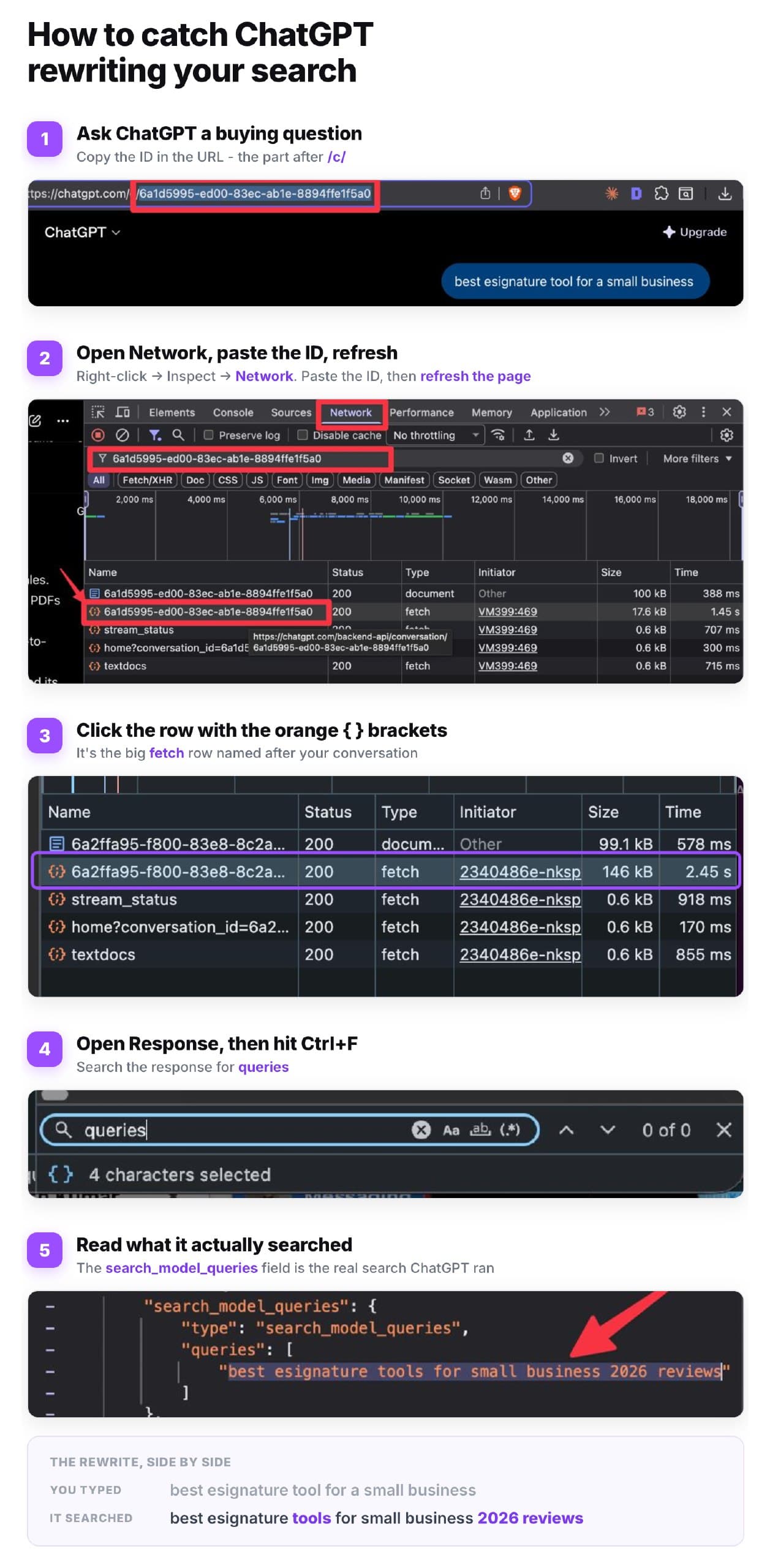
The AI picks the page that matches its search, not yours. So you can rank #1 for "best esignature tool" and still get skipped, because it went looking for "2026 reviews" and someone else owns that phrase.
These rewritten searches are getting longer and more specific. Peec AI's analysis of 20 million ChatGPT searches found their average length doubled from about 6 words in October 2025 to about 12 in January 2026. A later analysis of ChatGPT's August 2026 default model found the current year in 28.6% of its searches and the site: operator in 23%, meaning it often searches inside one specific domain. Our own, much smaller test found far more: when we logged ChatGPT's searches for 48 everyday questions through the API (GPT-6.1 Sol with web search), 85% were site: searches on one brand's own website, and in 9 of 16 "best X" and "alternatives" questions its first search already named specific brands.
How to see the searches ChatGPT runs
- Watch it. Run your buyers' prompts a few times. While ChatGPT searches, it often shows what it is looking up, and the sources it cites show which pages matched.
- Bing Webmaster Tools. The AI Performance report lists the "grounding queries" Microsoft's AI searched before citing your pages. They are Microsoft's searches, not ChatGPT's, but they show the same kind of rewriting.
- Google Search Console. Some AI tools send their rewritten searches to Google, and they land in your data. In Outrank's query fan-out study, 79% of 111 sites already received machine-written queries. To find yours, go to Performance → Search results → Add filter → Query → Custom (regex) and paste
^(\S+\s+){9,}\S+$to list queries of 10 words or more.
Then use their words
Put the words from those searches where ChatGPT will match them: your title, URL slug, H2s and first sentence. Near the top of the page, not the bottom. If the searches add "pricing", "for small business" or "reviews", the page should answer exactly that. Planning whole pages around these longer, question-shaped searches is the idea behind a content plan built on questions, not keywords.
One caution on years: add "2026" to a title only when the page is genuinely current. A stale page with a fresh year in the title is the kind of page that loses its spot once someone checks.
4. The search results it draws from do not rank you
ChatGPT builds answers from search results. OpenAI names Microsoft among its search partners, and a September 2026 investigation by Peec AI found it also blends results from its own index and several other providers. Either way, a page nobody ranks is a page ChatGPT rarely finds.
Outrank's study of AI citations across 200 sites found the same thing from the other side: Google impressions were the strongest predictor of AI citations (Spearman 0.80). 67% of sites with fewer than 50 pages visible in Google had zero AI citations, while none of the 110 sites with 400 or more visible pages had zero.
Two practical moves: verify your site in Bing Webmaster Tools and submit your sitemap there (many sites only ever set up Google), and build the authority that gets pages ranked in the first place. How to build backlinks covers the second. And if your pages are crawlable, readable and ranking but ChatGPT still names competitors, the gap is on other sites: see how to get ChatGPT to recommend your product.
5. The answer is buried
AI answers quote passages, not pages. If the answer to "how much does X cost?" sits in paragraph nine, after a story about your founding, a competitor's page with the price in its first sentence wins. The odds are already thin: in Outrank's test of what ChatGPT opens and cites, it opened about 36 pages per answer and cited about 4.
Lead each section with a direct, complete answer in one or two sentences, then the detail. Use the question as the H2. Define terms in one sentence ("X is..."). This is the same structure that wins featured snippets.
Interactive checklist
ChatGPT visibility check
0/10
Can it crawl you?
0/2Can it read you?
0/3Do you match its searches?
0/3Do you rank for them?
0/2Your progress is saved in this browser, so you can come back to it later.
Or skip most of the manual work: Outrank researches the keywords your buyers search, writes structured articles with an FAQ, publishes them to your CMS every day, and builds the backlinks that get them ranked, which is what puts them in front of ChatGPT in the first place.
FAQ
Does blocking GPTBot remove my site from ChatGPT?
No. GPTBot only collects content for training OpenAI's models. ChatGPT search relies on OAI-SearchBot, and OpenAI says sites that block OAI-SearchBot will not be shown in ChatGPT search answers. You can block GPTBot and allow OAI-SearchBot.
How do I allow ChatGPT to crawl my website?
Make sure your robots.txt does not disallow OAI-SearchBot (add User-agent: OAI-SearchBot with Allow: / if in doubt), and check that your CDN or firewall does not block OpenAI's published search bot IP addresses. OpenAI says robots.txt changes take about 24 hours to apply.
Why does ChatGPT cite my competitor instead of me?
Usually because their page matches the search ChatGPT actually ran, ranks for it, and answers the question near the top. Run the prompt, look at the cited page, and compare its title, headings and first paragraph with yours. If your page is not in the results at all, check crawling and rendering first.
Does ChatGPT use Google or Bing for search?
Both feed it, along with its own index. OpenAI lists Microsoft among the providers it sends search queries to, and Peec AI's September 2026 investigation found ChatGPT blending its own index with results from several outside providers. Ranking well in both Google and Bing gives you the best odds.
How long does it take for ChatGPT to see changes on my site?
Robots.txt changes take about 24 hours, according to OpenAI. Content changes appear once OAI-SearchBot recrawls the page, which depends on how important and how often updated your site is. OpenAI does not publish a recrawl schedule, so recheck a week or two after a change.