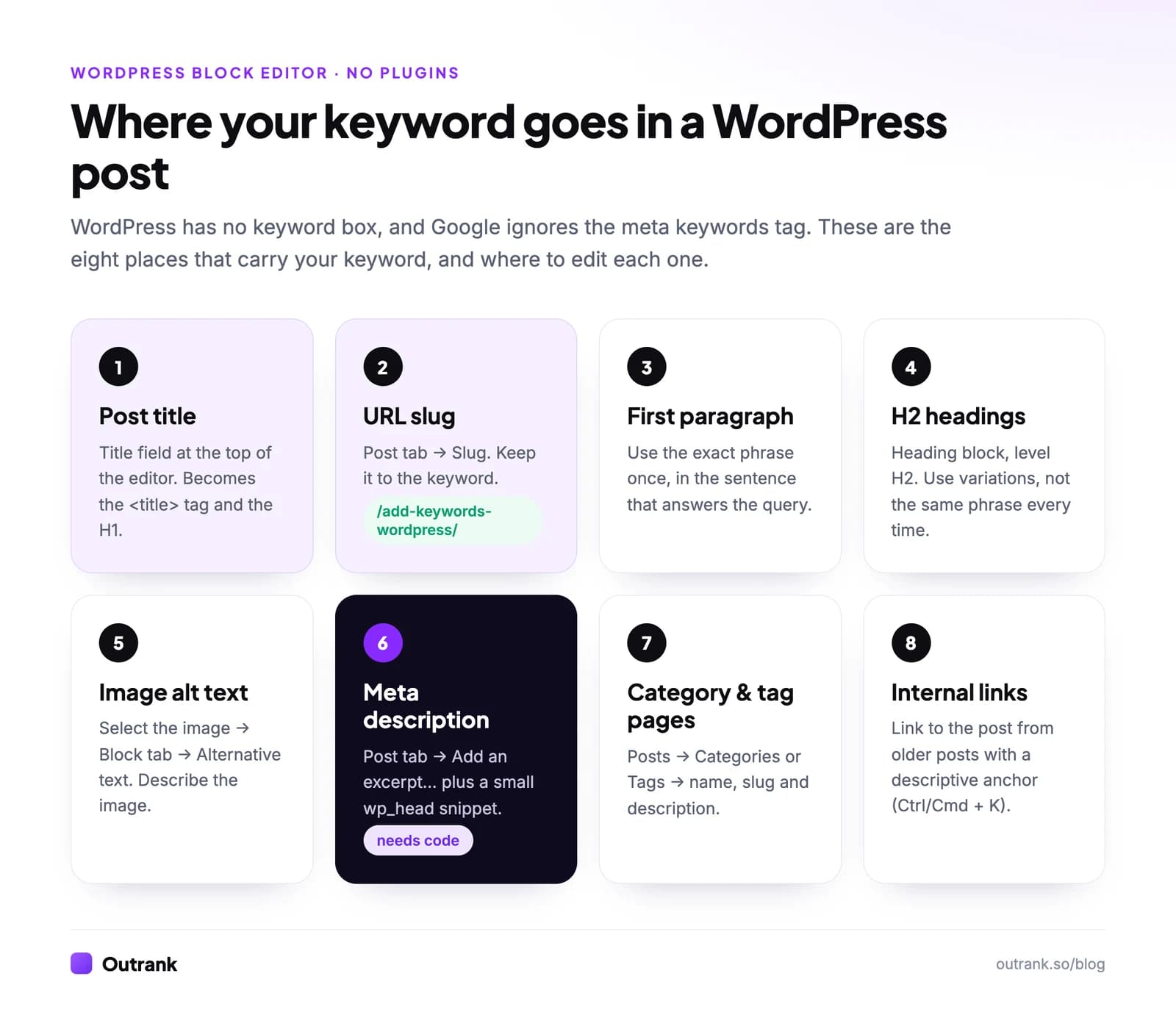
WordPress has no "keywords" field, and you don't need one: Google has ignored the meta keywords tag since 2009. To add a keyword in WordPress without a plugin, you put the phrase where Google actually reads it: the post title, the URL slug, the opening paragraph, your H2 headings, image alt text and the anchor text of internal links. The only thing core WordPress can't do on its own is print a meta description, and a short snippet in a child theme fixes that.
Below are the eight places with the exact clicks in the current block editor (WordPress 7.1, released August 2026; the same screens exist in 6.x), the copy-paste code, and how to check that it worked.
Key takeaways
- Google's own documentation says the meta keywords tag "is not used by Google Search, and it has no effect on indexing and ranking at all." Skip it.
- Core WordPress turns your post title into the page's title tag and, in almost every theme, the H1. The title field is the most valuable keyword spot you have.
- Edit the URL in the editor's Post tab → Slug. Keep it to the keyword: /add-keywords-wordpress/, not the whole title.
- WordPress has no meta description field. Write an excerpt (Post tab → Add an excerpt…) and print it with a short wp_head snippet in a child theme.
- Give every post one primary keyword. Two posts chasing the same phrase compete with each other instead of with your rivals.
WordPress has no keyword box, and the meta keywords tag is dead
SEO plugins such as Yoast SEO and Rank Math show a "focus keyphrase" field, so many people assume WordPress needs one. That field publishes nothing Google uses. It is a reminder the plugin uses to grade your draft.
The other thing people look for is the meta keywords tag (<meta name="keywords" content="...">). Google announced in September 2009 that it doesn't use it, and its current list of supported meta tags still says the tag "has no effect on indexing and ranking at all." Adding it does nothing for Google and hands competitors a list of what you're targeting.
So "adding keywords" in WordPress means writing them into content and settings that WordPress already outputs. Seven of the eight places below need no code at all.
Pick one keyword per post first
Placement only helps if the keyword is one you can win. Before you open the editor, choose one primary phrase and two to four close variations people also search. For this page, that's "add keywords in WordPress without plugins" plus "WordPress meta keywords" and "meta description without plugin."
Small, specific phrases are usually the right target for a WordPress blog. Across the 200,871 articles Outrank wrote for 4,348 sites in the last 90 days, the median target keyword had 170 searches a month and a keyword difficulty of 14 (Outrank platform data, 90 days to October 2026). Our guides on how to pick keywords and finding low competition keywords show how to choose them.
Then search your own site for the phrase. If an older post already targets it, update that post or pick a different angle, otherwise you create keyword cannibalization.
The 8 places to put your keyword in WordPress
| # | Place | Where to edit it in WordPress | What it does |
|---|---|---|---|
| 1 | Post title | Title field at the top of the editor | Becomes the title tag (with your site name) and usually the H1 |
| 2 | URL slug | Post tab → Slug, or Posts → All Posts → Quick Edit → Slug | Shows in the URL and in search results |
| 3 | Opening paragraph | The editor canvas | Confirms the topic to readers and search engines straight away |
| 4 | Subheadings | Heading block set to H2 or H3 | Gives each section a clear topic |
| 5 | Image alt text | Image block → Block tab → Alternative text | Describes the image for screen readers and Google Images |
| 6 | Meta description | Post tab → Add an excerpt… plus a snippet | Candidate text for the search snippet |
| 7 | Category and tag pages | Posts → Categories or Posts → Tags | Gives archive pages a keyword-rich name, URL and intro |
| 8 | Internal link anchors | Select text in another post → Link (Ctrl/Cmd + K) | Tells Google what the linked page is about |
1. Post title (your title tag and H1)
On any theme that declares title-tag support (every recent default theme and nearly every theme built since WordPress 4.1), WordPress builds the title tag from the post title plus your site name, for example How to Add Keywords in WordPress – Your Site. Most themes also print the post title as the page's H1. One field, two of the strongest on-page signals.
Put the keyword near the start, then give a reason to click. Google sets no character limit, but it truncates title links "to fit the device width," so keep the important words in the first 50 to 60 characters. Keep the site name short too (Settings → General → Site Title), because it's added to every title. Our guide on writing meta titles covers the copywriting side.
If you want the title tag to differ from the on-page headline, core WordPress needs code for that (the pre_get_document_title filter). For most posts, one well-written title does both jobs.
2. URL slug
WordPress builds the slug from your title, which often produces long URLs. Trim it to the keyword. In the block editor, open the settings sidebar (the Settings icon at the top right), stay on the Post tab, click the value next to Slug and edit it. For posts that are already live, Posts → All Posts → hover the title → Quick Edit → Slug works too.
Two settings make this possible. Settings → Permalinks must not be set to Plain, because ?p=123 URLs have no slug at all. Post name (example.com/sample-post/) is the simplest structure for most blogs; the WordPress default, Day and name, puts a date in every URL.
Changing a live post's URL is safer than people think. When you edit the slug of a published post, WordPress stores the old slug and redirects it to the new address. It does not do this for pages, and it won't cover a change of the whole permalink structure, so test the old URLs after either change and add 301 redirects for anything that returns a 404. Google's URL structure guidelines ask for readable words, which a keyword slug gives you.
3. Opening paragraph
Use the exact phrase once in the paragraph that answers the query, the way this page does in its first two sentences. That's where readers decide whether they landed in the right place.
There is no keyword density to hit. Google has never published a target, and its spam policies list keyword stuffing as a violation. After the opening, write naturally and use the words a reader would use. Variations and related terms come on their own when you cover the topic properly.
4. Subheadings
In the block editor, a new Heading block defaults to H2, and you switch the level from the block toolbar. Your theme already prints the post title as the H1, so start at H2 and never add a second H1 inside the content.
Use the H2s for the sub-questions people search ("Add a meta description without a plugin") rather than repeating the exact keyword in every heading. Each heading should make sense on its own, because Google and AI assistants often lift a single section.
5. Image alt text and file names
Select an image in the post, then in the settings sidebar open the Block tab and fill in Alternative text. Describe what the image shows; if the keyword fits that description, use it ("WordPress Post tab with the Slug field open"). Google says it reads alt text "along with computer vision algorithms and the contents of the page," and warns that filling alt attributes with keywords "may cause your site to be seen as spam" (Google image SEO best practices).
Two details trip people up:
- Rename the file before you upload it. Google's example:
my-new-black-kitten.jpgbeatsIMG00023.JPG. Our guide on naming images for SEO has a naming formula. - Alt text you add in Media → Library is used when you insert the image later. It does not update copies of the image already placed in posts, so fix those in the Image block itself.
6. Meta description
This is the one place WordPress doesn't cover out of the box. The full method is in the next section.
7. Category and tag pages
Every category and tag creates its own archive page, such as /category/keyword-research/. Go to Posts → Categories (or Posts → Tags), hover a term, click Edit, and set a clear Name, a short Slug and a one- or two-sentence Description.
Whether the description appears on the page depends on your theme. Block themes show it through the Term Description block in the archive template; many classic themes print it at the top of the archive. The snippet below also reuses it as the archive's meta description. Not every tag deserves to be indexed, and our guide to WordPress tags shows how to decide.
8. Internal link anchor text
The words you link from count. After you publish a post that targets "add keywords in WordPress," open two or three older, related posts, select a phrase that describes the new post, press Ctrl+K (Cmd+K on a Mac) and search for the new post by title. Descriptive anchors beat "click here," and they're the only keyword signal you control on other pages. Read why internal links matter for SEO for how to choose which pages to link from.
How to add a meta description in WordPress without a plugin
Core WordPress prints a title tag but no meta description. Google builds most snippets from page content, but it uses your description when it gives "a more accurate description of the page" (Google's snippet documentation). Google sets no length limit and truncates "to fit the device width," so put the keyword and the promise in the first 150 characters or so.
- 1
Set up a child theme
Code in a parent theme's functions.php is overwritten when the theme updates. Create a child theme (a folder with a style.css and a functions.php) by following the WordPress child theme guide, then activate it under Appearance → Themes. - 2
Write the excerpt
In the post editor, open the Post tab of the settings sidebar and click Add an excerpt…. Write one or two sentences with the keyword and a reason to click. Pages have no excerpt by default; the snippet below switches it on. - 3
Paste the snippet into functions.php
Open Appearance → Theme File Editor on a classic theme, or Tools → Theme File Editor on a block theme, select the child theme's functions.php and paste the code at the end. If your host has disabled the file editor, upload the file over SFTP or with the host's file manager. - 4
Check the output
Open the live post, view the page source (Ctrl+U, or Cmd+Option+U on a Mac) and search forname="description". You should find exactly one tag.
// Meta descriptions without an SEO plugin.
// Posts and pages: the excerpt. Categories and tags: the term description.
// Blog home page: the site tagline (Settings → General).
add_action( 'init', function () {
    add_post_type_support( 'page', 'excerpt' );
} );

add_action( 'wp_head', function () {
    $description = '';

    if ( is_singular() ) {
        $description = get_post_field( 'post_excerpt', get_queried_object_id() );
    } elseif ( is_category() || is_tag() ) {
        $description = term_description();
    } elseif ( is_front_page() ) {
        $description = get_bloginfo( 'description' );
    }

    $description = trim( wp_strip_all_tags( (string) $description ) );

    if ( '' !== $description ) {
        echo '<meta name="description" content="' . esc_attr( $description ) . '" />' . "\n";
    }
}, 1 );If you still want a meta keywords tag
If a client or an old SEO checklist insists on one, you can add it per post with a custom field and four lines of code. It won't change your Google rankings.
- In the post editor, open the three-dot menu (top right) → Preferences → General → Advanced, switch on Custom fields and click Show & Reload Page.
- Scroll below the content to the Custom Fields panel, add a field named
meta_keywordsand enter your phrases separated by commas. - Add this to the child theme's functions.php:
add_action( 'wp_head', function () {
    if ( ! is_singular() ) {
        return;
    }
    $keywords = get_post_meta( get_queried_object_id(), 'meta_keywords', true );
    if ( $keywords ) {
        echo '<meta name="keywords" content="' . esc_attr( $keywords ) . '" />' . "\n";
    }
}, 1 );How to check that your keywords are working
Start with the page source of a published post: one title tag that starts with your keyword, one meta description, one H1. Then use Google Search Console, which is free and needs no plugin (verify the site with a DNS record).
- After a big edit, run the URL through URL Inspection and click Request indexing.
- Two to four weeks later, open Performance → Search results, add a Page filter for the URL and look at the Queries tab.
- If your keyword shows impressions at positions 8 to 20, the placement is right and the page needs more depth or more internal links. If Google is matching the page to different queries, rewrite the title and opening paragraph around the phrase people actually use.
Our guide to tracking your Google rankings covers what to watch over time.
Interactive checklist
Keyword checklist for every WordPress post
0/12
Before you write
0/2In the editor
0/7After publishing
0/3Your progress is saved in this browser, so you can come back to it later.
When a plugin (or automation) is worth it
The manual route is fine for a blog that publishes a few posts a month. A free SEO plugin starts to pay for itself when you need per-page title overrides, noindex controls, schema markup or bulk redirects. Note that you don't need a plugin for an XML sitemap: WordPress has generated one at /wp-sitemap.xml since version 5.5.
If the bottleneck is producing the posts rather than placing keywords, Outrank picks low-competition keywords for your site, writes each article with an SEO title, meta description, H2/H3 structure, internal links and images, and publishes it to WordPress every day, either through its plugin or over the WordPress REST API. See the integrations page for setup.
FAQ
How do I add meta keywords in WordPress without a plugin?
Turn on custom fields (three-dot menu → Preferences → General → Advanced → Custom fields), add a field named meta_keywords to the post, and print it from your child theme's functions.php with a wp_head hook, as shown above. Google doesn't use the meta keywords tag for ranking, so your title, slug and headings matter far more.
How do I add a meta description in WordPress without a plugin?
Write the description as the post's excerpt (Post tab → Add an excerpt…) and add a wp_head snippet to your child theme that prints the excerpt as a meta description tag. Then view the page source to confirm the page has exactly one description tag.
Where is the SEO title in WordPress without a plugin?
It's the post title. WordPress builds the title tag from the post title plus the site name you set in Settings → General. Setting a title tag that differs from the on-page headline requires code (the pre_get_document_title filter) or an SEO plugin.
How many times should I use a keyword in a WordPress post?
There is no magic number. Google has never published a keyword density target, and keyword stuffing is listed in its spam policies. Use the exact phrase in the title, the slug and the opening paragraph, then write naturally.
Do WordPress tags add keywords to a post?
No. Tags don't add anything to the post's own page; each tag creates a separate archive page at /tag/your-tag/. That archive can rank if it groups several genuinely related posts, which is why a small, consistent set of tags works better than a long list.