Tags improve WordPress navigation when each tag is a topic that cuts across your categories and links at least five related posts, shown as clickable links under every post and on a few hub pages. Most sites do the opposite. When we pulled the tag lists of five well-known WordPress blogs on October 19, 2026, 1,217 of their 2,695 tags (45%) were attached to one post or none, so a reader who clicks them lands on a page with a single link.
This guide covers the difference between tags and categories, what tagging looks like on real sites, how to show tags where readers use them, a one-afternoon cleanup with the exact WordPress clicks, and whether tag pages should be in Google at all.
Key takeaways
- Categories are your table of contents (hierarchical, every post has one). Tags are cross-links between categories (flat, optional). Use tags only for topics that span several categories.
- On five large WordPress blogs we checked, 45% of tags were used on one post or none, and 72% on fewer than five posts.
- Give a topic its own tag only if it will hold at least five posts. Fewer than that and the tag page is a dead end.
- Show tags where readers decide what to read next. Block themes use the Post Terms block under each post, plus the Tag Cloud block set to 20 to 30 tags instead of the default 45.
- Three of the five blogs (ProBlogger, Torque and Copyblogger) mark every tag page noindex. WordPress itself indexes them all unless you change it.
Tags vs categories: what each one does for navigation
A WordPress category is a broad, hierarchical section that every post must belong to (WordPress assigns "Uncategorized" if you pick nothing). A WordPress tag is an optional, flat label that connects posts across those sections. Both create archive pages: /category/dinner/ and /tag/air-fryer/ by default.
| Categories | Tags | |
|---|---|---|
| Required on every post | Yes | No |
| Hierarchy | Parent and child categories | None, every tag is equal |
| Default URL | /category/slug/ | /tag/slug/ |
| Navigation job | Main sections and menus | Cross-links between sections |
| Sensible number for most blogs | 5 to 15 | A controlled list, often 20 to 50 |
Take a recipe blog. The categories are Breakfast, Dinner and Desserts. The tags are air fryer, vegetarian and 30-minute. Someone reading an air fryer dinner recipe clicks "air fryer" and sees every air fryer recipe, including breakfasts and desserts. That sideways move is the navigation job only tags can do, because a category page would keep them inside Dinner.
You can rename the /category/ and /tag/ prefixes in Settings → Permalinks → Optional (Category base, Tag base). Do it on a new site or not at all, because it changes every archive URL.
What tags look like on real WordPress sites
On October 19, 2026 we pulled every tag and its post count from the public WordPress REST API (/wp-json/wp/v2/tags) of five established WordPress blogs, then checked the robots meta tag on their tag pages. Counts are published posts per tag.
| Site | Published posts | Tags | Tags on 0 or 1 post | Tags on fewer than 5 posts | Tag pages indexable |
|---|---|---|---|---|---|
| WordPress.org News | 1,110 | 269 | 157 (58%) | 208 (77%) | Yes |
| Make WordPress Core | 6,659 | 884 | 316 (36%) | 529 (60%) | Yes |
| ProBlogger | 8,218 | 718 | 456 (64%) | 612 (85%) | No (noindex, follow) |
| Torque | 4,837 | 783 | 253 (32%) | 566 (72%) | No (noindex, follow) |
| Copyblogger | 2,387 | 41 | 35 (85%) | 38 (93%) | No (noindex, follow) |
| All five | 23,211 | 2,695 | 1,217 (45%) | 1,953 (72%) | 2 of 5 |
Share of tags used on one post or none
Copyblogger
85%
ProBlogger
64%
WordPress.org News
58%
Make WordPress Core
36%
Torque
32%
Four things stand out:
- One-off tags are the default outcome. These are experienced editorial teams, and four of the five still carry more than 100 tags used on a single post. If writers can type new tags freely, the list grows faster than the content behind it.
- The tags that work are recurring threads. Make WordPress Core's biggest tags are "agenda" (1,150 posts), "summary" (981) and "dev chat" (933): weekly meeting series a reader wants to follow across months. On WordPress.org News it's "releases" (84) and "minor-releases" (75).
- Some sites quietly give up on tags. Copyblogger runs 114 categories and 41 tags, 29 of which have no posts at all. Its navigation lives in categories.
- The extreme case is huge. TechCrunch's API reports 125,126 tags for 262,873 posts, roughly one tag for every two articles. We couldn't measure its distribution, but no reader browses 125,000 topic pages.
The lesson isn't "never use tags." It's that a tag list needs an owner and a rule, or it turns into hundreds of near-empty pages.
Build a tag list before you tag anything
A good tag names a topic a reader would want to browse, cuts across more than one category, and will hold at least five posts. Write the list down before the next post goes out, with the exact spelling, so "plugin" and "plugins" never both exist. On a new site, do this at the same time as your categories, as part of starting a WordPress blog.
A plain table is enough. Here's a starter for a WordPress tutorial blog:
| Tag | Slug | Use when the post… | Don't use for |
|---|---|---|---|
| Block themes | block-themes | Is about Site Editor, templates or theme.json | Classic theme tutorials |
| WooCommerce | woocommerce | Covers anything store-related | General payment advice |
| Performance | performance | Measures or improves load time | Hosting reviews (use the Hosting category) |
| Security | security | Hardens, updates or recovers a site | Backups only (use Backups) |
| Beginner | beginner | Assumes no prior WordPress knowledge | Posts that need code |
Rules that keep the list clean:
- Plural or singular, pick one. Lowercase names, hyphenated slugs.
- No tag that repeats a category name. It creates two pages with the same posts.
- No one-time tags. If you can't name four future posts for it, put the word in the post body instead.
- Two to five tags per post from the list is plenty. WordPress sets no limit, but every extra tag is another link competing for the reader's click.
How to add tags in WordPress
Block editor: open the settings sidebar (Settings icon, top right), stay on the Post tab and open the Tags panel. Type a tag and press Enter or type a comma. WordPress suggests existing tags as you type, which is your best defense against duplicates. Tags you use often appear under Most Used; click one to add it.
Classic editor: the Tags box sits in the right column below Categories. Type, then click Add, or click Choose from the most used tags.
Posts → Tags is the management screen. The form on the left creates a tag with a Name, Slug and Description. The table on the right lists every tag with a Count column, and that column is sortable. You'll use it in the cleanup below.
Show tags where readers decide what to read next
Tags only help navigation if visitors can see and click them. Check these four spots.
- Under every post. Most classic themes print tags at the end of a post already. On a block theme, go to Appearance → Editor → Templates → Single Posts and make sure the template contains a Post Terms block set to Tags (search the inserter for "Tags"). Put it after the content, where the reader has just finished.
- On the tag page itself. A bare list of posts gives no context. Add a one- or two-sentence description in Posts → Tags → Edit, then check that your archive template displays it: on block themes, edit Templates → Tag Archives (or All Archives if your theme has no tag template) and add the Archive Title and Term Description blocks above the post list.
- In a sidebar, footer or Topics page. The Tag Cloud block shows your most-used tags sized by popularity. It shows 45 tags by default (maximum 100) in sizes from 8pt to 22pt, with an option to show post counts. Lower it to 20 or 30 so only real hubs appear.
- In the main menu, for your two or three biggest threads. In the Navigation block, add a Tag Link and search for the tag. Reserve this for tags that work like sections, such as "releases" on WordPress.org News.
Tags are one layer of internal linking, not all of it. Contextual links inside the body copy carry more weight for both readers and search engines; our guide on why internal links are important for SEO explains how to plan them, and topical authority explains why tight topic clusters matter.
Clean up tag bloat in one afternoon
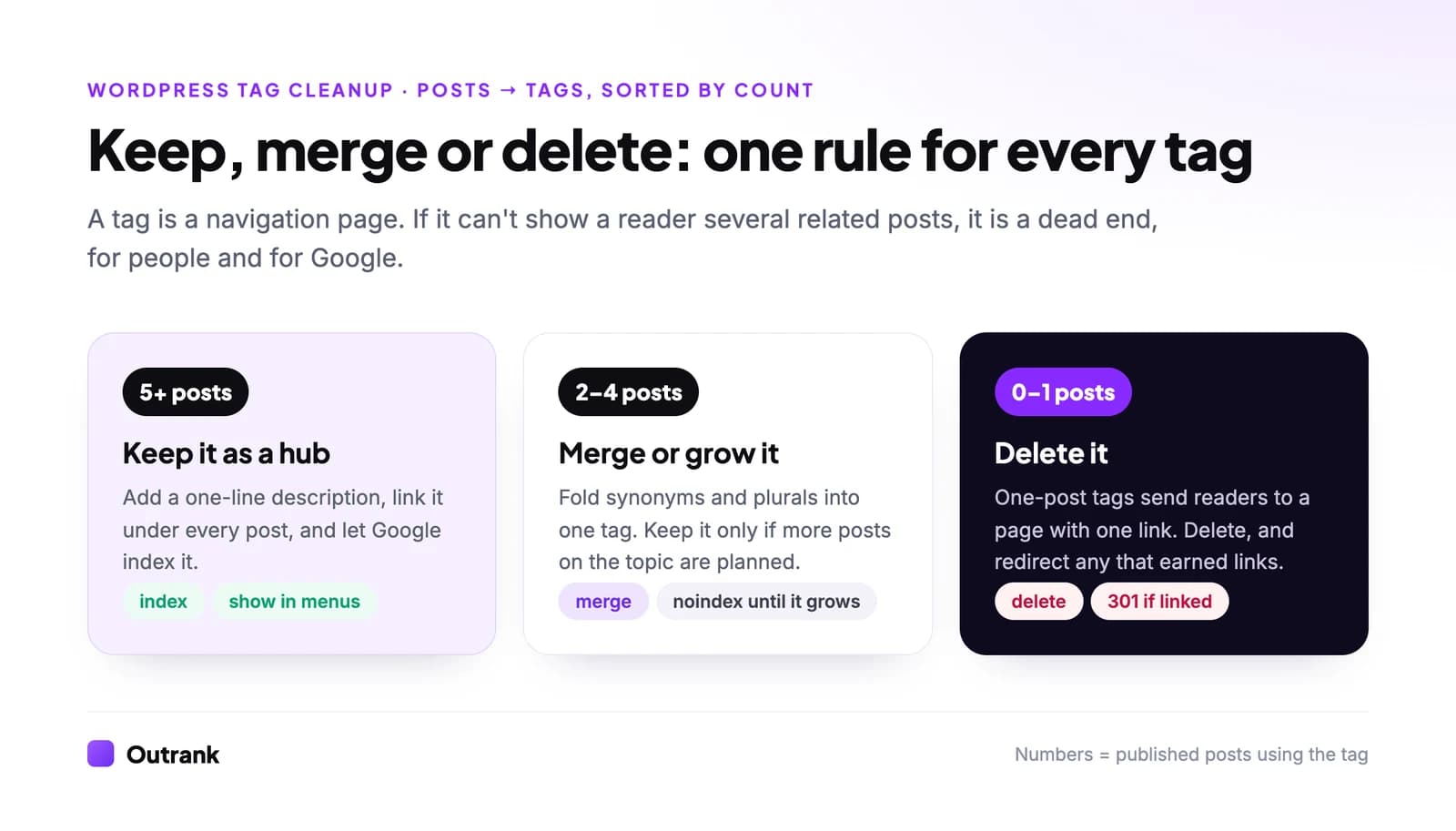
Go to Posts → Tags, open Screen Options (top right) and raise Number of items per page from the default 20 to 999 so you see everything at once. Click the Count column header to sort, and work through the list with the rule above.
- 1
Delete tags with zero or one post
Tick their checkboxes, choose Delete from Bulk actions and click Apply. Deleting a tag removes it from posts; it never deletes the posts themselves. - 2
Merge duplicates and synonyms
Click the number in the Count column of the tag you want to retire. WordPress opens Posts filtered to that tag. Select all, choose Edit from Bulk actions, click Apply, type the tag you're keeping in the Tags field and click Update. Then delete the retired tag. Bulk edit can add tags but can't remove them, which is why you delete last. - 3
Redirect tag URLs that earned traffic or links
In Search Console, open Performance → Search results, add a Page filter containing/tag/and note any deleted tag with clicks. Add a 301 redirect from it to the merged tag or the closest category at the server level (or in your host's redirect tool). - 4
Write descriptions for the tags you keep
Posts → Tags → Edit: one or two sentences saying what the reader will find, with the topic in plain words. This becomes the intro on the tag page. - 5
Lock the list
Share the tag table with everyone who publishes. On a team, an editor should approve any new tag before it goes live.
If you find that most of your tags are really sections, WordPress has an official converter: Tools → Import → Categories and Tags Converter installs it and turns selected tags into categories (or the reverse).
Interactive checklist
WordPress tag audit
0/14
Inventory
0/3Cleanup
0/4Navigation
0/4Indexing
0/3Your progress is saved in this browser, so you can come back to it later.
Should you noindex WordPress tag pages?
Index tag pages that work as real hubs: five or more posts, a description, and a topic people actually search for. Noindex the rest, or all of them if nobody on your team will police tagging. Three of the five blogs above chose the blanket option and serve noindex, follow on every tag page.
WordPress indexes every tag archive by default and lists every non-empty tag in its built-in sitemap at /wp-sitemap.xml (our sitemap guide explains what belongs in one). Thin tag pages are a common source of the "Crawled – currently not indexed" status in Search Console; Google fetched them and decided they weren't worth keeping. Our guide on fixing crawled but not indexed pages covers that report.
Without a plugin, two snippets in a child theme's functions.php handle it:
// Noindex tag archives with fewer than 5 published posts. Links stay followed.
add_filter( 'wp_robots', function ( $robots ) {
    if ( is_tag() && get_queried_object()->count < 5 ) {
        $robots['noindex'] = true;
        $robots['follow']  = true;
    }
    return $robots;
} );

// Optional: if you noindex all tags, drop them from the core XML sitemap too.
add_filter( 'wp_sitemaps_taxonomies', function ( $taxonomies ) {
    unset( $taxonomies['post_tag'] );
    return $taxonomies;
} );
The wp_robots filter has been in core since WordPress 5.7. If you use Yoast SEO or Rank Math, use their per-taxonomy setting for tags instead of this code. The plugin-free approach to other on-page settings is in our guide on adding keywords in WordPress without plugins.
FAQ
How many tags should a WordPress post have?
WordPress sets no limit, but two to five tags from a fixed list is plenty. Each tag should be a topic a reader would click to browse, and each should already hold, or soon hold, at least five posts.
What is the difference between tags and categories in WordPress?
Categories are required, hierarchical sections, like chapters in a table of contents. Tags are optional, flat labels that connect posts across categories, like entries in a book's index. Every post needs a category; tags are only worth adding when they link related posts in different sections.
Do WordPress tags help SEO?
Indirectly. A tag page that gathers many related posts can rank for its topic and spreads internal links, but hundreds of one-post tag pages add thin URLs for Google to crawl. Tags never add keywords to the post they're attached to.
Should I noindex tag pages in WordPress?
Noindex tag pages with fewer than about five posts and keep strong hubs indexable. If you can't control how authors tag, noindexing every tag page is a safe default, and ProBlogger, Torque and Copyblogger all do it.
How do I merge tags in WordPress without a plugin?
In Posts → Tags, click the Count number of the tag you're retiring to filter the posts list. Select all, use Bulk actions → Edit to add the tag you're keeping, then delete the old tag and redirect its URL if it had traffic.
How do I display tags on my WordPress posts?
Classic themes usually show them below the post automatically. On block themes, edit the Single Posts template under Appearance → Editor → Templates and add a Post Terms block set to Tags after the content.