You can find low competition keywords without paying for Ahrefs or Semrush. Pull ideas from Google's autocomplete, "People also ask" and your own Search Console, check keyword difficulty with a free checker (Outrank's free keyword research tool or Semrush's 10 free lookups a day), then confirm each keyword by hand: an allintitle: search for the Keyword Golden Ratio and a five-minute look at who ranks on page one.
Free tools give you fewer rows and less history than paid suites. They don't change the part that decides whether a keyword is easy, which is the SERP check, and that has always been free. This guide is the free toolkit and the manual tests. For the full end-to-end method, see our 7-step guide to finding low competition keywords.
Key takeaways
- KD (keyword difficulty) is a 0–100 estimate of how hard it is to reach Google's top 10, based mostly on backlinks to the pages ranking there now.
- Free sources cover the whole workflow. Google autocomplete and People also ask give you ideas, Search Console shows keywords you nearly rank for, and free checkers give you KD.
- The Keyword Golden Ratio (allintitle results ÷ monthly searches) flags keywords under 250 searches a month that few pages target directly. Under 0.25 is the target.
- Forum threads, outdated posts and off-topic pages on page one are the strongest free signals of an easy keyword.
- Almost 93% of the keywords in Ahrefs' US database get fewer than 10 searches a month, so most easy keywords look tiny in tools.
What KD means in SEO
KD, or keyword difficulty, is a score from 0 to 100 that estimates how hard it is to rank in Google's top 10 for a keyword. Most tools base it on the backlinks pointing to the pages that rank there now: Ahrefs uses the number of linking websites, and Semrush adds authority, search volume and SERP features.
Low difficulty keywords are the ones at the bottom of that scale, usually KD under 20 in Ahrefs or under 30 in Semrush (its "very easy" and "easy" bands). A low score is a shortlist filter, not a verdict. KD can't see that the top result is a thin post from 2019. You can, for free, in a few minutes. More on the metric in what is keyword difficulty.
The free low competition keyword toolkit
| Tool | What you get free | Limit | Best for |
|---|---|---|---|
| Google autocomplete, People also ask, Related searches | Real query phrasing and questions | None | Seed and long-tail ideas |
| Google Search Console | Queries you already appear for, with position | 1,000 rows per export in the interface | Keywords you nearly rank for |
| Outrank Keyword Research | Volume, KD, CPC, 12-month trend, related keywords, "quick win" flag for KD 35 or below | No signup, limited searches per hour | KD and volume for a seed and its variations |
| Semrush free plan | Volume, KD, intent | 10 keyword lookups a day | A second opinion on your shortlist |
| Google Keyword Planner | Volume (ranges without ad spend) and ideas | Needs a Google Ads account with billing details | A volume baseline from Google |
| Google Trends | Relative interest and rising queries | None | Topics climbing before tools show volume |
| Outrank Backlink Checker | Referring domains and backlinks for any ranking page | No signup, limited checks per hour | Judging how strong page one really is |
| Reddit, Quora, niche forums | Questions in your customers' own words | None | Topics that tools show as zero volume |
That's enough to do the job. If you later want a paid tool, our list of cheaper Semrush alternatives compares the options.
Method 1: Mine Google's own suggestions
Google shows you what people type, for free, on every search.
- Autocomplete: type your seed keyword followed by a space and each letter of the alphabet ("invoice template a", "invoice template b"…), then by question words ("how", "can", "why", "which"). Write down every specific suggestion.
- People also ask: expand two or three questions and more appear. These are question-shaped long-tail keywords, often with weak dedicated pages.
- Related searches: at the bottom of the results page. Click one and scroll again to go a level deeper.
- Forum results: when Google shows a "Discussions and forums" block or Reddit threads for your query, read the thread titles. Each one is a phrasing real people use.
This step gives you the long tail that keyword databases miss. Ahrefs reports that almost 93% of the keywords in its US database get fewer than 10 searches a month, and many real questions don't appear in any database at all. Our guide on why your content plan should be questions, not keywords explains why these matter even more for AI search.
Method 2: Find keywords you almost rank for in Search Console
If your site already has some content, your best low competition keywords are already in Search Console. Google is showing you for them, just not high enough to get clicks.
- 1
Open the Performance report
In Search Console, go to Performance → Search results and tick Average position. - 2
Filter to page 1.5–3
In the Queries table, add a filter for Position greater than 8. Set the date range to the last 3 months. - 3
Sort by impressions
The top rows are queries with real demand where you sit just off page one. - 4
Check which page ranks
Click a query, then the Pages tab. If the ranking page only mentions the query in passing, a dedicated section or a new page can move it up. - 5
Run the SERP check
Search the query yourself and use the flags below before you write anything.
These keywords come with proof: Google already considers your site relevant for them.
Method 3: Check difficulty with a free KD checker
Once you have 30 to 100 ideas, you need a difficulty number to sort them. Two free options:
- Outrank's free keyword research tool: enter a seed and get US volume, KD, CPC, a 12-month trend and hundreds of related keywords. Anything with a KD of 35 or below is flagged as a quick win, which gives you a pre-filtered list without signing up.
- Semrush's free plan: 10 keyword lookups a day. Save them for your shortlist rather than for brainstorming.
Use one tool for all your comparisons. KD scores from different tools are calculated differently, so a 15 in one is not a 15 in another.
Method 4: The Keyword Golden Ratio (KGR) test
The Keyword Golden Ratio is a free, manual test created by Doug Cunnington in 2015. It compares how many pages put the exact phrase in their title with how many people search for it:
KGR = number of allintitle: results ÷ monthly search volume
To get the first number, search allintitle: followed by your keyword (for example allintitle:invoice template for photographers) and note the approximate result count Google reports. On desktop it may be hidden under Tools below the search bar.
Interactive calculator
Keyword Golden Ratio calculator
Keyword Golden Ratio
0.13
- Max allintitle results for a score of 0.25
- 37
Read KGR as a quick filter with known weaknesses. Google's result counts are rough estimates, allintitle: isn't an officially documented operator, and a title match says nothing about how good the page is. A KGR of 0.1 with a Wikipedia page in position 1 is still a hard keyword. Use it to sort a long list, then run the SERP check.
Method 5: The 5-minute manual SERP check
This is the test that matters most, and it costs nothing. Search the keyword in a private window, set to the country you target, and scan the top 10 for these signals.
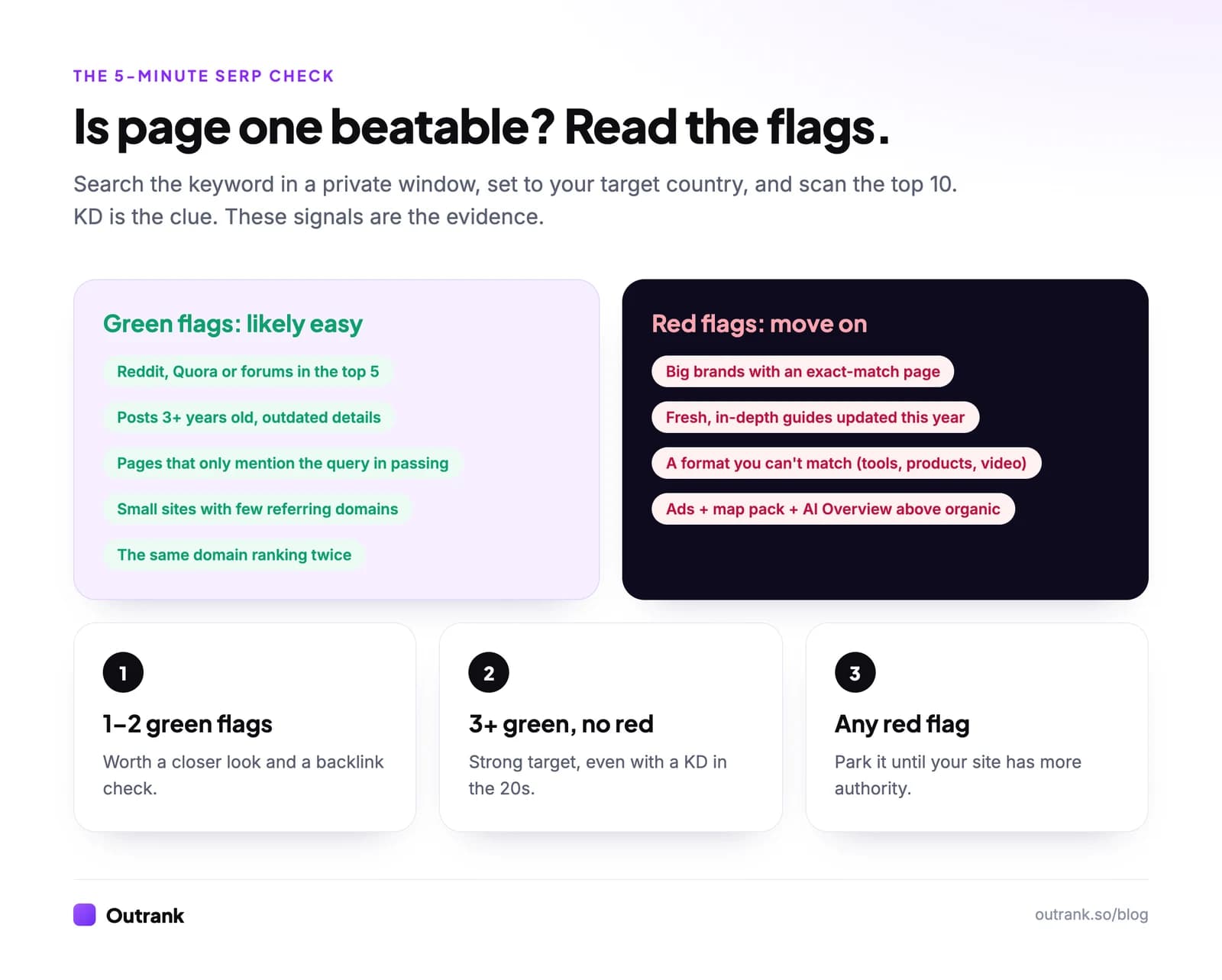
Green flags (the keyword is likely easy):
- Reddit, Quora or forum threads in the top 5
- Pages that are three or more years old, with outdated prices, screenshots or tools
- Results that answer a broader question and mention your keyword only in passing
- Small sites with few referring domains (check any URL with the free backlink checker)
- The same domain appearing twice, a sign Google has few good options
Red flags (move on, or come back later):
- Big brands or category leaders whose pages match the query exactly
- Fresh, in-depth guides updated this year
- A format you can't match, like interactive tools, product pages or videos
- Ads, a map pack and an AI Overview stacked above the first organic result
One or two green flags make a keyword worth a closer look. Three or more, with no red flags, is a strong target even if the KD is in the 20s.
How to find profitable low competition keywords
Easy keywords are only worth it if the visitors are worth something to you. To keep the list profitable:
- Use CPC as a value signal. What advertisers pay per click (shown in Keyword Planner and in Outrank's free tool) is a decent proxy for commercial value. Higher CPC usually means buyers.
- Add commercial modifiers. "Best X for Y", "X alternative", "X vs Y", "X pricing" and "X template" attract people closer to a decision than "what is X".
- Look for comparisons between small products. "Tool A vs Tool B" where neither is a household name often has a weak SERP and buyers ready to choose.
- Mix in informational clusters. Not every page needs to sell. Pages that answer early questions build the topical relevance that helps your commercial pages rank.
For patterns that work in specific industries, see our low competition keyword examples by niche.
A free 30-minute workflow
- Write 10 seed keywords from customer problems and questions.
- Run each through autocomplete and People also ask. Keep the specific phrases.
- Add striking-distance queries from Search Console (position 8+).
- Check KD and volume in a free checker. Keep KD under 20 (or the tool's quick-win flag).
- Run the KGR test on anything under 250 searches a month.
- Do the 5-minute SERP check on your top 10 candidates.
- Group keywords that share the same top results into one page.
That's the whole process, and it works without a paid subscription. When you'd rather not do it by hand every week, Outrank runs keyword research for your site with live volume and difficulty, and 63% of the keywords it picked for customers in the last 90 days had a KD under 20.
FAQ
What does KD mean in SEO?
KD stands for keyword difficulty, a 0–100 score that estimates how hard it is to rank in Google's top 10 for a keyword. Most tools calculate it from the backlinks pointing to the pages that currently rank, so it doesn't account for content quality or intent match.
What are low difficulty keywords?
Low difficulty keywords are search terms with a low KD score, usually under 20 in Ahrefs or under 30 in Semrush. The pages ranking for them have few backlinks, which makes them realistic targets for newer sites. Confirm each one by looking at the actual results before you write.
How do I find easy keywords to rank for?
Start with long, specific phrases from Google autocomplete, People also ask and your Search Console queries in positions 8 and beyond. Check KD with a free tool, then search each keyword and look for forum threads, outdated posts or off-topic pages on page one. Those are the easiest keywords to win.
Can I find low competition keywords without Ahrefs or Semrush?
Yes. Google's autocomplete, People also ask, Search Console and Trends cover idea generation and demand, Outrank's free keyword research tool shows volume and KD without signup, and Semrush's free plan allows 10 lookups a day. The manual SERP check, which decides most keywords, is free.
What is a good Keyword Golden Ratio score?
Under 0.25 is the target, meaning few pages put the exact phrase in their title compared with how many people search it. Scores from 0.25 to 1 can still work if the SERP is weak; above 1, many pages already target the phrase. The method is designed for keywords with 250 or fewer monthly searches.
Is the Keyword Golden Ratio still reliable?
It's a useful first filter, not a ranking predictor. Google's allintitle result counts are approximate and the operator isn't officially documented, and a title match doesn't tell you whether the page is any good. Use KGR to sort a long list, then check the live results.