


Name images for SEO by describing what the picture shows in three to six lowercase words joined by hyphens: the subject, the detail that makes it different, and the context. merino-wool-crew-sock-charcoal-side-view.jpg instead of IMG_4537.JPG. Google's own image guidelines use the same example logic: my-new-black-kitten.jpg is better than IMG00023.JPG.
Do it before you upload. Most platforms bake the file name into the image URL, and Google's John Mueller has advised against bulk-renaming images that are already indexed. This guide gives you the formula, 20 ready examples by page type, how the file name fits with alt text, and how to rename hundreds of files at once.
Key takeaways
- A good image file name is 3–6 descriptive words, lowercase, separated by hyphens, in the same language as the page.
- Google recommends hyphens over underscores in URLs and treats URLs as case sensitive, so IMG.jpg and img.jpg are different addresses.
- File names are a small signal; Google's own wording is "very light clues". It calls alt text "the most important attribute" for image metadata, and Mueller calls alt text and surrounding text "really, really strong signals".
- Name images before upload. WordPress, Shopify and Webflow put the original file name in the image URL and offer no simple way to rename it later.
- Don't bulk-rename images that already rank. Google recrawls images rarely, so renamed files can drop out of Google Images for months.
Why image file names matter (and how much)
An image file name is part of the image's URL, and Google reads URLs. Its image SEO documentation says the file name "can give Google very light clues about the subject matter of the image", recommends names that are "short, but descriptive", and asks you to avoid generic ones like image1.jpg, pic.gif or 1.jpg.
Keep it in proportion. The file name is one of several clues, and not the strongest:
| Signal | What it is | How much it matters |
|---|---|---|
| Alt text | The alt attribute on the <img> tag | Google calls it the most important attribute for image metadata; screen readers read it aloud |
| Surrounding text | Captions, headings and paragraphs near the image | A strong signal, according to Google's John Mueller |
| Page title and topic | What the page as a whole is about | Images on relevant pages rank for relevant searches |
| File name | The last part of the image URL | A useful clue, especially when alt text is missing |
| Structured data | image property on Product, Article, Recipe markup | Helps Google pick the representative image |
In a 2022 episode of Google's Search Off the Record podcast, reported by Search Engine Journal, Mueller said that if a site already has good alt text and surrounding text, renaming its images probably wouldn't produce "a significant change". So the file name is worth getting right once, when it costs nothing, not worth a migration.
To see whether images matter for your site at all, open Search Console, go to Performance → Search results, click Search type and choose Image. That's your Google Images traffic.
The image file name formula
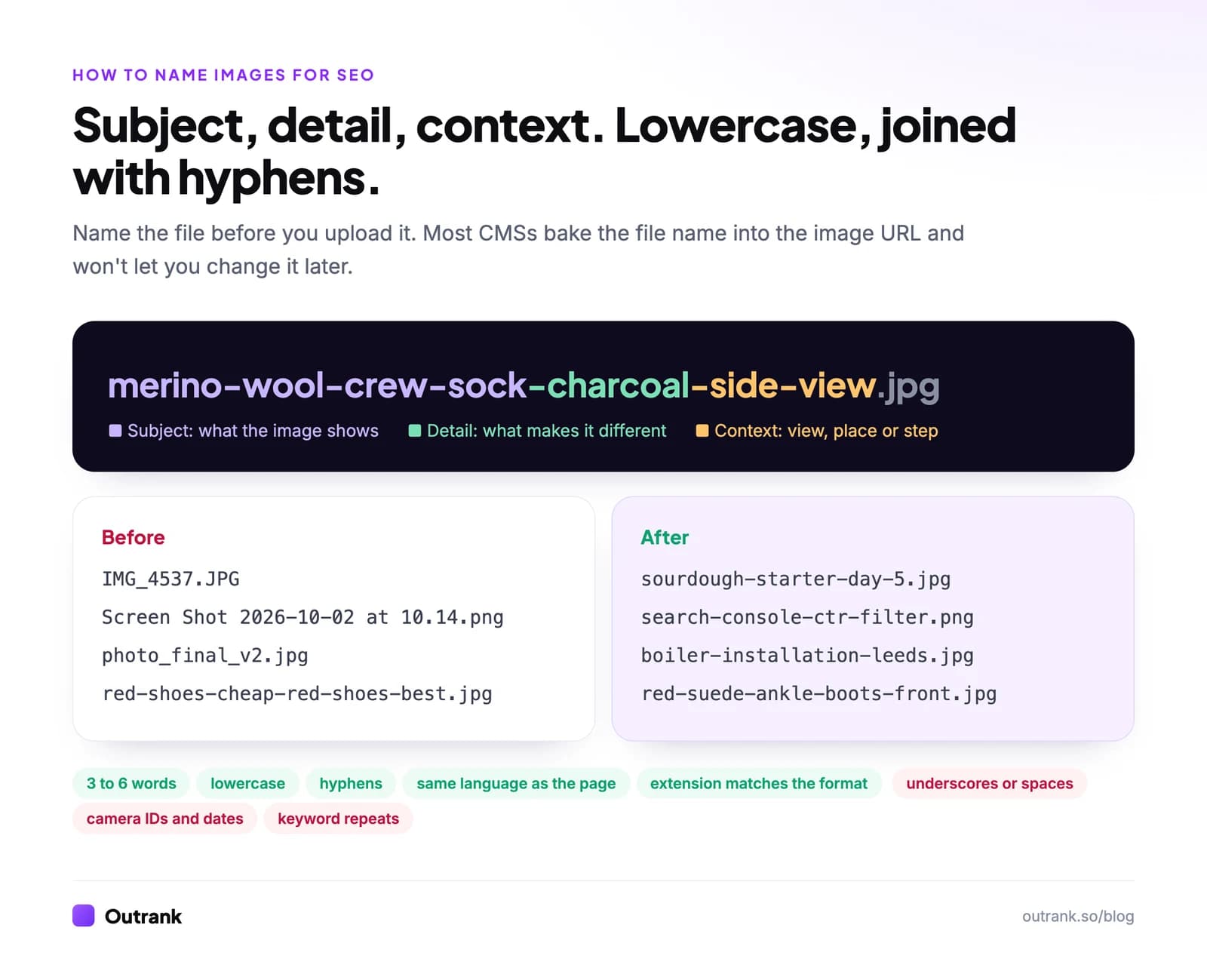
[subject]-[distinguishing detail]-[context].[extension]
- Subject: what the image shows, in the words people search:
crew-sock,sourdough-starter,boiler-installation. - Distinguishing detail: what separates this image from similar ones: colour, model, size, material, step number.
- Context: the view, place or purpose:
front,side-view,leeds,before,after,diagram.
Then apply the rules:
- Hyphens between words. Google's URL structure guidelines recommend hyphens over underscores, because underscores are read as joining words together.
- Lowercase only. Google treats URLs as case sensitive, so
/Red-Boots.jpgand/red-boots.jpgare two different URLs. Lowercase removes the ambiguity. - Three to six words. Enough to describe, short enough to read. Skip "a", "the" and "of" unless they change the meaning.
- One description, no repeats.
red-shoes-cheap-red-shoes-best-red-shoes.jpgis keyword stuffing in a file name. - Same language as the page. Google's guidelines say to translate file names when you localize images. Accented and non-Latin characters work, but they're percent-encoded in URLs (
übecomes%C3%BC), so plain ASCII is easier to manage. - Extension that matches the file. Google asks that the extension match the actual format: a WebP file should end in
.webp, not.jpg. - No camera IDs, dates or version notes.
IMG_4537,2026-10-02,final-v2andcopytell no one anything.
20 image file name examples by page type
| Page type | Instead of | Use |
|---|---|---|
| Product photo | IMG_4537.JPG | merino-wool-crew-sock-charcoal-front.jpg |
| Product photo, second angle | IMG_4538.JPG | merino-wool-crew-sock-charcoal-heel-detail.jpg |
| Product variant | product-blue.jpg | linen-shirt-mens-slim-fit-navy.jpg |
| Category banner | banner1.jpg | womens-trail-running-shoes-collection.jpg |
| Recipe step | DSC_0091.jpg | sourdough-starter-day-5-bubbles.jpg |
| Recipe hero | final-photo.jpg | sourdough-boule-crumb-cross-section.jpg |
| How-to screenshot | Screen Shot 2026-10-02 at 10.14.png | search-console-performance-ctr-filter.png |
| Software UI | screenshot3.png | shopify-admin-product-seo-fields.png |
| Diagram | diagram.png | title-tag-anatomy-diagram.webp |
| Chart | chart-final.png | median-ctr-by-month-2026-chart.png |
| Local service | job-photo.jpg | boiler-installation-leeds-before.jpg |
| Local service result | job-photo-2.jpg | boiler-installation-leeds-after.jpg |
| Real estate | house1.jpg | three-bedroom-terrace-kitchen-extension.jpg |
| Team page | team_03.jpg | jane-doe-head-of-design.jpg |
| Office or venue | office.jpg | coworking-space-manchester-meeting-room.jpg |
| Travel blog | beach.jpg | nusa-dua-beach-bali-sunrise.jpg |
| Infographic | infographic-v4-FINAL.png | long-tail-keyword-formula-infographic.webp |
| Logo | logo-new.png | acme-analytics-logo.svg |
| Before and after | ba.jpg | kitchen-cabinet-respray-before-after.jpg |
| Blog featured image | featured.jpg | how-to-name-images-for-seo-cover.webp |
Notice what the "use" column doesn't do: it doesn't add "best", "cheap" or "buy". The file name describes the picture. Commercial intent belongs in the page title and copy.
If you're naming dozens at once, Outrank's free URL slug generator turns a plain description into a clean lowercase, hyphenated string you can paste as a file name.
File name, alt text, title and caption: what goes where
These four get mixed up constantly. Each has a different job, and they shouldn't all say the same thing word for word.
<figure>
  <img src="/images/merino-wool-crew-sock-charcoal-front.jpg"
       alt="Charcoal merino wool crew sock laid flat, front view"
       width="1200" height="1200">
  <figcaption>Our best-selling crew sock in charcoal.</figcaption>
</figure>- File name: the short, URL-safe label.
merino-wool-crew-sock-charcoal-front.jpg. - Alt text: a sentence-like description of what's in the image for someone who can't see it. When the image is a link, Google also reads the alt text as the link's anchor text, which matters for internal links built from images. Google's example progression: missing alt is bad,
alt="puppy"is better,alt="Dalmatian puppy playing fetch"is best. Leavealt=""on purely decorative images. Outrank's free alt text generator drafts these if you have many to write. - Caption: visible text for readers, and part of the surrounding text Google reads. Use it for the point the image makes.
- Title attribute: the tooltip on hover. Optional; it isn't part of Google's image SEO guidance, so don't spend time on it.
How to rename images in bulk before you upload
Renaming one by one doesn't scale past a dozen files. Use the tools you already have:
- macOS Finder: select the files, right-click → Rename…, then choose Format → Name and Index, type the base name (for example
merino-wool-crew-sock-charcoal) and pick where the number goes. Fix the space Finder may insert before the number with Replace Text (replace " " with "-"). - Windows: install Microsoft's free PowerToys and use PowerRename (right-click → Rename with PowerRename). It supports search-and-replace, regular expressions and converting names to lowercase.
- Lightroom: in the Export dialog, under File Naming, choose a custom name with a sequence number, so every export comes out named.
- Product catalogs: build names from your product data. A spreadsheet column such as
=LOWER(SUBSTITUTE(A2&" "&B2&" "&C2," ","-"))(product, colour, view) produces names you can apply with any batch renamer.
Then upload. Most CMSs also create resized copies with a size suffix (WordPress adds names like -300x300), which keeps your descriptive name intact.
Should you rename images that are already published?
Usually not. In the same podcast, Mueller explained that Google crawls images less often than pages "because usually, they don't change a lot", so renamed images can drop out of Google Images before the new URLs are picked up. His advice: only rename when it's "really, really critical", for example when you're moving the images to a new URL anyway during a migration.
There's also a practical barrier. WordPress has no built-in way to rename an uploaded media file, Shopify bakes the file name into the CDN URL, and Webflow prefixes its own ID to every upload. Renaming means re-uploading and replacing every reference, which is where broken images come from.
The order that pays off:
- Name every new image properly from today.
- Fix alt text on existing images that matter (product pages, guides that rank). It's a stronger signal and changes nothing in the URL. A crawler from our technical SEO audit checklist lists every image with missing alt text.
- Rename existing files only when they're being moved or replaced anyway, and redirect the old URLs if your platform allows it.
For file size, format and loading speed, which matter more for rankings than the name does, see our guide to optimizing images for the web.
Image naming checklist
Interactive checklist
Image naming checklist
0/10
Your progress is saved in this browser, so you can come back to it later.
Where this fits in your workflow
Image naming is one of a dozen on-page details that are easy to skip when you publish often. Our blog post SEO checklist covers the rest. If you'd rather not handle it manually, Outrank generates and places the images in every article it writes (99.99% of the 200,871 articles it produced in the last 90 days shipped with a featured image) and publishes them to your CMS along with the text.
FAQ
What is the best file name for an image for SEO?
A short, specific description of what the image shows, in lowercase words joined by hyphens, such as sourdough-starter-day-5-bubbles.jpg. Aim for three to six words: the subject, the detail that makes it different, and the context or view. Avoid camera defaults like IMG_4537.JPG.
Should I use hyphens or underscores in image names?
Hyphens. Google's URL guidelines recommend hyphens to separate words because underscores are often read as joining words into one. red-suede-boots.jpg reads as three words; red_suede_boots.jpg may not.
Do image file names affect SEO?
Yes, but modestly. Google says file names give it "very light clues" about an image's subject, while alt text is the most important attribute and surrounding text is a strong signal. A good file name helps most when alt text is missing or the image appears out of context.
Should I put keywords in image file names?
Use the words that describe the image, which usually overlap with the keyword the page targets. Don't force the page's keyword onto every image or repeat it; blue-linen-shirt-front.jpg and blue-linen-shirt-back.jpg are better than five files all called best-linen-shirt.jpg.
Is it worth renaming old images for SEO?
Rarely. Google crawls images infrequently, so renamed files can disappear from Google Images for months, and every page that references them must be updated. Improve alt text on existing images instead, and rename only when images are being moved anyway.
Should image names match the alt text?
They should describe the same thing, not repeat each other. The file name is a compact label (dalmatian-puppy-fetch.jpg); the alt text is a fuller description for people who can't see the image ("Dalmatian puppy playing fetch in a park").


