A pillar page is a page that covers one broad topic and links to a cluster of more detailed pages on its subtopics, each of which links back to it. The best pillar page examples come in three shapes: the long single-page guide (HubSpot's content marketing guide, Shopify's ecommerce SEO guide, Google's SEO Starter Guide), the chaptered guide (Moz and Ahrefs' beginner's guides to SEO) and the hub that organises existing articles (Backlinko, Zapier, Atlassian).
We opened all eight on October 19, 2026, counted their words and their links to related pages on the same site, and noted what each one does that's worth copying. The numbers are in the sortable table below; the teardowns follow.
Key takeaways
- A pillar page covers a broad topic at a high level and links to a detailed page for each subtopic, which links back. The links are what make it a pillar, not the length.
- Pillars come in three shapes. A long guide (4,000–6,300 words in our examples), a short landing page with chapters, or a hub with little text that organises dozens of articles.
- The hubs we looked at link to between 48 and 200+ related pages. Moz and Ahrefs each split their beginner's guide into 9 chapters.
- Depth across a topic pays off beyond Google. In Outrank's study of 200 sites, 67% of sites with fewer than 50 pages visible in Google had no AI citations at all; none of the 110 sites with 400+ visible pages had zero.
- Pillars age at the top first. One of the eight still had last year's date in its title in October 2026.
What is a pillar page?
A pillar page is a comprehensive page on a broad topic that gives the overview and links out to detailed "cluster" pages for each subtopic, with every cluster page linking back to the pillar. Together, the pillar and its cluster are called a topic cluster.
The point is structure. A searcher who lands on the pillar can go deeper on any subtopic in one click, and search engines see a clear map of what your site covers and which page is the main one for the broad query. That's how a pillar supports topical authority: not by being long, but by connecting everything you've written on a subject.
There's evidence that breadth of coverage matters for AI answers too. In Outrank's study of AI citations across 200 sites, 67% of sites with fewer than 50 pages visible in Google had zero citations in ChatGPT, Perplexity, Gemini, Copilot or Google's AI features, while none of the 110 sites with 400 or more visible pages had zero. That's a correlation (bigger sites differ in many ways), but it points the same direction as every pillar on this list: cover the whole topic, and link it together.
The 8 pillar page examples at a glance
8 pillar pages compared (checked October 19, 2026)
| Atlassian: What is Agile? | Hub | 1,300 | 221 | A full course's worth of pages behind one overview |
| Zapier: the ultimate guide to remote work | Hub | 1,000 | 76 | Opens with first-hand authority, then seven categories |
| Shopify: ecommerce SEO guide | Long guide | 5,000 | 53 | Named author and date, jump links and an FAQ |
| Backlinko: SEO Marketing Hub | Hub | 400 | 48 | Nine sections, each with a one-line promise and a resource count |
| HubSpot: content marketing guide | Long guide | 6,300 | 42 | Chapter menu at the top and five free downloads inside the guide |
| Google: SEO Starter Guide | Long guide | 4,100 | 37 | A section on what not to focus on |
| Moz: Beginner's Guide to SEO | Chaptered guide | 1,100 | 9 | A section on how much of the guide you need to read |
| Ahrefs: SEO, the complete guide for beginners | Chaptered guide | 1,000 | 9 | Chapters plus a glossary and a book version |
Click a column header to sort.
The three shapes of a pillar page
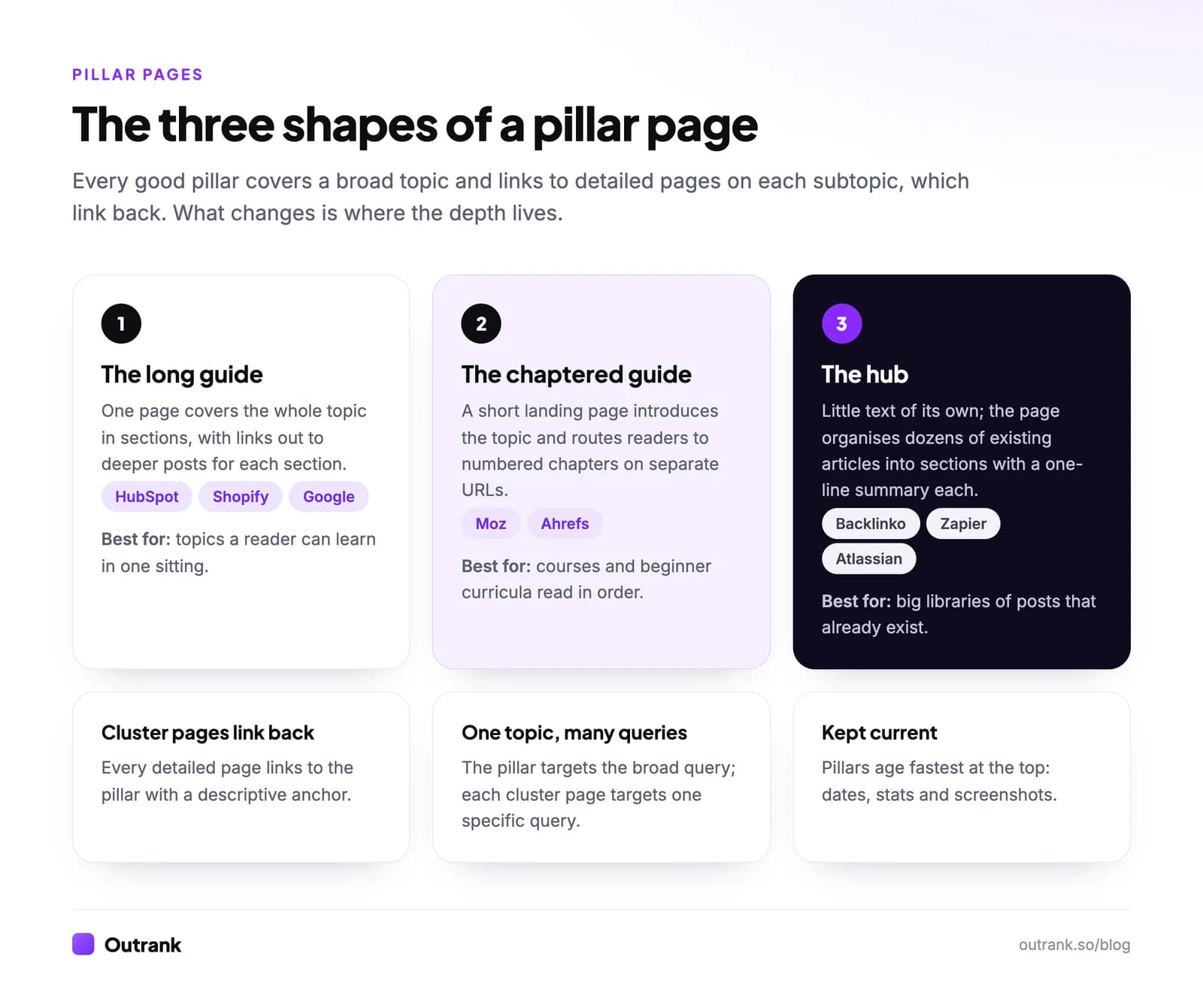
- The long guide puts the whole overview on one URL, organised into sections, and links out to deeper posts for each. It suits topics a reader can learn in one sitting and is easiest to rank for the broad query, because all the text is on the page. HubSpot, Shopify and Google use it.
- The chaptered guide keeps a short landing page that introduces the topic and routes readers to numbered chapters on separate URLs. It suits beginner curricula meant to be read in order. Moz and Ahrefs use it.
- The hub has little text of its own and organises dozens of existing articles into sections with a short summary each. It suits sites that already have a big library of posts on the topic. Backlinko, Zapier and Atlassian use it.
Whichever shape you choose, three rules hold: every cluster page links back to the pillar with a descriptive anchor, the pillar targets the broad query while each cluster page targets one specific query, and the pillar gets updated first when anything changes.
1. HubSpot: the content marketing guide (long guide)
HubSpot's content marketing guide is a single page of roughly 6,300 words with a chapter menu near the top: what content marketing is, statistics, types, SEO, social media, how it works, strategy, examples, traits of effective content marketing, resources and people to follow. It links to about 40 other pages on HubSpot's blog.
Worth copying: the guide doubles as a lead magnet without hiding the content. Five "Download Free" offers sit inside the guide (the first is a free editorial calendar template). And the first chapter opens with a one-sentence definition of content marketing, the line most likely to be quoted in a snippet or an AI answer.
2. Shopify: the ecommerce SEO guide (long guide)
Shopify's ecommerce SEO guide runs about 5,000 words under a named author, Shanelle Mullin, with an "On this page" menu and a 21-minute read time. Its H2s go from definition (what is ecommerce SEO?) to why it matters, how to build a strategy, tools, getting started and an FAQ, with more than 50 links to other Shopify pages.
Worth copying: the named author, the date and the jump menu, which together tell readers and search engines who wrote it and when. Worth avoiding: in October 2026, the title still read "The Industry Leading Ecommerce SEO Guide (2025)". A year in a title is a promise to keep it current; if you use one, put the pillar on a calendar.
3. Google: the SEO Starter Guide (long guide)
Google's SEO Starter Guide is a documentation pillar: about 4,100 words across 11 sections, from how Google Search works and how long it takes to see results to organising your site, images, video and promotion. It links to around 37 deeper documents in Google's Search Central docs, each of which is the "cluster page" for its section.
Worth copying: a section called "Things we believe you shouldn't focus on", which tackles myths head-on. A pillar that tells readers what to ignore saves them time and earns trust, and it's the kind of section competitors rarely write.
4. Moz: the Beginner's Guide to SEO (chaptered guide)
Moz's Beginner's Guide to SEO uses a landing page of about 1,100 words and nine linked chapters on their own URLs: a quick start guide, SEO 101, how search engines work, keyword research, on-page SEO, technical SEO, link building, measuring success and an SEO glossary.
Worth copying: a short section titled "How much of this guide do I need to read?", which sets expectations and then routes readers to the first chapter. It also points readers who want a guided course to Moz Academy's certification, a natural next step from a free guide to a paid product.
5. Ahrefs: SEO, the complete guide for beginners (chaptered guide)
Ahrefs' SEO guide is also chaptered: a landing page of about 1,000 words introducing "nine chapters researched, written, and reviewed by expert SEOs", from how search engines work and keyword research to link building, technical SEO, local SEO and what AI means for SEO. Next to the chapters sit an SEO book and an SEO glossary.
Worth copying: the chapter list evolves with the topic. A chapter on what AI means for SEO sits next to the classics, which keeps a "beginner's guide" relevant without rewriting it from scratch. The glossary is a second pillar in its own right, one short definition per term.
6. Backlinko: the SEO Marketing Hub (hub)
Backlinko's SEO Marketing Hub has only about 400 words of its own. It's organised into nine sections (SEO fundamentals, keyword research, content optimization, technical SEO, link building, user experience signals, SEO tools, advanced strategies and the SEOquake extension), each with a one-line "what you'll learn", a resource count and links to 4–7 guides, around 48 in total.
Worth copying: the resource count and the one-line promise per section. They turn a long list of links into a menu a reader can scan in seconds, and each guide lives under the same /hub/seo/ folder, which makes the cluster obvious from the URLs alone.
7. Zapier: the ultimate guide to remote work (hub)
Zapier's remote work guide is a hub of about 1,000 words that links to 76 Zapier blog articles. It opens with why Zapier is qualified to write it ("a 100% distributed company with over 800 teammates across 40 countries"), then splits its tips into seven categories, from teamwork and management to workspaces and tools.
Worth copying: the first sentence establishes first-hand experience, which is exactly the "Who" that Google's guidance on helpful content asks you to make clear. Then the categories let a manager and an employee each find their section without reading the other's.
8. Atlassian: What is Agile? (hub)
Atlassian's "What is Agile?" page is the front door to its Agile Coach. The page itself is about 1,300 words (the methodology, how Agile is changing with AI, why choose it, how to adapt frameworks, Atlassian's stance and an FAQ), but its navigation links to more than 200 pages under /agile/: Scrum, sprints, Kanban, user stories, estimation, project management and more.
Worth copying: the scale of the cluster behind one modest overview, and the folder structure that keeps it organised (/agile/scrum/, /agile/kanban/, /agile/project-management/). It's the clearest example on this list of a pillar built to own an entire subject, with pages like "Scrum in Jira and Confluence" connecting the topic to the product.
How to build your own pillar page
- Pick a topic broad enough for 10 or more subtopics that your buyers search for. Group your keyword list into clusters first (see keyword clustering); the biggest cluster is usually your pillar.
- Choose the shape. No existing posts on the topic: write a long guide. A course-like subject read in order: chapters. Twenty-plus posts already published: build a hub.
- Outline from the queries. Each H2 on the pillar answers one subtopic briefly and links to the page that covers it in depth. Write a one-sentence definition near the top, because that's what search snippets and AI assistants quote.
- Fill the gaps. Every subtopic without a cluster page is a content gap to brief and write. Our content brief template has the fields.
- Link both ways. The pillar links to every cluster page, and every cluster page links back with a descriptive anchor. Check it with how to find internal links to a page, and read why internal links matter if you need to convince anyone.
- Put it on a refresh schedule. Update statistics, screenshots and any year in the title at least once a year.
Building the cluster is the slow part: a pillar with ten subtopics needs ten good articles behind it. Outrank writes and publishes one SEO article a day on the long-tail keywords around your topic, with internal links between them, so the cluster around a pillar grows without a writing backlog. For longer single-page guides, see our long-form content examples.
FAQ
What is a pillar page?
A pillar page is a page that covers a broad topic at a high level and links to a set of detailed pages on each subtopic, which link back to it. The pillar and its linked pages form a topic cluster that shows readers and search engines how your content on a subject fits together.
What is the difference between a pillar page and a blog post?
A blog post usually answers one specific question in depth. A pillar page covers a whole topic at overview level and exists mainly to connect and route readers to the detailed posts on that topic. A pillar can be a long guide, but its job is structure as much as content.
How long should a pillar page be?
There's no fixed length. In our eight examples, the long guides ran 4,100 to 6,300 words, while the chaptered landing pages and hubs had 400 to 1,300 words of their own. Length depends on the shape: a hub can be short because the depth lives in its linked pages.
How many cluster pages does a pillar page need?
Enough to cover the subtopics people search for. The chaptered guides we looked at have 9 chapters each, and the hubs link to between 48 and more than 200 pages. Start with the subtopics that have real search demand and add more as you publish.
What is the difference between a pillar page and a landing page?
A landing page is built to get one action, like a sign-up or a purchase, and usually targets a commercial query. A pillar page is built to inform and route readers across a topic, targeting a broad informational query. A pillar can include calls to action, as HubSpot's downloads show, but conversion isn't its main job.