AI assistants read your website as text. When ChatGPT, Claude or Perplexity fetch a page, their crawlers take the raw HTML your server sends, throw away the layout and keep the words: headings, paragraphs, links, tables and image alt text. Most of them don't run JavaScript, so anything that only appears after scripts load, or only exists inside an image, never reaches the model.
So a page can look great to a person and say almost nothing to an AI. Below: what survives the trip, a 30-second way to see your own page the way an AI does, and a checklist to fix what's missing.
Key takeaways
- AI crawlers from OpenAI, Anthropic and Perplexity download your raw HTML and don't execute JavaScript, according to Vercel's analysis of crawler traffic. Google's Gemini is the exception because it uses Googlebot's rendering.
- Text inside images, screenshots and videos doesn't make it into the answer. Alt text and the words around the image do.
- When we ran Linear's homepage through a URL-to-Markdown converter, it came out as 543 words and 4 headings, with every product screenshot missing alt text.
- The test that matters: does the plain text say what you do, who it's for, what it costs and how you compare? If not, the AI guesses or quotes a competitor.
- In Outrank's study of 200 sites, 67% of sites with fewer than 50 Google-visible pages had zero AI citations. An AI can only quote text it can find.
What an AI crawler actually receives
An AI crawler is a bot that downloads web pages for an AI company, either to train models (GPTBot, ClaudeBot) or to answer a live question (OAI-SearchBot, ChatGPT-User, PerplexityBot, Claude-User). Whatever it downloads, the model ends up with text.
Vercel's study of AI crawler traffic found that OpenAI's crawlers, Anthropic's ClaudeBot and PerplexityBot download JavaScript files but never execute them. Gemini (which runs on Googlebot's infrastructure) and Applebot do render pages. For most assistants, then, your page is whatever the server sends before a single script runs.
Here is what survives:
| On your page | Reaches the AI? |
|---|---|
| Text in the HTML (headings, paragraphs, lists) | Yes |
| HTML tables | Yes, with rows and columns intact |
| Image alt text and captions | Yes |
| Text inside images, screenshots and logos | No |
| Content injected by JavaScript after load | No for ChatGPT, Claude and Perplexity crawlers; yes for Gemini |
| Tabs and accordions already in the HTML (hidden with CSS) | Yes |
| Tabs, "load more" sections and FAQs fetched on click | No |
| Video and audio without a transcript | No |
| Pricing shown only inside an interactive widget | Usually no |
What happened to Linear's homepage
Linear's homepage is one of the best-designed product pages on the web. In June 2026 we ran it through Outrank's URL to Markdown converter to see what an AI would get.
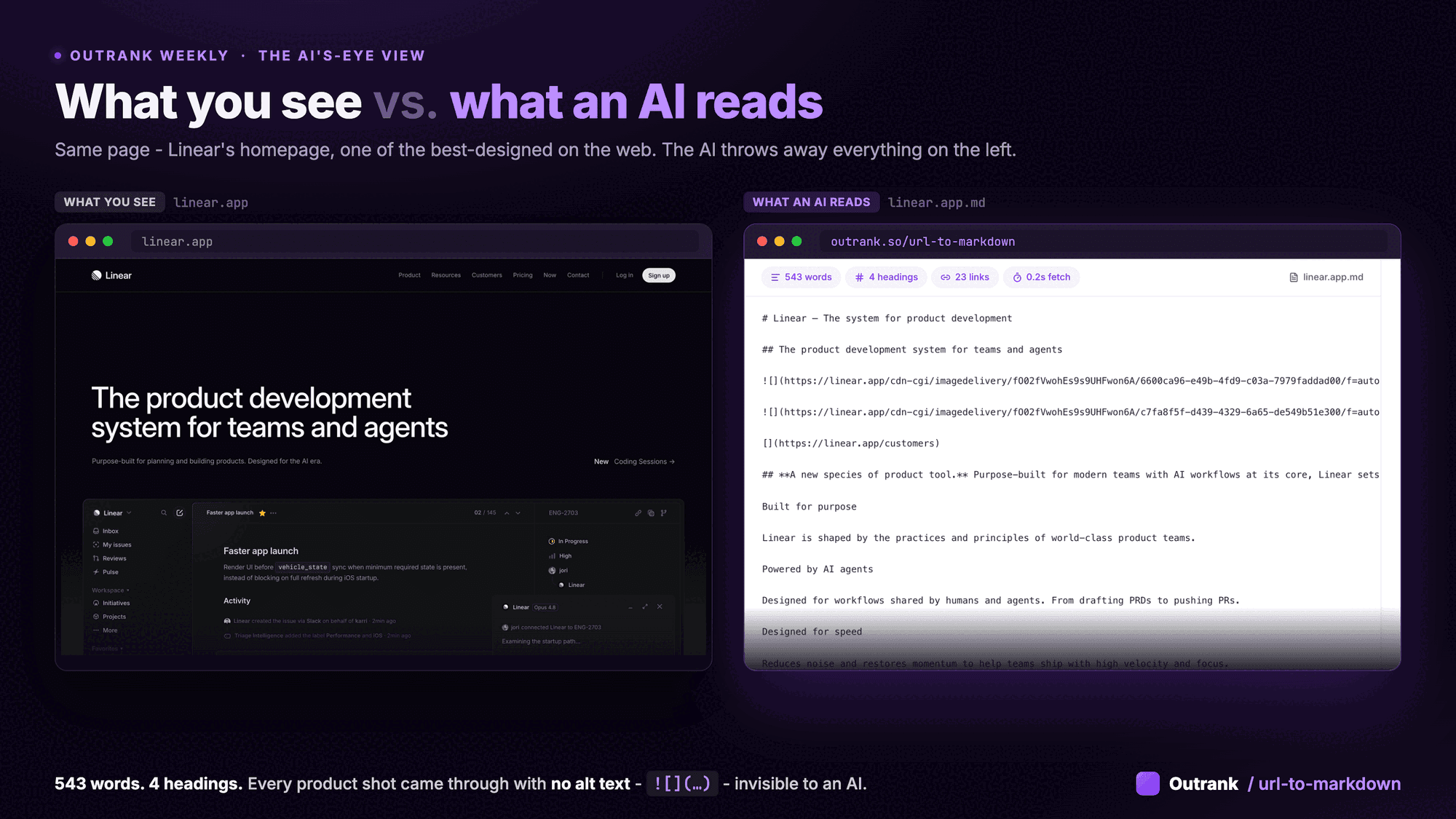
The result: 543 words, 4 headings, 23 links. The product screenshots that do most of the selling came through as , images with no alt text, which means nothing to a model. Most of the words that survived are taglines ("Built for purpose", "Designed for speed") that don't say what Linear does or who it's for.
Linear's design isn't the problem. A person fills the gaps from the logo, the screenshots and the polish. An AI has only the words. If the words don't say it, the model guesses, or it lifts the answer from a competitor's page that spelled it out.
See your page the way AI does (30 seconds)
- 1
Convert the URL to Markdown
Paste any URL into Outrank's free URL to Markdown converter. No signup. It strips navigation, scripts and styling and shows the clean text a model would read. - 2
Or switch off JavaScript
In Chrome, open DevTools, press Cmd+Shift+P (Ctrl+Shift+P on Windows), run Disable JavaScript and reload. What's left is close to what GPTBot and PerplexityBot receive. - 3
Or read the source
Press Ctrl+U (Cmd+Option+U on a Mac) to view the raw HTML, then search for your main claim, your price and your top FAQ answer. If they aren't in the source, most AI crawlers can't see them. - 4
Check which answer an AI would extract
Run the page through the free AI Page Inspector. It shows the answer an AI would pull from the page and where on the page that answer sits.
Then read the plain text and ask four questions:
- Does it say what you do, in the words a buyer would type?
- Does it say who it's for?
- Does it say what it costs, or at least how pricing works?
- Does it say how you compare with the alternatives?
Every "no" is a gap the AI will fill with a guess, or with someone else's page. This matters most on the pages AI reaches for when someone asks about you (we cover which pages those are in what ChatGPT reads when someone asks if you're any good).
How to fix a page AI can't read
The fix is boring and it works: put the facts into plain words, in the HTML, near the top of the page. Keep the design. Just stop relying on it to carry the message.
Interactive checklist
AI-readable page checklist
0/11
Is the content in the HTML?
0/3Does the text say what a buyer needs?
0/4Can a model lift a clean answer?
0/4Your progress is saved in this browser, so you can come back to it later.
Two related checks are worth five minutes each. Speed scores barely matter to these crawlers, but server response time does (see does page speed affect AI SEO). And if you want to go past readability to whether an agent can actually use your site, run the free grader in is your website ready for AI agents.
Why the words matter more than the design
AI assistants don't cite designs. They cite pages that state an answer. When we ran 96 questions through ChatGPT, Perplexity, Gemini and Claude, 74% of the sources they cited were blog content: listicles, guides and comparisons. In Outrank's study of AI citations across 200 sites, the strongest predictor of how often a site was cited was its Google impressions (Spearman correlation 0.80). Size mattered too: 67% of sites with fewer than 50 Google-visible pages had zero AI citations, while none of the 110 sites with 400 or more visible pages had zero.
That's a correlation, not proof. But the direction is clear: the more pages that plainly answer your buyers' questions, the more text an AI can find and quote. ChatGPT also rewrites the question before it searches, so those pages need to match the phrasing it actually uses (why ChatGPT skips your site shows how to see it).
Writing all those pages is the slow part. Outrank researches the questions your buyers ask, writes answer-first articles with plain-text headings, tables and FAQs, and publishes one a day to your CMS. How the page gets rendered still depends on your CMS, so run the checks above on what goes live.
FAQ
How does AI read a website?
An AI assistant sends a crawler that downloads the page's HTML and passes the text to the model: headings, paragraphs, links, tables and alt text. Layout, colors and images are discarded. The crawlers used by OpenAI, Anthropic and Perplexity don't run JavaScript, so content added by scripts after the page loads is usually missed.
Can ChatGPT read JavaScript content?
Not reliably. Vercel's analysis of crawler traffic found that OpenAI's crawlers fetch JavaScript files but don't execute them, so content rendered in the browser is invisible to them. Server-render or pre-render anything you want ChatGPT to see.
Can AI see the images on my website?
Treat images as invisible. What reaches an AI answer is the alt text and the text around the image, so describe screenshots in words and write real alt text. Some crawlers do download images (images were about 35% of Claude's crawler fetches in Vercel's data), but you can't count on a model reading text inside them.
How can I see my website the way ChatGPT sees it?
Paste the URL into a URL-to-Markdown converter such as Outrank's free one, or disable JavaScript in Chrome DevTools and reload the page. Either way you get roughly the plain text a crawler receives. Then check that your offer, audience, price and comparisons are stated in that text.
Does Google's AI read JavaScript?
Yes. Gemini runs on Googlebot's infrastructure, which renders JavaScript, and AI Overviews and AI Mode draw on Google's regular search index. Rendering is an extra step that can be delayed or fail, so server-rendered HTML is still the safer choice.