


Search engines blacklist two kinds of websites: sites that put visitors at risk (malware, phishing, scams, hacked pages) and sites that try to manipulate rankings (cloaking, sneaky redirects, doorway pages, scraped or mass-produced content, link schemes, keyword stuffing and thin affiliate pages). Google spells out every one of these in its spam policies, and says sites that violate them "may rank lower in results or not appear in results at all."
If you're answering this for a quiz, that first sentence is the answer. If you run a website, the more useful questions are which of these you could trip over by accident (hacked content is the big one), how to tell whether it's happened, and how to get back. That's what the rest of this page covers.
Key takeaways
- Google lists 16 named spam policies plus four other practices that can get a site demoted or removed, from cloaking to scam and fraud.
- "Blacklisted" can mean three different things: a manual action from a human reviewer, an automated demotion, or a Safe Browsing security warning.
- The most common way an honest site gets blacklisted is by being hacked. Google says training SpamBrain on hacked spam made its hacked-site detection 10 times better in 2022.
- Using AI isn't a violation in itself. Mass-producing pages that add no value is, however they're made (Google calls it scaled content abuse).
- Manual actions and security issues show up in Search Console, and reviews after you fix them usually take several days to weeks.
What "Blacklisted" Actually Means
A blacklisted website is one a search engine has removed from its results, pushed far down, or flagged as dangerous because it broke the engine's rules. Google doesn't use the word "blacklist" itself. In practice, it happens in three distinct ways, and you find and fix each one differently:
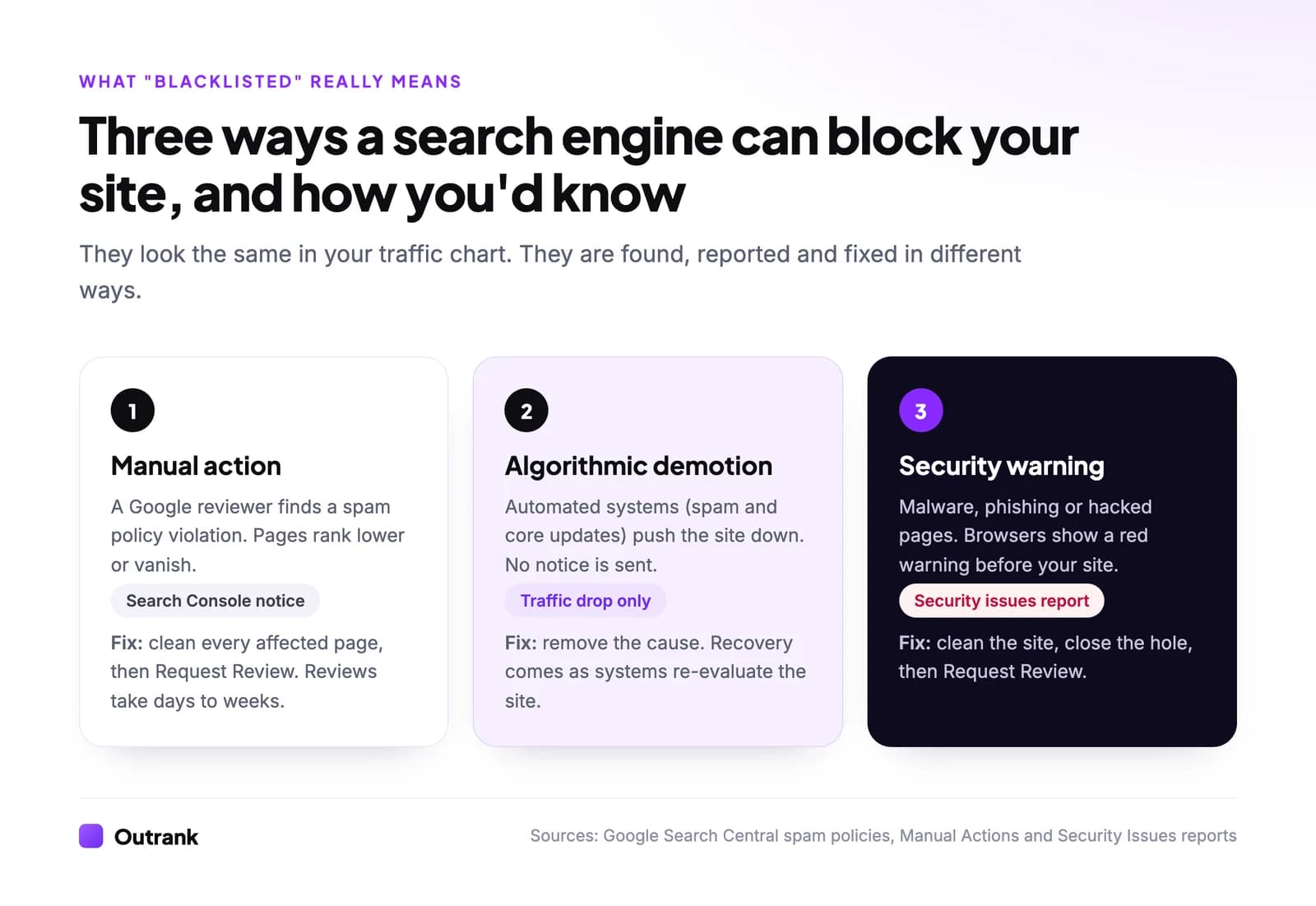
| Type | Who decides | What you see | Where to check |
|---|---|---|---|
| Manual action | A human reviewer at Google | Pages rank lower or disappear; a notice in Search Console | Manual actions report |
| Algorithmic demotion | Automated systems (SpamBrain, spam and core updates) | A traffic drop, usually with no notice | Search Console Performance report and the Search Status Dashboard |
| Security warning | Google Safe Browsing | A red warning page in the browser, warning labels in results | Security issues report |
There's also a fourth, rarer case: legal demotion. Google says that when a site receives a significant volume of valid copyright removal requests, it can demote other content from that site too, and it applies similar signals for defamation, counterfeit goods and court-ordered removals.
The Full List: Every Type of Website Google Penalizes
Here is every practice in Google's spam policies (last updated August 28, 2026), in plain English. Type in the filter box to find one, or sort by column.
Websites and practices that get blacklisted
| Hacked content | Injected code, pages, links or redirects added by an attacker through a security hole | ✓ |
| Malicious practices | Malware, unwanted software, or hijacking the back button so visitors can't leave | ✓ |
| User-generated spam | Spam posts, comments, profiles or uploads on forums and other open areas of your site | ✓ |
| Scam and fraud | Impostor sites, fake customer support, false information about a business | ✕ |
| Cloaking | Showing search engines different content from what visitors see | ✕ |
| Sneaky redirects | Sending visitors somewhere other than what they clicked, or redirecting only mobile users | ✕ |
| Doorway abuse | Many near-identical pages or domains built to rank for variations of a query and funnel visitors elsewhere | ✕ |
| Scaled content abuse | Mass-producing pages with little value, whether written by AI, templates or people | ✕ |
| Scraping | Republishing other sites' content, sometimes lightly reworded or translated, without adding value | ✕ |
| Thin affiliation | Affiliate pages that copy merchant descriptions and reviews with nothing original | ✕ |
| Link spam | Buying, selling or excessively swapping links, link networks, automated link building | ✕ |
| Keyword stuffing | Unnatural repetition of keywords, lists of cities or phone numbers | ✕ |
| Hidden text and link abuse | White text on white, text hidden off-screen, links on a single character | ✕ |
| Expired domain abuse | Buying an old domain to host low-value content that rides on its past reputation | ✕ |
| Site reputation abuse | Third-party content placed on a strong site mainly to borrow its ranking signals | ✕ |
| Misleading functionality | Fake tools or generators that promise a service and deliver ads instead | ✕ |
| Machine-generated traffic | Sending automated queries to Google or scraping its results without permission | ✕ |
| Policy circumvention | Moving violating content to new subdomains, folders or sites to dodge enforcement | ✕ |
| Legal removals | A large volume of valid copyright, defamation or counterfeit complaints | ✕ |
| Personal information removals | Many removal requests against a site with exploitative removal practices, doxxing or non-consensual imagery | ✕ |
Click a column header to sort.
Below are the eight types that site owners actually run into most, with what they look like and how to stay clear.
1. Hacked Websites (the One That Happens to Honest Sites)
A hacked site is one where an attacker has added content or code without the owner's permission, usually through an outdated plugin, a weak password or a vulnerable theme. Google's spam policies list three common forms:
- Code injection: malicious JavaScript slipped into your existing pages or iframes.
- Page injection: new spam or phishing pages added to your site, often in a folder you never look at.
- Content injection: hidden spam links or text added to real pages, sometimes visible only to search engines.
Google takes this seriously because hacked sites hurt searchers. In its 2022 webspam report, Google said training SpamBrain on hacked spam made its hacked-site detection 10 times better. The symptoms you'll notice: a "This site may be hacked" style label in results, Japanese or pharma keywords appearing in your Search Console queries, or pages in a site: search you never created. Attackers often use these pages for SEO poisoning, pushing malicious pages up for popular searches.
How to avoid it: update your CMS, plugins and themes, remove ones you don't use, turn on two-factor login for every admin, and keep backups you can restore from.
2. Malware, Phishing and Scam Sites
These are the sites search engines block hardest, because they cause direct harm. Google's malicious practices policy covers malware (software designed to harm a device or its user), unwanted software, and, as of its current policy, back button hijacking: manipulating browser history so visitors can't get back to where they came from. The separate scam and fraud policy covers impostor sites and fake customer support pages.
Enforcement happens on two fronts. In Search, these pages are demoted or removed. In the browser, Google Safe Browsing shows a full-page red warning before anyone reaches the site. Chrome uses it, and so do other browsers including Firefox.
Legitimate sites end up here mostly by accident: a hacked page serving malware, or a download file that turns out to bundle unwanted software. Google's malware guidance explains how to find and remove it. Anything on your site that asks for passwords or payment details should also run on HTTPS (see what an SSL certificate fixes).
3. Scraped and Mass-Produced Content Sites
Scraper sites copy other sites' content and republish it; scaled content sites generate huge numbers of pages that add little value. Google treats both as spam, and since its March 2024 update, "scaled content abuse" applies however the pages are made: AI, templates, spinning, translation or human writers.
Examples straight from Google's policy: using generative AI to produce many pages without adding value, scraping feeds or search results into pages, stitching together content from several sites, and spreading the same content across multiple sites to hide its scale. Google said the March 2024 changes left 45% less low-quality, unoriginal content in search results.
How to avoid it: every page should do something the existing results don't, whether that's original data, a first-hand test, a better example or a tool. Republishing with permission (syndication) is fine when you add a canonical tag pointing to the original. Our guide to content repurposing covers how to reuse content legitimately.
4. Link Farms and Link Schemes
Link spam is creating links to or from a site primarily to manipulate rankings. Google's examples include buying or selling links, exchanging goods or services for links, excessive "link to me and I'll link to you" swaps, automated link building, and private blog networks: groups of sites that exist mainly to link to each other or to a money site.
SpamBrain was retrained for this too: Google said it detected 50 times more link spam sites after the 2022 link spam update than after the previous one. Links caught this way stop passing any value, and a pattern of deliberate link buying can also earn an "unnatural links" manual action.
How to avoid it: earn links with content worth citing, mark paid or sponsored links with rel="sponsored" or rel="nofollow", and if you inherited a spammy link profile, use Google's disavow tool as a last resort. Our guide to building backlinks covers the methods that hold up.
5. Cloaking and Sneaky Redirects
Cloaking means showing search engines one thing and visitors another. Google's own example: a page about travel destinations for the crawler, discount drugs for the human. Sneaky redirects do the same with redirects, such as sending mobile visitors to a spam domain while desktop visitors see the normal page.
Both are severe violations because they deceive by design. They also show up on hacked sites, where the attacker cloaks spam so the owner never sees it.
How to avoid it: serve the same main content to Googlebot and to visitors. If your site relies on JavaScript, check what Google actually sees with the URL Inspection tool in Search Console (it replaced the old "Fetch as Google"). Legitimate redirects, like moving to a new domain or merging two pages, are fine.
6. Doorway Pages
Doorway pages are near-identical pages built to rank for slight variations of a query, which then funnel visitors to one destination. Classic example: 200 "plumber in [city]" pages with the city name swapped and nothing else changed, all pushing to the same contact form.
Google's examples also include multiple domains with slight URL variations, and pages that exist only to funnel visitors into the useful part of a site.
How to avoid it: a location or variation page is fine when it has something genuinely specific: real service areas, local reviews, prices, staff, photos or directions. If you can't say anything different about the city, don't make the page.
7. Keyword Stuffing and Hidden Text
Keyword stuffing is cramming a page with keywords or numbers, often as unnatural lists, to manipulate rankings. Google's examples include blocks of city names a page "wants to rank for", lists of phone numbers with no added value, and sentences that repeat the same phrase until they stop making sense.
Hidden text is its partner: white text on a white background, text positioned off-screen, font size set to zero, or a link hidden on a single hyphen. Normal design patterns like accordions and tabs are explicitly fine.
How to avoid it: write for the reader and use related terms naturally. Modern search engines understand synonyms and topics, which is what semantic SEO is built on.
8. Thin Affiliate Sites
A thin affiliate site publishes affiliate links alongside product descriptions and reviews copied from the merchant, with nothing original. Google notes that affiliate content distributed across a network of near-identical sites is a typical pattern.
Affiliate marketing itself is not a problem. Google's policy says plainly that not every affiliate site is thin, and that good ones add meaningful content or features.
How to avoid it: add what the merchant page can't: your own testing, photos, comparisons, pros and cons, and who should not buy the product.
The Newer Targets: Expired Domains and Site Reputation Abuse
Two policies added in March 2024 catch strategies that used to work:
- Expired domain abuse: buying a domain with a strong history (say, a former medical site) to host unrelated low-value content, such as casino reviews, that ranks on the old reputation. Google stresses that using an old domain for a new, original site is fine.
- Site reputation abuse: third-party content published on an established site mainly to borrow its ranking signals, like coupon or casino sections on a news site. The policy took effect on May 5, 2024.
How to Check If Your Site Is Blacklisted
Run through this list whenever traffic drops sharply. It takes about 15 minutes and separates a penalty from a normal ranking change.
Interactive checklist
Blacklist check
0/8
Is the site still in Google?
0/2Did Google tell you?
0/3Was it an update rather than a penalty?
0/3Your progress is saved in this browser, so you can come back to it later.
If none of those turn anything up, you probably aren't blacklisted. A gradual decline is more often a ranking or indexing issue; see our guide to fixing crawled but not indexed pages and the technical SEO audit checklist.
How to Get Your Site Back
The fix depends on which kind of block you have.
- 1
Find and fix every instance
Fix the problem on all affected pages, not a sample. For a hack, that means removing injected code and pages, closing the security hole and changing every password. For link spam, remove or nofollow the paid links and disavow the ones you can't remove. - 2
Request a review (manual actions and security issues only)
In the Manual actions or Security issues report, click Request Review. Explain the exact problem, what you changed, and the result. Google says most reviews take several days or weeks, link-related ones can take longer, and you shouldn't resubmit while one is pending. - 3
Wait for re-evaluation (algorithmic demotions)
There is no request button for automated demotions. Once the cause is fixed, recovery comes as Google's systems re-crawl and re-assess the site, which can take months and often lines up with later updates. - 4
Keep it from happening again
Keep software updated, moderate open areas like comments and forums, and review what gets published under your domain, including anything written by freelancers, partners or tools.
How Google Finds These Sites (by the Numbers)
Most enforcement is automated. Google's figures from its 2022 webspam report and the March 2024 update:
5×
more spam sites detected by SpamBrain in 2022 than in 2021
And 200× more than when it launched
99%+
of visits from Google Search were spam-free in 2022
According to Google
50%
fewer clicks on scam sites in 2022 than in 2021
45%
less low-quality, unoriginal content in results after March 2024
Google's figure once the rollout finished in April 2024
What About AI-Generated Content?
Using AI to write is not, by itself, a reason to be blacklisted. Google's guidance on AI-generated content (February 2023) says it rewards high-quality content however it's produced, and that using automation, including AI, with the primary purpose of manipulating rankings is what violates its spam policies. The scaled content abuse policy says the same from the other side: what matters is whether pages help people, not how they were made.
In practice, the line is volume without value. One well-researched article a day that answers a real search is a publishing schedule. Ten thousand templated pages a week that answer nothing is scaled content abuse. Outrank sits on the first side of that line: it publishes one article a day per site (30 a month by default), each built around a specific keyword with a real searcher behind it, and you can review drafts before they go live. If you're unsure where a page stands, ask the question at the heart of a search engine's primary goal: would a searcher stop searching after reading it?
FAQ
What kind of websites will the search engine blacklist?
Sites that harm users (malware, phishing, scams and hacked sites) and sites that manipulate rankings: cloaking, sneaky redirects, doorway pages, scraped or mass-produced low-value content, link schemes, keyword stuffing, hidden text and thin affiliate pages. Google lists all of them in its spam policies.
How do I know if my website is blacklisted by Google?
Search site:yourdomain.com to see whether your pages are still indexed, then check Search Console's Manual actions and Security issues reports. Google's Safe Browsing site status page shows whether browsers are warning visitors away from your domain.
How long does it take to get off a Google blacklist?
For manual actions and security issues, Google says most review requests take several days or weeks after you fix the problem and click Request Review. Algorithmic demotions have no review process; recovery comes as Google re-evaluates the site, which can take months.
Can a website be blacklisted without doing anything wrong?
Yes, usually through a hack: attackers inject spam pages, links or malware into a site the owner never checks. Spam posted in comments or forums can also cause problems. Keeping software updated and moderating user content prevents most of these cases.
Does Bing blacklist websites too?
Yes. Bing has its own webmaster guidelines and can demote or remove sites that use spam techniques, and Microsoft's browsers have their own malware and phishing protection. Check Bing Webmaster Tools alongside Google Search Console.
Will using AI content get my site blacklisted?
Not by itself. Google says it rewards helpful content however it is produced, and penalizes content mass-produced mainly to manipulate rankings. AI pages that add real value are fine; thousands of near-identical AI pages that answer nothing fall under scaled content abuse.


