


"SEO rich text" is used for two different things. Most often it means rich results (also called rich snippets): search listings with extras such as review stars, prices or recipe cooking times, which Google can generate from structured data on your page, usually JSON-LD code. In CMS platforms like Webflow, WordPress, Shopify and Contentful, it means rich text content: body copy formatted with headings, lists, links and images, which the CMS saves as HTML that search engines read. Both help search engines understand a page. Neither is a ranking factor by itself, and several rich result types, including FAQ rich results in May 2026, no longer appear at all.
Below: how the three terms that get mixed up relate to each other, which rich results Google still shows as of October 2026, a JSON-LD example, how to format CMS rich text so crawlers and AI systems can read it, and a checklist for both.
Key takeaways
- SEO rich text means either rich results (search listings with stars, prices or other extras, generated from structured data) or rich text content formatted in a CMS editor.
- Structured data makes a page eligible for rich results; it doesn't guarantee them. Google recommends JSON-LD because it's easiest to maintain.
- Google has retired many rich results: How-to in 2023, five types including course info and estimated salary in 2025, practice problem in January 2026 and FAQ on May 7, 2026.
- Where rich results show, they can lift clicks: Google reports Rotten Tomatoes measured a 25% higher CTR on pages with structured data, and Nestlé an 82% higher CTR for pages shown as rich results.
- For CMS rich text, what matters is the HTML it outputs: real H2 and H3 headings, real lists, descriptive anchor text on a-href links, and alt text on img elements.
Rich text, structured data and rich results: three different things
Most confusion about "SEO rich text" comes from three similar-sounding terms that sit at different layers of a page.
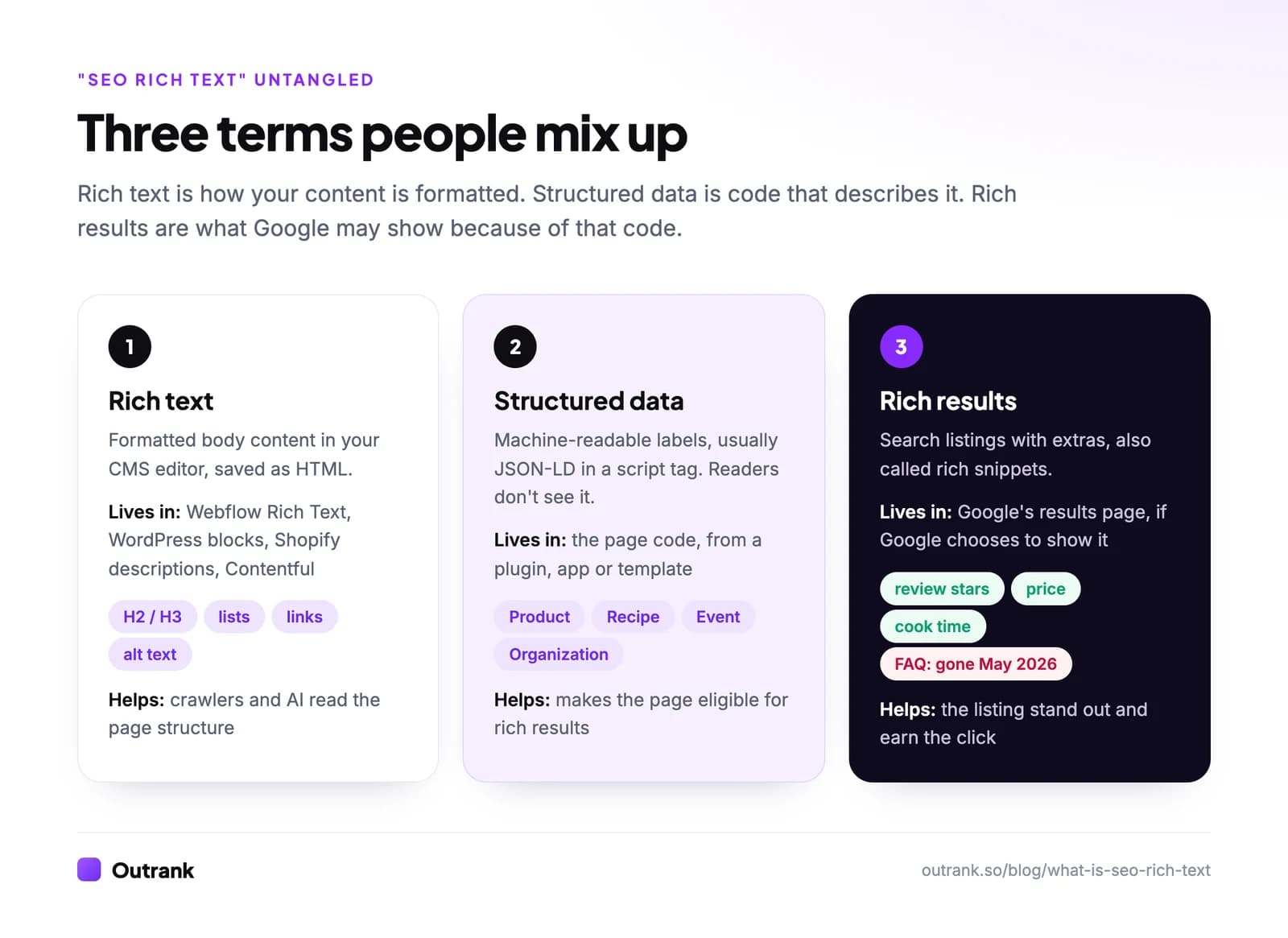
- Rich text is formatted content: what you type in a CMS editor with headings, bold, lists, links and images, as opposed to plain text. The CMS saves it as HTML, and that HTML is what crawlers read.
- Structured data is code that describes the page in a standard vocabulary (schema.org): "this is a product, its price is $49, its average rating is 4.6 from 212 reviews". Readers don't see it.
- Rich results are what Google may show in search because of that code: stars under the title, a price and stock status, a recipe's cooking time, an event's date.
If someone asks you to "add SEO rich text", ask which one they mean. A developer adding JSON-LD and a writer cleaning up heading levels are doing very different jobs.
Meaning 1: rich results and the structured data behind them
A rich result is a search listing enhanced with extra information pulled from structured data on the page. Google's documentation describes structured data as a standardized format for providing information about a page and classifying its content (Google).
Google supports three formats: JSON-LD, Microdata and RDFa. All three are equally fine for Google if valid, but Google recommends JSON-LD because it's the easiest to implement and maintain at scale. JSON-LD sits in a <script> tag instead of being woven through your HTML, so editors can change the content without breaking it.
Here is a minimal Product example with a review snippet:
<script type="application/ld+json">
{
  "@context": "https://schema.org",
  "@type": "Product",
  "name": "Trail Runner 3 Hiking Shoe",
  "image": "https://example.com/images/trail-runner-3.jpg",
  "brand": { "@type": "Brand", "name": "Example Outdoor" },
  "aggregateRating": {
    "@type": "AggregateRating",
    "ratingValue": "4.6",
    "reviewCount": "212"
  },
  "offers": {
    "@type": "Offer",
    "price": "129.00",
    "priceCurrency": "USD",
    "availability": "https://schema.org/InStock",
    "url": "https://example.com/trail-runner-3"
  }
}
</script>
Every value must match what the visitor sees on the page. Marking up a 4.6 rating that appears nowhere on the page, or reviews you wrote yourself, breaks Google's structured data guidelines and can lead to a manual action. Test every template with Google's Rich Results Test, then watch the enhancement reports in Search Console for errors after deployment.
Which rich results Google still shows (October 2026)
Google has been simplifying its results page, and the list of supported rich results is shorter than most older guides suggest. Based on Google's structured data search gallery and its documentation changelog as of October 2026:
| Structured data type | What it can show | Status, October 2026 |
|---|---|---|
| Product (product snippets, merchant listings) | Price, availability, ratings, shipping and returns | Supported |
| Review snippet | Star rating for products, recipes, books, movies, software, local businesses | Supported |
| Recipe | Image, rating, cooking time, calories | Supported |
| Event | Dates, location, ticket links | Supported (physical, publicly bookable events) |
| Local business | Hours, ratings, actions in the knowledge panel | Supported |
| Organization | Logo, contact details, identifiers in knowledge panels | Supported |
| Article, Breadcrumb, Video, Job posting, Discussion forum, Profile page, Software app | Various enhanced listings | Supported |
| FAQ | Expandable questions under the listing | Retired. Limited to government and health sites from August 2023, no longer shown at all from May 7, 2026 |
| How-to | Steps under the listing | Retired in September 2023 |
| Course info, estimated salary, learning video, special announcement, vehicle listing | Various | Retired in 2025 |
| Practice problem | Practice questions | Retired January 2026 |
Retired markup does no harm. When Google limited FAQ results in 2023, it said unused structured data causes no problems for Search (Google). You can leave it in place, but don't expect it to do anything in Google, and don't add new FAQ markup for a rich result that no longer exists.
Do rich results improve click-through rate?
Where they still appear, they can. In its own documentation, Google cites Rotten Tomatoes measuring a 25% higher CTR on 100,000 pages enhanced with structured data, the Food Network seeing a 35% increase in visits after enabling search features on 80% of its pages, and Nestlé measuring an 82% higher CTR for pages shown as rich results (Google). These are company-reported case studies chosen by Google, so treat them as best cases, not averages.
Two limits matter. First, structured data makes you eligible, not guaranteed: Google decides per query whether to show a rich result. Second, it isn't a ranking boost. Google's guide to optimizing for generative AI search adds that structured data isn't required to appear in AI Overviews or AI Mode and that no special markup exists for them, while still recommending it for rich result eligibility.
Meaning 2: rich text in your CMS
Rich text is the formatted content you create in a CMS editor. In Webflow it's the Rich Text element, which supports headings H1 to H6, ordered and unordered lists, images with captions and alt attributes, and custom code embeds, but no native tables (Webflow). In WordPress it's the block editor. In Shopify it's the editor for product descriptions and blog posts. In a headless CMS like Contentful, rich text is stored as structured JSON that your developers render into HTML.
Whatever the editor, search engines never see your editor. They see the HTML it outputs. That's where most rich text SEO problems hide:
- Fake headings. A bold, large paragraph looks like a heading but is a
<p>in the HTML. Use the editor's real H2 and H3 styles, in order, so the outline reflects the page's structure. Your template already renders the title as the H1, so body headings should start at H2. - Fake lists. Lines separated by manual line breaks aren't a list. Use the list button. Surfer found that 78% of Google AI Overviews contain an ordered or unordered list (Surfer), and a real list is far easier to lift than loose lines. (Our guide to getting featured snippets covers the formats.)
- Links that aren't links. Google generally only crawls links that are
<a>elements with anhrefattribute (Google). Buttons wired with JavaScript click handlers often aren't. Anchor text should describe the destination, which Google's same guide illustrates by contrasting descriptive anchors with "click here" and "read more". - Images without alt text, or as backgrounds. Google finds images in
<img>elements and doesn't index CSS background images (Google). Write alt text that describes the image in context, without stuffing keywords. - Text trapped in images. A table or chart pasted as a screenshot isn't text: it can't be matched to a query or quoted by an AI answer. Rebuild important tables as HTML, or describe the takeaway in the text next to the image.
- Pasted junk. Copying from Google Docs or Word can bring along empty headings, inline styles and stray spans. Paste as plain text, then format in the editor.
Perfect HTML isn't required. Google says the web is full of invalid HTML and it copes, but semantic HTML is still worth using because it helps screen readers and other parsers navigate the page (Google). To see what Google sees, open the page in Search Console's URL Inspection tool and click View crawled page → HTML.
Platform-specific help: Wix SEO, schema markup on Wix, publishing on WordPress and our comparison of the best CMS for SEO.
SEO rich text checklist
Run the first group on every article template and a sample of posts, and the second on every template that carries structured data. Your ticks are saved in your browser.
Interactive checklist
SEO rich text and rich results checklist
0/13
CMS rich text (formatted content)
0/8Structured data (rich results)
0/5Your progress is saved in this browser, so you can come back to it later.
Where Outrank fits
If you publish with Outrank, the rich text side is handled at the source: each article arrives in your CMS (WordPress, Webflow CMS collections, Shopify, Framer, Wix, Notion, Ghost or a webhook) with a real H2/H3 structure, internal and external links, an FAQ section and images, so it renders as clean HTML. Structured data depends on your site's template or SEO plugin, so check it with the Rich Results Test either way. For the bigger picture of how formatting, entities and markup work together, see our guide to semantic SEO.
FAQ
What is SEO rich text?
SEO rich text usually means rich results: search listings with extra details such as star ratings, prices or cooking times, which Google can show when a page has valid structured data. In CMS platforms it can also mean rich text content, the formatted body copy (headings, lists, links, images) that the CMS saves as HTML for search engines to read.
What is the difference between rich text and plain text for SEO?
Plain text has no structure. Rich text carries formatting that becomes HTML elements: headings, lists, links, emphasis and images. That structure helps search engines and AI systems understand which parts of a page matter and how they relate, and it makes passages easier to quote, but the words themselves still have to answer the query.
Are rich snippets a ranking factor?
No. Structured data and rich snippets don't boost rankings directly. They can make your listing more visible and more clickable where Google chooses to show them, which can increase traffic at the same ranking position. Google says structured data is also not required for its AI features.
How do I get rich snippets in Google?
Add structured data, ideally JSON-LD, for a type Google still supports (such as Product, Review snippet, Recipe, Event or Local business), make sure every value matches the visible page, and validate it with Google's Rich Results Test. Then request indexing in Search Console and monitor the enhancement reports. Google decides whether to show the rich result for each query.
Does FAQ schema still work in 2026?
Not for rich results in Google. Google limited FAQ rich results to well-known government and health sites in August 2023 and stopped showing them entirely on May 7, 2026. Existing FAQPage markup does no harm, and a visible FAQ section is still useful to readers and to AI systems that quote clear question-and-answer passages.
What is rich text in Webflow?
Webflow's Rich Text element is a field for long-form formatted content, typically bound to a CMS collection such as blog posts. It supports headings H1 to H6, lists, links, images with captions and alt text, and custom code embeds, but it has no native table element, so tables need an embed or a workaround.


