SEO for restaurants starts with the menu. Most diners don't search for a restaurant's name; they search for what they want to eat: "ramen near me", "gluten free pizza in [neighborhood]", "oysters happy hour", "vegan brunch". Google and AI assistants can only match your restaurant to those searches if your menu exists as readable text: a page on your own website listing every dish with a short description, dietary labels and prices, linked from your Google Business Profile and kept identical everywhere else.
This guide covers the menu side of restaurant SEO: which format to use, how to build a menu page, structured data, signature dish pages, photos and keeping every copy in sync. For the full strategy (Business Profile rules, reviews, listings and press), read our complete restaurant SEO guide.
Key takeaways
- Diners search for dishes, diets and occasions far more often than for restaurant names, so your menu is your keyword list.
- Publish the menu as text on your own website, one page per menu. PDFs and photos of menus are weaker for search and harder to use on a phone.
- Google's Business Profile rules require a full menu (not a "popular items" sample) and forbid linking the menu directly to a third-party ordering or delivery service.
- Add Restaurant structured data with your menu URL, servesCuisine and priceRange; schema.org's Menu and MenuItem types can describe the dishes themselves.
- Give a famous dish its own page or section, with its story, when it's available and real photos.
How diners search for food
Look at how people actually phrase restaurant searches:
- Dish + place: "birria tacos [city]", "best burger near me", "xiao long bao downtown".
- Diet or allergy: "gluten free restaurants near me", "vegan options [neighborhood]", "halal food near me".
- Occasion or time: "brunch with bottomless mimosas", "late night food", "happy hour oysters", "restaurants open on Christmas".
- Price: "cheap eats [neighborhood]", "prix fixe dinner [city]".
Every one of those searches is matched against text: your menu, your Business Profile, your reviews, your website. If your menu is a photo of a chalkboard, you've removed most of that text from the competition.
Which menu format should you use?
Here's how the common ways of publishing a menu compare for search and for diners:
Restaurant menu formats compared for SEO
| Text menu page on your website | Yes | Yes, edit like any page | Yes | Yes, if it lists the full menu |
| PDF on your website | Usually, if the PDF contains real text (not a scan) | No: re-export and re-upload each change | Poorly: zooming and downloads | Yes, if complete |
| Photo or scan of the printed menu | Not reliably | No | Poorly | Yes, if complete, but weak |
| Menu widget loaded in an iframe from a provider | Not reliably as part of your page | Yes | Depends on the widget | Yes, if it's on your page and complete |
| Third-party ordering or delivery page | Yes, but it ranks for them, not you | Managed on their platform | Yes | No: direct links aren't allowed |
| Instagram or Facebook post | Only as a social post, not on your site | Easy to post, hard to keep current | Yes | No: not a full menu page |
Click a column header to sort.
The verdict is clear: a text menu on your own site wins on every column. If you use a restaurant website platform, check that its menu module outputs real text rather than images.
Joe's Stone Crab in Miami Beach is a good example. Its menus page, built on a restaurant website platform, lists every section (stone crabs, starters, sides, main courses, dessert) as text, with descriptions and prices, plus useful facts diners search for, such as the Florida stone crab season dates. The site also has a separate take-away menu and marks up the restaurant as a food establishment with a reservation action.
Build a menu page Google and diners can read
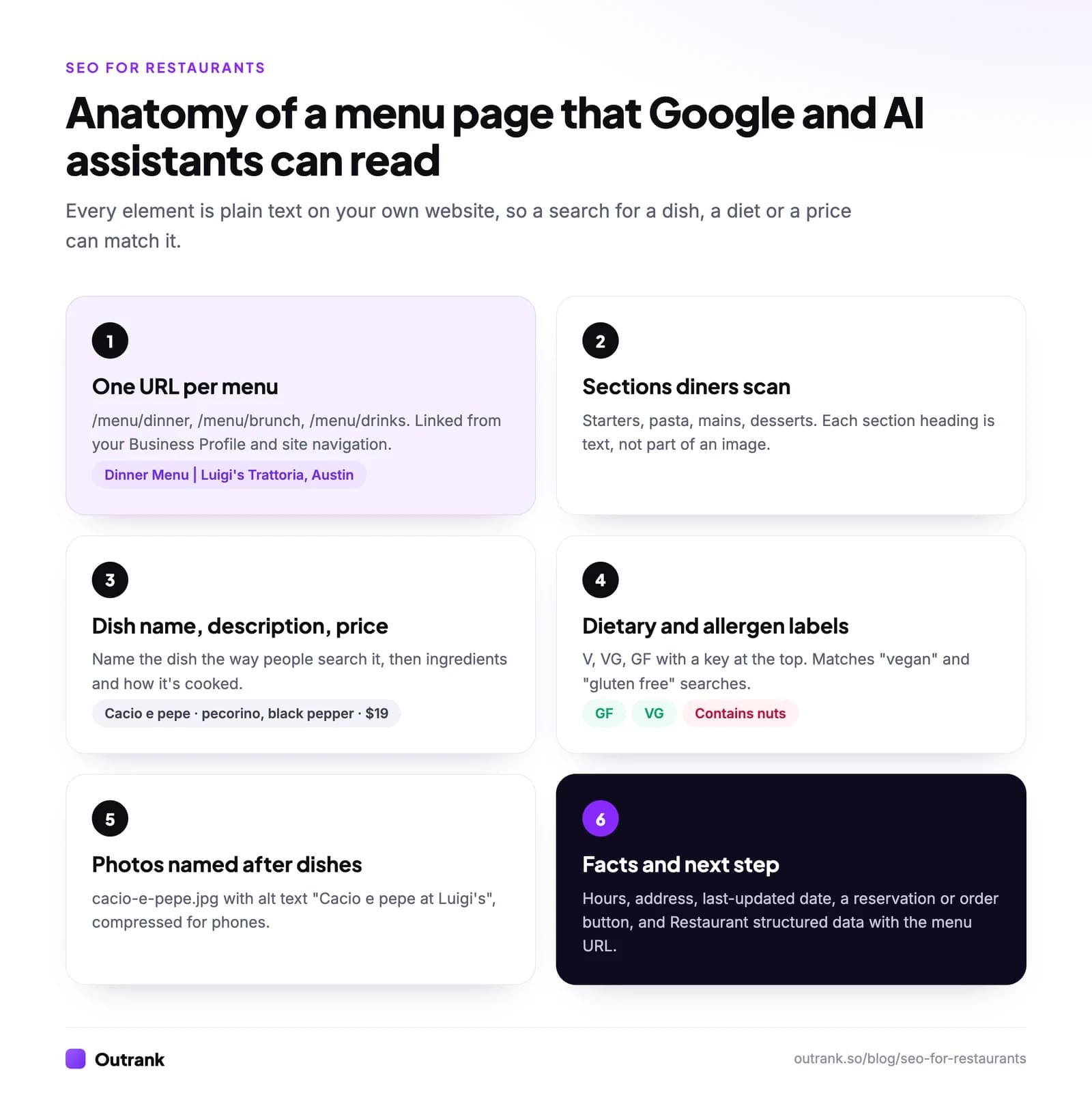
- One URL per menu. /menu/dinner, /menu/brunch, /menu/drinks. Google's guidelines explicitly allow meal-specific menus that link to each other. Give each a title like "Dinner Menu | [Restaurant], [City]".
- Sections as text. Starters, mains, desserts, drinks: real headings, not part of an image.
- Dish names the way people search them, then a short description of ingredients and preparation. "Cacio e pepe: pecorino, black pepper, house-made tonnarelli" matches more searches than a clever name alone. Keep the clever name if you like it; add the plain one.
- Dietary and allergen labels with a key at the top (V, VG, GF, contains nuts). These match some of the most specific searches diners make, so make sure they're accurate.
- Prices. Diners use them to decide before they come, and searches like "cheap eats" or "prix fixe" depend on them.
- Hours, address, a reservation or order button, and a "last updated" date.
Franklin Barbecue in Austin does the essentials well on a short page: hours stated plainly (lunch Tuesday to Sunday from 11 a.m. until sold out, closed Monday), a link to its preordering system, a note on sourcing (USDA Prime brisket), and every meat, sandwich and side listed as text with prices by the pound or portion.
If you're part of a chain with 20 or more locations operating under the same name, the FDA's menu labeling requirements also require calorie information on menus and menu boards, so keep your website menus consistent with them.
Structured data for restaurants and menus
Structured data tells search engines what each part of your page is. For a restaurant, Google's local business documentation supports these properties on a Restaurant:
menu: the full URL of your menu page.servesCuisine: for example "Italian" or "Sichuan".priceRange: "$$" or "$20–40" (under 100 characters, or Google won't show it).openingHoursSpecification: including seasonal closures with start and end dates.- Name, address, phone, geo coordinates and URL, matching your Business Profile.
Schema.org also has Menu, MenuSection and MenuItem types (and hasMenu on a Restaurant) for describing the dishes themselves. Google doesn't list a menu rich result, so don't expect the markup to change how your result looks; use it to make the dishes unambiguous to any system reading the page. And don't mark up your own reviews: Google recommends the review property only for sites that capture reviews about other businesses.
Most restaurant website platforms add basic Restaurant markup automatically. Check yours with Google's Rich Results Test, and make sure the menu URL and hours are filled in.
Signature dish pages
When one dish is the reason people come, give it its own page or a substantial section: "Stone crabs at [Restaurant]", "Our brisket". Include:
- The story: where the recipe comes from, how it's made, how long it takes.
- Sourcing: the farm, the cut, the grade, the catch.
- When it's available: seasons, days of the week, how early it sells out.
- Real photos, named after the dish.
- Links to the menu, reservations and the location page.
These pages can rank for "[dish] in [city]" searches, which are often more valuable than generic "restaurants near me" ones, and they're exactly what local food writers link to.
Photos that match the menu
Diners eat with their eyes first, and both your website and your Business Profile need photos that match what's actually on the menu:
- Name files after the dish ("birria-tacos.jpg", not "IMG_4412.jpg") and write alt text that says what's in the photo. Our guide to naming images for SEO covers the conventions.
- Compress them. Food photos are large, and Google's Core Web Vitals guidance calls loading good when the main content appears within 2.5 seconds. See how to optimize images for the web.
- Upload the same dishes to your Business Profile, and replace photos of dishes you no longer serve.
Menus and AI assistants
When someone asks ChatGPT or Google's AI Mode "where can I get good vegan ramen near [place]?", the answer is built from text the AI can find and trust: menus, reviews, listings and articles. BrightLocal's Local Consumer Review Survey 2026 found that 45% of US consumers now use ChatGPT or similar tools for local recommendations, up from 6% the year before.
A text menu with dish names and dietary labels is the easiest way to give AI assistants something specific to match. Consistent details everywhere (hours, price range, address) stop them from hedging or picking a competitor. For how these systems read a site, see how AI reads your website.
Keep every copy of the menu in sync
Your menu lives in more places than you think: your website, your Business Profile, Yelp, Tripadvisor, your reservation platform, every delivery app, and your social profiles. When prices or dishes change in one place and not the others, diners notice, and the mismatch often ends up in a review.
- Make your website the master copy and update it first.
- Update the Business Profile and delivery apps the same day.
- Check every platform monthly, especially after seasonal menu changes.
- Date your menus ("Updated October 2026") so diners and staff know which is current.
If you run a restaurant group or a food brand with a content team, the same discipline applies to articles and guides. Outrank can research and publish those articles every day and link them to your menu and location pages, but the menu itself is something only you can keep accurate.
FAQ
Should my restaurant menu be a PDF?
Ideally not. A PDF can be read by search engines if it contains real text, but it's hard to read on a phone, easy to let go out of date, and sits outside your site's navigation. A text menu page on your own website is better for diners, Google and AI assistants. If you keep a PDF for printing, link it from the text page.
How do I add my menu to Google?
Link your full menu page in your Google Business Profile. Google's guidelines require the menu to list the complete set of food and drink items (not a "popular items" sample), allow separate breakfast, lunch and dinner menus, and don't allow the menu link to point directly to a third-party ordering or delivery service.
Does menu schema markup help restaurant SEO?
It helps search engines understand your page, but don't expect a visual change in results. Google supports the menu URL, cuisine, price range and hours on Restaurant markup, and schema.org's Menu and MenuItem types can describe individual dishes. Google doesn't currently offer a menu rich result.
How can my restaurant rank for "best [dish] near me"?
List the dish by its common name on a text menu page, give it a short description, add dish photos to your website and Business Profile, and earn reviews that mention it naturally (without asking guests to name it, which Google's policy forbids). A dedicated page for a signature dish helps most.
Do restaurants need a blog for SEO?
A single restaurant usually doesn't. Menus, dish pages, location pages, events and a few useful guides do more. Restaurant groups and food brands that compete for broader searches (recipes, guides, catering) are the ones that benefit from regular articles; our guide to content marketing for small business covers how to start.