An enterprise content management (ECM) solution is software that captures, stores, organises, secures and routes an organisation's documents and records through their whole life, from the moment an invoice or contract arrives to the day it's legally safe to delete. Widely used platforms include Microsoft SharePoint, OpenText Content Management, Hyland (OnBase, Alfresco, Nuxeo), IBM FileNet, M-Files, Laserfiche and Box.
The right one depends less on feature lists than on three things: where your documents already live (Microsoft 365, SAP, Salesforce), which processes you need to automate first, and how strict your retention and compliance rules are. This guide explains what ECM does, walks through a real ECM workflow, compares seven platforms on what they actually publish, and gives you a requirements template to take into vendor demos.
Key takeaways
- ECM is a strategy plus software for capturing, managing, storing, preserving and delivering an organisation's documents. AIIM, the industry association, calls it "a dynamic combination of strategies, methods, and tools".
- Most ECM vendors don't publish prices. Of the seven platforms we checked in October 2026, Laserfiche, M-Files and Box show prices; OpenText, Hyland and IBM ask you to contact sales.
- Published prices leave out implementation. Laserfiche's pricing page says so explicitly, so budget for migration, configuration and training separately.
- Start with two or three workflows (invoice approval, contract review, employee onboarding), not with the whole company's file shares.
- For marketing teams, enterprise content is a different problem. Publishing SEO articles or campaign assets at scale needs content automation, a CMS or a DAM, not an ECM.
What is an enterprise content management solution?
An enterprise content management solution is a system that manages an organisation's unstructured information (documents, scans, emails, forms, records) with metadata, version control, access rules, automated workflows and retention policies, so the right people can find and act on the right version and nothing is kept longer or deleted sooner than the rules allow.
AIIM, the information management association, describes ECM as "the systematic collection and organization of information that is to be used by a designated audience" and stresses that it's a strategy, not a single technology. In practice, buyers use ECM, "content services platform" and "document management" almost interchangeably, so it helps to know where the lines are:
| System | Manages | Typical example |
|---|---|---|
| ECM / content services platform | All business documents and records across departments, with workflow and retention | Invoices, contracts, HR files, policies, case files |
| Document management system (DMS) | Storing, versioning and finding documents, usually for one team or use case | A legal team's matter files |
| Web content management system (CMS) | Pages published on a website | WordPress, Webflow, a headless CMS |
| Digital asset management (DAM) | Brand and media files | Logos, product photos, videos |
An ECM usually includes a DMS. It doesn't replace your website CMS or your DAM; those manage content for customers, while ECM manages content for operations and compliance.
The five things an ECM system does
AIIM's classic definition breaks ECM into five jobs: capture, manage, store, preserve and deliver content related to organisational processes. Each maps to features you'll see in every demo:
- Capture. Getting content in: scanning paper, importing email attachments, uploading files, filling in web forms. Modern platforms add OCR and AI extraction that read fields (supplier, amount, due date) from documents automatically.
- Manage. Metadata, version control, check-in and check-out, permissions, search and workflow. This is where most of the day-to-day value sits.
- Store. Repositories in the cloud, on your own servers or both, often connected to the file shares and apps you already use.
- Preserve. Records management: retention schedules, legal holds, audit trails and secure disposal when the retention period ends.
- Deliver. Getting content to people and systems: search results, portals for customers or suppliers, integrations with ERP and CRM, exports.
When you compare platforms, ask to see each of the five on your own documents, not on the vendor's demo data.
How an ECM workflow works: an invoice example
An enterprise content management workflow is a set of automated steps that moves a document from arrival to final storage, assigning tasks and applying rules along the way. Accounts payable is the classic first project, because the steps are clear and every delay costs money.
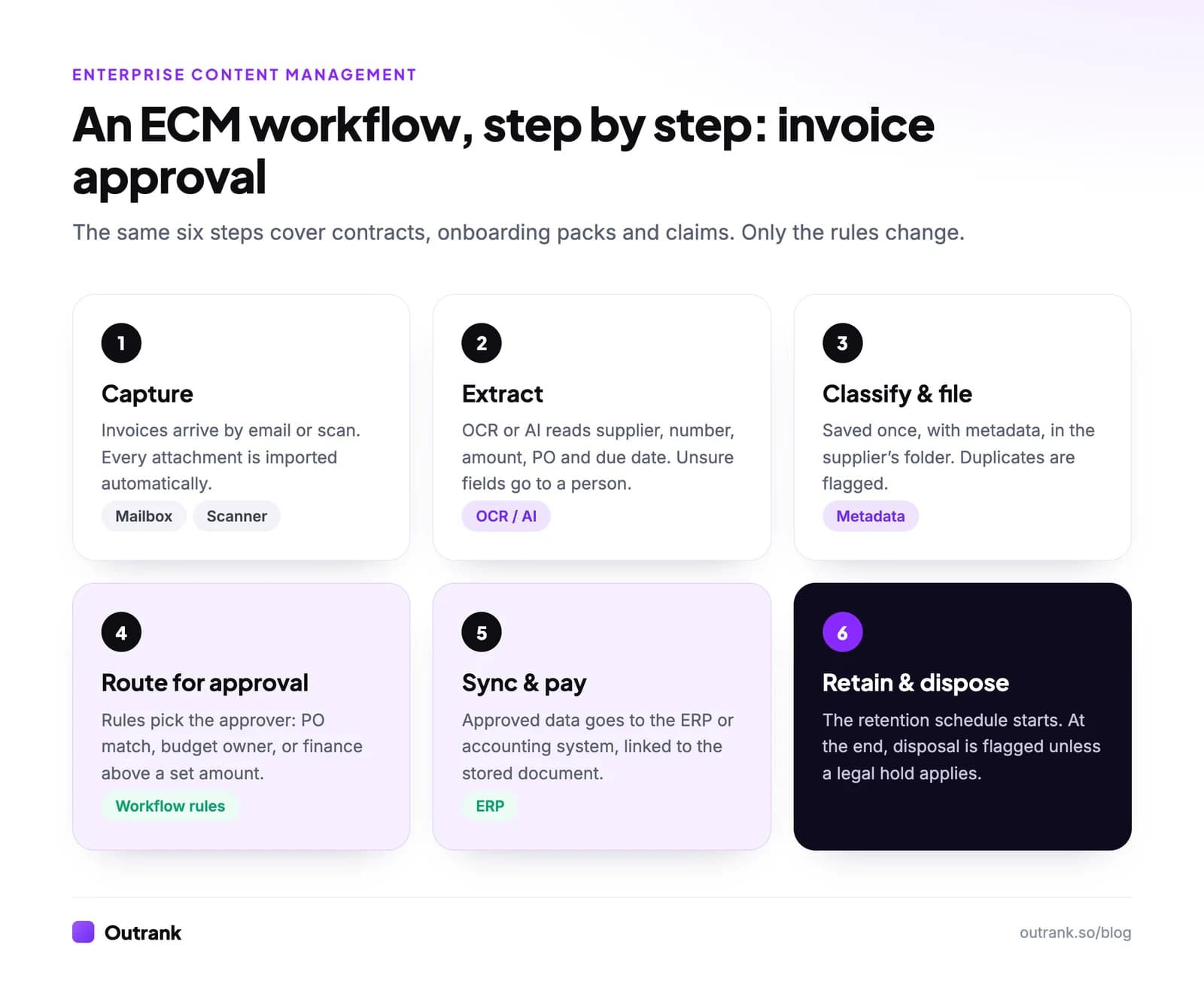
- 1
Capture
Invoices arrive in a shared mailbox or are scanned in the mailroom. The ECM imports every attachment automatically. - 2
Extract
OCR or AI extraction reads the supplier, invoice number, amount, PO number and due date. Low-confidence fields go to a person to check. - 3
Classify and file
The invoice is saved once, with metadata, in the right supplier folder. Duplicates (same supplier and invoice number) are flagged. - 4
Route for approval
Rules decide who approves. For example, invoices matching a PO go straight to payment, others go to the budget owner, and anything above a set amount also goes to finance. - 5
Sync and pay
Approved invoices and their data are pushed to the ERP or accounting system for payment, with a link back to the stored document. - 6
Retain and dispose
The retention schedule for financial records starts. When it ends, the system flags the invoice for disposal unless a legal hold applies.
The same pattern (capture, extract, file, route, sync, retain) covers contract approval, employee onboarding packs, claims processing and quality documents. Once one workflow runs well, the next one is mostly configuration.
7 ECM platforms compared
The platforms below are widely used for enterprise content management. Prices are what each vendor published on its own site when we checked in October 2026; "by quote" means you have to contact sales.
Enterprise content management platforms (October 2026)
| Laserfiche | Professional $73/user/month billed annually (from 5 users); Business $93 (from 25 users); Business+ $42 (from 500 users) | Forms and process automation; records management and audit trail included in Business and Business+ | Mid-size organisations that want published pricing and built-in forms |
| M-Files | Essentials €65 per seat per month; Enterprise by quote | Metadata-driven document management with Microsoft 365, Teams and Copilot integration | Microsoft 365 shops that want documents organised by what they are, not where they're saved |
| Box | From $5 per user per month, minimum 3 users; Enterprise Advanced by quote | Cloud content management with unlimited storage on Business plans and above | Collaboration with external partners and replacing file servers |
| OpenText Content Management | By quote (Express, Premium and Ultimate tiers) | Integrates content with SAP, Salesforce, Microsoft and Guidewire | Large enterprises with SAP or Salesforce at the centre |
| Hyland (OnBase, Alfresco, Nuxeo, Perceptive Content) | By quote | Several content platforms, from low-code OnBase to the Alfresco and Nuxeo platforms | Regulated industries such as healthcare, insurance and government |
| IBM FileNet Content Manager | By quote | A cloud-native, AI-powered content services solution | Large organisations already running IBM automation software |
| Microsoft SharePoint | Included in Microsoft 365 business and enterprise plans | Team sites, document libraries and versioning inside Microsoft 365 | Organisations on Microsoft 365 with straightforward document needs |
Click a column header to sort.
Two patterns stand out. First, the platforms built around one ecosystem (SharePoint and M-Files for Microsoft 365, OpenText for SAP) are easiest to justify when that ecosystem already runs your business. Second, transparent pricing is the exception: only three of the seven publish numbers, and even those exclude services. Laserfiche's pricing page states that pricing "excludes professional services and implementation fees", which is true of every vendor here.
Cloud vs on-premises ECM
Cloud enterprise content management means the vendor hosts and maintains the system and you pay a subscription. On-premises means you run it on your own servers. Most vendors above now lead with cloud (IBM, for example, describes FileNet as "fully redesigned, rebuilt and optimized for cloud-native deployment"), and many still support hybrid setups for content that must stay in a specific location.
| Cloud ECM | On-premises ECM | |
|---|---|---|
| Setup | Faster; no servers to provision | Slower; hardware, installation, upgrades |
| Cost model | Per-user subscription | Licences plus infrastructure and IT staff |
| Updates | Continuous, managed by the vendor | Scheduled by your IT team |
| Data location | Vendor's regions; check residency options | Fully under your control |
| Good when | You want speed and less IT overhead | Regulation or contracts require local hosting |
ECM requirements template (copy this)
Before you book demos, write your requirements down. Vendors are good at showing what their product does well; this template makes them show what you need. Copy it into a doc and fill in each line.
ECM REQUIREMENTS

1. SCOPE
   Departments in scope (first phase): [ ]
   Number of users: internal [ ] · external (suppliers, clients) [ ]
   Document volume: existing [ ] · new per month [ ]

2. FIRST WORKFLOWS TO AUTOMATE (pick 2-3)
   [e.g. invoice approval, contract review, employee onboarding]
   For each: steps, approvers, rules, systems it touches

3. CAPTURE
   Sources: email [ ] · scanners [ ] · uploads [ ] · web forms [ ] · other apps [ ]
   OCR / AI extraction needed for: [document types and fields]

4. INTEGRATIONS (must-have vs nice-to-have)
   Microsoft 365 / Google Workspace [ ] · ERP [ ] · CRM [ ] · HR system [ ] · e-signature [ ]

5. RECORDS AND COMPLIANCE
   Retention schedules by document type: [ ]
   Legal hold · audit trail · secure disposal: [required?]
   Regulations and standards that apply to us: [ ]
   Data residency requirements: [ ]

6. SECURITY
   SSO / MFA [ ] · role-based permissions [ ] · encryption [ ] · external sharing rules [ ]

7. DEPLOYMENT
   Cloud / on-premises / hybrid: [ ]

8. MIGRATION
   Where documents live today: [file shares, old DMS, email]
   What moves, what is archived, what is deleted: [ ]

9. BUDGET AND TEAM
   Licence budget per year: [ ] · implementation budget: [ ]
   Who administers it after launch: [ ]

10. DEMO SCRIPT
    Ask every vendor to run workflow #1 end to end with 10 of our real documents.
Line 10 is the one that separates vendors fastest. A platform that needs weeks of services work to run your simplest workflow will need months for the rest.
Enterprise content management examples by department
| Department | Content | What ECM automates |
|---|---|---|
| Finance | Invoices, receipts, statements | Capture, approval routing, ERP sync, retention |
| Legal | Contracts, NDAs, matter files | Version control, review and signature routing, renewal alerts, legal holds |
| HR | Employee files, onboarding forms, policies | Onboarding packs, access by role, retention after employees leave |
| Operations and quality | Procedures, work instructions, audit evidence | Controlled versions, review cycles, sign-off records |
| Customer service | Claims, case files, correspondence | Case folders, routing by case type, customer portals |
"Enterprise content" for marketing: a different category
Some searches for enterprise content automation, content workflow solutions or the "content supply chain" come from marketing teams, not records managers. Their problem is producing and publishing content (articles, landing pages, campaign assets) at volume, with review steps and brand control. An ECM system isn't built for that; the tools are a CMS for publishing, a DAM for assets, a workflow tool for approvals and content automation for production.
For SEO content specifically, Outrank automates the production line: it picks keywords a site can rank for, writes a long-form article each day with images, internal links and FAQ, and publishes it to WordPress, Webflow, Shopify, Wix, Framer, Notion, Ghost, Next.js or a webhook. In the 90 days to October 2026 it produced 200,871 articles for 4,348 websites. Teams running many sites can use volume pricing for agencies. For the workflow side, see our guides to content automation, the content creation workflow, content management strategy and scaling content marketing.
FAQ
What is an ECM solution?
An ECM (enterprise content management) solution is software that captures, organises, stores, secures and routes an organisation's documents and records through their full lifecycle. It combines document management, workflow automation, search, integrations and records management, so the right people find the right version and retention rules are applied automatically.
What is the difference between ECM and a document management system?
A document management system stores, versions and retrieves documents, often for one team. ECM is broader: it includes document management but adds capture, workflow automation, records management and integrations across departments. Many vendors now sell both under the name "content services platform".
What are examples of ECM software?
Widely used ECM platforms include Microsoft SharePoint, OpenText Content Management (Extended ECM), Hyland OnBase, Alfresco and Nuxeo, IBM FileNet Content Manager, M-Files, Laserfiche and Box. Which fits best depends mostly on your existing systems, the workflows you need and your compliance requirements.
How much does an ECM solution cost?
Few vendors publish prices. As of October 2026, Laserfiche lists $73 per user per month billed annually for its Professional plan (from five users), M-Files lists €65 per seat per month for Essentials, and Box starts from $5 per user per month with a three-user minimum. OpenText, Hyland and IBM quote on request. Implementation, migration and training are extra.
Is cloud ECM secure enough for regulated industries?
Often, yes, but check rather than assume. Ask each vendor for its security certifications, where your data will be stored, how encryption and access controls work, and whether it supports the retention and legal hold rules your regulators require. Some organisations still choose on-premises or hybrid deployment for specific records.