


Programmatic SEO in Webflow works like this: each page is one item in a CMS collection, you design the collection's template page once, and you bind the H1, body blocks, title tag, meta description, Open Graph image and JSON-LD to collection fields. A sync tool (Whalesync, Make, Zapier) or the Webflow CMS API keeps the collection in step with Airtable or Google Sheets, so adding a row adds a page. As of October 2026, Webflow's Premium site plan holds up to 20,000 CMS items, which comfortably covers a few hundred to a few thousand programmatic pages, but not 50,000.
Below: whether Webflow is the right CMS for your project, the limits that shape it, a calculator for your CMS item budget, and the exact settings that make content flow into SEO metadata and structured data automatically.
Key takeaways
- One CMS item = one page. Bind the title tag, meta description, Open Graph and head custom code on the Collection template to fields, and every item gets its own metadata.
- Webflow's Premium site plan caps you at 20,000 CMS items and 40 collections, with a CMS API limit of 120 requests per minute (Webflow pricing, October 2026). Count blog posts and reference collections in that budget too.
- A Collection list shows at most 100 items, and non-Enterprise pages can hold 20 Collection lists, so plan hub pages with pagination.
- Do the math and the cleaning in Airtable or Sheets (formula fields, length checks, a publish checkbox). Webflow's CMS stores values; it doesn't compute them.
- Publish thin rows as drafts, not pages. Launch 20 to 50 items first and check indexing in Search Console before syncing the rest.
Is Webflow a good CMS for programmatic SEO?
Yes, for the right size of project. Webflow gives you a visual template designer, field binding for every SEO setting, and clean markup without plugins. Its limit is volume: a hard ceiling on CMS items per site. Here is how it compares with the other common choices for programmatic landing pages:
| Webflow | WordPress | Headless (Next.js + database) | |
|---|---|---|---|
| Page capacity | 20,000 CMS items on Premium (more on Team/Enterprise) | No hard limit; depends on hosting and database | No CMS limit; depends on build and hosting |
| Template building | Visual, no code | Theme template + custom fields (ACF), some PHP or a page builder | Code (React components) |
| SEO fields per page | Native binding to collection fields | Rank Math or Yoast variables, or custom fields | Whatever you code |
| Getting data in | CSV import, Whalesync, Make, Zapier, CMS API | CSV via WP All Import, REST API | Direct from your database or API |
| Best for | Design-led teams, up to a few thousand pages | Large sets on a budget, full control | Tens of thousands of pages, complex data |
If you need more than about 15,000 pages, or the data changes every hour (prices, inventory), a headless build usually fits better. If you are already on WordPress, our programmatic SEO on WordPress guide covers that stack. For the strategy that applies to any CMS (finding patterns, sizing demand, Google's rules), start with the programmatic SEO guide.
Webflow CMS limits that shape a programmatic project
Webflow restructured its site plans: the old CMS and Business plans have been replaced by a single CMS-capable site plan, Premium. From Webflow's pricing page as of October 2026:
| Site plan | Price | CMS items | CMS collections | CMS API rate limit |
|---|---|---|---|---|
| Starter | Free | 50 | 20 | 60 requests/min |
| Basic | $15/mo billed yearly ($25 monthly) | No CMS | No CMS | n/a |
| Premium | From $25/mo billed yearly ($39 monthly), more with extra bandwidth | 20,000 | 40 | 120 requests/min |
| Team (platform plan) | $2,500/mo, annual contract | 20,000, more for a fee | 100 | 600 requests/min |
| Enterprise | Custom | Custom | Custom | Custom |
Page-level limits matter as much as plan limits. According to Webflow's dynamic content limits article, a Collection list displays at most 100 items (use pagination for more), a page can hold 20 Collection lists on non-Enterprise plans, and nested Collection lists are capped at a small number per page. In practice that means a hub page like "All integrations" needs pagination or category sub-hubs once you pass 100 items.
Use this calculator to check your item budget before you commit to Webflow:
Interactive calculator
Will your programmatic project fit in Webflow's CMS?
Total CMS items
1,850
- Share of the Premium plan's 20,000 items
- 9.3%
- Months until you hit the limit
- 605
- Minutes to push every item once through the API (120 requests/min)
- 16
Remember that reference collections count. A "Marketing agencies in [city]" project with 800 city pages that references 6,000 agency records uses 6,800 items, not 800.
Step 1: Design the collection before the page
Every column in your data becomes a field. Take a SaaS company publishing one page per integration ("[App] integration"), a common programmatic pattern for Webflow-built marketing sites:
| Field | Webflow field type | Used for |
|---|---|---|
| Name | Plain text | H1 and title ("Slack integration") |
| Slug | Plain text (slug) | URL: /integrations/slack |
| Category | Reference | Hub pages and breadcrumbs ("Communication") |
| Logo | Image | Hero and Open Graph image |
| What it does | Plain text | Intro paragraph built from the row's data |
| Use cases | Rich text | The unique substance of the page |
| Setup steps | Rich text | How-to block |
| SEO title | Plain text | Title tag (keep under 60 characters) |
| Meta description | Plain text | Meta description (120 to 155 characters) |
| FAQ question 1 / answer 1 | Plain text | Visible FAQ and FAQPage JSON-LD |
| Related integrations | Multi-reference | Internal links to sibling pages |
| Robots | Plain text | "index, follow" or "noindex, follow" |
| Last verified | Date | Freshness, shown on the page |
Use plain text, not rich text, for anything that goes into metadata or JSON-LD. Rich text fields carry HTML that breaks JSON and title tags.
Step 2: Get data from Airtable or Google Sheets into Webflow
You have four options, from simplest to most flexible:
- CSV import. Export from Sheets or Airtable and import into the collection (Webflow maps columns to fields). Fine for a one-off launch; painful for updates.
- Whalesync. Two-way sync between Webflow and Airtable, Notion and other sources. Edit a row, the item updates. This is the most common choice for no-code programmatic builds.
- Make or Zapier. Trigger-based automations ("new Airtable record → create Webflow item"). Useful when you want a step in between, such as enriching a row with an API call or an AI summary before it reaches Webflow.
- Webflow CMS API. A script that creates and updates items. Most control, needs a developer, and you work within the plan's rate limit (120 requests per minute on Premium).
Airtable tips that pay off for SEO:
- Generate slugs with a formula (
LOWER(SUBSTITUTE(TRIM({Name}), " ", "-"))), then freeze them. Changing a slug after launch changes the URL. - Add length checks: a formula field like
LEN({SEO title})with a view that filters anything over 60, and the same for descriptions over 155. - Add a "Ready to publish" checkbox and sync only that view. Rows without enough data stay out of Webflow.
- Keep FAQ answers, intros and summaries in their own fields so you can review them in a grid, not on 1,000 pages.
The easiest way to turn Google Sheets into a CMS for landing pages is the same idea with fewer features: one sheet, one row per page, and a sync tool or a Make scenario pushing rows into Webflow. Move to Airtable when you need linked records (cities linked to agencies, apps linked to categories).
Step 3: Make content flow into SEO metadata and structured data automatically
This is the part most guides skip. Once the template is bound, every new item gets correct metadata with no manual work.
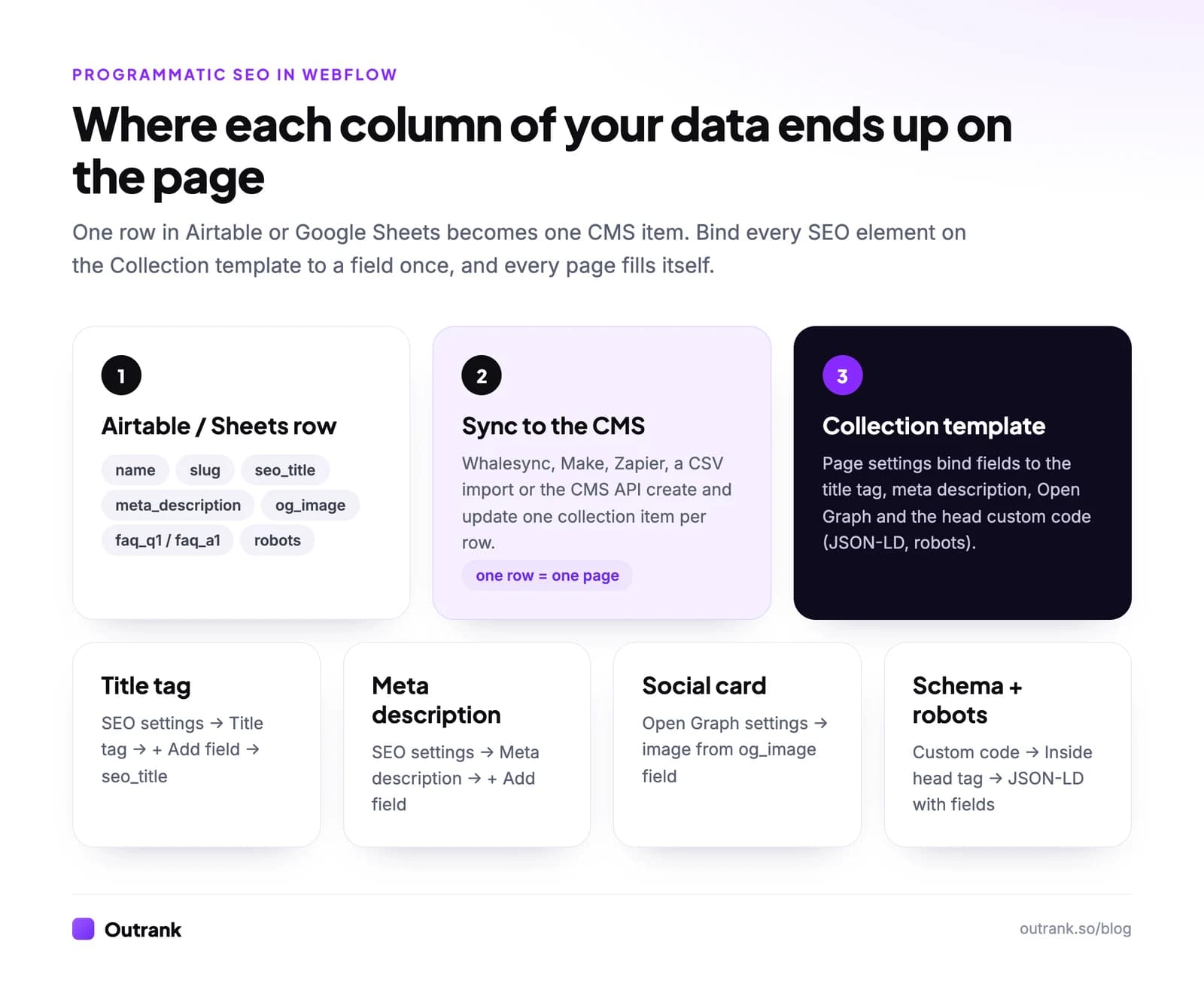
In the Designer, open the Pages panel → CMS Collection pages → your collection's Template → the settings (gear) icon. Then:
- SEO settings → Title tag: click + Add field and insert your SEO title field (or build it from fields, such as Name + " integration | Brand").
- SEO settings → Meta description: insert the meta description field.
- Open Graph settings: bind the OG title, description and image to fields, so shared links show the right page.
- Custom code → Inside
<head>tag: paste your JSON-LD and robots tag, using + Add field to insert values where the placeholders are below.
<meta name="robots" content="[Robots]">
<script type="application/ld+json">
{
  "@context": "https://schema.org",
  "@type": "FAQPage",
  "mainEntity": [{
    "@type": "Question",
    "name": "[FAQ question 1]",
    "acceptedAnswer": { "@type": "Answer", "text": "[FAQ answer 1]" }
  }]
}
</script>
Two cautions. Google has shown FAQ rich results only for well-known government and health sites since August 2023, so FAQPage markup is about clarity for machines, not a SERP feature; use the schema type that matches your page (Product, SoftwareApplication, LocalBusiness, Event) where one fits. And any field you insert into JSON must never contain straight double quotes or line breaks, so clean those in Airtable first.
For canonicals, set the global canonical URL under Site settings → SEO so every collection item gets a self-referencing canonical on your production domain.
Step 4: Make every page worth indexing
A Webflow template with 1,500 items and one changing word is a doorway set, and Google's spam policies treat it that way. Uniqueness comes from the data:
- Fields that really differ per row: use cases, setup steps, prices, specs, listings, local details. If a field is the same on 90% of rows, it is decoration.
- Conditional visibility: hide sections when a field is empty instead of showing an empty block or a generic fallback paragraph.
- AI enrichment, grounded in the row: a Make scenario can send the row's facts to an AI model and write back a short summary or FAQ. Give it only that row's data and review a sample; AI text with nothing behind it is what the scaled content policy targets.
- Related items: a multi-reference "Related" field gives each page links to its closest siblings, which helps both users and crawlers. See why internal links matter.
Running calculations inside a CMS-populated table: Webflow's CMS stores values but doesn't compute them. Precompute in Airtable or Sheets (a formula field for "price per user", "savings vs. competitor", "distance") and sync the result as a number or text field. If the visitor must change inputs, add a small custom code script that reads values from data- attributes bound to fields.
Step 5: Launch in batches and watch indexing
- Publish 20 to 50 items covering strong and weak rows. With Premium you can publish individual items without republishing the whole site, and schedule items.
- Make sure Site settings → SEO → Auto-generate sitemap is on; published collection items are added automatically. Our sitemap guide explains how to submit it.
- Link the new pages from a hub (paginated) and from related items.
- In Search Console, request indexing for a handful, then check Indexing → Pages after two to four weeks. If items show "Crawled - currently not indexed", improve the template before syncing more; our guide to fixing crawled but not indexed walks through it.
- Sync the rest in batches, keeping thin rows unpublished.
Where Outrank fits in a Webflow site
Programmatic pages handle lookup-style queries ("[app] integration", "[service] in [city]"). The questions around them ("how to automate X", "best way to do Y") need articles, and that is what Outrank produces: it picks long-tail keywords your site can rank for, writes one article a day with images, internal links and an FAQ, and publishes it straight into your Webflow blog collection. It doesn't build your template pages.
Outrank published 5,354 articles to 111 Webflow sites in the 90 days to October 2026 (Outrank platform data), and 72% of the 67 Webflow sites in our AI SEO agent study grew their Google clicks. AIApply, a SaaS on Webflow, grew Google clicks 44% year over year (case study). If you use the calculator above, add 30 items a month for a daily article cadence. Setup details are on the integrations page.
FAQ
Can Webflow handle thousands of CMS items?
Yes, up to its plan limit. As of October 2026, the Premium site plan supports 20,000 CMS items and 40 collections, and the Team platform plan starts at 20,000 with more available for a fee. Supporting collections and blog posts count toward the same limit, so add them up before you build.
How do I get Webflow content to flow into SEO metadata and structured data automatically?
Store the values as plain text fields, then open the Collection template's page settings and use + Add field in the title tag, meta description and Open Graph settings. For structured data, paste JSON-LD into the template's custom code (inside the head tag) and insert fields as values. Every item, including new ones synced later, inherits the bindings.
What is the best way to do programmatic SEO with Webflow?
Keep your data in Airtable (or Google Sheets for simple projects), sync it to a Webflow collection with Whalesync, Make or the CMS API, and bind every SEO element on the Collection template to fields. Launch a pilot of 20 to 50 pages, check indexing in Search Console, then scale in batches.
What CMS is best for building programmatic landing pages?
Webflow suits design-led teams with up to a few thousand pages. WordPress suits larger sets on a budget, using custom post types, custom fields and an importer. A headless setup (Next.js with a database) suits tens of thousands of pages or data that changes constantly.
Do I need a developer for programmatic SEO in Webflow?
Not for most projects. Airtable, a sync tool and Webflow's field binding cover the full workflow without code. You may want a developer for API scripts, large or fast-changing datasets, or interactive elements like calculators on each page.
How do I avoid duplicate content with Webflow programmatic pages?
Give each item fields with genuinely different data, hide empty sections with conditional visibility, write unique titles and descriptions per row, and don't publish rows that have nothing specific to show. If two items would display the same facts, merge them into one page.


