To create an editorial calendar, start from your content strategy's goal and topic list, work out how many pieces your team can really produce each month, pick a tool (a spreadsheet is fine), set up columns for title, keyword, format, owner, stage dates and status, then fill one quarter: tentpole pieces first, supporting posts and refresh slots around them. Executing it is a separate skill: schedule every piece backward from its publish date and review the calendar for 30 minutes every week.
Below are the eight steps, a column template you can copy into Google Sheets or Notion, a backward-scheduling timeline, and a calculator that tells you how many posts your hours actually support.
Key takeaways
- An editorial calendar is the dated, owned version of your content plan. Every row has a publish date, an owner for each stage and a status.
- Most calendars fail on capacity, not ideas. The average blog post takes 3 hours 20 minutes just to write (Orbit Media, 2026), so plan from hours available, not from ambition.
- Schedule backward. Brief at publish minus 14 days, draft at minus 10, edit at minus 5, final SEO checks at minus 2, then distribution and a 90-day review.
- Reserve slots for updates. Fractl found the typical article loses about 76% of its peak traffic within three months of peaking, so a calendar with only new posts slowly loses ground.
- Plan a quarter at a time, lock the next four weeks, and leave about one slot in five open for timely topics.
What an editorial calendar is (and how it differs from an editorial plan)
An editorial calendar is a shared schedule of every content piece you plan to publish, with its publish date, owners, workflow stage and channel. An editorial plan is the layer above it: the themes, topics and formats you chose for the quarter, before any dates are attached. Editorial planning is the process that turns the plan into the calendar.
If you want the full definition, the types of calendars and a comparison of editorial calendar systems and tools, read what an editorial calendar is. This page is the hands-on build.
Step 1: Start from the strategy, not a blank calendar
A calendar filled from a brainstorm becomes a list of things people felt like writing. Before you open a spreadsheet, have three things from your content strategy:
- The goal and metric the content serves (for example, organic demo requests).
- 3 to 5 topic pillars, each with a prioritized list of keywords or questions.
- The format per topic (how-to, comparison, tool, case study), chosen from what the query wants.
If you have these, filling the calendar is mostly sequencing. If you don't, the calendar will expose it within a month.
Step 2: Work out how many pieces you can really publish
Capacity is where most editorial calendars break. Teams schedule weekly posts, miss two in the first month, and the calendar quietly stops being true.
Orbit Media's 2026 survey of 1,042 content marketers found the average blog post takes 3 hours and 20 minutes to write. That is writing only. Add research, editing, images, SEO checks, publishing and promotion, and the real cost per post is much higher. Use the calculator to turn your available hours into a cadence you can keep.
Interactive calculator
How many posts can your team publish per month?
Posts per month you can sustain
5
- Total hours per post
- 6.5 h
- Posts per week
- 1.2
- Days between posts
- 6
Commit to the number the calculator gives you for at least six months, and keep a short backlog of finished pieces so one sick week does not break the schedule.
Why cadence matters at all: on Outrank's results page, customer sites publishing 30 or more articles a month reached a median 2.27× their pre-Outrank Google clicks, against 1.38× for 5 to 14 articles and 1.07× for fewer than 5. It is a correlation, not a guarantee, but it is why teams that want search growth look for ways past the hours limit. Our guide to scaling content marketing covers the options.
Step 3: Choose a tool your team will actually open
The best editorial calendar system is the one everyone updates. Match the tool to the team, not to the feature list:
| Team | Good fit | Why |
|---|---|---|
| Solo or 2 people, under 8 posts a month | Google Sheets or Excel | Free, fast, easy to filter and share with freelancers |
| Small team with writers and an editor | Trello, Notion or Airtable | Board view for stages, calendar view for dates, comments on each card |
| Larger team with approvals and many channels | Asana, Monday.com or a dedicated tool like CoSchedule | Dependencies, automations, approval steps, workload views |
| Automated SEO publishing | Your SEO platform's built-in calendar | The schedule and the publishing live in one place |
Whatever you pick, you need four features: a calendar view, a status for each piece, one owner per stage, and comments in context instead of email threads. A tool comparison with free plans is in our editorial calendar explainer.
Step 4: Set up the columns (copy this template)
Copy these columns into a spreadsheet or database. The first eight are required; the rest pay off once you publish more than a few pieces a month.
| Column | What goes in it | Example |
|---|---|---|
| Publish date | The day it goes live | 2026-11-12 |
| Working title | Specific, with the angle | How to Price a Kitchen Remodel in 2026 (With a Cost Calculator) |
| Pillar | Which topic pillar it supports | Remodeling costs |
| Target keyword | One primary query | kitchen remodel cost |
| Format | How-to, comparison, tool, case study, refresh | Tool + guide |
| Owner | One person accountable for the whole piece | Dana |
| Status | Current workflow stage | Draft |
| Live URL | Filled in when published | /blog/kitchen-remodel-cost |
| Brief due / draft due / edit due | Stage deadlines, counted back from publish | Oct 29 / Nov 2 / Nov 7 |
| Writer, editor | If different from the owner | Sam, Dana |
| Distribution | Channels planned for this piece | Newsletter, LinkedIn, 2 internal links |
| CTA | The next step for the reader | Get a quote |
| Review date | Publish date + 90 days | 2027-02-10 |
Keep one row per piece, including updates to existing posts (format: "refresh"). Updates that are not on the calendar do not happen.
Step 5: Define statuses, owners and exit rules
Statuses only help if each one has an owner and a clear exit rule. A simple set that works in any tool:
- Idea. A topic from the plan, not yet briefed.
- Briefed. Keyword, angle, outline and sources agreed. Exit when the writer accepts it. Our content brief template covers what goes in.
- Drafting. Exit when the full draft is in the shared doc.
- In edit. Structure, accuracy and voice. Exit when every claim has a source.
- Ready. Images, meta title, description and internal links done.
- Scheduled. In the CMS with a date.
- Published. Live URL added to the calendar.
- Review due. 90 days after publishing: keep, update or merge.
Limit the number of pieces allowed in "In edit" at once. When edits pile up, the editor is the bottleneck, and adding more writers makes it worse. For the production side of this, see the content creation workflow guide.
Step 6: Fill one quarter, tentpoles first
Fill the calendar in this order:
- Fixed dates. Product launches, events, seasonal peaks in your niche. Search content needs time to rank (Fractl found articles peak a median of four months after publishing), so seasonal posts go live months before the season, not the week of.
- Tentpoles. One or two big pieces per month: a tool, a study, a definitive guide. Everything else links to them.
- Supporting posts. The long-tail questions from your pillars, scheduled so each pillar gets regular coverage rather than a burst.
- Refresh slots. At least one update for every three or four new pieces. Start with pages ranking at positions 8 to 20.
- Open slots. Leave roughly one slot in five empty for news, trends or a customer question that comes up.
A quarter is the right planning horizon for most teams: long enough to sequence pillars, short enough that priorities have not changed by the time you get there. Lock the next four weeks in detail and keep the rest at topic level.
Step 7: Schedule every piece backward from its publish date
The publish date goes in first. Then count back and give every stage a due date and an owner:
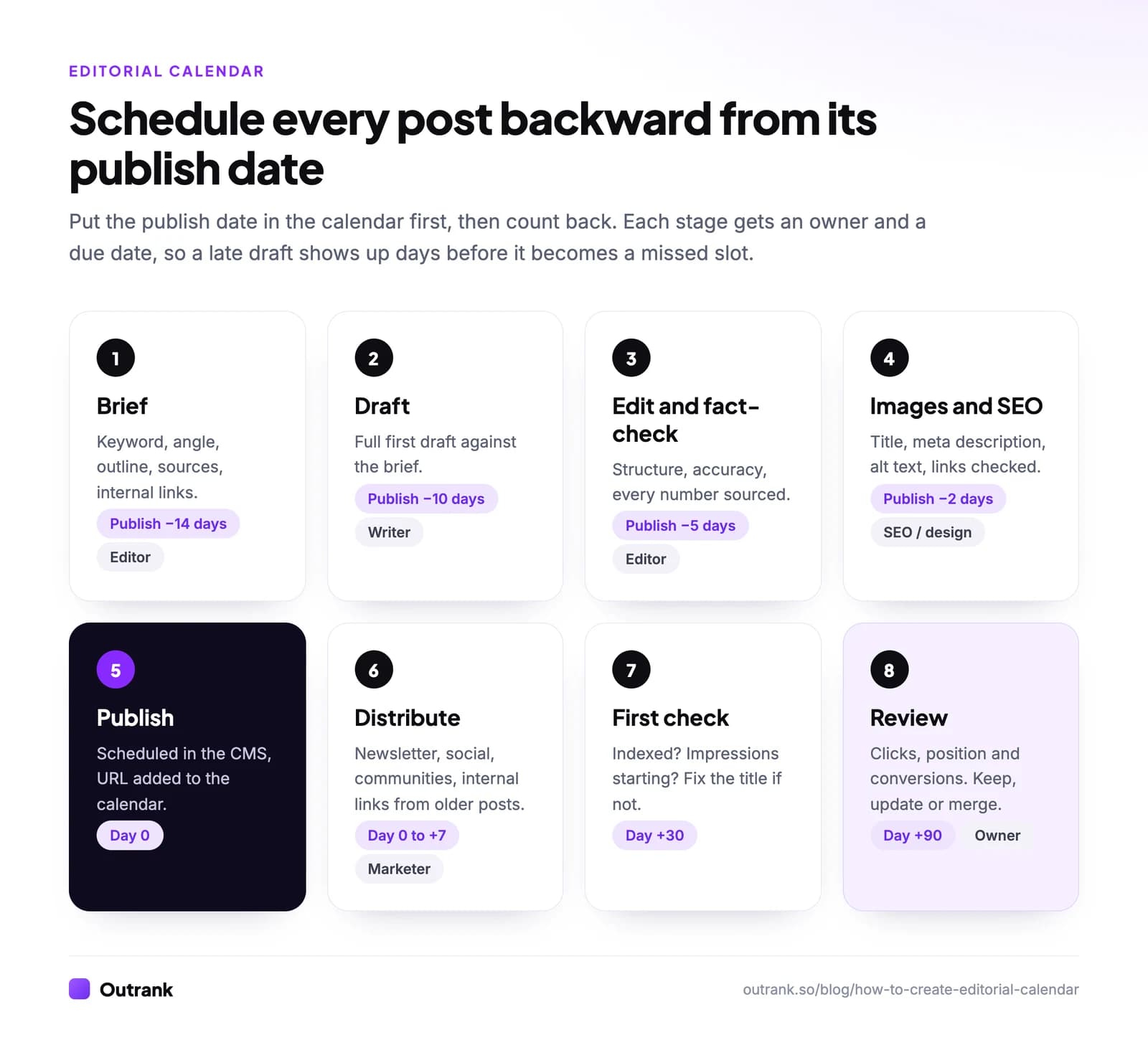
- Publish −14 days: brief approved.
- Publish −10 days: first draft in.
- Publish −5 days: edit and fact-check done.
- Publish −2 days: images, title, meta description, alt text and internal links done.
- Day 0: published, URL added to the calendar.
- Day 0 to +7: distribution (newsletter, social, communities, links from older posts). See our content distribution strategy for a per-post checklist.
- Day +30: first check. Is the page indexed in Search Console, and are impressions starting?
- Day +90: review clicks, position and conversions, then decide keep, update or merge.
These gaps suit a weekly cadence with one writer and one editor. Shorten them for news, lengthen them for anything that needs design, legal or client approval.
Step 8: Run it: the weekly, monthly and quarterly rhythm
A calendar is only executed if someone looks at it on a schedule.
- Weekly (30 minutes). Walk through the next four weeks. What is late, what is blocked, who needs help? Move dates in the calendar, not in chat, so it stays the single source of truth.
- Monthly (1 hour). Look at what was published 90 days ago. Use Search Console → Performance → Pages to compare clicks and impressions, and mark pieces for update. Our guide to content performance analysis shows what to look at.
- Quarterly (half a day). Re-plan the next quarter from the strategy and from what the data says is working.
If your calendar mostly serves search, you can also hand the scheduling to software. Outrank, for example, finds keywords, writes one article a day and publishes it to your CMS on a set schedule, and you can save articles as drafts and preview them up to 7 days ahead before they go live. Your calendar then only needs the pieces that require a human: tentpoles, case studies and updates.
FAQ
How do you create an editorial calendar step by step?
Start from your content strategy's goal and topics, calculate how many pieces you can produce, choose a tool, set up columns (publish date, title, keyword, format, owner, status, stage deadlines), define statuses with owners, fill one quarter with tentpoles first, schedule each piece backward from its publish date, and review the calendar every week.
What should an editorial calendar include?
At minimum: publish date, working title, target keyword, format, owner, status and the live URL once published. Add stage deadlines (brief, draft, edit), distribution channels, the call to action and a review date once you publish more than a few pieces a month.
How far in advance should you plan an editorial calendar?
Plan themes a quarter ahead and lock specific pieces four weeks ahead. Seasonal search content needs a longer lead, because articles typically take months to reach their peak traffic. Leave about one slot in five open for timely topics.
What is the difference between an editorial plan and an editorial calendar?
An editorial plan lists the themes, topics and formats you will cover in a period. An editorial calendar puts those pieces on specific dates with owners and statuses. You need the plan first; the calendar is how you execute it.
What is the best tool for an editorial calendar?
For a solo creator or small team, Google Sheets is enough. Teams with writers and editors usually move to Trello, Notion or Airtable for board and calendar views. Larger teams with approvals use Asana, Monday.com or CoSchedule. The best tool is the one your whole team updates.
How often should you publish?
As often as your capacity allows without dropping quality, consistently for at least six months. Use the calculator above to find that number. A steady weekly post beats a burst of five followed by a month of silence.