Blogging for photographers works when each post answers something a future client searches for: a venue or location ("Banff Springs wedding photos"), a session question ("what to wear for family photos in autumn") or a price ("how much a newborn photographer costs in Denver"). Publish one of those per shoot, with 20 to 40 of your best images (not the whole gallery), descriptive file names and alt text, vendor credits with links, and a clear way to inquire. A blog full of "Sarah + Tom!" posts with 200 photos and no words gets neither rankings nor bookings.
This guide covers the three post types that bring inquiries, how live photography blogs structure them in 2026, a calculator that shows how heavy your gallery posts are, platform choices, and how blog posts earn the links that lift your whole site.
Key takeaways
- Title posts by what clients search, such as the venue, location, session type or city. Couples search venues, not your clients' names.
- Show 20 to 40 images per post with 150 to 400 words of genuinely useful text. Google reads text, file names and alt text, not pixels.
- Google says lossy WebP images are 25 to 34% smaller than comparable JPEGs. Switching formats is the fastest way to lighten a gallery post.
- The median mobile web page weighed 2,311 KB in October 2024 (HTTP Archive). A post with 60 images at 800 KB each weighs about 47 MB, roughly 20 times that.
- Vendor credits, real wedding features and directory listings are the links photographers can earn. Outrank's free tool builds that list by specialty and city.
Why most photography blogs don't book clients
A typical photography blog post is titled with the couple's first names, contains 150 full-size images and two sentences ("Such a fun day! Congrats you two!"). It is lovely for the couple and invisible to everyone else:
- Nobody searches for your clients' names. They search for the venue, the location, the session type and the city.
- There is almost no text, so Google has little to understand or rank.
- The page is enormous, so it loads slowly on the phone your next client is holding.
The fix is not writing essays. It is choosing a searchable subject for each post and adding the few hundred words of useful detail only a photographer who was there can provide.
Three post types that bring inquiries
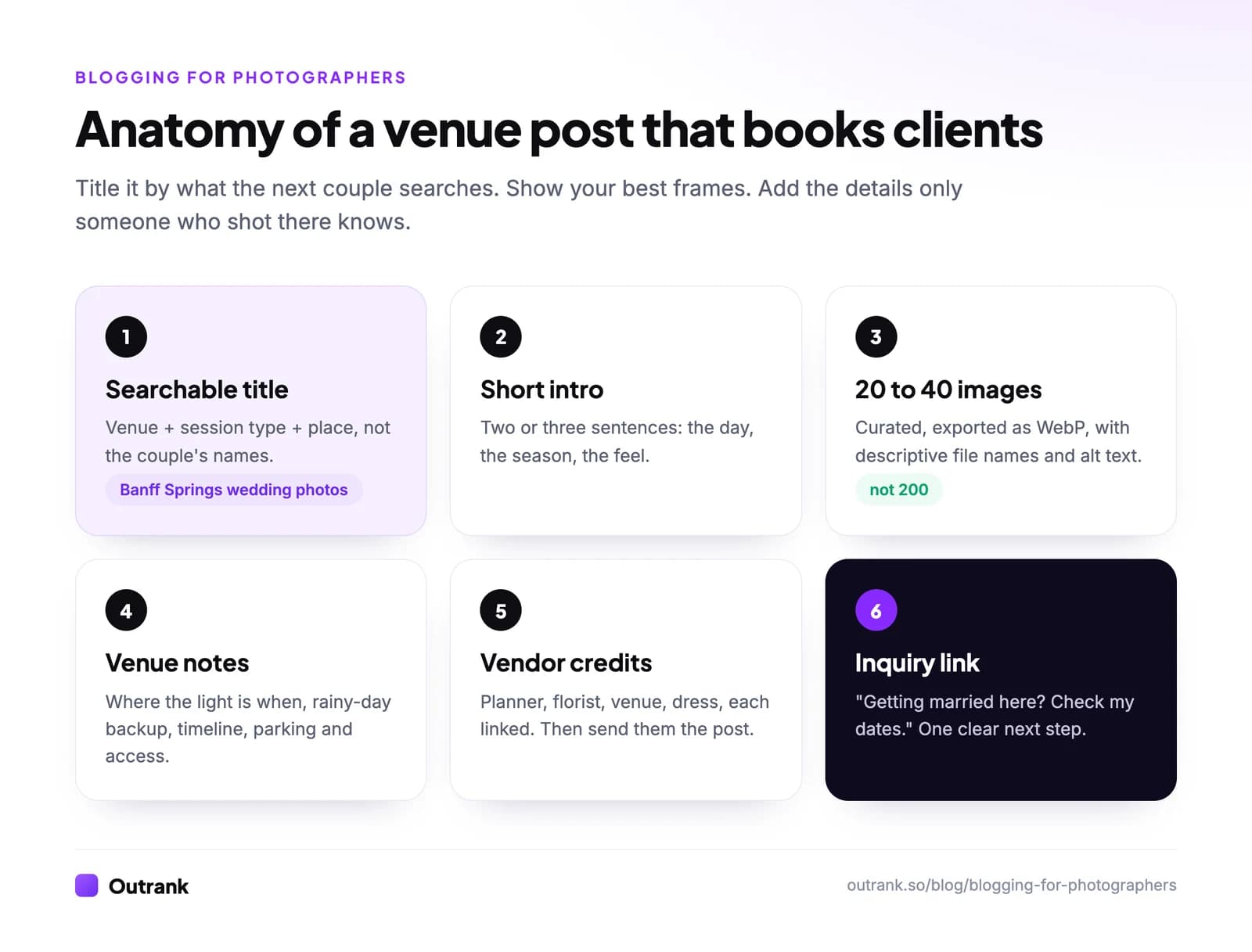
1. Venue and location posts. "Fairmont Banff Springs wedding: light, timeline and the best portrait spots." A couple who just booked that venue searches for exactly this, finds your photos there, and sees that you know the place. Include where the light is at different times, the best rainy-day backup, timing between ceremony and portraits, and parking or access notes.
2. Session guides. "What to wear for family photos in autumn (with 12 real examples)", "How to prepare toddlers for a photo session", "Headshot tips for LinkedIn: what to bring". These bring people who are about to book, and each one is a chance to show your work in context.
3. Pricing and process posts. "How much does a newborn photographer cost in Denver? (Our 2026 prices explained)." Prospects search for prices before they contact anyone. A transparent post filters out bad fits and gives good fits a reason to inquire.
How live photography blogs do it (October 2026)
| Blog | What it does well |
|---|---|
| Two Mann Studios | Their tagline is "We blog them all", and the blog filters by location (Alberta, the Canadian Rockies, Mexico, the UK and more) and by type (weddings, travel, portraits). A couple planning a Rockies wedding can find every post from that area. |
| Katelyn James | A wedding photographer turned "online educator for photographers and entrepreneurs". Shows how a client blog can grow into an education business. |
| Jasmine Star | A former wedding photographer whose blog is now about business strategy and encouragement for entrepreneurs. |
| Digital Photography School | The education route: photo tips, gear and post-processing articles for photographers rather than clients. Monetised with courses, ebooks, presets and advertising. |
Decide early whether your blog is for clients (venue, session, pricing posts) or for other photographers (tutorials, gear, presets). Both work. Mixing them in one feed confuses both audiences.
Image SEO for photographers
Google's image SEO guidance is short and worth following to the letter:
- Descriptive file names:
banff-springs-wedding-first-look.webp, notDSC_4021.jpg. Rename on export in Lightroom with a custom naming template. Our guide on how to name images for SEO has the pattern. - Alt text that describes the photo: "Bride and groom's first look on the Banff Springs terrace in morning light." Google says alt text is the most important attribute for image metadata.
- Text near the image: Google uses captions and the surrounding page text to understand images, which is why a few sentences per section matter.
- License metadata if you sell prints or licences: add the
licenseproperty or the IPTC Web Statement of Rights field, and your images can show the "Licensable" badge in Google Images (image license metadata).
How heavy is your gallery post?
Speed matters because your images are the largest thing on the page. Google recommends a Largest Contentful Paint of 2.5 seconds or less (web.dev), and the median mobile page weighed 2,311 KB in October 2024 (HTTP Archive Web Almanac). Check one exported file, then plug in your numbers.
Interactive calculator
How heavy is your photography blog post?
Image weight of the post
46.9 MB
- Compared with the median mobile page (2,311 KB)
- 20.8×
- Seconds to download every image at that speed
- 18.8 s
- Weight if converted to WebP (25% smaller, Google's low estimate)
- 35.2 MB
- Weight with 30 images instead
- 23.4 MB
The two biggest wins are almost always the same: export at the width your theme actually displays (often around 2,000 px for full-width images, less for grids) and use WebP. Our guide on how to optimize images for the web covers export settings in detail.
Where photographers should host their blog
| Platform | Cost (October 2026) | Why photographers choose it | Watch out for |
|---|---|---|---|
| Showit | $27/month billed annually with a basic WordPress blog (up to 10,000 blog visits a month); $39 with the advanced blog (up to 25,000) | Drag-and-drop design popular with wedding and portrait photographers, with WordPress behind the blog | Visit caps per plan; the basic blog does not allow extra plugins |
| Squarespace | No free plan (14-day trial) | Polished image templates, portfolio and blog in one place | The blog cannot live on a site hosted elsewhere |
| Self-hosted WordPress | Hosting fees | Full control, every gallery and SEO plugin | You maintain updates, backups and speed |
| Outrank Blogs | Free up to 10,000 visits a month | A fast blog on your own domain (for example blog.yourstudio.com), with sitemap and structured data handled | Launched October 2026, five templates, no client galleries or booking (keep those in your existing tools) |
| Pixieset, Zenfolio, SmugMug | Paid plans | Client galleries and print sales with a website attached | Blogging features are secondary to galleries |
If your main site is on Squarespace or Showit, keep the blog there so posts strengthen the same domain. If you are starting from nothing, a free blog on your own domain is enough to test whether venue and session posts bring inquiries before you pay for a full website builder. More options in how to start a blog for free.
Earn links with every post
Links from relevant sites help your whole domain rank, and photographers are in an unusually good position to earn them:
- Credit every vendor with a link (planner, florist, venue, dress designer) and send them the post. Many will share it or link back from their own sites.
- Submit real weddings to wedding blogs such as Junebug Weddings, Style Me Pretty or Green Wedding Shoes, which credit vendors with links when they publish.
- List your business on The Knot, WeddingWire and local directories, with the same name, address and website as your Google Business Profile.
- Give venues a reason to link: a well-photographed "venue guide" post is something a venue may link to from its own site.
Write posts faster without losing your voice
The bottleneck is rarely ideas; it is writing 300 words after a 10-hour wedding day. Three habits help:
- Voice-note the day on the drive home: light, timeline, standout moments, vendor names. That is your post.
- Use the same structure every time (see the anatomy above), so you fill in sections instead of facing a blank page.
- Batch: cull and write two posts on one fixed afternoon each week.
For evergreen posts (session guides, pricing explainers, location roundups), Outrank can research the searches your site can rank for and publish a draft SEO article to your blog every day. Add your own images and on-the-day details to each one; that is what makes a photography post convincing. Our guide to writing blog posts faster has more shortcuts, and this video from photographer Nate Torres covers the SEO basics in a photographer's terms:
Blogging about interiors or design shoots? See how to start an interior design blog and how to start an art blog.
FAQ
Should photographers have a blog?
Yes, if you want clients to find you on Google rather than only through referrals and social media. Each venue, session or pricing post is a new page that can rank for a search a future client makes, and it shows your work in context. A portfolio alone gives search engines very little text to rank.
What should a photographer blog about?
Venues and locations you have shot at, session guides (what to wear, how to prepare), pricing and process explainers, and behind-the-scenes posts. Title each one by what clients search for, such as the venue name or session type and city, not by your clients' names.
How many photos should be in a photography blog post?
Usually 20 to 40 curated images, with a few sentences of useful text between sections. Posting the whole gallery makes the page heavy and slow on phones, and it buries your best work. Send clients their full gallery through your gallery platform instead.
How do I make my photography blog load faster?
Export images at the width your theme displays rather than full resolution, use WebP (Google says lossy WebP files are 25 to 34% smaller than comparable JPEGs), limit posts to your best images, and let images below the fold lazy-load. Aim for a Largest Contentful Paint of 2.5 seconds or less.
What is the best blogging platform for photographers?
Showit and Squarespace are popular because they combine design control with a blog (Showit from $27 a month billed annually with a basic blog in October 2026). WordPress gives the most control. If you want to test blogging for free on your own domain first, Outrank Blogs is free up to 10,000 visits a month.
How do photographers get backlinks?
By crediting vendors with links and asking them to link back, submitting real weddings to blogs that credit vendors, listing the business on directories such as The Knot and WeddingWire, and creating venue guides that venues want to share. Outrank's free tool for photographers builds a ranked plan for your specialty and city.