Content optimization (content optimisation in British English) is the process of improving a page so it matches what searchers want, ranks higher, earns more clicks and converts more of its visitors. In SEO, that means aligning the page with search intent, covering the topic fully, tightening on-page elements such as the title tag, headings and internal links, keeping facts current, and using Search Console and analytics data to decide what to change next. You can optimize a page before it's published, but the biggest wins usually come from pages that already get impressions.
This guide covers what optimized content looks like, which elements to work on, a 7-step process, how to use performance data to pick pages, a site-wide strategy, the tools, and a calculator for what a better click-through rate is worth.
Key takeaways
- Optimize pages that already have impressions first. A page at position 8–20 with thousands of impressions is the cheapest traffic you'll ever win.
- Content decays. Fractl found the typical piece loses about 76% of its peak traffic within three months of peaking.
- Clicks are harder to earn. Across 415 sites in Outrank's panel, median impressions rose 2.18× from October 2025 to August 2026 while CTR fell 40%.
- Format matters as much as wording. In Outrank's 6.2M-page study, free tools earned 2.11× the CTR of the same site's articles at positions 4–10.
- Google tells you to do it. Its SEO Starter Guide says to "check in on previously published content and update it as needed."
What is content optimization?
Content optimization is the ongoing work of making a page more useful and more visible: to searchers, to search engines and, increasingly, to AI assistants that quote web pages. It is not a one-time keyword pass. A page is "optimized" when it targets a clear query, answers it better than the alternatives, is easy to scan, is technically easy to crawl, and is kept accurate.
The term covers a few related jobs, which is why searches for it vary so much:
| Type | Goal | Main metric | Typical changes |
|---|---|---|---|
| SEO content optimization | Rank higher for the right queries | Average position, impressions | Intent match, topic coverage, headings, internal links |
| Snippet (CTR) optimization | Win more clicks from the same rankings | Click-through rate | Title tag, meta description, structured data, freshness |
| Conversion optimization | Turn more visitors into leads or sales | Conversion rate | Calls to action, proof, offer, page layout |
| Content performance optimization | Use data to decide what to fix | All of the above, per page | Prioritized refreshes, merges and deletions |
| AI answer optimization | Be quoted by AI Overviews and chatbots | AI citations, mentions | Clear definitions, self-contained sections, lists, sources |
Optimized content, then, is content that matches the intent of its target query, answers it in the first few sentences, covers the follow-up questions, is structured with clear headings, links to and from related pages, and is current. Everything else in this guide is how to get there.
Why content optimization matters
Three reasons, all measurable.
Pages decay. Fractl's 2026 analysis of content decay found the typical piece loses about 76% of its peak traffic within three months of peaking. Competitors publish newer pages, facts go stale, and search results change shape.
Old pages still win, if they're maintained. Ahrefs found 72.9% of pages in Google's top 10 are more than three years old. Rankings accumulate; improving a page that already has links and history is usually faster than starting a new one. Google's SEO Starter Guide puts it plainly: "Check in on previously published content and update it as needed."
Each click is scarcer. In Outrank's zero-click study of 415 sites, median impressions grew 2.18× between October 2025 and August 2026, clicks grew 22%, and click-through rate fell 40%; 79% of sites lost CTR. More of the work is now in winning the click once you rank.
What to optimize: the elements that matter
| Element | What good looks like | How to check |
|---|---|---|
| Search intent | The page type and format match what ranks (guide, list, tool, product page) | Search the query and compare the top 5 |
| Opening | The first 2–4 sentences answer the query | Read only the first paragraph: is the answer there? |
| Topic coverage | Every important sub-question has a section | Compare H2s with People Also Ask and the page's Search Console queries |
| Title tag | Query first, a reason to click, unique | Search Console CTR for the page's top queries |
| Meta description | One or two sentences with a concrete promise | Does Google show it, or rewrite it? |
| Headings | Descriptive H2s and H3s phrased like questions people ask | Skim only the headings: do they tell the story? |
| Internal links | Links in from related pages and out to the next step | Crawl or search site:yourdomain.com "topic" |
| Facts and freshness | Current numbers, prices, screenshots, sources | Check every number and date |
| Media | Useful images, tables or a tool, with alt text | Does each visual explain something? |
| Technical basics | Indexable, fast, mobile-friendly, no duplicate URL | Search Console URL Inspection and Page experience |
Google's own documentation is the best guide to the snippet elements: titles have no length limit but get truncated to fit the screen, and snippets are mostly built from page content, with your meta description used when it describes the page better. Our SEO copywriting checklist lists the on-page checks in order.
How to optimize content in 7 steps
- 1
Pull the data
In Search Console, open Performance → Search results, set the last 3 months, and look at the Pages tab. Export it. Add each page's conversions from your analytics if you have them. - 2
Pick the pages
Start with pages ranking at positions 4–20 with high impressions, pages whose clicks fell versus the same period last year, and pages with good rankings but low CTR. - 3
Check intent against today's results
Search each page's main query. If Google now ranks a different page type or format, change the format before you touch the wording. - 4
Find the gaps
Filter Search Console by the page and open the Queries tab. Every query you rank for but don't answer is a missing section, FAQ or table. Compare with the top 3 results for anything else they cover. - 5
Rewrite the parts that matter
Lead with the answer, add the missing sections, update facts and examples, cut repetition, and rewrite the title and meta description around the query people actually use. - 6
Strengthen internal links
Link to the page from 3–5 related pages using descriptive anchors, and make sure it links to the next step for the reader. - 7
Re-submit and measure
Request indexing with URL Inspection. After about 28 days, compare clicks, CTR and position with the 28 days before the change.
Content performance optimization: using Search Console to decide
Content performance optimization means letting the data choose the work. Search Console tells you how each page performs in search; the pattern of the numbers tells you what's wrong.
| What you see | Likely cause | What to do |
|---|---|---|
| High impressions, position 1–5, low CTR | The snippet loses the click, or an AI Overview answers the query | Rewrite the title and description; add something the summary can't give (a tool, a template, data) |
| Position 8–20 on queries with good volume | The page is relevant but not the best answer | Add sections for those queries, improve depth and examples, add internal links |
| Clicks falling year over year, position stable | Lower CTR from SERP changes | Refresh the snippet; check what now appears above you |
| Position falling | Competitors improved, or your facts are stale | Compare with the new top results and update |
| Impressions for unrelated queries | Muddled topic | Tighten the focus; move unrelated material to its own page |
| Two pages swapping for one query | Keyword cannibalization | Merge them and redirect the weaker URL |
Use the calculator to size the opportunity on one page before you spend time on it. For a benchmark, the median site in Outrank's 415-site panel had a CTR of 0.73% in August 2026; your own pages vary widely by position and query type.
Interactive calculator
What would a better CTR be worth on this page?
Extra clicks per month
260
- Clicks per month now
- 240
- Extra clicks per year
- 3.1K
For a full walkthrough of the reports, see our content performance analysis guide and how to improve click-through rate.
A content optimization strategy for a whole site
Optimizing one page is a task; a strategy decides which pages get attention, in what order, and what happens to the rest.
- Audit once, then keep a queue. List every indexable page with its clicks, impressions, position and conversions. Our content audit template has the columns.
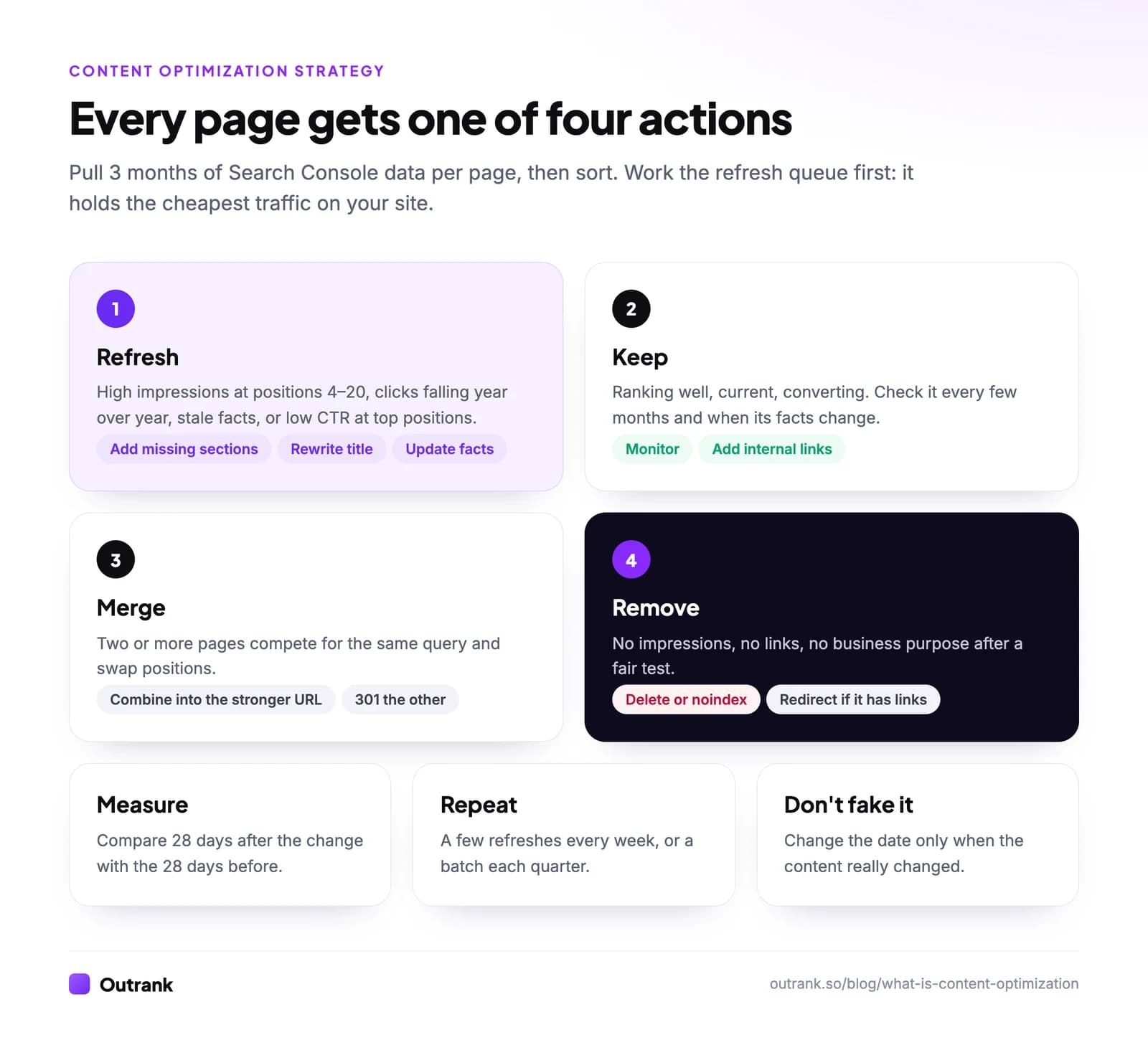
- Sort every page into one of four actions: keep (performing, current), refresh (good potential, decaying or stale), merge (two or more pages on the same intent), or remove (no traffic, no links, no purpose; redirect if it has links).
- Prioritize by potential, not by age. Impressions at positions 4–20 and commercial value beat "oldest first".
- Work in a fixed rhythm. A few refreshes every week or a batch every quarter, so optimization doesn't wait for a traffic drop.
- Only change the date when the content changes. Google's helpful content guidance specifically flags changing dates "to make them seem fresh when the content has not substantially changed."
- Consider the format, not only the words. Outrank's study of 6.2 million pages found free tools and calculators earned 2.11× the CTR of the same site's articles at positions 4–10, while "what is" definition pages earned 0.52×. Sometimes the best optimization is turning an explainer into a tool.
That repeatable loop (data, queue, refresh, measure) is what people usually mean by a content optimization system.
Content optimization tools
| Tool | What it's for | Cost |
|---|---|---|
| Google Search Console | Queries, impressions, CTR and position per page; indexing status | Free |
| Google Analytics 4 | Engagement and conversions by landing page | Free |
| Content optimizers such as Surfer, Frase and Clearscope | Compare a draft's coverage of terms and headings with top-ranking pages | Paid |
| Screaming Frog SEO Spider | Crawl the site for titles, headings, broken links and duplicates | Free up to 500 URLs, paid beyond |
| Ahrefs or Semrush | Keyword data, competitor pages, backlinks, rank tracking | Paid |
| Outrank | Finds underperforming articles so you can schedule AI rewrites, and publishes new SEO articles daily | Paid, with a 3-day trial |
Content scores are a guide, not a goal: matching the term list of the top results makes a page similar to them, not better. For a longer comparison, see our list of AI content optimization tools.
Optimizing content for AI answers
AI Overviews and chatbots quote passages, not pages, so structure decides whether you get cited. Use a one-sentence definition at the top of key sections, make each section understandable on its own, use lists and tables for steps and comparisons, and cite primary sources.
Classic SEO still does most of the work. In Outrank's study of AI citations across 200 sites, Google impressions were the strongest predictor of how often a site was cited by AI assistants (Spearman correlation 0.80). Pages that rank get read by the systems that answer. You can monitor where you're mentioned with AI visibility tracking.
Common content optimization mistakes
- Keyword stuffing. Google's spam policies treat filling a page with keywords to manipulate rankings as spam. Write for the reader; use the query where it reads naturally.
- Optimizing pages nobody sees. A page with no impressions usually has an intent or indexing problem, not a wording problem. Check crawled but not indexed first.
- Changing everything at once. If you rewrite the title, the intro and the structure on the same day, you won't know what worked. For important pages, change one thing and measure.
- Chasing a content score. Covering every term a tool suggests can make a page longer and worse.
- Deleting pages with backlinks. Merge or redirect them instead.
FAQ
What is content optimization?
Content optimization is the process of improving web content so it matches search intent, ranks higher, earns more clicks and converts better. It includes aligning the page with what searchers want, covering the topic fully, improving the title, headings and internal links, keeping facts current, and using performance data to decide what to change. It applies to both new and existing pages.
What is SEO content optimization?
SEO content optimization is the part of content optimization focused on search rankings and clicks. It means matching the page to the intent of its target query, answering that query early and completely, structuring it with clear headings, writing a compelling title tag and meta description, and linking it to related pages, then checking Search Console to see what to improve.
What does optimized content mean?
Optimized content is content that targets a clear search query and serves it well: it matches the intent, answers the question in the first few sentences, covers the follow-up questions, is easy to scan, links to related pages and is up to date. It reads naturally; optimized does not mean stuffed with keywords.
How often should you optimize content?
Review your most important pages at least every few months and whenever their facts change, and run a full content audit once or twice a year. Pages with high impressions at positions 4 to 20, falling clicks or stale information should be optimized first. Change the published date only when the content has substantially changed.
What is a content optimization strategy?
A content optimization strategy is a repeatable plan for improving existing content across a site: audit every page, decide whether to keep, refresh, merge or remove it, prioritize by potential traffic and business value, and work through the queue on a regular schedule while measuring the results of each change.
Can content be over-optimized?
Yes. Repeating keywords unnaturally, cramming in every term a tool suggests, or adding sections that don't help the reader can make a page worse for people and can violate Google's spam policies on keyword stuffing. Optimization should make the page clearer and more useful, not just longer or denser.