


401 Unauthorized means the request has no valid credentials: the server doesn't know who you are, so logging in or sending a valid token should fix it. 403 Forbidden means the server understood the request and refuses it anyway: you may be logged in, but you don't have permission, and sending the same credentials again won't help. A 401 response must include a WWW-Authenticate header that tells the client how to authenticate; a 403 doesn't need one.
In short, 401 is an authentication problem ("who are you?") and 403 is an authorization problem ("you can't do that"). The rest of this page covers the official definitions, which code to return in each situation, the OAuth 2.0 rules for APIs, code examples, how to fix each error, and what they do to SEO.
Key takeaways
- 401 Unauthorized = missing, invalid or expired credentials. Authenticate and try again.
- 403 Forbidden = the server refuses the request even with your credentials (wrong role, missing scope, IP or firewall block).
- RFC 9110 requires a WWW-Authenticate header on every 401. A 401 without it is technically invalid.
- In OAuth 2.0 APIs, an invalid or expired token returns 401 (invalid_token); a valid token without the needed scope returns 403 (insufficient_scope) (RFC 6750).
- A server may return 404 instead of 403 to hide that a resource exists. GitHub does this for private repositories.
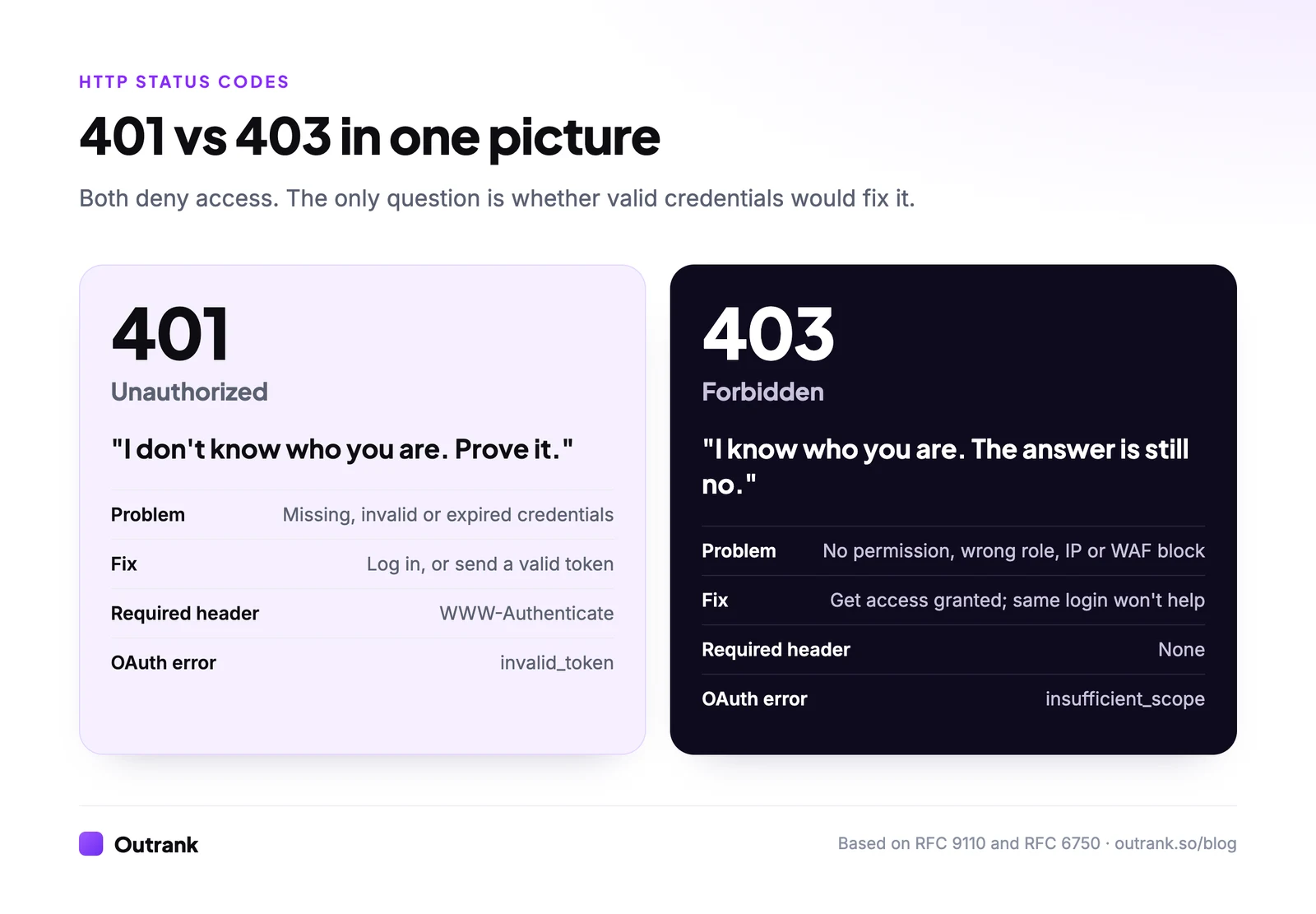
401 vs 403 at a glance
| 401 Unauthorized | 403 Forbidden | |
|---|---|---|
| The question | Who are you? | Are you allowed? |
| Concept | Authentication | Authorization |
| Typical cause | No login, wrong password, expired or invalid token | Wrong role or plan, missing OAuth scope, IP block, firewall rule, file permissions |
| Will logging in help? | Yes | No (only different credentials or new permissions) |
| Required header | WWW-Authenticate with at least one challenge | None |
| OAuth 2.0 error code | invalid_token | insufficient_scope |
| What the client should do | Prompt for login or refresh the token | Show a permission error; don't retry the same request |
The names are confusing for historical reasons: "Unauthorized" really means "unauthenticated". If you remember only one thing, remember that.
What 401 Unauthorized means
The current HTTP specification, RFC 9110 (June 2022, which replaced RFC 7231 and RFC 7235), defines 401 as a response to a request that "lacks valid authentication credentials for the target resource". The server must send a WWW-Authenticate header with at least one challenge. If the request did include credentials, the 401 means those credentials were refused, and the client may try again with new ones.
A typical 401 from an API using bearer tokens:
HTTP/1.1 401 Unauthorized
WWW-Authenticate: Bearer realm="api", error="invalid_token", error_description="The access token expired"
Content-Type: application/json

{"error": "invalid_token", "message": "The access token expired"}
When the challenge uses the Basic scheme, browsers show their built-in username and password prompt. That's why a password-protected staging site pops up a login box: it's answering every request with a 401 and WWW-Authenticate: Basic.
Common reasons for a 401:
- No
Authorizationheader or session cookie was sent. - The password, API key or token is wrong.
- The token has expired or been revoked.
- The token was signed for a different audience or issuer.
- A proxy or gateway stripped the
Authorizationheader before it reached the app.
What 403 Forbidden means
RFC 9110 defines 403 as a response where "the server understood the request but refuses to fulfill it". If credentials were sent, the server considers them insufficient, and the client should not automatically repeat the request with the same credentials. The refusal doesn't have to be about credentials at all.
HTTP/1.1 403 Forbidden
Content-Type: application/problem+json

{"type": "https://example.com/errors/forbidden", "title": "Forbidden", "status": 403, "detail": "Your role does not allow editing billing settings."}
(The application/problem+json format is the standard error body defined in RFC 9457; it's a good default for APIs.)
Common reasons for a 403:
- The user is logged in but lacks the role or plan (a viewer trying to edit, a free user calling a paid endpoint).
- The OAuth token is valid but doesn't carry the required scope.
- The request comes from a blocked IP address, country or network.
- A web application firewall, CDN or security plugin flagged the request as a bot.
- File-system permissions on the server block the web server from reading the file, or directory listing is disabled.
- A CSRF token check failed (many frameworks answer with 403).
Which status code should you return?
Answer two questions about the request and the picker tells you which code fits. It covers the codes people most often confuse with 401 and 403.
2-question decision helper
Which status code should my endpoint return?
Question 1 of 2
Did the request include credentials (a session cookie, token or API key)?
401 vs 403 in APIs and OAuth 2.0
For APIs secured with OAuth 2.0 access tokens, RFC 6750 (bearer token usage) spells out which code goes with which failure:
Error code in WWW-Authenticate | Meaning | HTTP status |
|---|---|---|
invalid_request | The request is malformed (missing parameter, token sent twice) | 400 Bad Request |
invalid_token | The token is expired, revoked, malformed or invalid | 401 Unauthorized |
insufficient_scope | The token is valid but lacks the scope the endpoint requires | 403 Forbidden |
Whatever identity provider issues your tokens (Auth0, Okta, Amazon Cognito, Clerk, Keycloak), the split is the same, because it comes from the spec rather than the vendor. Your API validates the token's signature, issuer, audience and expiry: any failure there is a 401. Then it checks the scopes or permissions in the token against the endpoint: a mismatch is a 403.
One framework detail worth knowing: Django REST framework returns 403 instead of 401 for unauthenticated requests when the view's first authentication class has no WWW-Authenticate challenge (session authentication is the usual case), because a 401 without that header would break the spec. Its authentication docs explain the rule. If your frontend expects 401 to trigger a login redirect, check which authentication class comes first.
Code examples
Node.js (Express)
// 401: no token, or a token that fails verification
function requireAuth(req, res, next) {
  const header = req.headers.authorization || '';
  const token = header.startsWith('Bearer ') ? header.slice(7) : null;

  if (!token) {
    res.set('WWW-Authenticate', 'Bearer realm="api"');
    return res.status(401).json({ error: 'unauthorized', message: 'Authentication required' });
  }

  try {
    req.user = verifyAccessToken(token); // checks signature, issuer, audience, expiry
    return next();
  } catch {
    res.set('WWW-Authenticate', 'Bearer realm="api", error="invalid_token"');
    return res.status(401).json({ error: 'invalid_token', message: 'Invalid or expired token' });
  }
}

// 403: authenticated, but missing the scope this route needs
const requireScope = (scope) => (req, res, next) => {
  if (!req.user.scopes.includes(scope)) {
    res.set('WWW-Authenticate', `Bearer realm="api", error="insufficient_scope", scope="${scope}"`);
    return res.status(403).json({ error: 'insufficient_scope', message: `Requires ${scope}` });
  }
  return next();
};

app.get('/api/reports', requireAuth, requireScope('reports:read'), listReports);
RFC 6750 requires a WWW-Authenticate header whenever the token doesn't grant access, so it belongs on this 403 too. Here it tells the client which scope is missing rather than asking it to log in. Note that the first 401 (no token at all) carries no error code: the spec says to omit error details when the client sent no credentials.
Java (Spring Security 6)
@Configuration
@EnableWebSecurity
public class SecurityConfig {

    @Bean
    SecurityFilterChain api(HttpSecurity http) throws Exception {
        http
            .authorizeHttpRequests(auth -> auth
                .requestMatchers("/api/public/**").permitAll()
                .requestMatchers("/api/admin/**").hasAuthority("SCOPE_admin")
                .anyRequest().authenticated())
            .oauth2ResourceServer(oauth2 -> oauth2.jwt(Customizer.withDefaults()));
        return http.build();
    }
}
With the resource server configured, Spring Security answers a missing or invalid bearer token with 401 and a WWW-Authenticate: Bearer header, and a valid token without the admin scope with 403. The older WebSecurityConfigurerAdapter pattern you'll find in many tutorials was removed in Spring Security 6.
Nginx
# 401: password-protect a staging area (browsers show a login prompt)
location / {
    auth_basic           "Staging";
    auth_basic_user_file /etc/nginx/.htpasswd;
}

# 403: allow one office network, refuse everyone else
location /admin/ {
    allow 203.0.113.0/24;
    deny  all;
}When to return 404 instead of 403
A 403 confirms that something exists at that URL. Sometimes that's a leak: GET /invoices/8841 returning 403 tells an attacker invoice 8841 exists and belongs to someone else. RFC 9110 explicitly allows a server to "hide" a forbidden resource by answering 404 instead.
GitHub is the best-known example: its REST API documentation says it returns 404 rather than 403 for private repositories you can't access, to avoid confirming they exist. Use the same pattern for any object ID that belongs to another user or tenant, and keep 403 for cases where the resource is public knowledge but the action isn't allowed (an admin page, a paid feature).
How to fix a 401 or 403 error
If you're a visitor or API user
401 Unauthorized
- Log in again; your session may have expired.
- Check the API key or token for typos, extra spaces or a missing
Bearerprefix. - Refresh the access token, or generate a new key if it was revoked.
- Confirm you're calling the right environment (a production key won't work on staging).
403 Forbidden
- Check that your account has the role, plan or scope the action needs, and ask an admin to grant it.
- If you use a VPN or corporate proxy, try without it; the IP may be blocked.
- Clear cookies for the site (a corrupted session or failed CSRF check can cause 403s).
- If the page is public and you still get 403, the site's firewall may be misfiring; contact the site owner.
If you run the site or API
- Unexpected 401s: check that a proxy, load balancer or CDN isn't stripping the
Authorizationheader; check clock skew between servers (tokens can look expired); confirm the token's audience and issuer match what the API expects. - Unexpected 403s: check file and folder permissions on the server; check
.htaccessor Nginxdenyrules; check security plugins and CDN bot settings; look for a missingindex.htmlin a folder where directory listing is disabled.
What 401 and 403 mean for SEO
Googlebot doesn't log in, so anything that returns 401 or 403 to Googlebot can't be indexed. Google's HTTP status code documentation says it doesn't use the content of URLs that return 4xx codes, and treats all 4xx errors except 429 the same way. In Search Console these appear under Indexing → Pages as "Blocked due to unauthorized request (401)" and "Blocked due to access forbidden (403)". They sit alongside reasons like "Crawled - currently not indexed", which has nothing to do with access; see how to fix crawled but not indexed.
That's what you want for staging sites, admin areas and logged-in app screens; a 401 behind HTTP authentication is the most reliable way to keep staging out of Google (our technical SEO for SaaS guide covers preview and staging leaks). It's a problem when public pages return 403 to Googlebot, which usually means a firewall, CDN or security plugin is treating Google's crawler as a bot to block. Check with URL Inspection's live test, and allow verified Googlebot traffic in your bot settings.
Two more rules from Google: don't use 401 or 403 to slow Googlebot down (use 429 or 503 instead, which Google treats as "slow down"), and don't put content you want ranked behind a login. For the wider picture, see our technical SEO audit checklist, the guide to technical SEO best practices, and how to fix broken links for the 404 side of status codes.
Related status codes
| Code | Name | Use it when |
|---|---|---|
| 400 | Bad Request | The request is malformed (invalid JSON, missing field) |
| 401 | Unauthorized | Credentials are missing or invalid |
| 403 | Forbidden | The request is understood and refused |
| 404 | Not Found | Nothing is there, or you're hiding that something is |
| 407 | Proxy Authentication Required | Like 401, but a proxy needs the credentials |
| 410 | Gone | The resource was removed on purpose and won't return |
| 429 | Too Many Requests | The client hit a rate limit (add Retry-After) |
FAQ
What is the difference between 401 and 403?
A 401 Unauthorized means the request lacks valid credentials, so the server doesn't know who the user is; logging in or sending a valid token should fix it. A 403 Forbidden means the server understood the request and refuses it regardless, typically because the user lacks permission. Repeating a 403 request with the same credentials won't succeed.
Should I return 401 or 403 for an expired token?
Return 401. An expired token is an authentication failure, and RFC 6750 uses 401 with error="invalid_token" for expired, revoked or malformed tokens. Clients can then refresh the token and retry. Use 403 only when the token is valid but lacks the scope or permission the endpoint requires.
Is 401 an authentication or authorization error?
401 is an authentication error, despite its name "Unauthorized". It means the server couldn't verify who is making the request. 403 Forbidden is the authorization error: the identity is known or irrelevant, but the request isn't allowed.
Does a 401 response need a WWW-Authenticate header?
Yes. RFC 9110 says a server generating a 401 must send a WWW-Authenticate header with at least one challenge, such as Basic or Bearer. If you can't send a meaningful challenge, for example with cookie-based session login, some frameworks return 403 instead to stay within the spec.
Do 401 and 403 errors affect SEO?
Pages returning 401 or 403 to Googlebot aren't indexed, because Google doesn't use content from URLs that return 4xx codes. That's fine for staging and logged-in areas but harmful when a firewall or security plugin accidentally blocks Googlebot from public pages. Check Search Console's Pages report for "Blocked due to access forbidden (403)".


